





nickro8303
Members
-
Joined
-
Last visited
Everything posted by nickro8303
-
@Addy thanks for your reply. I was able to make it work after rebooting my server. I had the variable set correctly but it wouldn't work until after the reboot for some reason.
-
I'm having this same issue. I tried manually adding the variable but it didn't work. Can you post a screenshot of your variable settings?
-
@Squid I checked those settings and everything is set correctly. Image is still at 77%.
-
I don't know if any body else is having this issue but UNMS keeps growing the log size and filling up my Docker image. Is there any way to prevent this? I've gone through the app and removed the backups and downloaded firmware but it continues to keep growing. What is causing this?
-
Docker logs: root@Tower:~# docker logs binhex-plexpass usermod: no changes [info] Env var PUID defined as 99 [info] Env var PGID defined as 100 [info] Setting permissions recursively on /config... [info] Starting Supervisor... 2016-07-18 11:13:25,351 CRIT Set uid to user 0 2016-07-18 11:13:25,351 INFO Included extra file "/etc/supervisor/conf.d/plexmediaserver.conf" during parsing 2016-07-18 11:13:25,355 INFO supervisord started with pid 14 2016-07-18 11:13:26,360 INFO spawned: 'plexmediaserver' with pid 17 2016-07-18 11:13:27,361 INFO success: plexmediaserver entered RUNNING state, process has stayed up for > than 1 seconds (startsecs) supervisord.log: 2016-07-18 11:13:25,351 CRIT Set uid to user 0 2016-07-18 11:13:25,351 INFO Included extra file "/etc/supervisor/conf.d/plexmediaserver.conf" during parsing 2016-07-18 11:13:25,355 INFO supervisord started with pid 14 2016-07-18 11:13:26,360 INFO spawned: 'plexmediaserver' with pid 17 2016-07-18 11:13:27,361 INFO success: plexmediaserver entered RUNNING state, process has stayed up for > than 1 seconds (startsecs)
-
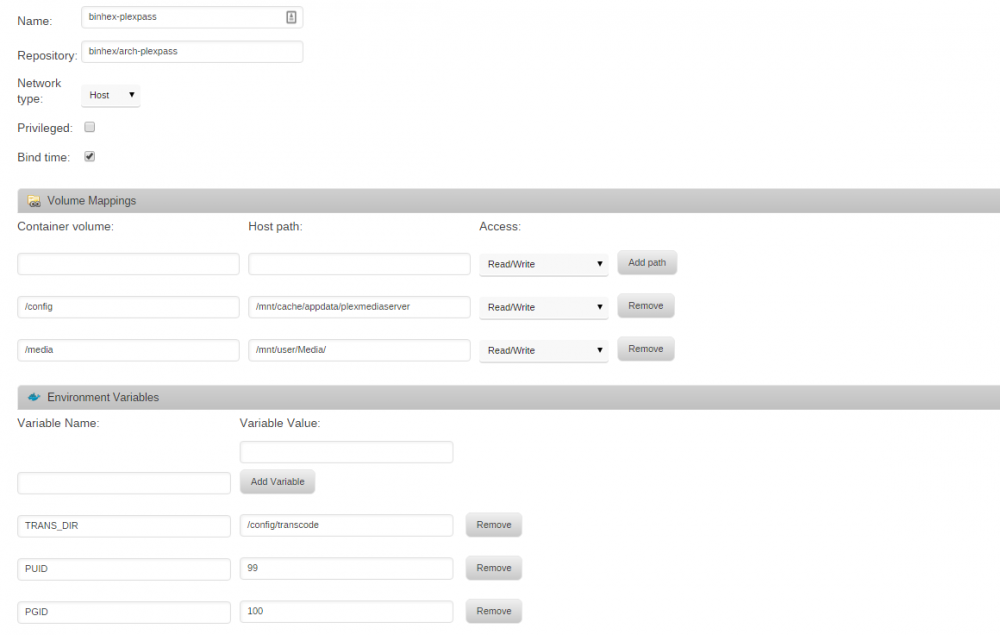
Checked the config path and there were no spaces. Added screenshot of the advanced config. App has been running for over 2 hours now and still not able to access the server from the webui.
-
ok well this would explain why its not getting very far:- chown: cannot access '/config': No such file or directory but from your earlier screenshot it looks like this is defined, hmm im confused!. ok can you go to unraid webui, left click the icon for the docker container, select edit, then click on the "advanced view" button top right, can you take another screenshot please of this and post it, also can you double check there are no leading/trailing spaces for the container path /config, if there are then remove them and click save and see what happens. "also can you double check there are no leading/trailing spaces for the container path /config, if there are then remove them and click save and see what happens." Wow thanks Binhex did not even catch that. So it seems the issue was with a space on the media volume path and once I deleted the space and saved it the app started right up. I guess now I wait for the permissions to process? The app is running but I'm not able to access the sever from the webui.
-
ok can you check the permissions for the path you have specified for /config on the host side, the folder should be set for user nobody group users, also can you try issueing the following command via ssh:- docker logs <name of container> if you can paste the output from the above command, as ive detailed earlier it can take some time to process all files and folders if the path for /config containers a lot of existing files so please give it a while before you stop it, im assuming youve done this right?. binhex thanks for your help. I checked all the folders in the config path (/mnt/user/appdata/plexmediaserver) and the nobody user is added to all of them with full control permissions. I also ran the command you provided, below is the output. root@Tower:/mnt# docker logs binhex-plexpass usermod: no changes [info] Env var PUID defined as 99 [info] Env var PGID defined as 100 [info] Setting permissions recursively on /config... chown: cannot access '/config': No such file or directory
-
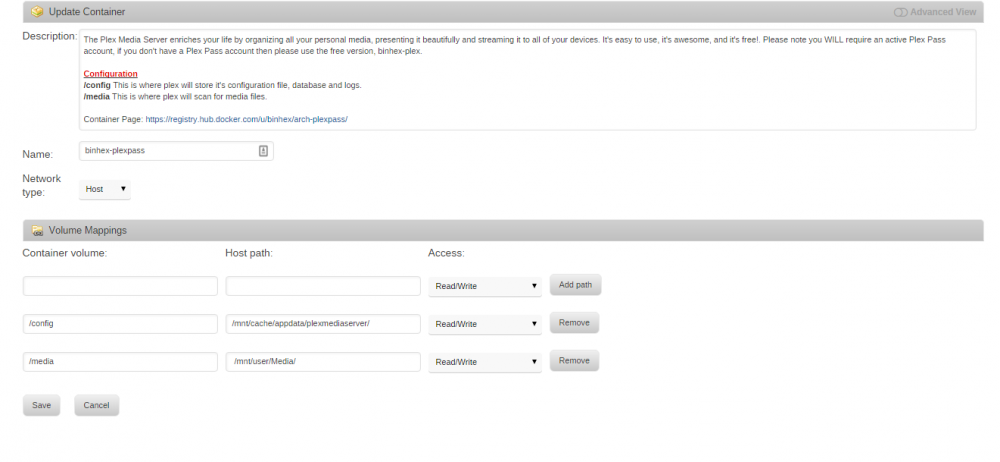
I'm not finding the perms.txt or the supervisord.log file file in any of the /config folders. I created one in /mnt/user/appdata/plexmediaserver and removed and re-added the app but I still have the same issue. After installing the app does not start. I tried to manually start it and nothing happens. I have added some screenshots of my docker and plex app setup.

-
Hello binhex, Was hoping you might be able to help me out. I'm trying to install your docker container on my server but I can't seem to get it to start. I was previously using needo's plex media server container. I removed it and installed your container but it will not start for some reason. I tried to manually start it but nothing happens. I pointed the config to /mnt/cache/appdata/plexmediaserver/ and the media to /mnt/user/Media/. When I save and open the docker container screen though it shows as stopped and the volume mappings do not show up like the do for other containers and the way it did previously with my last plex server setup. I made sure the access permissions are set to read/write. I'm not sure what I'm doing wrong here. Please let me know if you might be able to point me in the right direction. Thanks for your help in advance. PS: This is what shows up under the log [info] Env var PUID defined as 99 [info] Env var PGID defined as 100 [info] Setting permissions recursively on /config...


