





smidley
Members
-
Joined
-
Last visited
-
I currently use a 1TB NVMe drive for my cache drive, but it's an older one. I recently got a new faster NVMe drive that I want to use as the primary cache device. The new drive is the same 1TB size. What are my options here? I would like to use both NVMe drives still (motherboard has enough slots). What is the process to use the new drive as the primary drive, and what's the recommendation for how to use the second (old) drive. I don't use VM's, just use docker, so cache is used to run all docker apps and store downloads.
-
My current system is over 7 years old, but has worked great until recently, and I'm looking to replace the main components (motherboard, cpu, memory). Current system will power on, but CPU fan won't spin and system won't post. At first I tried replacing the CPU fan, but the new one won't power on either, so I think the motherboard has an issue. It's about time for this system to be upgraded to something more modern anyway. Notes: I don't do GPU transcoding, but I would like a CPU with integrated graphics so that I can configure things without needing a graphics card. For context, I don't run VM's, just docker containers, and don't need a ton of horsepower. I will be reusing my existing case, power supply, HBA, and hard drives. Would like to keep things as low powered as possible to conserve energy. I have 2gig internet service, and would like to be able to use that and possibly 10gig in the future, so a higher bandwidth NIC would be nice. Old System: Case - Fractal Design Node 804 (microATX) Motherboard - Asrock H170M Pro 4s CPU - Intel i7 7700 (7th gen) Memory - Corsair 32GB DDR4 Power supply - Corsair 1000w HBA - RocketRAID PCI-e x4 card Drives - 1x M.2 drive, 8x 3.5" drives New Build Option 1 (Intel): Motherboard - ASRock B760M PRO RS CPU - Intel Core i5-13400 Memory - 32GB DDR5 4800 New Build Option 2 (AMD): Motherboard - ASRock B650M PRO RS CPU - AMD Ryzen 5 7600X Memory - Corsair 32GB DDR5 4800 The AMD option is actually a bit more expensive than the Intel option, which surprised me (shopping at Newegg and amazon). Looking for advice with which way to go or if I should be looking at something else. I mostly checked out Asrock and Asus motherboards since I've had good experience with them in the past. Same goes for corsair brand memory.
-
Is there an easy way to remove all audio tracks except English? I see there’s a plug-in that can drop specific audio languages, but it requires you to list all of them that you want dropped, and I have no idea what ones I have. I just know I want them all dropped except English.
-
I've been trying to find a program that can remove non-english audio tracks from files in bulk. Is this program the best solution for that job? Or is there something better suited for that? From what I can tell, I can make it work, I just need to figure out how to properly set the output folder when I have a list from radar as the source.
-
I'm also willing to test. Currently using intel GPU and want to test hardware decoding.
-
Right, thread was the wrong word, I meant that someone else direct replied to my quote.
-
@dlandon Bumping this since someone else accidentally replied to my thread.
-
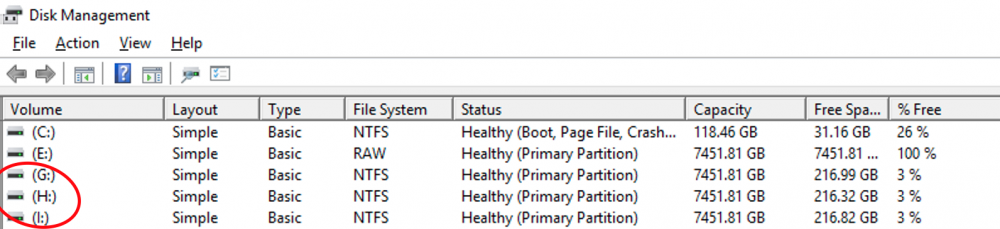
Here's a screenshot of the drives when I'm booted into windows. It's the G, H, and I drives. Each has one partition that covers the entire drive.
-
Yea nothing shows up in unraid for some reason, but when I boot into windows, those drives are just NTFS.
-
Normally I see a "Mount" button, but for these 3 drives, I only see a "Format" button. I want to mount them in order to get the data off of them just like I have done with previous drives.

-
Yea that drive is unrelated to the issue I'm having though. That was a spare 1TB USB drive that I briefly had attached to try to move some data, but the drive was faulty. The drives I'm trying to mount for this issue are "sdd, sde, sdf" and they are each 8TB drives.
-
I didn't see anything in the logs that looked out of place, but I'm very new to this software. My logs are attached server-diagnostics-20201213-1714.zip
-
I have 5 drives that are direct attached to my server. All of them are formatted NTFS. Only two of them will allow me to mount them with UD. Where should I start looking to see why the other 3 drives won’t let me mount them? They’re all identical model drives and all of them show up in windows fine.

