





Matt0925
Members
-
Joined
-
Last visited
Everything posted by Matt0925
-
So I have no clue what changed, it had been working as it was supposed to, I'd switched to 8081 ages ago due to a conflict. But that solved it, thank you very much!
-
Sorry, I'd been messing with it to see if that could be the issue, however it wasn't. I've got it as 10.0.0.0/24 now and still no luck docker run -d --name='binhex-qbittorrentvpn' --net='bridge' --pids-limit 2048 --privileged=true -e TZ="America/Chicago" -e HOST_OS="Unraid" -e HOST_HOSTNAME="Tower" -e HOST_CONTAINERNAME="binhex-qbittorrentvpn" -e 'VPN_ENABLED'='yes' -e 'VPN_USER'='XXXXX' -e 'VPN_PASS'='XXXXX' -e 'VPN_PROV'='pia' -e 'VPN_CLIENT'='openvpn' -e 'VPN_OPTIONS'='' -e 'STRICT_PORT_FORWARD'='yes' -e 'ENABLE_PRIVOXY'='no' -e 'WEBUI_PORT'='8081' -e 'LAN_NETWORK'='10.0.0.0/24' -e 'NAME_SERVERS'='84.200.69.80,37.235.1.174,1.1.1.1,37.235.1.177,84.200.70.40,1.0.0.1' -e 'VPN_INPUT_PORTS'='' -e 'VPN_OUTPUT_PORTS'='' -e 'DEBUG'='false' -e 'UMASK'='000' -e 'PUID'='99' -e 'PGID'='100' -l net.unraid.docker.managed=dockerman -l net.unraid.docker.webui='http://[IP]:[PORT:8080]/' -l net.unraid.docker.icon='' -p '6881:6881/tcp' -p '6881:6881/udp' -p '8081:8080/tcp' -p '8118:8118/tcp' -v '/mnt/user/data/torrents/':'/data/torrents/':'rw' -v '/mnt/user/appdata/binhex-qbittorrentvpn':'/config':'rw' --sysctl="net.ipv4.conf.all.src_valid_mark=1" 'binhex/arch-qbittorrentvpn:4.6.7-1-01' 00601d5808a97722f63453d0c95d194231ad897fe9fe116110e686ffbc55a740
-
10.0.0.11 and 255.255.255.0
-
Hello @wgstarks , thanks for the reply. Unfortunately no luck, their guide gave me the same numbers I already had.
-
I'm in the group of qbit not connecting now. Thought it would be as simple as updating the openvpn folder to a new PIA endpoint, but no such luck. Below are my logs, any thoughts on what I've got wrong? Docker run- docker run -d --name='binhex-qbittorrentvpn' --net='bridge' --pids-limit 2048 --privileged=true -e TZ="America/Chicago" -e HOST_OS="Unraid" -e HOST_HOSTNAME="Tower" -e HOST_CONTAINERNAME="binhex-qbittorrentvpn" -e 'VPN_ENABLED'='yes' -e 'VPN_USER'='XXXXXXX' -e 'VPN_PASS'='XXXXXXX' -e 'VPN_PROV'='pia' -e 'VPN_CLIENT'='openvpn' -e 'VPN_OPTIONS'='' -e 'STRICT_PORT_FORWARD'='yes' -e 'ENABLE_PRIVOXY'='no' -e 'WEBUI_PORT'='8081' -e 'LAN_NETWORK'='10.0.0.1/24' -e 'NAME_SERVERS'='84.200.69.80,37.235.1.174,1.1.1.1,37.235.1.177,84.200.70.40,1.0.0.1' -e 'VPN_INPUT_PORTS'='' -e 'VPN_OUTPUT_PORTS'='' -e 'DEBUG'='false' -e 'UMASK'='000' -e 'PUID'='99' -e 'PGID'='100' -l net.unraid.docker.managed=dockerman -l net.unraid.docker.webui='http://[IP]:[PORT:8080]/' -l net.unraid.docker.icon='https://raw.githubusercontent.com/binhex/docker-templates/master/binhex/images/qbittorrent-icon.png' -p '6881:6881/tcp' -p '6881:6881/udp' -p '8081:8080/tcp' -p '8118:8118/tcp' -v '/mnt/user/data/torrents/':'/data/torrents/':'rw' -v '/mnt/user/appdata/binhex-qbittorrentvpn':'/config':'rw' --sysctl="net.ipv4.conf.all.src_valid_mark=1" 'binhex/arch-qbittorrentvpn:4.6.7-1-01' bd6bb10bbe0098088c5f39948df6f80911895e286bc0c3fe3839beadc29ba46e QBit log is here- PastebinQBit Log - Pastebin.comPastebin.com is the number one paste tool since 2002. Pastebin is a website where you can store text online for a set period of time. Would appreciate any thoughts, thanks! Edit- So it's weird, on my trackers they now show I am seeding. But I still cannot access the webGUI.
-
So I never got it to work properly by assigning new ports, couldn't figure out why my torrents and categories were vanishing. The one torrent file in the wrong location was a simple fix. I just had downloaded one before changing the save location in the webUI. In any case, I set up a second instance as br0 instead and assigned it a separate IP address. Not how I wanted it handled but not like I'm going to run out of addresses I can assign any time soon, so really not a big deal. Knock on wood, it seems to be running fine now. Added torrents that are still seeding, categories and everything is still in place a day later, even after a reset. I think we are finally good.
-
No, both instances are on 4.3.9-2-01. Why would this be an issue for the second instance but not the first? First instance has the same path set up but always puts it in my /downloads folder rather than appdata. I did forgot to adjust settings in the webUI before downloading the first torrent, so it's possible it was that one. Now that I've added the correct path no further torrents went under appdata. Any thoughts on why all my torrents and settings disappeared however?
-
I've got it set the same way the my instance of qBit is, it's had zero problems putting files in the correct place. Unfortunately I need to figure out first why my torrents and categories disappeared before I worry about where they are being saved
-
/downloads/complete/ is how it is set in the web UI. In the configuration I have /downloads set as /mnt/user/downloads/ I should add that I had downloaded 10-15 torrents and this is the only one that ended up in there, so it is very possible I might have selected the wrong path for it when I set the category
-
Well I was wrong, something still isn't right. I configured everything last night, set my categories, added a handful of torrents that downloaded and were seeding, now upon opening it today that is all gone. Interestingly in the appdata folder there is also a downloads folder with only one torrent file saved in it. Not sure if it downloaded before I configured everything or what?
-
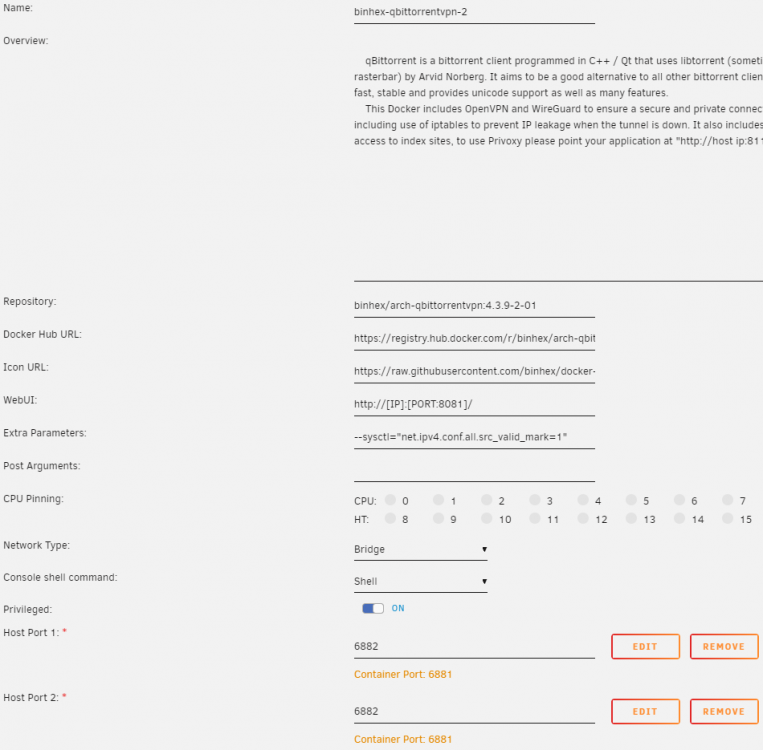
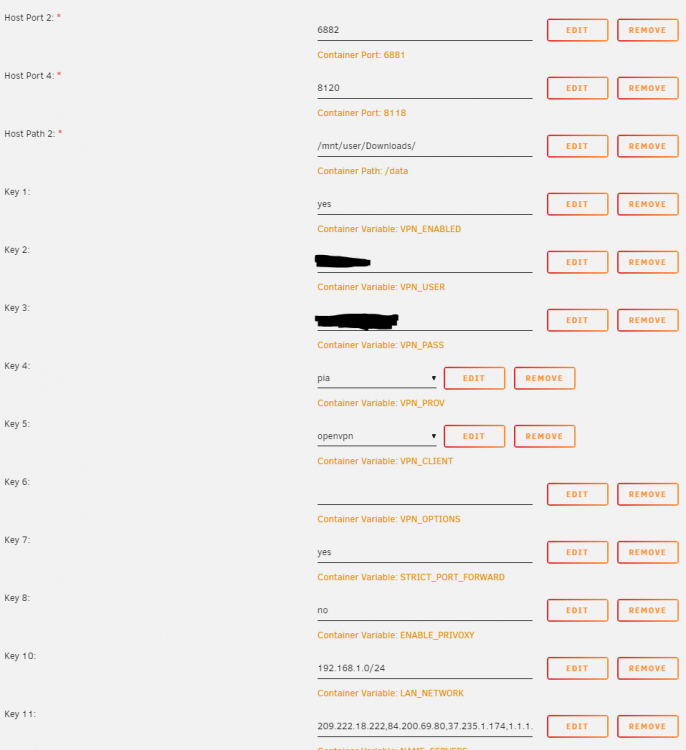
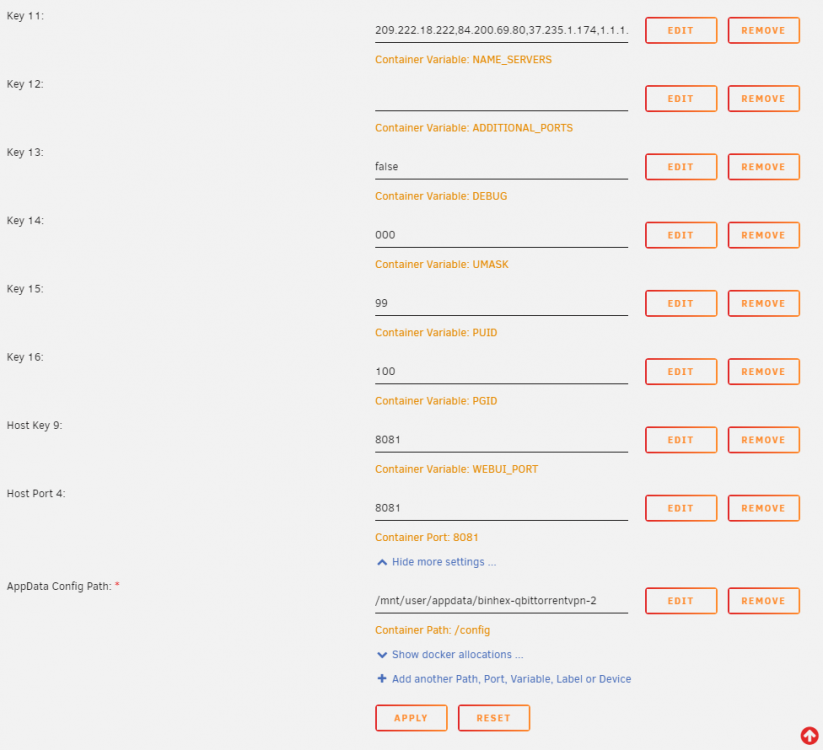
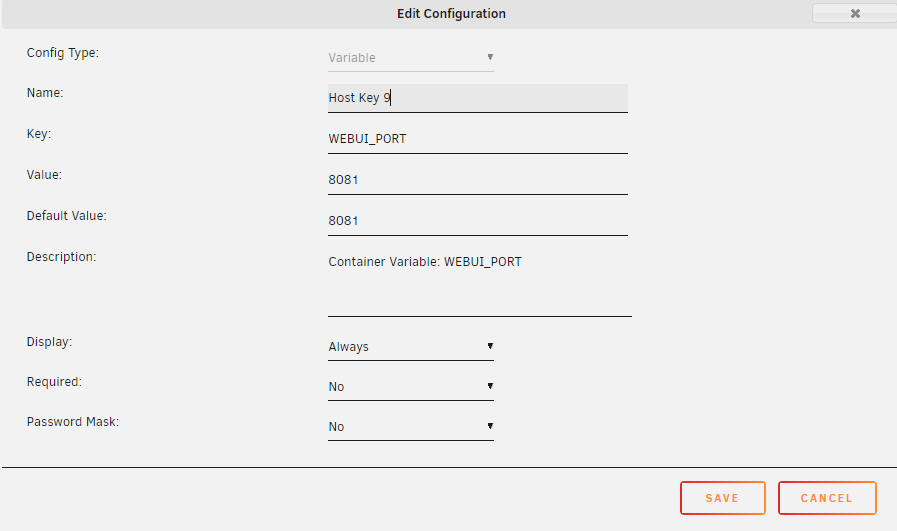
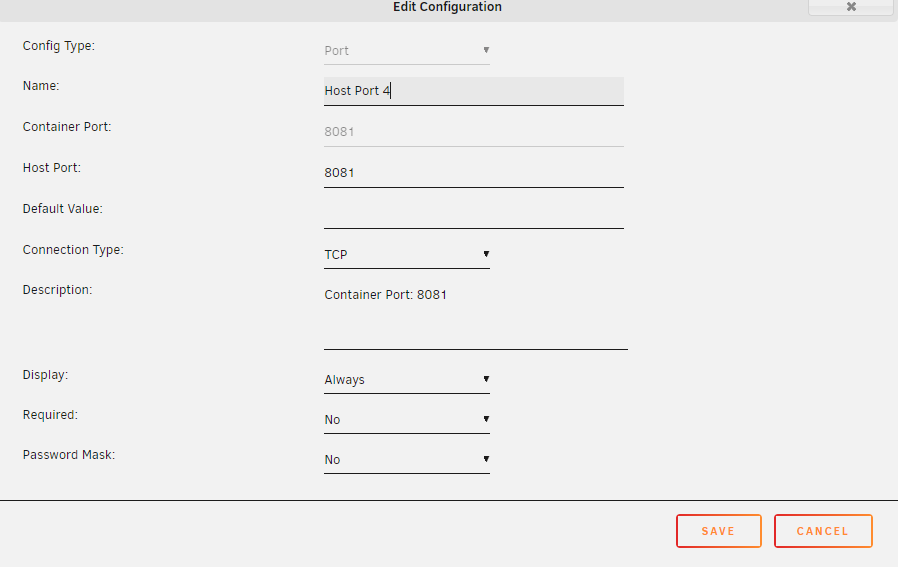
I started over and used this guidance, made some progress. But now I think I'm having the same issue as @Blairwin. If I type in myip:8081 it'll bring up the new instance of qbit. Going to WebUI just brings me to myip:8080 with the original container. I've tested in multiple browsers and restarted unraid with no change. I've attached my settings just in case I'm missing something as well. If I'm not it's certainly not ideal but I guess at least it'll get the job done for now.
-
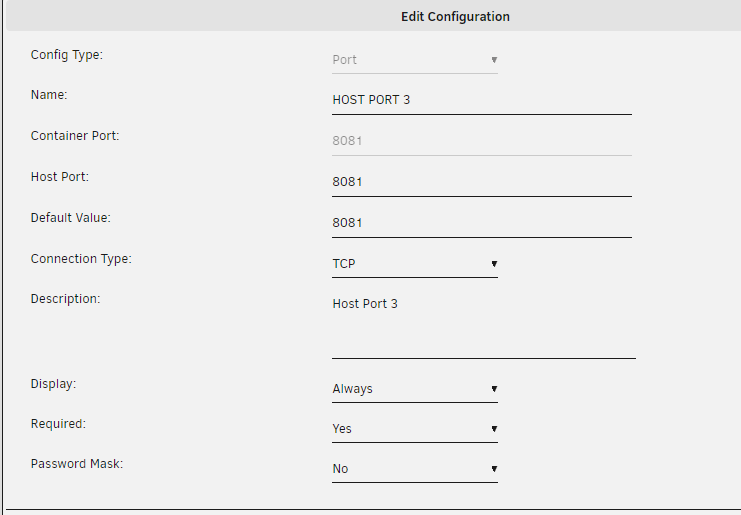
I had done this by using the add another path, port, variable, label or device option- Should I have named it WEBUI_PORT like you did? Though after seeing your example I tried changing key 8 like you have done and still no change.
-
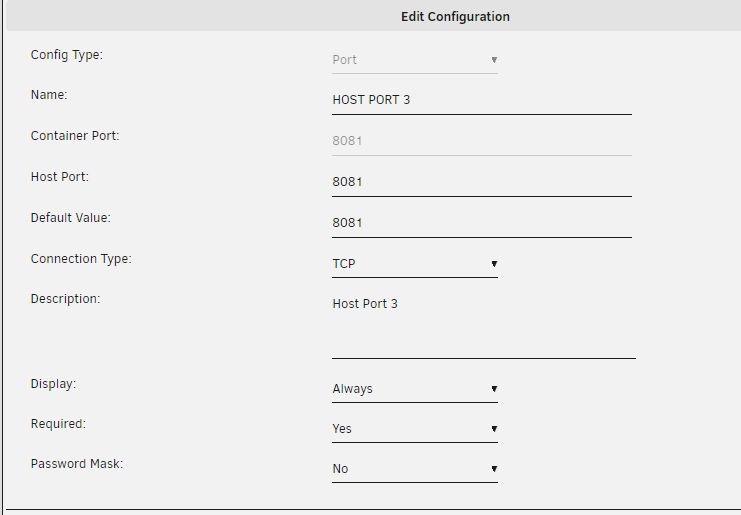
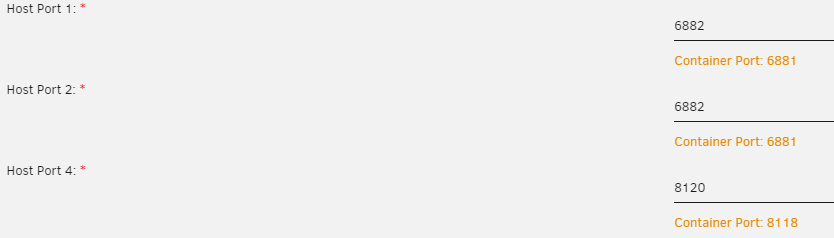
Yes I have- I also changed the ports- And finally added the webUI port and deleted the original config on it- I tried deleting it and starting fresh, still directed to the original 8080. Interestingly despite my settings in the config file it still showed the port as 8080. When changed there to 8081 and saved it still brings up port 8080, so that wasn't it. I feel like there must be something small I'm missing but I have no idea what it is?

-
Yes I did


-
Well interesting development. Adding a new port for it and deleting the original one does load up qBit on the webUI, however it directs to the original instance of it on port 8080 rather than the new one despite pointing to 8081 and app data in a different spot
-
Honestly I had not, I didn't realize that had something on it. That's my mistake. Was following guides I found elsewhere and everyone just said change the port, no need to edit the other details. Seems that is probably my issue. That said, clicking on edit for host port 3 it only allows me to edit the Host Port and Default Value, not the Container Port. Do I need to delete this Host Port and add another Port at the bottom with the correct new port?
-
Both are now attached. supervisord.log

-
I seem to have the container running OK again, however with the number of files seeding I'd ideally like to set up a second instance of the container. As far as I'm aware you need to make three changes- name, app data folder and port numbers. Looking at the log it looks to start up find, but opening the webUI the page cannot be found and won't connect. Any thoughts on what I could be doing wrong? Also sorry if this was posted somewhere previously in the thread, I searched but couldn't find anything on it.
-
Thank you for taking a look. I did a reboot last night after I rolled it back, however it gave me issues until I reinstalled it a second time. So I'll try another reboot. I'd do a completely fresh install but I'm concerned I'd have to readd all the torrents manually and I just don't have the heart to do that I should mention, it definitely is not connecting properly. A couple of the sites are not showing me as seeding everything I have listed in qBit, so some might be but not all. Edit 2- Server reboot has not helped, at least with the connection issue. Hasn't been long enough to see on the memory. I'm thinking about starting a second instance of qBit, transfer a couple thousand to the new one. Don't suppose there is an easy way to do that?
-
Well I made the mistake of updating as well. I've rolled qBit back now to 4.3.9-2-01, but I still seem to be having issues. It appears that it is connecting with the trackers eventually, but it shows as updating for a very long time. Further, since rolling it back I've had the web UI crash several times saying out of memory, which makes me think data is still being sent to the wrong place? Under mnt/user/appdata/binhex-qbittorrentvpn/data there is a folder titled BT-backup with over 10,000 files in it, mostly torrent files, so I suspect that might be causing me problems? My docker run looks like this- root@localhost:# /usr/local/emhttp/plugins/dynamix.docker.manager/scripts/docker run -d --name='binhex-qbittorrentvpn' --net='bridge' --privileged=true -e TZ="America/Chicago" -e HOST_OS="Unraid" -e 'VPN_ENABLED'='yes' -e 'VPN_USER'='REMOVED' -e 'VPN_PASS'='REMOVED' -e 'VPN_PROV'='pia' -e 'VPN_CLIENT'='openvpn' -e 'VPN_OPTIONS'='' -e 'STRICT_PORT_FORWARD'='yes' -e 'ENABLE_PRIVOXY'='no' -e 'WEBUI_PORT'='8080' -e 'LAN_NETWORK'='192.168.1.0/24' -e 'NAME_SERVERS'='209.222.18.222,84.200.69.80,37.235.1.174,1.1.1.1,209.222.18.218,37.235.1.177,84.200.70.40,1.0.0.1' -e 'ADDITIONAL_PORTS'='' -e 'DEBUG'='false' -e 'UMASK'='000' -e 'PUID'='99' -e 'PGID'='100' -p '6881:6881/tcp' -p '6881:6881/udp' -p '8080:8080/tcp' -p '8118:8118/tcp' -v '/mnt/user/Downloads/':'/downloads':'rw' -v '/mnt/user/appdata/binhex-qbittorrentvpn':'/config':'rw' --sysctl="net.ipv4.conf.all.src_valid_mark=1" 'binhex/arch-qbittorrentvpn:4.3.9-2-01' bf501b9f033560bb60bc64d11571b52e288bb08127419d68762e832d4db34738 In the web UI I have my save paths as- Default- /downloads/Complete/ Incomplete is not checked, but is configured- /downloads/Incomplete/ Copy torrent files for finished downloads to- /downloads/Torrents/Torrent_Files/ Any thoughts on what I'm missing? I read through the last several pages but I believe I tried all the fixes. I probably missed something. I will say, I do have a bit over 5000 files currently in qBit seeding, so I'm sure that doesn't help. Once I get this fixed probably time to start a second copy of it.
-
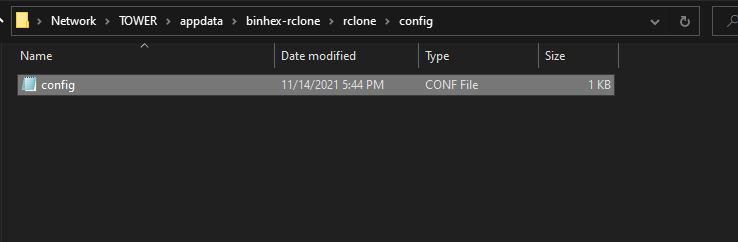
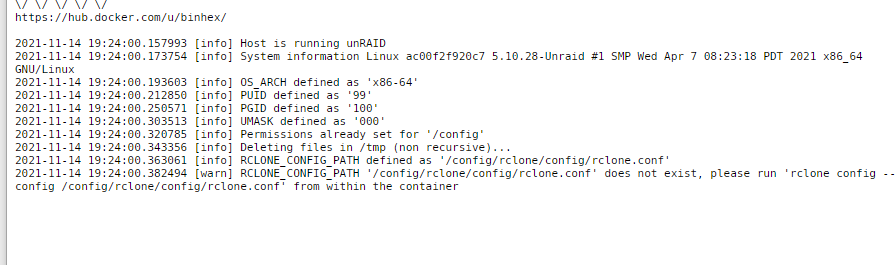
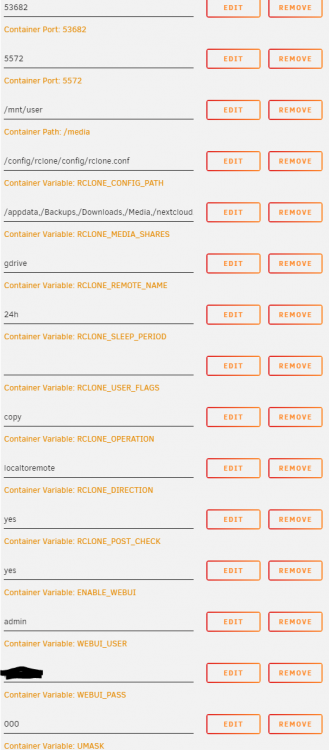
I seem to be having issues with the config file. I originally just created it using rclone config, read some more and realized that was incorrect, so reran it with rclone config --config /config/rclone/config/config.conf, I now have a config file showing But upon starting the web UI I'm getting "This site can't be reached". Looking at the log, looks like it is not seeing the config file? Only thing I can think of is I messed up my config path somehow but I have it as the default still so I think I should be good? Do you see anything obvious that I'm missing? I'm terrible with this stuff, so it probably is something right in front of me.
-
Full disclaimer, I'm very new to this, just finished my first Unraid build last week and really trying to get it up and running now, so this very well could be user error. Early in the week I was using QBittorrent and was getting fantastic downloads. Then suddenly they stopped with no changes to settings. Looking at the Q&A- https://github.com/binhex/documentation/blob/master/docker/faq/vpn.md Question 22 I believe applies, I get this error from the logs- 2020-12-11 23:15:07 DEPRECATED OPTION: --cipher set to 'aes-256-gcm' but missing in --data-ciphers (AES-256-GCM:AES-128-GCM). Future OpenVPN version will ignore --cipher for cipher negotiations. Add 'aes-256-gcm' to --data-ciphers or change --cipher 'aes-256-gcm' to --data-ciphers-fallback 'aes-256-gcm' to silence this warning. I followed the directions the answer 22 and have had no change. I've tried a couple different endpoints, all the same results. Am I just missing sometime or doing something wrong? At this point I'm open to signing up with a new VPN if that would solve it, I know PIA seems to be a mess right now. Edit- Please disregard. It very much was user error and me not entering my save paths correctly.


