





Zentachi
Members
-
Joined
-
Last visited
-
Many thanks for your advice. Definitely will have a look!
-
Any news on a function like this? I would like to delete a few older snapshots from my zfs disk in the array which causing very long mounting times when I reboot the server.
-
I believe the ZFS master plugin. I set everything up some time back. Maybe I should go ask in the ZFS master plugin thread rather than wasting your time
-
In the end I decided to just recreate the pools. Thankfully I had some partial backups of the VMs in this pool and I managed to have everything up and running almost as good as before. One of the things I found out though is that the array start up in my case takes too long. Disk 3 which is a zfs disk overall takes 50+ mins to be mounted. I don't know if its because it has too many snapshots (3000+) since it doesn't seem there is any other issue with it. Any idea how to remove some snapshots or how to decrease the frequency they are created?
-
Yes it was created with Unraid. I tried a couple of things but nothing worked for the cachessd pool. So I destroyed it and will rebuild it from scratch.
-
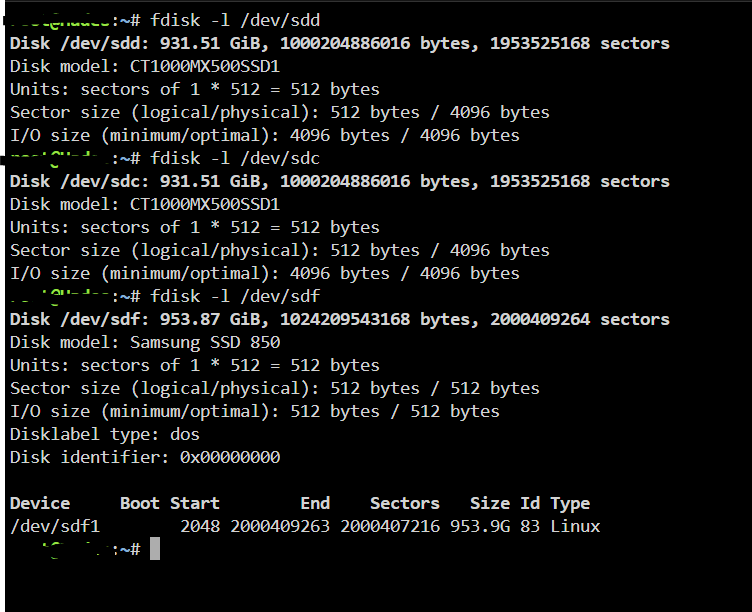
I entered this , took like 10 mins and came online. If not disk3 problem maybe its the cachessd pool zfs raidz1? I came across this topic Do you think it is a partition problem in my case as well? Even though the two bad disks aren't identical to the still working one? fdisk -l fdis If there is no other ideas I think I will try this solution
-
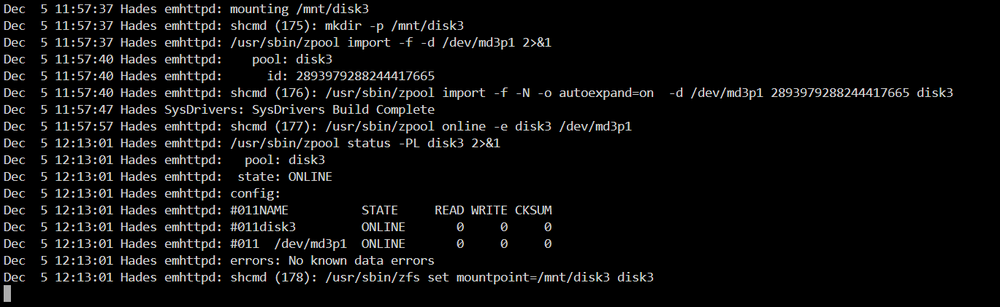
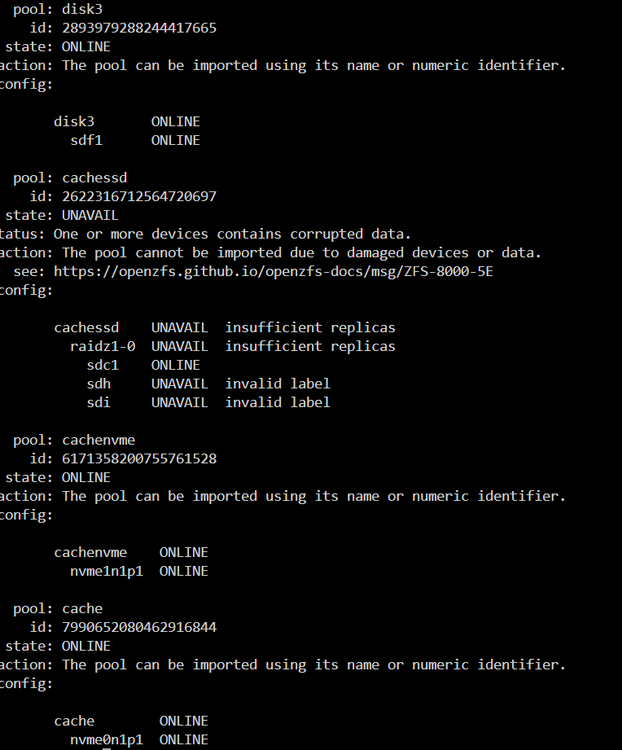
Hi everyone, hope you can help me fix the following issue. I had to shutdown my array today due to electrical work taking place, and the array isn't starting up anymore. It is stuck on mounting disks. I am attaching the diagnostics before I start the array. I don't see any issue on the log file. The process is stuck at trying to mount Disk 3 of the array. Disk 1 and 2 are xfs and Disk 3 is zfs. 8TB each. zpool import returns Which is strange since I didn't do anything to the cachessd pool which shows as unavailable. Any thoughts are more than welcome. Cheers, Zen hades-diagnostics-20241205-1144.zip
-
Thanks again, I used fdisk to remove the zfs_member signature.
-
Thanks for trying to help @JorgeB. In the end I just erased and recreated the pool from scratch. By the way, now I have 1 disk under unassigned devices with label pool greyed out. How can I format this one and just use it as an unassigned device?
-
I still get the same pool: cachessd id: 16821189125514654564 state: UNAVAIL status: One or more devices contains corrupted data. action: The pool cannot be imported due to damaged devices or data. see: https://openzfs.github.io/openzfs-docs/msg/ZFS-8000-5E config: cachessd UNAVAIL insufficient replicas raidz1-0 UNAVAIL insufficient replicas sde1 ONLINE replacing-1 UNAVAIL insufficient replicas 14112098753288857692 UNAVAIL 9022637102148647340 UNAVAIL sdd1 UNAVAIL I don't seem to be able to get the missing drive to show up.
-
Yes it is still connected. However, when I connected it back it gave me an error: "Unraid Cachessd 3 errorAlert [HADES] - Cachessd 3 in error state (disk bad)ST1000LM024_HN-M101MBB" Is there a way to cancel the replacing-1? I change this disk back to the original so there is no need to do any replacement. Somehow I would like to change: replacing-1 UNAVAIL insufficient replicas 14112098753288857692 UNAVAIL 9022637102148647340 UNAVAIL to sdc1
-
Hi everyone using the latest unraid version I had a zfs pool with 3 drives in raidz. I tried to replace one of the drives but unfortunately somehow I managed to get the pool all messed up. Even though I added the old drive back when I start the array I get a message saying "Unmountable: unsupported or no file system" When I use the zpool import this is what I get: pool: cachessd id: 16821189125514654564 state: UNAVAIL status: One or more devices contains corrupted data. action: The pool cannot be imported due to damaged devices or data. see: https://openzfs.github.io/openzfs-docs/msg/ZFS-8000-5E config: cachessd UNAVAIL insufficient replicas raidz1-0 UNAVAIL insufficient replicas sde1 ONLINE replacing-1 UNAVAIL insufficient replicas 14112098753288857692 UNAVAIL 9022637102148647340 UNAVAIL sdd1 UNAVAIL As I said I have back in all the original drives. Is there a way to get them back online and not loose any data? Many thanks, zen PS: If I destroy and recreate the pool with the original drives, will I lose all the data? hades-diagnostics-20231003-0713.zip
-
Did the migration to Nordlynx as well yesterday. Everything seems to work smoothly. I am using docker-compose.yaml for setting up my containers rather than the unraid gui.
-
Can you please give a few more details like a step by step guide? Or was it plug and play?
-
Updated to 6.9.1 as well and everything runs smoothly. As I can see the issue is resolved for everyone, so will be tagging this topic as solved.

