





shunde
Members
-
Joined
-
Last visited
-
Deleted the entire vdisk. No problem to start containers after that. Hopefully it will stay that way. Thanks Edit: RIP Immich (due to docker-compose I guess).
-
After a couple of reboots I'm still getting execution error 403. Attached are diagnostics from a recently restarted server. morn-diagnostics-20240206-2117.zip
-
Trying to figure out how to block 8112 from being accessible through the VPN but without any luck. I'm not using proton, pia or airvpn but another provider. I've tried with both OpenVPN and Wireguard without any success. How can I make sure that the deluge web client is accessible from my local network but not through VPN? Can't block ports at the VPN provider so I need to drop it with rules in the client.
-
Have you tried to pass /run/dbus to your HA container? Alongside installing bluez like my post mentioned. I wonder if passing /run/dbus and using bluez is enough or if passing /run/dbus, installing bluez and passing the corresponding /dev/ttyX is enough.
-
TL;DR: (Possibly): Install un-get Install bluez through un-get start rc.bluetooth & passthrough dbus/bt-device Profit Now for a more thorough explanation of everything I've tried: I have basically thrown every available ball against the wall so a couple of steps I've done might not be of use. I have a TP-Link UB500 whichs seems to be similiar, at least this thread came up when I googled the issue so I'll respond if any fellow UB500 purchaser ends up here while Googling. What I've passed through to HA: --device='/dev/bus/usb/001/003' --device='/dev/tty6' 001/003 being where I see the device being when I'm in the terminal in unRaid and doing `lsusb`. In one of the billions of google attempts I found a script that an unRaid user used to mention which tty* that was recently attached but I cant find it. In extra properties I've shared this to the container. /run/dbus I am quite certain the way to solve my issue, if anyone tests is out please respond. Is this way: Install https://github.com/ich777/un-get un-get from lovely ich777 and install bluez. Once you've installed bluez need to add this to /boot/config/go /etc/rc.d/rc.bluetooth start
-
Right. I think I tested 3 CPUs, 2 motherboards and 5 or 6 sets of RAM (both ECC and non ECC) and had issues with memtest86+. Went and bought Memtest86 Pro and ran the same test many more times until I found a setup that worked. That still gave me the errors with docker. So I bought a new USB stick and now it's gone. Yay
-
Happens on 6.10.3 as well. morn-diagnostics-20220923-0930.zip Over at the docker tab I have: And in settings I get: Edit: I did a reboot and still see the issue. But Diagnostics is never downloading. Its stuck on Downloading... - I've tried several times and the most scary thing is that I see "Unraid OS No Flash" instead of "Unraid OS Pro" from time to time. On the bottom of the docker tab I have: Edit: Same errors in 6.11.0
-
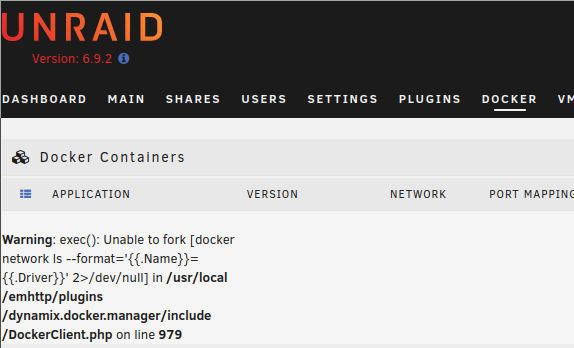
It's back Warning: exec(): Unable to fork [docker network ls --format='{{.Name}}={{.Driver}}' 2>/dev/null] in /usr/local/emhttp/plugins/dynamix.docker.manager/include/DockerClient.php on line 979 morn-diagnostics-20220915-1938.zip Going to give 6.10.3 a try
-
The specific issue with unable to fork docker network seems to pup up randomly. I've even switched hardware (not the usb stick I boot with). But just restarted and I can see stuff in Apps for now.
-
Thanks, made https://forums.unraid.net/topic/128354-692-unable-to-fork-docker-network/
-
Diagnostics: morn-diagnostics-20220915-1214.zip When visiting the Docker tab I sometimes stumble into an error message: And earlier today I received a similar error within CA on the apps tab. Something really wrong went on during defaultSortOrder Post the ENTIRE contents of this message in the Community Applications Support Thread OS: 6.9.2 Modified CA Browser: Mozilla/5.0 (X11; Linux x86_64; rv:104.0) Gecko/20100101 Firefox/104.0 Language: <br /> <b>Warning</b>: exec(): Unable to fork [docker network ls --format='{{.Name}}={{.Driver}}' 2>/dev/null] in <b>/usr/local/emhttp/plugins/dynamix.docker.manager/include/DockerClient.php</b> on line <b>979</b><br /> <br /> <b>Warning</b>: exec(): Unable to fork [/usr/local/emhttp/plugins/dynamix.plugin.manager/scripts/plugin 'version' '/var/log/plugins/community.applications.plg'] in <b>/usr/local/emhttp/plugins/dynamix.plugin.manager/include/PluginHelpers.php</b> on line <b>17</b><br /> <br /> <b>Warning</b>: shell_exec(): Unable to execute 'cd /usr/local/emhttp/plugins/community.applications && md5sum -c ca.md5' in <b>/usr/local/emhttp/plugins/community.applications/include/exec.php</b> on line <b>62</b><br /> {"status":"ok"} Ive also attached massivelog.txt from the CA tab.massivelog.txt Bonus bug: Tried to download diagnostics and was met with /boot/logs Warning: exec(): Unable to fork [echo /usr/local/emhttp/webGui/scripts/diagnostics '/usr/local/emhttp/morn-diagnostics-20220915-1212.zip' | at NOW > /dev/null 2>&1] in /usr/local/emhttp/plugins/dynamix/include/Download.php on line 37 /morn-diagnostics-20220915-1212.zip But trying to download again worked. But the main issue seems to be DockerClient.php line 979.
-
Something really wrong went on during defaultSortOrder Post the ENTIRE contents of this message in the Community Applications Support Thread OS: 6.9.2 Modified CA Browser: Mozilla/5.0 (X11; Linux x86_64; rv:104.0) Gecko/20100101 Firefox/104.0 Language: <br /> <b>Warning</b>: exec(): Unable to fork [docker network ls --format='{{.Name}}={{.Driver}}' 2>/dev/null] in <b>/usr/local/emhttp/plugins/dynamix.docker.manager/include/DockerClient.php</b> on line <b>979</b><br /> <br /> <b>Warning</b>: exec(): Unable to fork [/usr/local/emhttp/plugins/dynamix.plugin.manager/scripts/plugin 'version' '/var/log/plugins/community.applications.plg'] in <b>/usr/local/emhttp/plugins/dynamix.plugin.manager/include/PluginHelpers.php</b> on line <b>17</b><br /> <br /> <b>Warning</b>: shell_exec(): Unable to execute 'cd /usr/local/emhttp/plugins/community.applications && md5sum -c ca.md5' in <b>/usr/local/emhttp/plugins/community.applications/include/exec.php</b> on line <b>62</b><br /> {"status":"ok"} When visiting the apps tab. From time to time I see the issue with unable to fork docker network in the docker tab as well. Error message in the docker tab, since its mentioned in the error in the app tab: Warning: exec(): Unable to fork [docker network ls --format='{{.Name}}={{.Driver}}' 2>/dev/null] in /usr/local/emhttp/plugins/dynamix.docker.manager/include/DockerClient.php on line 979
-
Had to reinstall my docker and wanting to get unifi video up and running again but it doesn't start. Webui says Starting unifi video services. Logs for the container says that mongo isn't started. 2022-09-12 23:17:49.398759 Starting unifi-video... (unifi-video) Hardware type:Unknown (unifi-video) checking for system.properties and truststore files... done. /run.sh: line 101: 17464 Aborted mongo --quiet localhost:7441 --eval "{ ping: 1}" > /dev/null 2>&1 The log file is ful of aborted mongo.
-
Awesome work. Not sure if it's for this or your regular deluge container. But is it possible to run one deluge container entirely through proxy or is it still leaky and insecure? I already have a container to a custom vpn provider with static ip w/ binhex-deluge-vpn but the webui is getting slow so I thought about spinning up another instance and use the same connection, that is proxy to binhex-deluge-vpn. Could I just binhex-delugevpn and the proxy settings in deluge, should I use something else or give up?
