





Rick Sanchez
Members
-
Joined
-
Last visited
Everything posted by Rick Sanchez
-
I'm in the same boat as you, but I want PCIe 4.0!
-
Ok, thank you for your help.
-
The CPU and iGPU - I've read the new Rocket Lake CPU's are under powered compared to the previous version? Sent from my TA-1004 using Tapatalk
-
What spec systems are you running? Sent from my TA-1004 using Tapatalk
-
Any update on this? Sent from my TA-1004 using Tapatalk
-
I'm finally to jump onboard now that my living situation is sorted. Has anyone thought about RocketLake?
-
I have updated and I have received this error and I can't find a solution for it? [quote] Test was aborted due to an error: Unable to connect to SABnzbd, The SSL connection could not be established, see inner exception. The remote certificate is invalid according to the validation procedure.: 'https://###.###.#.#:8080/api?mode=get_config&apikey=##############&output=json'[/quote] Does anyone have any ideas? Thanks
-
Honestly, I have no idea but I was trying to future proof a bit! [emoji106] What do you think of my build? Any suggestions for me? Sent from my TA-1012 using Tapatalk
-
Thank you for your help [emoji4] I will have a read and make my purchases today! What ECC RAM wound you recommend that I buy for this board, that will hopefully work with the next upgrade? Sent from my TA-1012 using Tapatalk
-
Deleted as everything has been put into a new, complete topic.
-
What CPU and RAM is everyone using with this setup - AsRock Rack E3C246D4U? - Is this the 'go-to' board at the moment? I'd like to copy your systems as it will be easier to problem solve any issues that I have!
-
Can't find the CPU or MOBO in the UK
-
I've ordered - https://www.icydock.com/goods.php?id=155
-
So, MB15SB-B is one worth purchasing? - Do you have a link? Thanks!
-
UK/EU stock of the BPN-DE350SS is almost non-existent. Has anyone got any ideas?
-
What dock is this? Does anyone know? - It's to fit in a Antec 1200.
-
Is anyone else having sound issues? I can't any sound at all. Any ideas?
-
Thanks, for your help! How can I prevent the VM from sleeping?
-
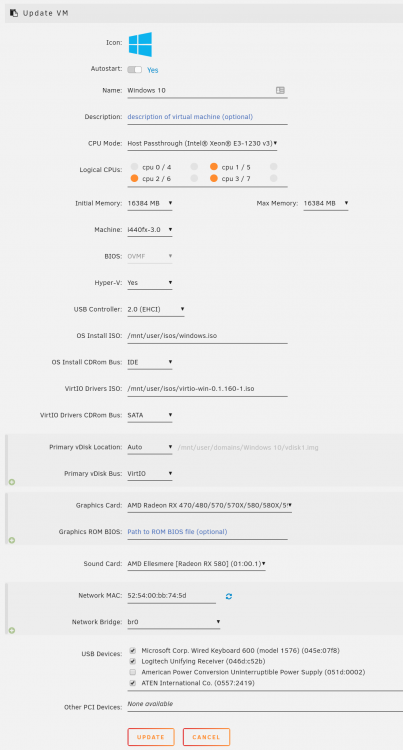
I've watched @SpaceInvaderOne's Youtube videos (thanks btw) for installing a Windows 10 VM and I don't see the multi-tick boxes for the 'Logical CPUs'. What am I doing wrong? - The VM is for an Office/gaming machine. - I will another 8GB Windows 10 VM after to test software at a later date. Screenshot below/attached: Thank you for your help
-
Thanks, for responding! I'm following SpaceInvader One's guide to setup my Windows 10 VM but I cannot figure out how to display Windows 10 on the connected screen without a graphics card. Is it possible? If so, how, what am I missing??
-
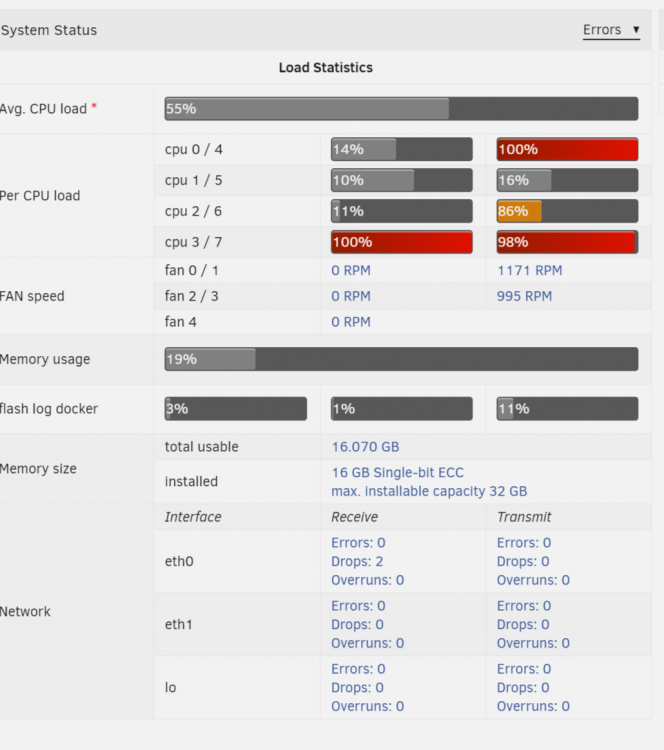
I've noticed a huge issue appear: Any idea how to find out whats going on?
-
Yes I can't ping in or out. Almost as if there is no IP/etc? Update The log states
-
Since the upgrade, I can no longer access unraid via web GUI, nor via any other machine.
-
This is exactly my issue at the moment. I've downloaded multiple copies of the Windows 10 ISO from Microsoft and none boot? The log doesn't really provide any help either. Any ideas? Thanks.
-
My case has arrived Are there any other mods that I should do?


