






Unsealed0019
Members
-
Joined
-
Last visited
Everything posted by Unsealed0019
-
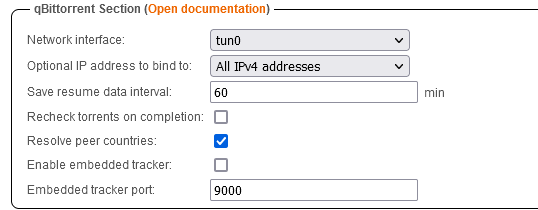
Might be a nice addition to default these values (at least specifying the Network interface as tun0):
-
Gotcha - thanks for the reminder - it was probably the audio. Yeah the 2 discrete GPUs are bound to VFIO (still can't get passthrough working for them but they are bound anyway). Ok cool, good to know how that would manifest otherwise, thanks!
-
Yes I did read that and installed & set that up. At first there was huge CPU usage which could have just been something else... and very minimal GPU usage but then the CPU usage settled after a while and the GPU usage continued low. Looks like it's working great 👍 Was hoping Jellyfin may be more definitive on it's own (I am using hardware vs software for instance). I do actually have 3 AMD GPUs plugged into this system (one integrated, two discrete) I don't suppose /dev/dri specifies one over another or if maybe just the primary is selected?
-
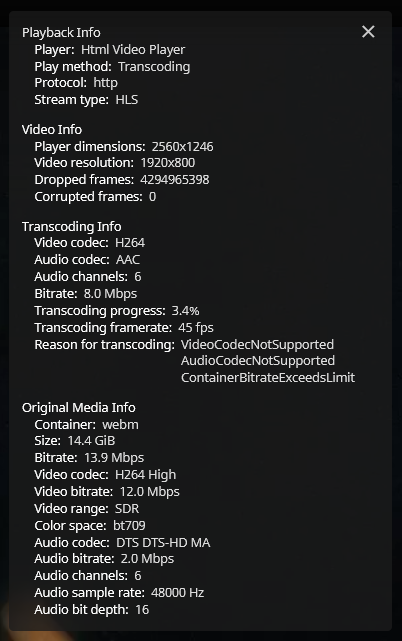
Yes indeed - at first I was unable to log in to your container perhaps because I already had the binhex container. Seems like it was a port conflict and changing the port allowed it to work. Dumb question... but how can I differentiate between cpu & gpu transcode?
-
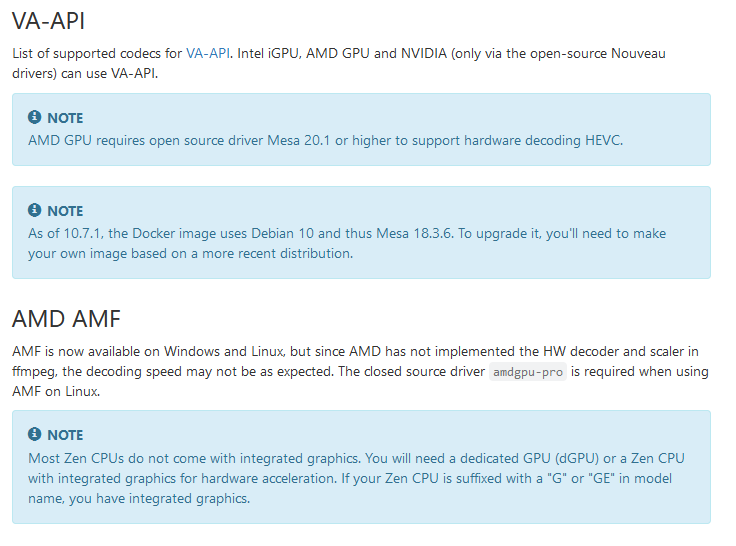
I am not sure how to check but the binhex jellyfin docker does not work with the device passthrough as such. Probably missing the sufficient mesa version?: https://jellyfin.org/docs/general/administration/hardware-acceleration.html Seems like AMF may be on the horizon for support here but maybe not until it's available through the open source amdgpu driver module.
-
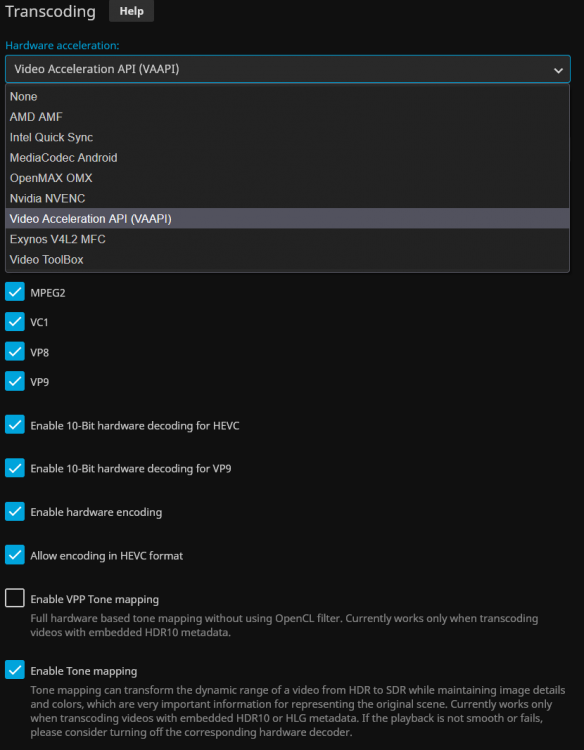
Noticed there's an AMD AMF option for transcoding - is that usable on certain hardware?
-
Yes I am on 6.10.0-rc1 - does that mean I don't need to add the modprobe line to the /boot/config/go file? If I add the same parameter as is in your docker config to other docker containers (Device with value /dev/dri ) that will allow the other containers to use the hardware? (I guess just Emby additionally maybe)? You may be right, Plex has this posted in their article:
-
Cool! Worth a shot - I was interested in trying all 3 (Jellyfin, Plex, Emby) if I can pass hardware transcode capability to each docker. Install said this which was interesting: Verifying package radeontop-2021.09.13.txz. Installing package radeontop-2021.09.13.txz: PACKAGE DESCRIPTION: Package radeontop-2021.09.13.txz installed. -----AMDGPU Kernel Module already enabled!----- ----Installation of radeontop complete----- plugin: radeontop.plg installed I do have these items: Is there a way to use this amdgpu module on other dockers mentioned as well? (trying out your Jellyfin shortly)

-
Just the one bind mount is sufficient but I was hoping to be able to have a browse UI for that location to choose a subfolder that way but it looks like it's just a limitation of the web UI and can't be done. Using the monitor folder options is the next best thing (adding one for each possible download location).
-
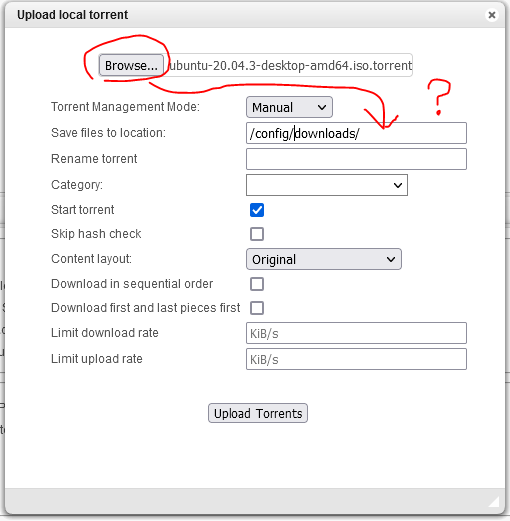
Sorry if this is a dumb question but is there some way to browse the local docker shares when adding a file? I'm not a fan of guessing manual paths and having to double check them. Also, Browse... only lets you browse the accessing system rather than local shares to the docker. Is there a way to have both be just through the docker shares directly? If it was direct control of the application rather than the web UI, this would be possible so it's a curious limitation.
-
@binhex Added the noted line to the end of the list of options in the .ovpn file. No change in the log output - seems like it may be benign and not matter much anyway. I am noticing this option is in there as well: setenv UV_IPV6 yes Edit: commenting out that line (and leaving yours) seems to have cleared up the log messages
-
Seeing this in the log info - is there a way to disable the ipv6 stuff? 2021-09-21 03:57:34 WARNING: OpenVPN was configured to add an IPv6 route. However, no IPv6 has been configured for tun0, therefore the route installation may fail or may not work as expected. 2021-09-21 03:57:34 add_route_ipv6(::/3 -> :: metric -1) dev tun0 2021-09-21 03:57:34 net_route_v6_add: ::/3 via :: dev tun0 table 0 metric -1 2021-09-21 03:57:34 sitnl_send: rtnl: generic error (-13): Permission denied 2021-09-21 03:57:34 ERROR: Linux IPv6 route can't be added 2021-09-21 03:57:34 add_route_ipv6(2000::/4 -> :: metric -1) dev tun0 2021-09-21 03:57:34 net_route_v6_add: 2000::/4 via :: dev tun0 table 0 metric -1 2021-09-21 03:57:34 sitnl_send: rtnl: generic error (-13): Permission denied 2021-09-21 03:57:34 ERROR: Linux IPv6 route can't be added 2021-09-21 03:57:34 add_route_ipv6(3000::/4 -> :: metric -1) dev tun0 2021-09-21 03:57:34 net_route_v6_add: 3000::/4 via :: dev tun0 table 0 metric -1 2021-09-21 03:57:34 sitnl_send: rtnl: generic error (-13): Permission denied 2021-09-21 03:57:34 ERROR: Linux IPv6 route can't be added 2021-09-21 03:57:34 add_route_ipv6(fc00::/7 -> :: metric -1) dev tun0 2021-09-21 03:57:34 net_route_v6_add: fc00::/7 via :: dev tun0 table 0 metric -1 2021-09-21 03:57:34 sitnl_send: rtnl: generic error (-13): Permission denied 2021-09-21 03:57:34 ERROR: Linux IPv6 route can't be added
-
Fair enough - does that mean that if I revert the settings and just ignore the guest VM memory allocation, I can leave UNRAID with more free memory or does it not work that way either?
-
Oh, interesting - they were not. That fixed it but in so doing, does that mean the VM always has 12G memory allocated to it when running (and UNRAID has 12G less memory usable?
-
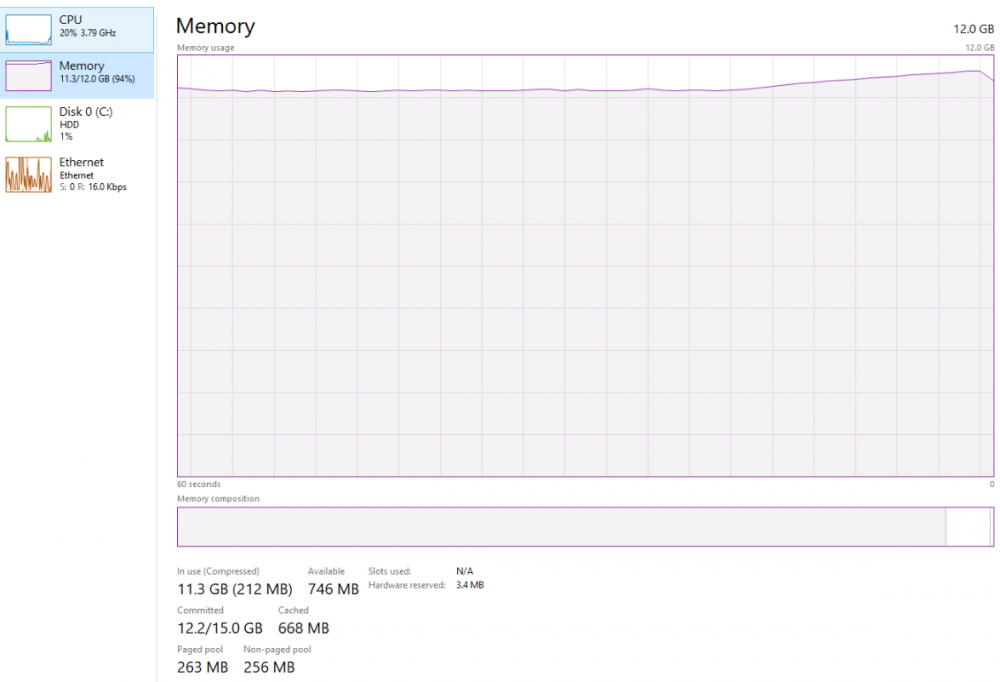
I installed the balloon and other virtio drivers but it seems like something may be wrong because this is what I see in the system: Almost nothing is running so it's almost as if it's inverted? Is this just normal with Windows 10 VMs or did I miss something?
-
You can also enter exit or quit at that prompt and you may get bumped into the bios where you can re-select the boot device manually (giving you another chance to hit enter at boot). In the UEFI interface you can also adjust boot order.
-
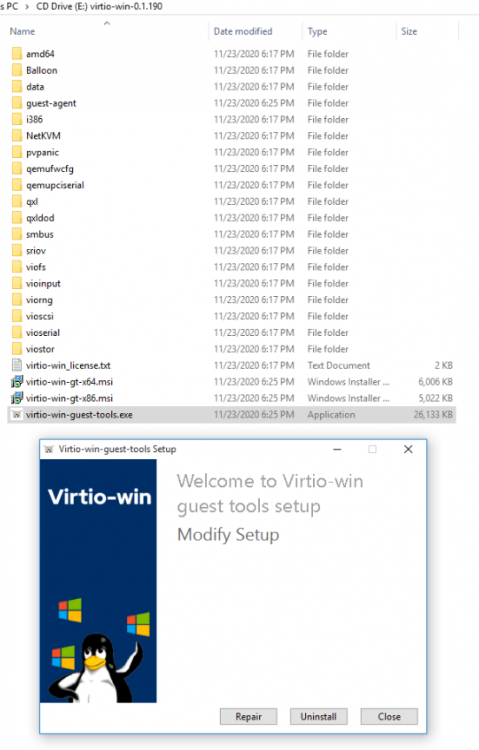
That was a helpful read but also seems to raise even more questions than I can wrap my head around. Short answer, just use virtio-net for stability (which I am trying to achieve) For some reason, I am unable to get internet access on a windows VM. Tried switching between the two Network Model types - no difference - both complain about DNS not working. Every other device on my network (real devices) use the same DNS (router IP) which then uses 1.1.1.1 or 8.8.8.8. The VM internet was working seemingly until I ran this: Before I ran that, I manually installed all the missing drivers and everything seemed good but did this just for fun. Any known data suggest this is a bad idea? Any way to undo it? I've tried manually uninstalling/deleting network adapter and re-detecting but still nothing. Edit: setting a static IP and DNS work fine... maybe IP conflict
-
Well allow me to explain and reveal probably how inexperienced I am but here goes... What is a parity drive if not a redundant storage drive (rather, it would let one drive be rebuilt if one drive failed without any data loss) - to me that means, while it's not backed up (same data in 2 systems), it's sort of backed up in the parity data within the same system. Extending that... adding a 2nd parity drive would (as I understand it, but could be wrong) allow for 2 drives to fail in this system and be recoverable with replacement drives and the expectation is that no data would be lost from either of the two failed drives. So in short, I am relying on the parity drive being able to recover one failed drive at a time (and hoping that no more than one drive fail at a time). Of course if two drives fail, I assume I lose everything, maybe - that's where I am at a loss. Or just everything on that one failed drive in any case?
-
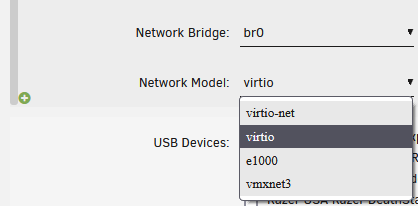
Is there a wiki somewhere that explains the differences? Seems to me like they are basically the same thing since virtio in the network adapter list is also a virtio network adapter driver?
-
Thanks for the info. Yeah It wouldn't be more than the cache size at once anyway. I am/would be pretty much relying on the parity drive but plan to get a 2nd eventually. Setting up unraid because my aforementioned external has no backup at all lol. Relying on single disk failures and not having them happen in batches is about all I can afford right now. Wondering if since the share is using high water that would explain why I don't see a 'media' folder on any of the other disks & what I can do about that? If I wanted to preload some onto disk2 or 3 for example, those are still completely empty as far as I can see.
-
Followup question... If there's 4 disks in a share, and most of those disks don't actually show the share folder name yet, is it safe to create/recreate the structure so I can manually copy straight to disk? Or do I need to tell UNRAID to do something so I can direct copy?
-
I just got my first UNRAID server set up and it has about 10TB of space in the array with lots of room to grow. I have a disk that has been storing data temporarily until I can move it into something redundant like this system. The array has a cache ssd set up and I can copy files/folders manually through windows (two samba mounts) and speeds are 40-60MiB/s. Would take a long long time to transfer 5TB or so but can be done in many chunks. Watched numerous spaceinvader one videos and in a few he recommended using Krusader which I set up. Unfortunately I cannot pull the drive and do a direct transfer so it will have to go through the network anyway. I set up a remote NFS share with Unassigned Devices to the storage drive and tried a copy from that NFS share directly to disk 1 on the array (bypassing the cache I believe) and speeds were pretty bad (15MiB/s average). Started off around 40-60 but then tapered down. On another test, transferring to the user share itself (using cache) Krusader sees 60-70MiB/s (still from NFS mounted source). So the source is not limited in this regard but it seems like the target disk is? One of several questions... should I be bypassing the cache drive for importing data? My thoughts were to save it needless cycles as it writes,reads,clears through the several TB's of data. What would be the best speed to expect over a gig Ethernet cable from NFS to UNRAID disk array? Is there a better way to transfer via network? Edit: tried the same direct to disk1 copy with an SMB share rather than NFS and it is maintaining 40-50MiB/s so that's pretty decent.
-
Interested in loading the amdgpu module and using the AMD APU (5700G) for docker containers - is that possible now?
-
Unraid crashed/became unresponsive when doing a Detect with the System Temp plugin - what do I do? I was in the middle of some Preclears with new disks, should I assume I have to start those over and force reboot the system or is there another way? Edit: Ehh... rebooted and now a full parity check in process - not fun
-
Lots of libvit log errors when saving/loading a VM config: 2021-09-13 11:34:14.972+0000: 12063: error : virConnectNumOfDefinedStoragePools:244 : this function is not supported by the connection driver: virConnectNumOfDefinedStoragePools 2021-09-13 11:34:14.973+0000: 12059: error : virConnectNumOfStoragePools:164 : this function is not supported by the connection driver: virConnectNumOfStoragePools 2021-09-13 11:34:14.974+0000: 12058: error : virConnectNumOfStoragePools:164 : this function is not supported by the connection driver: virConnectNumOfStoragePools 2021-09-13 11:34:14.974+0000: 12060: error : virConnectNumOfDefinedStoragePools:244 : this function is not supported by the connection driver: virConnectNumOfDefinedStoragePools 2021-09-13 11:34:14.974+0000: 12066: error : virConnectNumOfSecrets:79 : this function is not supported by the connection driver: virConnectNumOfSecrets 2021-09-13 11:34:15.053+0000: 12067: error : virConnectNumOfDefinedStoragePools:244 : this function is not supported by the connection driver: virConnectNumOfDefinedStoragePools 2021-09-13 11:34:15.053+0000: 12065: error : virConnectNumOfStoragePools:164 : this function is not supported by the connection driver: virConnectNumOfStoragePools 2021-09-13 11:34:15.054+0000: 12059: error : virConnectNumOfStoragePools:164 : this function is not supported by the connection driver: virConnectNumOfStoragePools 2021-09-13 11:34:15.054+0000: 12062: error : virConnectNumOfDefinedStoragePools:244 : this function is not supported by the connection driver: virConnectNumOfDefinedStoragePools 2021-09-13 11:34:15.054+0000: 12058: error : virConnectNumOfSecrets:79 : this function is not supported by the connection driver: virConnectNumOfSecrets 2021-09-13 11:34:48.445+0000: 12065: error : virConnectNumOfDefinedStoragePools:244 : this function is not supported by the connection driver: virConnectNumOfDefinedStoragePools 2021-09-13 11:34:48.447+0000: 12060: error : virConnectNumOfStoragePools:164 : this function is not supported by the connection driver: virConnectNumOfStoragePools 2021-09-13 11:34:48.450+0000: 12067: error : virConnectNumOfStoragePools:164 : this function is not supported by the connection driver: virConnectNumOfStoragePools 2021-09-13 11:34:48.450+0000: 12066: error : virConnectNumOfDefinedStoragePools:244 : this function is not supported by the connection driver: virConnectNumOfDefinedStoragePools 2021-09-13 11:34:48.450+0000: 12058: error : virConnectNumOfSecrets:79 : this function is not supported by the connection driver: virConnectNumOfSecrets 2021-09-13 11:34:48.534+0000: 12066: error : virConnectNumOfDefinedStoragePools:244 : this function is not supported by the connection driver: virConnectNumOfDefinedStoragePools 2021-09-13 11:34:48.536+0000: 12067: error : virConnectNumOfStoragePools:164 : this function is not supported by the connection driver: virConnectNumOfStoragePools 2021-09-13 11:34:48.538+0000: 12064: error : virConnectNumOfStoragePools:164 : this function is not supported by the connection driver: virConnectNumOfStoragePools 2021-09-13 11:34:48.538+0000: 12063: error : virConnectNumOfDefinedStoragePools:244 : this function is not supported by the connection driver: virConnectNumOfDefinedStoragePools 2021-09-13 11:34:48.538+0000: 12059: error : virConnectNumOfSecrets:79 : this function is not supported by the connection driver: virConnectNumOfSecrets 2021-09-13 11:35:09.805+0000: 23714: error : qemuMonitorIORead:496 : Unable to read from monitor: Connection reset by peer 2021-09-13 11:35:09.805+0000: 23714: error : qemuProcessReportLogError:2132 : internal error: qemu unexpectedly closed the monitor: 2021-09-13T11:35:09.778441Z qemu-system-x86_64: -device pcie-pci-bridge,id=pci.7,bus=pci.1,addr=0x0: Bus 'pci.1' not found 2021-09-13 11:35:17.890+0000: 12061: error : virConnectNumOfDefinedStoragePools:244 : this function is not supported by the connection driver: virConnectNumOfDefinedStoragePools 2021-09-13 11:35:17.891+0000: 12065: error : virConnectNumOfStoragePools:164 : this function is not supported by the connection driver: virConnectNumOfStoragePools 2021-09-13 11:35:17.892+0000: 12059: error : virConnectNumOfStoragePools:164 : this function is not supported by the connection driver: virConnectNumOfStoragePools 2021-09-13 11:35:17.892+0000: 12062: error : virConnectNumOfDefinedStoragePools:244 : this function is not supported by the connection driver: virConnectNumOfDefinedStoragePools 2021-09-13 11:35:17.892+0000: 12063: error : virConnectNumOfSecrets:79 : this function is not supported by the connection driver: virConnectNumOfSecrets 2021-09-13 11:35:17.987+0000: 12058: error : virConnectNumOfDefinedStoragePools:244 : this function is not supported by the connection driver: virConnectNumOfDefinedStoragePools 2021-09-13 11:35:17.987+0000: 12062: error : virConnectNumOfStoragePools:164 : this function is not supported by the connection driver: virConnectNumOfStoragePools 2021-09-13 11:35:17.988+0000: 12063: error : virConnectNumOfStoragePools:164 : this function is not supported by the connection driver: virConnectNumOfStoragePools 2021-09-13 11:35:17.988+0000: 12065: error : virConnectNumOfDefinedStoragePools:244 : this function is not supported by the connection driver: virConnectNumOfDefinedStoragePools 2021-09-13 11:35:17.988+0000: 12059: error : virConnectNumOfSecrets:79 : this function is not supported by the connection driver: virConnectNumOfSecrets 2021-09-13 11:35:28.379+0000: 12064: error : virConnectNumOfDefinedStoragePools:244 : this function is not supported by the connection driver: virConnectNumOfDefinedStoragePools 2021-09-13 11:35:28.381+0000: 12058: error : virConnectNumOfStoragePools:164 : this function is not supported by the connection driver: virConnectNumOfStoragePools 2021-09-13 11:35:28.384+0000: 12061: error : virConnectNumOfStoragePools:164 : this function is not supported by the connection driver: virConnectNumOfStoragePools 2021-09-13 11:35:28.385+0000: 12059: error : virConnectNumOfDefinedStoragePools:244 : this function is not supported by the connection driver: virConnectNumOfDefinedStoragePools 2021-09-13 11:35:28.385+0000: 12063: error : virConnectNumOfSecrets:79 : this function is not supported by the connection driver: virConnectNumOfSecrets 2021-09-13 11:35:28.468+0000: 12062: error : virConnectNumOfDefinedStoragePools:244 : this function is not supported by the connection driver: virConnectNumOfDefinedStoragePools 2021-09-13 11:35:28.470+0000: 12065: error : virConnectNumOfStoragePools:164 : this function is not supported by the connection driver: virConnectNumOfStoragePools 2021-09-13 11:35:28.472+0000: 12063: error : virConnectNumOfStoragePools:164 : this function is not supported by the connection driver: virConnectNumOfStoragePools 2021-09-13 11:35:28.472+0000: 12060: error : virConnectNumOfDefinedStoragePools:244 : this function is not supported by the connection driver: virConnectNumOfDefinedStoragePools 2021-09-13 11:35:28.472+0000: 12061: error : virConnectNumOfSecrets:79 : this function is not supported by the connection driver: virConnectNumOfSecrets 2021-09-13 11:37:57.387+0000: 12065: error : virConnectNumOfDefinedStoragePools:244 : this function is not supported by the connection driver: virConnectNumOfDefinedStoragePools 2021-09-13 11:37:57.388+0000: 12059: error : virConnectNumOfStoragePools:164 : this function is not supported by the connection driver: virConnectNumOfStoragePools 2021-09-13 11:37:57.388+0000: 12067: error : virConnectNumOfStoragePools:164 : this function is not supported by the connection driver: virConnectNumOfStoragePools 2021-09-13 11:37:57.389+0000: 12060: error : virConnectNumOfDefinedStoragePools:244 : this function is not supported by the connection driver: virConnectNumOfDefinedStoragePools 2021-09-13 11:37:57.389+0000: 12061: error : virConnectNumOfSecrets:79 : this function is not supported by the connection driver: virConnectNumOfSecrets 2021-09-13 11:37:57.483+0000: 12061: error : virConnectNumOfDefinedStoragePools:244 : this function is not supported by the connection driver: virConnectNumOfDefinedStoragePools 2021-09-13 11:37:57.484+0000: 12060: error : virConnectNumOfStoragePools:164 : this function is not supported by the connection driver: virConnectNumOfStoragePools 2021-09-13 11:37:57.485+0000: 12059: error : virConnectNumOfStoragePools:164 : this function is not supported by the connection driver: virConnectNumOfStoragePools 2021-09-13 11:37:57.485+0000: 12062: error : virConnectNumOfDefinedStoragePools:244 : this function is not supported by the connection driver: virConnectNumOfDefinedStoragePools 2021-09-13 11:37:57.485+0000: 12065: error : virConnectNumOfSecrets:79 : this function is not supported by the connection driver: virConnectNumOfSecrets 2021-09-13 11:38:07.255+0000: 12065: error : virConnectNumOfDefinedStoragePools:244 : this function is not supported by the connection driver: virConnectNumOfDefinedStoragePools 2021-09-13 11:38:07.256+0000: 12062: error : virConnectNumOfStoragePools:164 : this function is not supported by the connection driver: virConnectNumOfStoragePools 2021-09-13 11:38:07.259+0000: 12060: error : virConnectNumOfStoragePools:164 : this function is not supported by the connection driver: virConnectNumOfStoragePools 2021-09-13 11:38:07.259+0000: 12063: error : virConnectNumOfDefinedStoragePools:244 : this function is not supported by the connection driver: virConnectNumOfDefinedStoragePools 2021-09-13 11:38:07.260+0000: 12059: error : virConnectNumOfSecrets:79 : this function is not supported by the connection driver: virConnectNumOfSecrets 2021-09-13 11:38:07.345+0000: 12059: error : virConnectNumOfDefinedStoragePools:244 : this function is not supported by the connection driver: virConnectNumOfDefinedStoragePools 2021-09-13 11:38:07.346+0000: 12061: error : virConnectNumOfStoragePools:164 : this function is not supported by the connection driver: virConnectNumOfStoragePools 2021-09-13 11:38:07.348+0000: 12062: error : virConnectNumOfStoragePools:164 : this function is not supported by the connection driver: virConnectNumOfStoragePools 2021-09-13 11:38:07.348+0000: 12058: error : virConnectNumOfDefinedStoragePools:244 : this function is not supported by the connection driver: virConnectNumOfDefinedStoragePools 2021-09-13 11:38:07.349+0000: 12060: error : virConnectNumOfSecrets:79 : this function is not supported by the connection driver: virConnectNumOfSecrets


