Unsealed0019
Members
-
Joined
-
Last visited
Everything posted by Unsealed0019
-
Is there any other information I can provide to help figure out why it's not working?
-
Unraid log for VM startup: Aug 19 03:53:13 kernel: br0: port 2(vnet0) entered blocking state Aug 19 03:53:13 kernel: br0: port 2(vnet0) entered disabled state Aug 19 03:53:13 kernel: device vnet0 entered promiscuous mode Aug 19 03:53:13 kernel: br0: port 2(vnet0) entered blocking state Aug 19 03:53:13 kernel: br0: port 2(vnet0) entered forwarding state Aug 19 03:53:15 kernel: vfio-pci 0000:01:00.0: vfio_ecap_init: hiding ecap 0x19@0x270 Aug 19 03:53:15 kernel: vfio-pci 0000:01:00.0: vfio_ecap_init: hiding ecap 0x1b@0x2d0 Aug 19 03:53:15 kernel: vfio-pci 0000:01:00.0: vfio_ecap_init: hiding ecap 0x1e@0x370 Aug 19 03:53:15 avahi-daemon[2640]: Joining mDNS multicast group on interface vnet0.IPv6 with address fe80::fc54:ff:fe39:2041. Aug 19 03:53:15 avahi-daemon[2640]: New relevant interface vnet0.IPv6 for mDNS. Aug 19 03:53:15 avahi-daemon[2640]: Registering new address record for fe80::fc54:ff:fe39:2041 on vnet0.*.
-
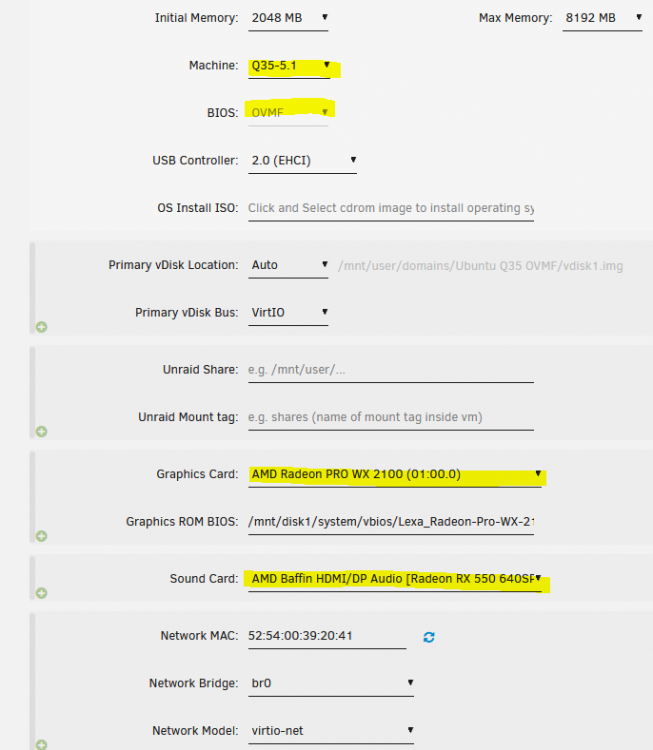
I was able to boot a Ubuntu VM (OVMF Q35 5.1) with only the video device passed through (no sound counterpart) and the system worked for 2 subsequent boots with 3D acceleration (but no sound). I then added the sound device pass-through and it stopped booting. I made the Space Invader special XML tweak that seems to be a long-standing bug that isn't fixed yet. The system looks like it boots and I can even see the teamviewer alias pop into the list but it is inaccessible and the GPU has no output. I can get it back to booting by removing the sound device and restarting unraid (tested once - I maybe had to boot with VNC vga once first too before reassigning the passthrough GPU). I am booting unraid in UEFI (tried legacy boot also) System has an APU (Ryzen 5 2400G) as primary GPU & passthrough GPU in first PCIe slot IOMMU forced enabled in bios (GPU reserved in unraid for vfio) I have tried with or without the specified ROM vbios file (pulled manually from a bare metal windows boot and the techpowerup utility) VM log: -overcommit mem-lock=off \ -smp 4,sockets=1,dies=1,cores=2,threads=2 \ -uuid 8ed21dac-e164-28c6-457f-66f600401822 \ -display none \ -no-user-config \ -nodefaults \ -chardev socket,id=charmonitor,fd=31,server,nowait \ -mon chardev=charmonitor,id=monitor,mode=control \ -rtc base=utc,driftfix=slew \ -global kvm-pit.lost_tick_policy=delay \ -no-hpet \ -no-shutdown \ -boot strict=on \ -device pcie-root-port,port=0x8,chassis=1,id=pci.1,bus=pcie.0,multifunction=on,addr=0x1 \ -device pcie-root-port,port=0x9,chassis=2,id=pci.2,bus=pcie.0,addr=0x1.0x1 \ -device pcie-root-port,port=0xa,chassis=3,id=pci.3,bus=pcie.0,addr=0x1.0x2 \ -device pcie-root-port,port=0x13,chassis=4,id=pci.4,bus=pcie.0,addr=0x2.0x3 \ -device pcie-root-port,port=0x14,chassis=5,id=pci.5,bus=pcie.0,addr=0x2.0x4 \ -device ich9-usb-ehci1,id=usb,bus=pcie.0,addr=0x7.0x7 \ -device ich9-usb-uhci1,masterbus=usb.0,firstport=0,bus=pcie.0,multifunction=on,addr=0x7 \ -device ich9-usb-uhci2,masterbus=usb.0,firstport=2,bus=pcie.0,addr=0x7.0x1 \ -device ich9-usb-uhci3,masterbus=usb.0,firstport=4,bus=pcie.0,addr=0x7.0x2 \ -device virtio-serial-pci,id=virtio-serial0,bus=pci.2,addr=0x0 \ -blockdev '{"driver":"file","filename":"/mnt/user/domains/Ubuntu Q35 OVMF/vdisk1.img","node-name":"libvirt-1-storage","cache":{"direct":false,"no-flush":false},"auto-read-only":true,"discard":"unmap"}' \ -blockdev '{"node-name":"libvirt-1-format","read-only":false,"cache":{"direct":false,"no-flush":false},"driver":"raw","file":"libvirt-1-storage"}' \ -device virtio-blk-pci,bus=pci.3,addr=0x0,drive=libvirt-1-format,id=virtio-disk2,bootindex=1,write-cache=on \ -netdev tap,fd=33,id=hostnet0 \ -device virtio-net,netdev=hostnet0,id=net0,mac=52:54:00:39:20:41,bus=pci.1,addr=0x0 \ -chardev pty,id=charserial0 \ -device isa-serial,chardev=charserial0,id=serial0 \ -chardev socket,id=charchannel0,fd=34,server,nowait \ -device virtserialport,bus=virtio-serial0.0,nr=1,chardev=charchannel0,id=channel0,name=org.qemu.guest_agent.0 \ -device usb-tablet,id=input0,bus=usb.0,port=1 \ -device vfio-pci,host=0000:01:00.0,id=hostdev0,bus=pci.4,multifunction=on,addr=0x0,romfile=/mnt/disk1/system/vbios/Lexa_Radeon-Pro-WX-2100.rom \ -device vfio-pci,host=0000:01:00.1,id=hostdev1,bus=pci.4,addr=0x0.0x1 \ -sandbox on,obsolete=deny,elevateprivileges=deny,spawn=deny,resourcecontrol=deny \ -msg timestamp=on 2021-08-19 10:20:07.657+0000: Domain id=2 is tainted: high-privileges 2021-08-19 10:20:07.657+0000: Domain id=2 is tainted: host-cpu char device redirected to /dev/pts/0 (label charserial0) XML config: <?xml version='1.0' encoding='UTF-8'?> <domain type='kvm'> <name>Ubuntu Q35 OVMF</name> <uuid>8ed21dac-e164-28c6-457f-66f600401822</uuid> <metadata> <vmtemplate xmlns="unraid" name="Ubuntu" icon="ubuntu.png" os="ubuntu"/> </metadata> <memory unit='KiB'>8388608</memory> <currentMemory unit='KiB'>2097152</currentMemory> <memoryBacking> <nosharepages/> </memoryBacking> <vcpu placement='static'>4</vcpu> <cputune> <vcpupin vcpu='0' cpuset='0'/> <vcpupin vcpu='1' cpuset='4'/> <vcpupin vcpu='2' cpuset='1'/> <vcpupin vcpu='3' cpuset='5'/> </cputune> <os> <type arch='x86_64' machine='pc-q35-5.1'>hvm</type> <loader readonly='yes' type='pflash'>/usr/share/qemu/ovmf-x64/OVMF_CODE-pure-efi.fd</loader> <nvram>/etc/libvirt/qemu/nvram/8ed21dac-e164-28c6-457f-66f600401822_VARS-pure-efi.fd</nvram> </os> <features> <acpi/> <apic/> </features> <cpu mode='host-passthrough' check='none' migratable='on'> <topology sockets='1' dies='1' cores='2' threads='2'/> <cache mode='passthrough'/> <feature policy='require' name='topoext'/> </cpu> <clock offset='utc'> <timer name='rtc' tickpolicy='catchup'/> <timer name='pit' tickpolicy='delay'/> <timer name='hpet' present='no'/> </clock> <on_poweroff>destroy</on_poweroff> <on_reboot>restart</on_reboot> <on_crash>restart</on_crash> <devices> <emulator>/usr/local/sbin/qemu</emulator> <disk type='file' device='disk'> <driver name='qemu' type='raw' cache='writeback'/> <source file='/mnt/user/domains/Ubuntu Q35 OVMF/vdisk1.img'/> <target dev='hdc' bus='virtio'/> <boot order='1'/> <address type='pci' domain='0x0000' bus='0x03' slot='0x00' function='0x0'/> </disk> <controller type='pci' index='0' model='pcie-root'/> <controller type='pci' index='1' model='pcie-root-port'> <model name='pcie-root-port'/> <target chassis='1' port='0x8'/> <address type='pci' domain='0x0000' bus='0x00' slot='0x01' function='0x0' multifunction='on'/> </controller> <controller type='pci' index='2' model='pcie-root-port'> <model name='pcie-root-port'/> <target chassis='2' port='0x9'/> <address type='pci' domain='0x0000' bus='0x00' slot='0x01' function='0x1'/> </controller> <controller type='pci' index='3' model='pcie-root-port'> <model name='pcie-root-port'/> <target chassis='3' port='0xa'/> <address type='pci' domain='0x0000' bus='0x00' slot='0x01' function='0x2'/> </controller> <controller type='pci' index='4' model='pcie-root-port'> <model name='pcie-root-port'/> <target chassis='4' port='0x13'/> <address type='pci' domain='0x0000' bus='0x00' slot='0x02' function='0x3'/> </controller> <controller type='pci' index='5' model='pcie-root-port'> <model name='pcie-root-port'/> <target chassis='5' port='0x14'/> <address type='pci' domain='0x0000' bus='0x00' slot='0x02' function='0x4'/> </controller> <controller type='virtio-serial' index='0'> <address type='pci' domain='0x0000' bus='0x02' slot='0x00' function='0x0'/> </controller> <controller type='sata' index='0'> <address type='pci' domain='0x0000' bus='0x00' slot='0x1f' function='0x2'/> </controller> <controller type='usb' index='0' model='ich9-ehci1'> <address type='pci' domain='0x0000' bus='0x00' slot='0x07' function='0x7'/> </controller> <controller type='usb' index='0' model='ich9-uhci1'> <master startport='0'/> <address type='pci' domain='0x0000' bus='0x00' slot='0x07' function='0x0' multifunction='on'/> </controller> <controller type='usb' index='0' model='ich9-uhci2'> <master startport='2'/> <address type='pci' domain='0x0000' bus='0x00' slot='0x07' function='0x1'/> </controller> <controller type='usb' index='0' model='ich9-uhci3'> <master startport='4'/> <address type='pci' domain='0x0000' bus='0x00' slot='0x07' function='0x2'/> </controller> <interface type='bridge'> <mac address='52:54:00:39:20:41'/> <source bridge='br0'/> <model type='virtio-net'/> <address type='pci' domain='0x0000' bus='0x01' slot='0x00' function='0x0'/> </interface> <serial type='pty'> <target type='isa-serial' port='0'> <model name='isa-serial'/> </target> </serial> <console type='pty'> <target type='serial' port='0'/> </console> <channel type='unix'> <target type='virtio' name='org.qemu.guest_agent.0'/> <address type='virtio-serial' controller='0' bus='0' port='1'/> </channel> <input type='tablet' bus='usb'> <address type='usb' bus='0' port='1'/> </input> <input type='mouse' bus='ps2'/> <input type='keyboard' bus='ps2'/> <hostdev mode='subsystem' type='pci' managed='yes'> <driver name='vfio'/> <source> <address domain='0x0000' bus='0x01' slot='0x00' function='0x0'/> </source> <rom file='/mnt/disk1/system/vbios/Lexa_Radeon-Pro-WX-2100.rom'/> <address type='pci' domain='0x0000' bus='0x04' slot='0x00' function='0x0' multifunction='on'/> </hostdev> <hostdev mode='subsystem' type='pci' managed='yes'> <driver name='vfio'/> <source> <address domain='0x0000' bus='0x01' slot='0x00' function='0x1'/> </source> <address type='pci' domain='0x0000' bus='0x04' slot='0x00' function='0x1'/> </hostdev> <memballoon model='none'/> </devices> </domain> All of IOMMU group 8:

-
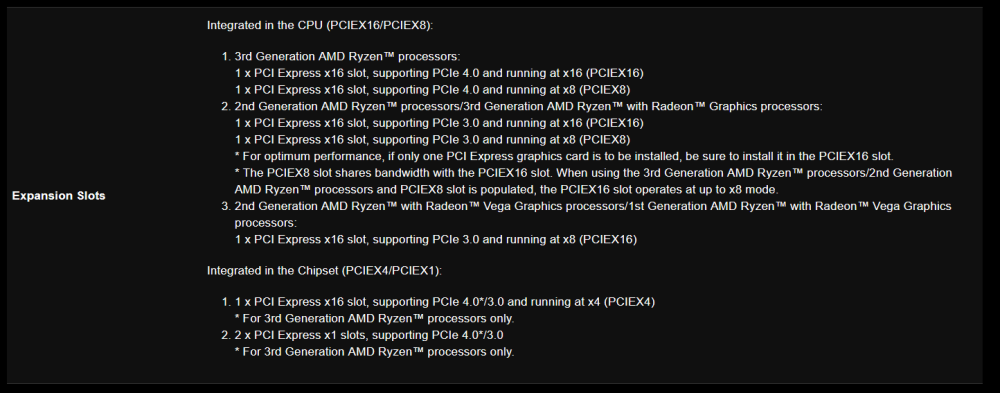
Yeah that makes sense. I did try to decipher the manual but it was very unclear when it comes to this configuration so I was hoping for someone who may be better informed than myself to weigh in. This is the 'spec': Integrated in the CPU (PCIEX16/PCIEX8): 1. 3rd Generation AMD Ryzen™ processors: 1 x PCI Express x16 slot, supporting PCIe 4.0 and running at x16 (PCIEX16) 1 x PCI Express x16 slot, supporting PCIe 4.0 and running at x8 (PCIEX8) 2. 2nd Generation AMD Ryzen™ processors/3rd Generation AMD Ryzen™ with Radeon™ Graphics processors: 1 x PCI Express x16 slot, supporting PCIe 3.0 and running at x16 (PCIEX16) 1 x PCI Express x16 slot, supporting PCIe 3.0 and running at x8 (PCIEX8) * For optimum performance, if only one PCI Express graphics card is to be installed, be sure to install it in the PCIEX16 slot. * The PCIEX8 slot shares bandwidth with the PCIEX16 slot. When using the 3rd Generation AMD Ryzen™ processors/2nd Generation AMD Ryzen™ processors and PCIEX8 slot is populated, the PCIEX16 slot operates at up to x8 mode. 3. 2nd Generation AMD Ryzen™ with Radeon™ Vega Graphics processors/1st Generation AMD Ryzen™ with Radeon™ Vega Graphics processors: 1 x PCI Express x16 slot, supporting PCIe 3.0 and running at x8 (PCIEX16) Integrated in the Chipset (PCIEX4/PCIEX1): 1 x PCI Express x16 slot, supporting PCIe 4.0*/3.0 and running at x4 (PCIEX4) * For 3rd Generation AMD Ryzen™ processors only. 2 x PCI Express x1 slots, supporting PCIe 4.0*/3.0 * For 3rd Generation AMD Ryzen™ processors only. It's actually a lot clearer here than it was in the manual so it does seem to indicate that I get just one PCIe x16 (running at x8). So it looks like the 2400G is just a terrible matchup... Looks like I need to wait for a gen3 iGPU/APU.
-
Hello fellow Ultra owners. Dumb question... If I have a Ryzen 2400G, is that a reason for why the 2nd PCIe slot does not show up at all? I have '3' GPUs (slot 1 & slot 2) and the Ryzen iGPU. UNRAID can only see the GPU in slot 1 and the iGPU. I do also have two m.2 sticks installed and can see both of those. Sometimes the m.2 lanes overlap PCIe GPU slots.
-
Will the SSD TRIM work for m.2 SSD's in the parity & data disk slots or just cache slots?
-
Thanks that ended up working but it was a "EFI-" > "EFI". Interestingly, it failed when I interrupted autostart and tried manually picking items saying for each: Failed to allocate initramfs memory, failing out Booting kernel failed: Bad file number
-
Ah, no I did not. In the inverse scenario (non-UEFI boot), must that folder contain the dash?
-
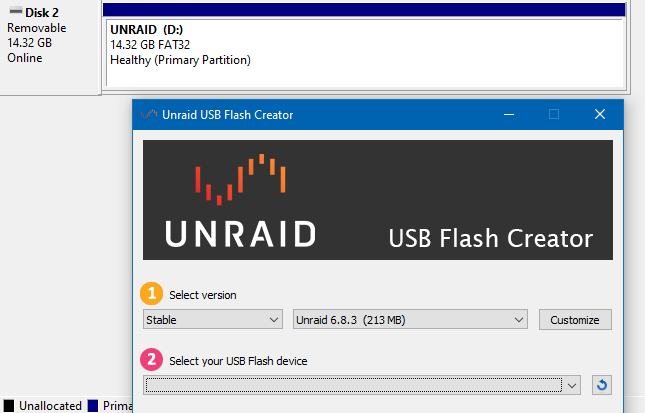
Yeah I did try that as well and ran the .bat as admin. It looks like it worked but the host system won't boot the drive. Tried booting UEFI and legacy - neither worked. Ordered some 2.0 flash drives to try anyway but now I need to return the 3.0 ones I got.
-
Same issue - this is a pretty frustrating limitation: This drive is plugged into a 2.0 port but the drive is a SanDisk 3.2Gen1.