





nuggolips
Members
-
Joined
-
Last visited
-
I got DSM running great with the the ARPL loader thanks to the comments in this thread. Wondering if it is possible to expand storage later with another “drive” (virtual or otherwise) or if anyone has tried that. Is it as simple as adding another Drive to the VM settings?
-
Update: Solved. As soon as the active step in the preclear process (which was the zeroing out step) finished, the other drive finished format and other errors (Docker tab message, unable to access logs) disappeared. So it would appear that was indeed the issue, and it was able to resolve itself even before the entire pre-clear operation completed; just the current process.
-
Will do, thanks for the insight! I'll report back to close the loop on this.
-
Here's the syslog from the above process syslog
-
I can issue the command, and it returns "Starting diagnostics collection..." but appears to be stuck there (it's been about 3 minutes so far). I'll leave it for a while and post anything that comes up.
-
I forgot to mention, as part of the work I did yesterday I also added a HBA card (Dell H310) to the system which is serving (2) new disks as well as my cache drive. The current config is as follows: Motherboard SATA: Parity, Disk 1-4 HBA Card: Cache, Disk 5-6 Disk 5 is the one stuck in formatting. Disk 6 is currently running a pre-clear and that process is continuing without issue (according to the UI). I checked and have no issues reading/writing to the cache drive, so I don't think there's any cable issues at play. I guess I will leave it alone until Disk 6 preclear finishes, and if the other disk is still stuck I will restart the server.
-
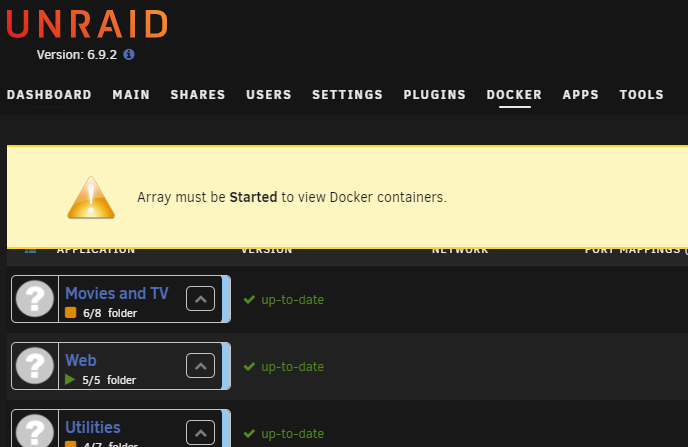
Hello, something funky is happening on my server. Yesterday I updated to 6.9.2 from 6.8.3 and everything seemed to be as it should, once I got up and running. I checked the existing array, docker seemed to run fine, etc. I added a disk to the array and left it to clear. Clearing completed overnight and this morning I formatted the disk. Normally this only takes a few seconds but it's been stuck on "formatting" for an hour or more. I haven't stopped the array and all existing data is accessible, dockers running, etc. However, I cannot cancel the formatting operation, can't access the system logs from the UI, and I now have an error on the docker tab (see attachment). I'm curious what others think I should do as a next step. I can let it go and see if formatting eventually completes, but since it normally only takes a few seconds I'm not sure how long to wait.
-
Yes indeed, it was the band-aid to get Docker updates working again in 6.8.3, I had forgotten that I applied it in the go file in case of a server reboot. Cleared that out and all is working. Thanks!
-
Hello, I didn't see this in an existing topic but apologies if this is already solved elsewhere. I recently upgraded to 6.9.2 from 6.8.3. I followed the standard process as outlined - e.g. tools -> Update OS and updated to the stable 6.9.2. Upon boot I noticed the cache drive was unassigned, so I assigned it. Checked and files all still there. Now, when I visit the "Docker" tab I no longer have any containers listed and instead show the following error: Parse error: syntax error, unexpected ':' in /usr/local/emhttp/plugins/dynamix.docker.manager/include/DockerClient.php on line 457 I checked settings -> Docker and encounter the same error there, and there's none of the normal options to stop/start docker service. Another issue I've encountered, is in Community Applications. The tab shows up, but when clicking on it I have the following error message: Something really wrong went on during dismiss_warning Post the ENTIRE contents of this message in the Community Applications Support Thread <br /> <b>Parse error</b>: syntax error, unexpected ':' in <b>/usr/local/emhttp/plugins/dynamix.docker.manager/include/DockerClient.php</b> on line <b>457</b><br /> Any help is appreciated. Thanks

