





ConnerVT
Members
-
Joined
-
Last visited
Everything posted by ConnerVT
-
Will it work? Probably. Will you be happy with the result, after the money, time and effort spent? Most likely not. I had to look to see if the 7800X3D even has an integrated GPU. It does, but it is as cut down, basic iGPU that AMD has ever offered. As Plex has only recently even supported AMD transcoding (and what some quick search of recent comments on the subject say) I see nothing but disappointment ahead.
-
Can you click on the "67 enabled" link, then select the unchecked stations? IIRC, if you do a rescan, Plex only selects the channels that were selected during a previous scan and does not automatically add any new ones.
-
A 3900X is more than powerful enough to CPU transcode almost any format to another, for a single stream on a local LAN.
-
Always a hard question to answer, as it depends on the details. "Can my car take me to the airport?" vs "Can my car take 20 people and their luggage to the airport?" Same car, same destination, completely different task. For a media server, it all depends on how many streams you are transcoding at one time, and the formats you are transcoding from > to. I used a 1500X (4c/8t) in my original Plex server with no GPU transcoding, and it worked fine on my home LAN. Your 3900X has much more horsepower. AMD GPUs aren't the best choice for media transcoding. They weren't supported by media server apps until just recently, and still are a work in progress. If you can sell it, you would be much better served getting a Quadro T400 (or even its predecessor, P400). It consumes much less power (TDP 30W vs 180W) and is well supported in all apps that perform transcoding. You hardware is very solid for the rest of your desired tasks. Unraid for NAS and Docker can run on most any x64 setup (if not pushed to extremes). It is when running VM that the hardware needs go up. Let's use a Win11 VM as an example: Visualize this as there are now two computers in your server's case - one running Unraid, one running Win11. You allocate CPU cores, DRAM, and storage to the VM. In simplest terms, Unraid no longer sees what is given to the VM, the VM no longer sees what is Unraid. With your 3900X being 12c/24t) you have plenty of threads to allocate to the VM (nobody wants to work on a 1c/2t 4GB Windows machine). As for power usage, your hardware would be about average for a typical server (especially if you ditch the AMD GPU). Most of the time the box sits idle, so not consuming much power at all. You will find that the spinning drives in the server account for the majority of your power usage.
-
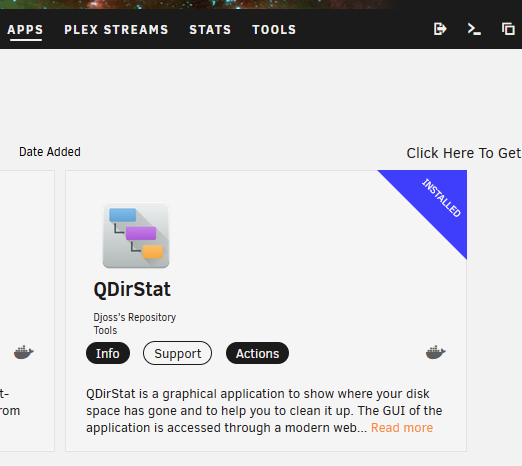
I've always found QDirStat to be one of my best go-to utilities. It's available in CA.
-
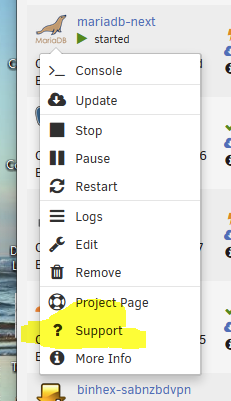
I'm not much of a database guy. Probably a good place to start looking for answers would be in the support thread for the docker container you are using. On the Docker tab, click the docker's icon and the Support.
-
If I may ask, what do you have in appdata that is 800GB large? Mine is 1/10th of that (81GB) and I have 36 Docker containers installed, 27 which run 24/7/365. The conventional thinking for appdata is it contains configuration/logs and static resources needed for the container to run. Having a backup of this is most useful not only for a major failure (such as a dead drive) but to recover if a container gets messed up by either human error (a reconfiguration gone wrong) or by automation (a bad update, for example). Many times replacing a containers appdata folder puts things back to how they ran before. If what is making your appdata so large is working data (such as media files for Plex, or photos for Immich/PhotoPrism), those would likely be better off being mapped to another share, somewhere outside of the appdata share. It would then also allow you to use one of many backup options, where an incremental backup is done. In either case, the best methodology is that any docker container that modifies the data being backed up is stopped before backing up the data. Modifications done to the backup's source dataset during backup will make any verification check fail, as well as potentially corrupting the backed up data by it not being a true snapshot in time of that data.
-
I have a Kingston HyperX 3K 120GB SSD in my server now, which I bought in 2012. It has lived in many different systems over those years. Originally a Windows boot drive for my daily use PC, it now is used for transcoding space for Plex in my server. I just pulled up the SMART for it, now at 66971 hours (7.6 years). It has written a little more than 21.6 TB of data, which is its full capacity 180 times. No errors, no retired blocks. The little bastard will probably outlive all of us. 😆
-
Thanks for the quick response and your feedback. My plan is to get this installed this week, and your reply boosts my confidence.
-
The Appdata pluging backs up the appdata share and flash drive. It is a very configurable plugin, where you can select which docker appdata folders to back up, any additional folders, and exclude files/folders in any specific docker appdata folder. The Docker templates are stored in your flash drive, and (obviously) the Dockers are stored in their repositories (Github and such). Realize that the "cache" pool is just another pool. If you have data outside of your appdata share, you can use the same backup strategy you would use to back up any other data.
-
I'm preparing to do a fresh install Frigate on my backup server (so nothing to carry over or save). My thoughts are to start directly with v0.14.0-rc2, as to avoid any re-configuring once this release candidate is a stable release (and also enjoy the new features). I know I can set the Repository to ghcr.io/blakeblackshear/frigate:v0.14.0-rc2 to pull the 0.14 release candidate. The question(s) I have is this all I need to change in the Docker template currently in CA or are there other mappings/changes needed? Or is there another template that I should use? These are questions that came to me reading a post from you, from back in June:
-
search CA for "appdata". There are several versions of the backup plugin, due to changes in the maintainer of the plugin and Unraid updates.
-
I love reading how the sausage is made. Thanks for sharing, and for your outstanding work as well as your continued dedication. (Sometime a guy needs to hear that what they do is appreciated...)You are stopping Plex, but do you possibly have some other program which may be updating the Plex database? If so, you can/should stop all of the related Dockers together.Look at the Docker in the Apps tab. The comments from the author will be listed there.Yes, I've seen the BIOS setting sometimes with 2 choices (Power Off, Power On) as well as with three (Off, On, Last State). Depends on the model of CPU/Motherboard chipset and probably MB manufacturer.Looks as your UPS has something call Sleep Mode, which will automatically power back on the UPS AC outlets once the battery charges. Not every function of every UPS ever made is in any software. As for the server coming back up, check your BIOS settings. There usually is a section for what can power on a system (Keyboard, Ethernet, PCIe card, etc). Usually has a setting to either power the system up when power is applied or when power button is pressed.Not an issue with SanDisk directly. There are a number of "questionable" look alike flash drives out on the market, many coming from the big internet retailers.You can use User Scripts to write a short bash script to do this. There are commands to restart the system as well as individual docker containers. User Scripts can set up to run this script on a schedule you define. I use a script to restart my cloudflared container after the Appdata Backup plugin runs. Though you may wish to figure out why your server requires to be rebooted weekly. This shouldn't be required, and indicates something isn't quite right with your server's setup.You could always buy one of each. 😆If it is just tasked to be a backup NAS, most anything will work. Transfer speed usually isn't a concern for a backup, as it is automated and running behind the scenes. Not like you need to sit at a desk and watch it the entire time. If you are mirroring/archiving another server, other than the initial data transfer, I wouldn't think there will be a large amount of data to transfer in subsequent backups. Here is a thread I started last year, on the build of my backup server. I recently upgraded it, only because I plan to move my home automation services onto it. Even though I have a 2.5Gbe LAN, I just used the 1Gbe motherboard NIC on the server, as speed was never an issue. Even with the fastest CPU and LAN, your spinning drives will most likely be the gating factor for speed.I really don't believe that the speed difference between Gen3 and Gen4 will ever be noticeable in most appdata use cases. So if this is the criteria you are using to define "Budget", a Gen3 should be more than fast enough. I would avoid the most unknown, never heard of them brands. (As I type this with a Leven NVMe in my main server as an experiment). This is more about drive longevity and other drive issues. That said, I've never had an issue with any of the NVMe or cheap SSD drives I've used (*knocks on wood*).I have been using re-certified drives in my servers since I built my first Unraid server 3.5 years ago, and have had zero issues. I've only purchased HGST drives, which are all likely pulled from commercial servers as part of preventative maintenance or storage space upgrades by the original owners. Most important is to buy from well respected, reputable sellers. There can be a big savings purchasing a used drive, but the little money saved going with the cheapest price found is not worth the risk. My last few purchases were from ServerPartDeals.com who have been great to do business with. The decision to buy new vs re-certified really depends on each person. How important is the data? Is the data replaceable? Do you have a solid backup strategy? (RAID is not a backup) What is your risk tolerance? Everyone will have a different opinion, so it really comes down to what is important to you.This only happens when you are running syslog server.


