





ryphez
Members
-
Joined
-
Last visited
Everything posted by ryphez
-
Got caught up with other things, would you enable all dockers or start 1 by 1?
-
Yes the GUI was still unresponsive in safe mode
-
I've turned off many dockers proactively to just what I consider my core dockers. Logs seem much cleaner than before Mar 19 12:17:02 Andromeda emhttpd: read SMART /dev/sdd Mar 19 12:17:24 Andromeda emhttpd: read SMART /dev/sdb Mar 19 12:18:31 Andromeda nginx: 2025/03/19 12:18:31 [error] 27738#27738: MEMSTORE:00: tried adding WAITING chanhead 00000000008FD780 m/ Mar 19 12:18:31 Andromeda nginx: 2025/03/19 12:18:31 [error] 27738#27738: MEMSTORE:00: tried adding WAITING chanhead 00000000008FD780 m/ Mar 19 12:18:31 Andromeda nginx: 2025/03/19 12:18:31 [error] 27738#27738: MEMSTORE:00: tried adding WAITING chanhead 00000000008FD780 m/ Mar 19 12:19:09 Andromeda emhttpd: read SMART /dev/sde Mar 19 12:22:42 Andromeda emhttpd: error: publish, 172: Connection reset by peer (104): read Mar 19 12:23:15 Andromeda kernel: veth51f6bf9: renamed from eth0 Mar 19 12:23:15 Andromeda kernel: docker0: port 23(veth413a115) entered disabled state Mar 19 12:23:15 Andromeda kernel: docker0: port 23(veth413a115) entered disabled state Mar 19 12:23:15 Andromeda kernel: device veth413a115 left promiscuous mode Mar 19 12:23:15 Andromeda kernel: docker0: port 23(veth413a115) entered disabled state Mar 19 12:24:15 Andromeda kernel: br-fb0d039ca56f: port 20(vethb12b49c) entered disabled state Mar 19 12:24:15 Andromeda kernel: veth9f18505: renamed from eth0 Mar 19 12:24:15 Andromeda kernel: br-fb0d039ca56f: port 20(vethb12b49c) entered disabled state Mar 19 12:24:15 Andromeda kernel: device vethb12b49c left promiscuous mode Mar 19 12:24:15 Andromeda kernel: br-fb0d039ca56f: port 20(vethb12b49c) entered disabled state Mar 19 12:25:03 Andromeda kernel: docker0: port 2(veth3981603) entered disabled state Mar 19 12:25:03 Andromeda kernel: vethd6c5cef: renamed from eth0 Mar 19 12:25:03 Andromeda kernel: docker0: port 2(veth3981603) entered disabled state Mar 19 12:25:03 Andromeda kernel: device veth3981603 left promiscuous mode Mar 19 12:25:03 Andromeda kernel: docker0: port 2(veth3981603) entered disabled state Mar 19 12:28:26 Andromeda kernel: docker0: port 2(veth9b0ac81) entered blocking state Mar 19 12:28:26 Andromeda kernel: docker0: port 2(veth9b0ac81) entered disabled state Mar 19 12:28:26 Andromeda kernel: device veth9b0ac81 entered promiscuous mode Mar 19 12:28:29 Andromeda kernel: eth0: renamed from veth32e16d2 Mar 19 12:28:29 Andromeda kernel: IPv6: ADDRCONF(NETDEV_CHANGE): veth9b0ac81: link becomes ready Mar 19 12:28:29 Andromeda kernel: docker0: port 2(veth9b0ac81) entered blocking state Mar 19 12:28:29 Andromeda kernel: docker0: port 2(veth9b0ac81) entered forwarding state Mar 19 13:36:15 Andromeda kernel: docker0: port 6(vethe484515) entered blocking state Mar 19 13:36:15 Andromeda kernel: docker0: port 6(vethe484515) entered disabled state Mar 19 13:36:15 Andromeda kernel: device vethe484515 entered promiscuous mode Mar 19 13:36:18 Andromeda kernel: eth0: renamed from vethc929149 Mar 19 13:36:18 Andromeda kernel: IPv6: ADDRCONF(NETDEV_CHANGE): vethe484515: link becomes ready Mar 19 13:36:18 Andromeda kernel: docker0: port 6(vethe484515) entered blocking state Mar 19 13:36:18 Andromeda kernel: docker0: port 6(vethe484515) entered forwarding state Mar 19 13:36:57 Andromeda kernel: docker0: port 6(vethe484515) entered disabled state Mar 19 13:36:57 Andromeda kernel: vethc929149: renamed from eth0 Mar 19 13:36:58 Andromeda kernel: docker0: port 6(vethe484515) entered disabled state Mar 19 13:36:58 Andromeda kernel: device vethe484515 left promiscuous mode Mar 19 13:36:58 Andromeda kernel: docker0: port 6(vethe484515) entered disabled state Mar 19 13:38:04 Andromeda nginx: 2025/03/19 13:38:04 [alert] 13698#13698: worker process 13699 exited on signal 6 Mar 19 13:38:05 Andromeda nginx: 2025/03/19 13:38:05 [alert] 13698#13698: worker process 13707 exited on signal 6 Mar 19 13:40:10 Andromeda nginx: 2025/03/19 13:40:10 [alert] 21261#21261: worker process 21262 exited on signal 6 Mar 19 13:40:12 Andromeda nginx: 2025/03/19 13:40:12 [alert] 21261#21261: worker process 21286 exited on signal 6 Mar 19 13:40:13 Andromeda nginx: 2025/03/19 13:40:13 [alert] 21261#21261: worker process 21371 exited on signal 6 Mar 19 13:40:15 Andromeda nginx: 2025/03/19 13:40:15 [alert] 21261#21261: worker process 21408 exited on signal 6 Mar 19 13:42:15 Andromeda nginx: 2025/03/19 13:42:15 [alert] 28625#28625: worker process 28626 exited on signal 6 Mar 19 13:44:20 Andromeda nginx: 2025/03/19 13:44:20 [alert] 4713#4713: worker process 4716 exited on signal 6 Mar 19 13:44:22 Andromeda nginx: 2025/03/19 13:44:22 [alert] 4713#4713: worker process 4728 exited on signal 6 Mar 19 13:44:23 Andromeda nginx: 2025/03/19 13:44:23 [alert] 4713#4713: worker process 4772 exited on signal 6 Mar 19 13:44:25 Andromeda nginx: 2025/03/19 13:44:25 [alert] 4713#4713: worker process 4811 exited on signal 6 Mar 19 14:05:32 Andromeda emhttpd: spinning down /dev/sdd Mar 19 14:28:35 Andromeda emhttpd: spinning down /dev/sdb Mar 19 14:28:49 Andromeda emhttpd: spinning down /dev/sde Mar 19 14:33:46 Andromeda emhttpd: read SMART /dev/sdb Mar 19 14:42:50 Andromeda emhttpd: read SMART /dev/sde Mar 19 14:51:10 Andromeda nginx: 2025/03/19 14:51:10 [error] 10414#10414: MEMSTORE:00: tried adding WAITING chanhead 0000000000A2B400 m/ Any ideas what else to try to investigate
-
Hmm I'm looking through Unraid's dashboard on the containers and nothing is showing as restarted more than 12 hours ago (when I last rebooted). Is there something else I should check?
-
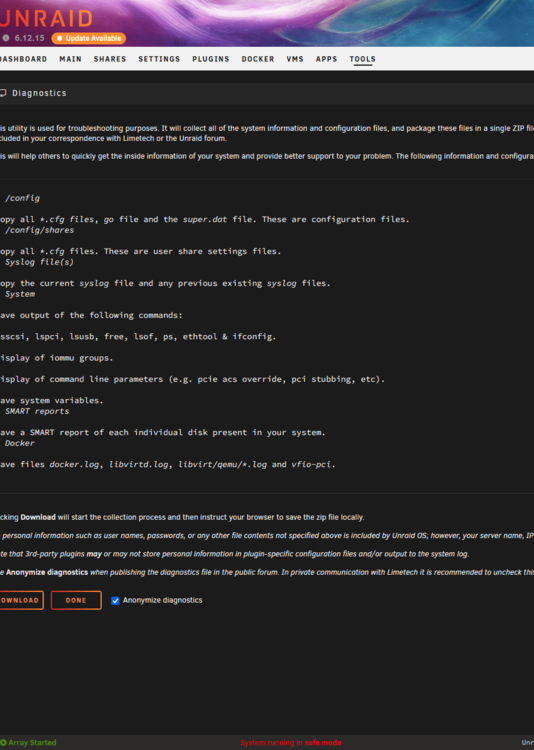
Here is another 1 in safe mode, confirmed it was in safe mode too andromeda-diagnostics-20250318-1406.zip
-
Here's the new diag. It's been about 20 mins but the UI is already unresponsive andromeda-diagnostics-20250317-1702.zip
-
My unraid ui becoems unresponsive after some time from a restart. I try to keep the page closed to not have an open tab on my browser too long which I know has caused issues in the past, but it's still having the issue. Any help would be appreciated. Thanks! andromeda-diagnostics-20250317-1155.zip
-
I'm having the same issue and my external URLs aren't working. Edit: Looks like the sample config has changed, see https://github.com/linuxserver/docker-swag/blob/master/root/defaults/nginx/site-confs/default.conf.sample
-
I started getting an error on my Redis container "bad file format reading the append only file appendonly.aof.209.incr.aof: make a backup of your AOF file, then use ./redis-check-aof --fix <filename.manifest>". This container immediately fails so I can't start it and then run the command to fix it. I need to run "./redis-check-aof --fix appendonly.aof.209.incr.aof" but I need the container to start up first to do so. Any advice?
-
I attached the logs and want to figure out what's going on as it's frustrating to have to keep restarting it over and over. I see nginx errors without having any open web sessions and am not sure what I can do to help minimize this syslog-127.0.0.1.log
-
I'm running Frigate as a docker for alerting and have Blue Iris in Windows VM. I assume this would be more likely a Frigate issue as the VM would have the resources separately, right? I'll double check the dockers are configured properly. Thought wouldnt docker just not start if there was a shared port?
-
Hey, I had my unraid instance lock up last night and it seems to have self recovered but likely related to this out of memory error. Attached diagnostics andromeda-diagnostics-20240304-0825.zip
-
I reinstalled the app and it seems to be working so far. I kept the appdata intact so everything saved moving forward. Bit strange but hope it keeps working!
-
Same issue for me. Forcing update isn't fixing it either
-
That makes too much sense. Thank you!
-
I've had the problem the last couple days since jumping to rc4 that puts my server to sleep at night. I can tap the power button on my case and everything is up and working (array/docker still active). Any help debugging would be great! Diagnostic attached andromeda-diagnostics-20220901-0840.zip
-
Awesome that did it (the EFI- to EFI). Thank you so much!
-
Hey all, I had the latest Unraid RC running for a few days in preparation of my new build. I put everything together and watched the BIOS post and HDDs get detected successfully. I configured the BIOS to boot of USB first and ensured UEFI was enabled. I added my USB stick from my old machine and unfortunately went right back to BIOS. I followed some of the tips and tricks on the Getting Started guide but none seemed to work. I have not removed the SATA drives as that will be next step tomorrow, but wanted to check here first to see if there are BIOS settings I need to modify to get it to work. Here is the build I have, https://pcpartpicker.com/user/ryphez/saved/nHQfdC. I'm open to trying a different USB drive with Unraid on it and restoring from a backup if need be too!
-
Got it, likely need to change that timing then. Thanks!
-
Which time are you referring to? I'm looking for it to automatically stop the array before powering down but I didn't see any option for that
-
Is there a way to stop the array before powering Unraid down? I have the auto-shutdown working correctly but the array isn't getting shutdown properly I think (parity check starts when restarted)
-
I'm trying to configure Radarr currently to hook up to my seedbox for downloading. Radarr is hosted locally on Unraid and I have tested the connection to the Seedbox works as intended. I have added a remote path mapping to handle this external host with "Remote Path" set to the downloads path on the Seedbox and "Local Path" set to where SyncThing will eventually download it to the Unraid server. This gives me a warning saying: Any help would be great!

