





BGDAV
Members
-
Joined
-
Last visited
-
thank you - will try as suggested
-
my mistake - have attached the diagnostics davehub-diagnostics-20210815-0736.zip
-
hey guys - bit of a interesting one with my cache pool - have 2 x ssd in my cache pool both have past smart HDD test everytime I have them both in the cache pool I get errors here's what I have done 1 - changed LSI card 2- Changed cables 3- changed power connectors on both if I remove the second one from the pool it results in no errors - any ideas? thought maybe the LSI card was dead, or the ssd dieing - but doesn't seem to error out at all have attached SDI and SDH disk logs- any help be appreciated https://ibb.co/jgTmwxf https://ibb.co/TWjwsSy
-
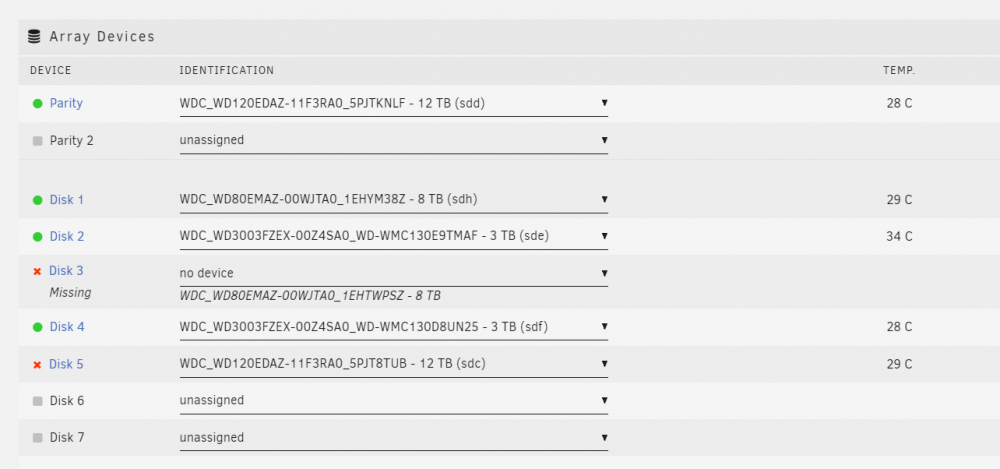
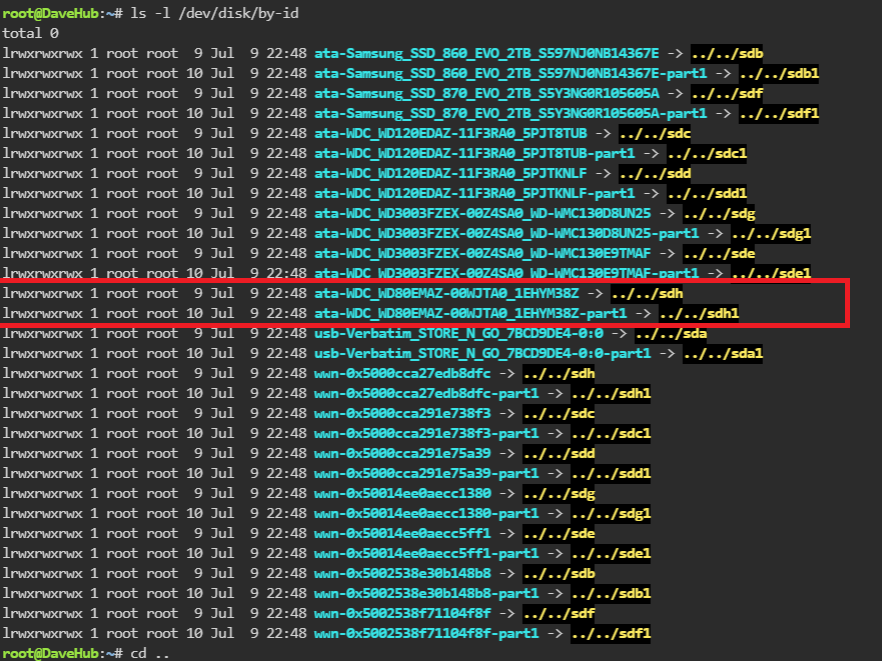
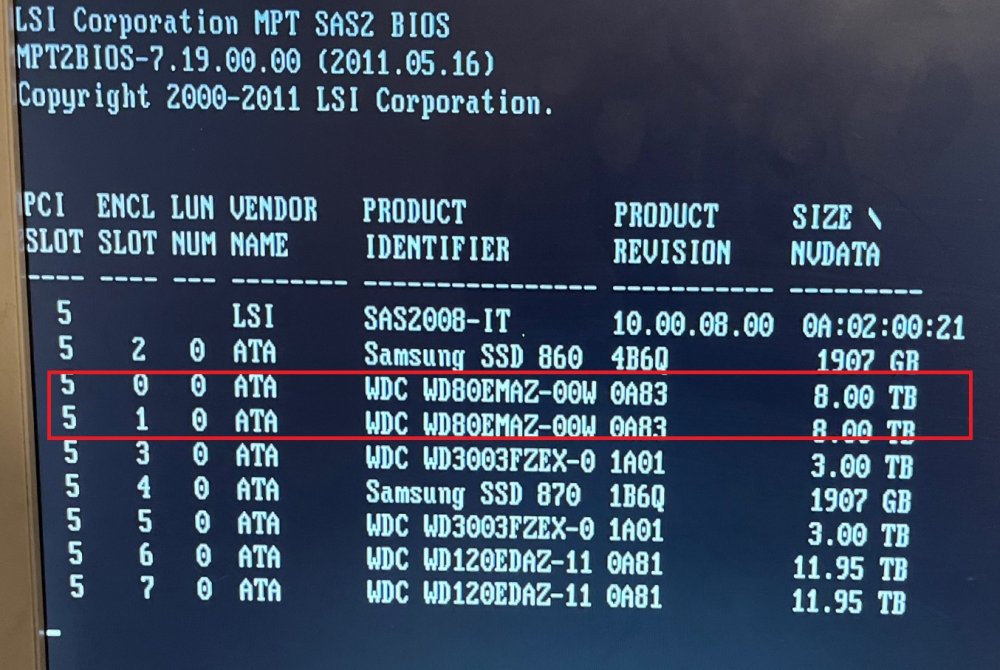
Hdd missing - but shows up on sas controller - new cables sata , new power - still shows up just not in unraid - (configuration was previously working with this hdd in unraid no problem wasnt even the drive that had an error on it) hey guys - bit of a problem - unraid working perfect, was having a issue doing a parity check so stopped it and did a manual reboot as one of the other disks was having issues - ended up having to redo the config and replace all the hdds in the correct order- the issue one drive will not show up in unraid - it was changed to "missing" before i did the new config (new config to try and fix it) i have changed power, changed sas to sata connectors - the drive shows up on the sas controller boot screen- just will not show up as an option in unraid - any ideas? i haven't started my array as yet after the new configuration - as dont want to ruin the parity - any advice would be great!
-
new to all this but unraid 6.9.0-rc2 GTX 1050 TI, says everything loaded, nividia drivers etc etc - but wont show up on the dashboard nvidia-smi -q -x <nvidia_smi_log> <timestamp>Thu Jan 14 03:01:21 2021</timestamp> <driver_version>455.45.01</driver_version> <cuda_version>11.1</cuda_version> <attached_gpus>1</attached_gpus> <gpu id="00000000:02:00.0"> <product_name>GeForce GTX 1050 Ti</product_name> <product_brand>GeForce</product_brand> <display_mode>Disabled</display_mode> <display_active>Disabled</display_active> <persistence_mode>Disabled</persistence_mode> <mig_mode> <current_mig>N/A</current_mig> <pending_mig>N/A</pending_mig> </mig_mode> <accounting_mode>Disabled</accounting_mode> <accounting_mode_buffer_size>4000</accounting_mode_buffer_size> <driver_model> <current_dm>N/A</current_dm> <pending_dm>N/A</pending_dm> </driver_model> <serial>N/A</serial> <uuid>GPU-63abd8bb-9585-8097-3fda-1770bca9b8b8</uuid> <minor_number>0</minor_number> <vbios_version>86.07.59.00.A0</vbios_version> <multigpu_board>No</multigpu_board> <board_id>0x200</board_id> <gpu_part_number>N/A</gpu_part_number> <inforom_version> <img_version>G001.0000.01.04</img_version> <oem_object>1.1</oem_object> <ecc_object>N/A</ecc_object> <pwr_object>N/A</pwr_object> </inforom_version> <gpu_operation_mode> <current_gom>N/A</current_gom> <pending_gom>N/A</pending_gom> </gpu_operation_mode> <gpu_virtualization_mode> <virtualization_mode>None</virtualization_mode> <host_vgpu_mode>N/A</host_vgpu_mode> </gpu_virtualization_mode> <ibmnpu> <relaxed_ordering_mode>N/A</relaxed_ordering_mode> </ibmnpu> <pci> <pci_bus>02</pci_bus> <pci_device>00</pci_device> <pci_domain>0000</pci_domain> <pci_device_id>1C8210DE</pci_device_id> <pci_bus_id>00000000:02:00.0</pci_bus_id> <pci_sub_system_id>8C961462</pci_sub_system_id> <pci_gpu_link_info> <pcie_gen> <max_link_gen>2</max_link_gen> <current_link_gen>2</current_link_gen> </pcie_gen> <link_widths> <max_link_width>16x</max_link_width> <current_link_width>8x</current_link_width> </link_widths> </pci_gpu_link_info> <pci_bridge_chip> <bridge_chip_type>N/A</bridge_chip_type> <bridge_chip_fw>N/A</bridge_chip_fw> </pci_bridge_chip> <replay_counter>0</replay_counter> <replay_rollover_counter>0</replay_rollover_counter> <tx_util>0 KB/s</tx_util> <rx_util>0 KB/s</rx_util> </pci> <fan_speed>45 %</fan_speed> <performance_state>P0</performance_state> <clocks_throttle_reasons> <clocks_throttle_reason_gpu_idle>Not Active</clocks_throttle_reason_gpu_idle> <clocks_throttle_reason_applications_clocks_setting>Not Active</clocks_throttle_reason_applications_clocks_setting> <clocks_throttle_reason_sw_power_cap>Not Active</clocks_throttle_reason_sw_power_cap> <clocks_throttle_reason_hw_slowdown>Not Active</clocks_throttle_reason_hw_slowdown> <clocks_throttle_reason_hw_thermal_slowdown>Not Active</clocks_throttle_reason_hw_thermal_slowdown> <clocks_throttle_reason_hw_power_brake_slowdown>Not Active</clocks_throttle_reason_hw_power_brake_slowdown> <clocks_throttle_reason_sync_boost>Not Active</clocks_throttle_reason_sync_boost> <clocks_throttle_reason_sw_thermal_slowdown>Not Active</clocks_throttle_reason_sw_thermal_slowdown> <clocks_throttle_reason_display_clocks_setting>Not Active</clocks_throttle_reason_display_clocks_setting> </clocks_throttle_reasons> <fb_memory_usage> <total>4040 MiB</total> <used>0 MiB</used> <free>4040 MiB</free> </fb_memory_usage> <bar1_memory_usage> <total>256 MiB</total> <used>2 MiB</used> <free>254 MiB</free> </bar1_memory_usage> <compute_mode>Default</compute_mode> <utilization> <gpu_util>2 %</gpu_util> <memory_util>0 %</memory_util> <encoder_util>0 %</encoder_util> <decoder_util>0 %</decoder_util> </utilization> <encoder_stats> <session_count>0</session_count> <average_fps>0</average_fps> <average_latency>0</average_latency> </encoder_stats> <fbc_stats> <session_count>0</session_count> <average_fps>0</average_fps> <average_latency>0</average_latency> </fbc_stats> <ecc_mode> <current_ecc>N/A</current_ecc> <pending_ecc>N/A</pending_ecc> </ecc_mode> <ecc_errors> <volatile> <single_bit> <device_memory>N/A</device_memory> <register_file>N/A</register_file> <l1_cache>N/A</l1_cache> <l2_cache>N/A</l2_cache> <texture_memory>N/A</texture_memory> <texture_shm>N/A</texture_shm> <cbu>N/A</cbu> <total>N/A</total> </single_bit> <double_bit> <device_memory>N/A</device_memory> <register_file>N/A</register_file> <l1_cache>N/A</l1_cache> <l2_cache>N/A</l2_cache> <texture_memory>N/A</texture_memory> <texture_shm>N/A</texture_shm> <cbu>N/A</cbu> <total>N/A</total> </double_bit> </volatile> <aggregate> <single_bit> <device_memory>N/A</device_memory> <register_file>N/A</register_file> <l1_cache>N/A</l1_cache> <l2_cache>N/A</l2_cache> <texture_memory>N/A</texture_memory> <texture_shm>N/A</texture_shm> <cbu>N/A</cbu> <total>N/A</total> </single_bit> <double_bit> <device_memory>N/A</device_memory> <register_file>N/A</register_file> <l1_cache>N/A</l1_cache> <l2_cache>N/A</l2_cache> <texture_memory>N/A</texture_memory> <texture_shm>N/A</texture_shm> <cbu>N/A</cbu> <total>N/A</total> </double_bit> </aggregate> </ecc_errors> <retired_pages> <multiple_single_bit_retirement> <retired_count>N/A</retired_count> <retired_pagelist>N/A</retired_pagelist> </multiple_single_bit_retirement> <double_bit_retirement> <retired_count>N/A</retired_count> <retired_pagelist>N/A</retired_pagelist> </double_bit_retirement> <pending_blacklist>N/A</pending_blacklist> <pending_retirement>N/A</pending_retirement> </retired_pages> <remapped_rows>N/A</remapped_rows> <temperature> <gpu_temp>32 C</gpu_temp> <gpu_temp_max_threshold>102 C</gpu_temp_max_threshold> <gpu_temp_slow_threshold>99 C</gpu_temp_slow_threshold> <gpu_temp_max_gpu_threshold>N/A</gpu_temp_max_gpu_threshold> <memory_temp>N/A</memory_temp> <gpu_temp_max_mem_threshold>N/A</gpu_temp_max_mem_threshold> </temperature> <power_readings> <power_state>P0</power_state> <power_management>Supported</power_management> <power_draw>N/A</power_draw> <power_limit>75.00 W</power_limit> <default_power_limit>75.00 W</default_power_limit> <enforced_power_limit>75.00 W</enforced_power_limit> <min_power_limit>52.50 W</min_power_limit> <max_power_limit>75.00 W</max_power_limit> </power_readings> <clocks> <graphics_clock>1341 MHz</graphics_clock> <sm_clock>1341 MHz</sm_clock> <mem_clock>3504 MHz</mem_clock> <video_clock>1202 MHz</video_clock> </clocks> <applications_clocks> <graphics_clock>N/A</graphics_clock> <mem_clock>N/A</mem_clock> </applications_clocks> <default_applications_clocks> <graphics_clock>N/A</graphics_clock> <mem_clock>N/A</mem_clock> </default_applications_clocks> <max_clocks> <graphics_clock>1961 MHz</graphics_clock> <sm_clock>1961 MHz</sm_clock> <mem_clock>3504 MHz</mem_clock> <video_clock>1708 MHz</video_clock> </max_clocks> <max_customer_boost_clocks> <graphics_clock>N/A</graphics_clock> </max_customer_boost_clocks> <clock_policy> <auto_boost>N/A</auto_boost> <auto_boost_default>N/A</auto_boost_default> </clock_policy> <supported_clocks>N/A</supported_clocks> <processes> </processes> <accounted_processes> </accounted_processes> </gpu>

