





godzillafanclub
Members
-
Joined
-
Last visited
Everything posted by godzillafanclub
-
I am using PIA as my VPN provider and I am interested in buying a static IP from them. Is this something that I can use within DelugeVPN/arch-RTorrentVPN? I didn't see anywhere to add my static IP token. Any help would be appreciated!
-
Did you ever resolve this? My Rtorrentvpn log shows this same thing over and over. It randomly happens and it will be down for hours/days. Sometimes it will fix itself after a certain period of time. Any help would be appreciated!
-
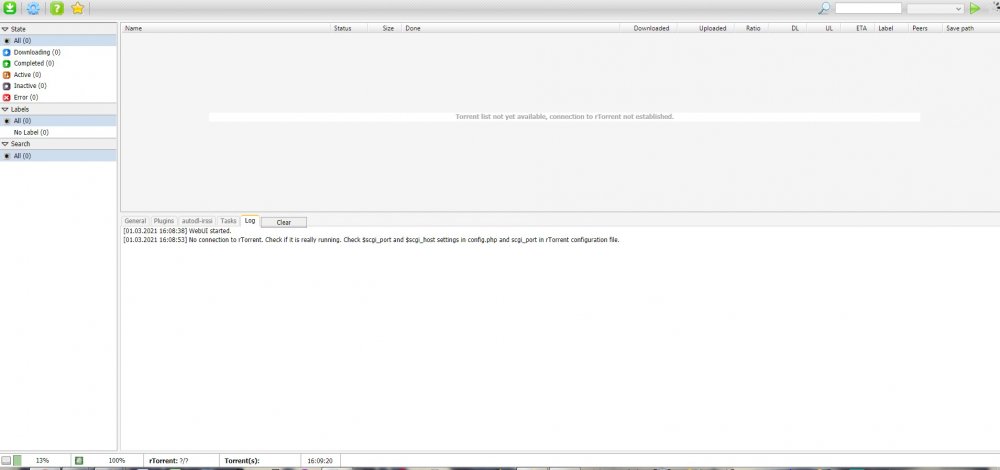
I'm having a strange issue with the rtorrentVPN container. I installed this a week or so ago and it has been running fine but overnight it crashed and then every time I boot it up, it will only work until for a few minutes before rtorrent crashes. I can open the rutorrent gui but none of my torrents show up and it just says it can't connect to rtorrent (see attached photo). One time it worked for a day or so, but only because (seemingly) I never actually opened the webgui. That seems to be what kills it. Per your instructions I: 1) Deleted the supervisord log file 2) Removed the container 3) Rebuilt the container using my stack I waited until I knew it had crashed and then copied the log file. If you could point me to some way I can fix this, I would greatly appreciate it. Thanks! supervisord.log
-
I'm having an issue with some containers not running from a delugevpn stack. The error I get is: "Error response from daemon: no such container: XXXXX", where the XXXXX is a long string of numbers (too long to be a container ID). This stack had been working fine for days but I had to update something in the delugevpn container so I reloaded it and now the rest of the containers won't work. For reference, I've been running containers through the delugevpn container as a stack to route traffic in those containers through the VPN. At first it took a little work but I finally got it set up (I've attached my stack info for reference.) I currently have the following running through the VPN via this stack: Sonarr Radarr Lidarr NZBHydra LibreSpeed AirDCPP Currently, AirDCPP and Lidarr were just commented out in my stack because I hadn't figured out how exactly to get those to work yet. I tried commenting out the containers one at a time, e.g. the first one I tried was commenting out everything but delugevpn and nzbhydra, but I get the same error every time. Host OS: FreeNAS VM: RancherOS I use Portainer for all my dockers for simplicity. If anyone can shed some light on how to fix this, I would appreciate it! delugestack.txt
-
Recently installed the container. I was having a start-up issue where the container wouldn't launch because it was hung up on not having passwords for the webui and the contrainer itself "RPC2_USER not defined (via -e RPC2_USER), defaulting to 'admin' /usr/local/bin/init.sh: line 346: /config/nginx/security/rpc2_pass: No such file or directory" After reading through someone else's post, they fixed this by defining a user/pass for the webui and the RPC2 and this worked for me too. However, when I try to log into the webui using https://IP:9443, it gives me a certificate error. I can essentially tell my browser "Yes, it's fine. I promise." and I can log in, but I'd like to get this issue fixed if possible. Any help would be appreciated!
-
Hello! I've spent the better part of this weekend trying to get all this set up and I feel like I'm | | this close to it, lol. I have DelugeVPN installed on my FreeNAS machine using RancherOS as my VM. I'm using PIA for my VPN with port forwarding turned on. I have the container installed and the webui launches fine but when I go to add a torrent to test things out (I just grabbed the Night of the Living Dead one from the internet archive), I can click the add button over and over but nothing happens. I also tried the URL option and it says "Failed to download torrent." I'm sure it's something stupid like a checkbox left unchecked but any help would be appreciated. Edit: I fixed the issue. I found this link where someone had the same issue. Torrents added weren't working but magnet links would start but then do nothing. I went through this user's steps and realized I didn't have the user permissions for my data folder set up correctly. It's always the user permissions. Everything is working fine now. Thanks for creating this, binhex!
