





cadmiumcadamium
Members
-
Joined
-
Last visited
-
I moved the parity drives to the on board SATA ports (luckily I had two unused ports left) and rebooted the server. Now the parity drives show up as they should and I have started the array with the new drive as well. So far it's writing data back to the new disk. So far so good. Thank you very much for the help on this but I still wonder why I could see the drives as unassigned devices (and probably mount them too if I wanted) but were unable to set them as parity drives. Will set this as solved. Thanks again.
-
Ok. I understand. Thanks for checking this out. Just want to double check something before I do what you suggested. "Try connecting or swapping the disks that are not being detected to the onboard SATA controller.", they are being detected as they show up in unassigned devices. It's just that they don't show up in the list of available drives for the parity. What is the difference? Thank you for the help so far.
-
I think it's this one. It's just a PCI to SATA adapter https://www.delock.com/produkt/89384/merkmale.html
-
Apologies, Here are the diagnostics independents-diagnostics-20260609-1639.zip
-
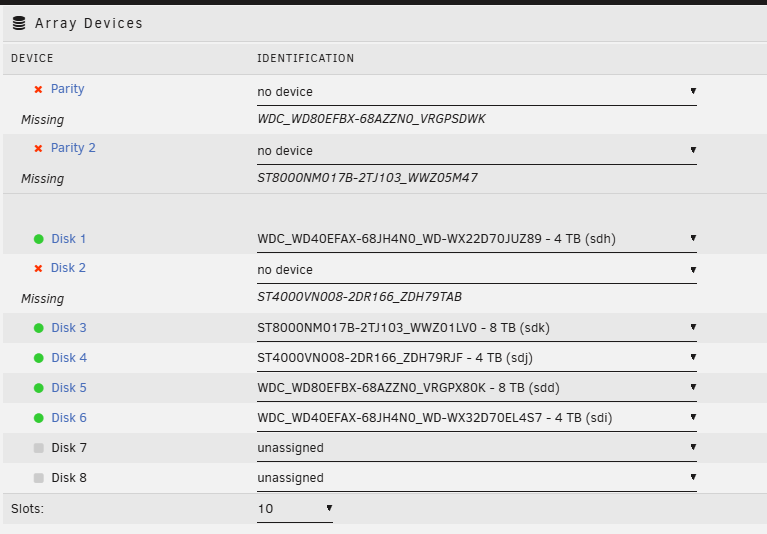
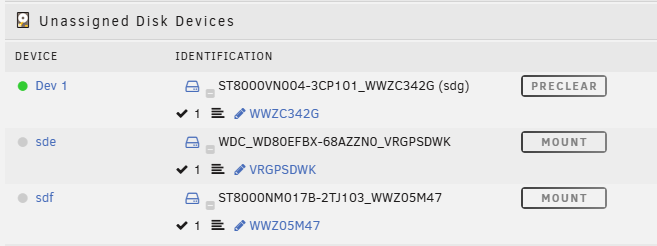
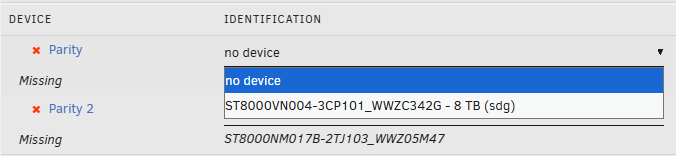
So I noticed that one of my disks started getting a bunch of read errors and I decided to replace it with a larger drive. I shut down the array, turned off the server, replaced the drive and booted up the server again. Started a preclear on the new drive. Note: I did not start the array back up. During the preclear I went back to the main menu and noticed that my two parity disks were missing in addition to the old disk. I then checked the unassigned devices and found both disks there along with the new disk that is being precleared. I then tried to add the parity disks back in their respective slots but all I see in the drop down is the new disk. Why is this happening and can I fix it somehow? Otherwise I can't rebuild my array.
-
Hello. I'm sure this question has been asked before but I could not find a good answer. So currently all my dockers are on the same IP as the unraid server (or at least same subnet if using x mode). I would like to move the Plex docker to my other vlan where my htpc and other clients are. How would I do this? The main reason is to remove the "Plex server is on a different subnet than client" issue and also to secure my server so that my htpc can't reach the other dockers. So current setup is this Unraid Server address: 10.2.0.x Plex Docker address: 10.2.0.x:32400 What I want is this Unraid Server address: 10.2.0.x Plex Docker address: 10.3.0.x:32400 How do I fix this and also allow the plex server docker to grab the media files still on 10.2.0.x? Does the plex docker need to be able to connect to the unraid server fileshares through the firewall? If so, which ports are used?

