Sickdove
Members
-
Joined
-
Last visited
-
I have tried both VM and a container in my 7.0.0 unraid machine. Same results. I cannot get the backups to leave the docker container to either a share in unraid or a share on a drobo. I've used all defaults at install and seems quite obvious is user error somewhere. Any tips are welcome. TiA
-
root@*********:~# ls -al /mnt/user/appdata/pbs total 0 drwxr-xr-x 1 root root 20 Feb 10 09:09 ./ drwxrwxrwx 1 nobody users 648 Jan 14 15:34 ../ drwx------ 1 34 34 302 Feb 10 13:40 etc/ drwx------ 1 34 34 88 Feb 11 01:28 lib/ drwx------ 1 34 34 16 Feb 10 09:11 logs/ root@*********:~# ls -la /mnt/user/pbs_backup total 4 drwxr-xr-x 1 nobody users 0 Feb 10 09:09 ./ drwxrwxrwx 1 nobody users 4096 Feb 11 04:41 ../ root@*********:~# Thank you for following up
-
I left everything with default values.
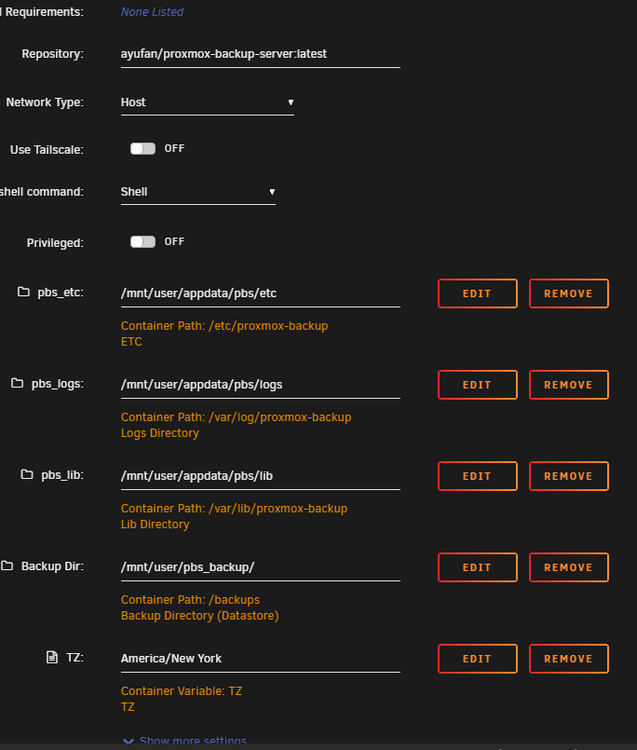
-
Please let me know the contents of which file and I can share with you. ty
-
Can this credentials be the problem? I just installed PBS as a unraid_VM with same results. TiA
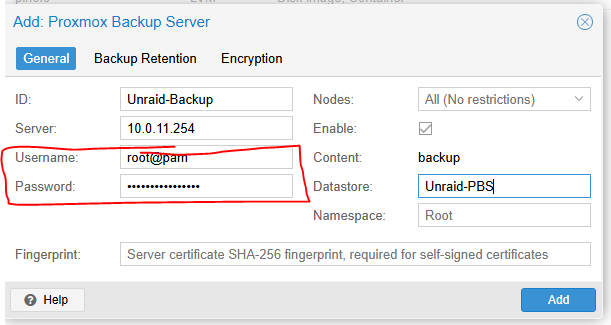
-
I just can't get for the backups to move to the share. It stays in the docker container. It has something to do with permissions. My expertise doesn't know where to set them. Your assistance is much appreciated. Logs: text error warn system array login rm: cannot remove '/etc/proxmox-backup/.*.lck': No such file or directory rm: cannot remove '/etc/proxmox-backup/*.lock': No such file or directory Unable to open syslog: Os { code: 2, kind: NotFound, message: "No such file or directory" } catching shutdown signal catching reload signal Unable to open syslog: Os { code: 2, kind: NotFound, message: "No such file or directory" } applied rrd journal (2 entries in 0.034 seconds) rrd journal successfully committed (0 files in 0.005 seconds) catching shutdown signal catching reload signal authentication failure; rhost=[::ffff:10.0.11.240]:62676 msg=ticket with invalid signature authentication failure; rhost=[::ffff:10.0.11.240]:62666 msg=ticket with invalid signature GET /api2/json/nodes/localhost/tasks?running=1&limit=100: 401 Unauthorized: [client [::ffff:10.0.11.240]:62676] authentication failed - ticket with invalid signature GET /api2/json/admin/datastore/Unraid-PBS/active-operations: 401 Unauthorized: [client [::ffff:10.0.11.240]:62666] authentication failed - ticket with invalid signature authentication failure; rhost=[::ffff:10.0.11.240]:62666 user=root@pam msg=authentication error - SUCCESS (0) error getting zfs devices: failed to execute "zpool" "list" "-H" "-p" "-P" "-v" - No such file or directory (os error 2) GET /api2/json/nodes/MSD-Unraid/tasks/UPID%3AMSD-Unraid%3A0000000A%3A01D9B932%3A00000000%3A67AA099A%3Acreate-datastore%3AUnraid%5Cx2dPBS%3Aroot%40pam%3A/status: 400 Bad Request: [client [::ffff:10.0.11.240]:62676] control socket connect failed - Permission denied (os error 13) GET /api2/json/nodes/MSD-Unraid/tasks/UPID%3AMSD-Unraid%3A0000000A%3A01D9B932%3A00000000%3A67AA099A%3Acreate-datastore%3AUnraid%5Cx2dPBS%3Aroot%40pam%3A/status: 400 Bad Request: [client [::ffff:10.0.11.240]:62676] control socket connect failed - Permission denied (os error 13) GET /api2/json/nodes/MSD-Unraid/tasks/UPID%3AMSD-Unraid%3A0000000A%3A01D9B932%3A00000000%3A67AA099A%3Acreate-datastore%3AUnraid%5Cx2dPBS%3Aroot%40pam%3A/status: 400 Bad Request: [client [::ffff:10.0.11.240]:62677] control socket connect failed - Permission denied (os error 13) GET /api2/json/nodes/MSD-Unraid/tasks/UPID%3AMSD-Unraid%3A0000000A%3A01D9B932%3A00000000%3A67AA099A%3Acreate-datastore%3AUnraid%5Cx2dPBS%3Aroot%40pam%3A/status: 400 Bad Request: [client [::ffff:10.0.11.240]:62677] control socket connect failed - Permission denied (os error 13) GET /api2/json/nodes/MSD-Unraid/tasks/UPID%3AMSD-Unraid%3A0000000A%3A01D9B932%3A00000000%3A67AA099A%3Acreate-datastore%3AUnraid%5Cx2dPBS%3Aroot%40pam%3A/status: 400 Bad Request: [client [::ffff:10.0.11.240]:62676] control socket connect failed - Permission denied (os error 13) GET /api2/json/nodes/MSD-Unraid/tasks/UPID%3AMSD-Unraid%3A0000000A%3A01D9B932%3A00000000%3A67AA099A%3Acreate-datastore%3AUnraid%5Cx2dPBS%3Aroot%40pam%3A/status: 400 Bad Request: [client [::ffff:10.0.11.240]:62676] control socket connect failed - Permission denied (os error 13) GET /api2/json/nodes/MSD-Unraid/tasks/UPID%3AMSD-Unraid%3A0000000A%3A01D9B932%3A00000000%3A67AA099A%3Acreate-datastore%3AUnraid%5Cx2dPBS%3Aroot%40pam%3A/status: 400 Bad Request: [client [::ffff:10.0.11.240]:62676] control socket connect failed - Permission denied (os error 13) GET /api2/json/nodes/MSD-Unraid/tasks/UPID%3AMSD-Unraid%3A0000000A%3A01D9B932%3A00000000%3A67AA099A%3Acreate-datastore%3AUnraid%5Cx2dPBS%3Aroot%40pam%3A/status: 400 Bad Request: [client [::ffff:10.0.11.240]:62676] control socket connect failed - Permission denied (os error 13) GET /api2/json/nodes/MSD-Unraid/tasks/UPID%3AMSD-Unraid%3A0000000A%3A01D9B932%3A00000000%3A67AA099A%3Acreate-datastore%3AUnraid%5Cx2dPBS%3Aroot%40pam%3A/status: 400 Bad Request: [client [::ffff:10.0.11.240]:62676] control socket connect failed - Permission denied (os error 13) GET /api2/json/nodes/MSD-Unraid/tasks/UPID%3AMSD-Unraid%3A0000000A%3A01D9B932%3A00000000%3A67AA099A%3Acreate-datastore%3AUnraid%5Cx2dPBS%3Aroot%40pam%3A/status: 400 Bad Request: [client [::ffff:10.0.11.240]:62676] control socket connect failed - Permission denied (os error 13) GET /api2/json/nodes/MSD-Unraid/tasks/UPID%3AMSD-Unraid%3A0000000A%3A01D9B932%3A00000000%3A67AA099A%3Acreate-datastore%3AUnraid%5Cx2dPBS%3Aroot%40pam%3A/status: 400 Bad Request: [client [::ffff:10.0.11.240]:62676] control socket connect failed - Permission denied (os error 13) GET /api2/json/nodes/MSD-Unraid/tasks/UPID%3AMSD-Unraid%3A0000000A%3A01D9B932%3A00000000%3A67AA099A%3Acreate-datastore%3AUnraid%5Cx2dPBS%3Aroot%40pam%3A/status: 400 Bad Request: [client [::ffff:10.0.11.240]:62676] control socket connect failed - Permission denied (os error 13) GET /api2/json/nodes/MSD-Unraid/tasks/UPID%3AMSD-Unraid%3A0000000A%3A01D9B932%3A00000000%3A67AA099A%3Acreate-datastore%3AUnraid%5Cx2dPBS%3Aroot%40pam%3A/status: 400 Bad Request: [client [::ffff:10.0.11.240]:62676] control socket connect failed - Permission denied (os error 13) GET /api2/json/nodes/MSD-Unraid/tasks/UPID%3AMSD-Unraid%3A0000000A%3A01D9B932%3A00000000%3A67AA099A%3Acreate-datastore%3AUnraid%5Cx2dPBS%3Aroot%40pam%3A/status: 400 Bad Request: [client [::ffff:10.0.11.240]:62676] control socket connect failed - Permission denied (os error 13) authentication failure; rhost=[::ffff:10.0.11.240]:62676 user=root@pam msg=authentication error - SUCCESS (0) starting new backup on datastore 'Unraid-PBS' from ::ffff:10.0.11.250: "vm/101/2025-02-10T14:17:11Z" created new fixed index 1 ("vm/101/2025-02-10T14:17:11Z/drive-scsi0.img.fidx") add blob "/10.0.11.254/PBSBackup/vm/101/2025-02-10T14:17:11Z/qemu-server.conf.blob" (405 bytes, comp: 405) Upload statistics for 'drive-scsi0.img.fidx' UUID: bb326a1186a54913aa0a458443eae0ca Checksum: 4a4b97be3c42347569802f8fe796df27e6c82303735adf237d6714f723c57b44 Size: 10737418240 Chunk count: 2560 Upload size: 9281994752 (86%) Duplicates: 347+0 (13%) Compression: 57% successfully closed fixed index 1 add blob "/10.0.11.254/PBSBackup/vm/101/2025-02-10T14:17:11Z/index.json.blob" (327 bytes, comp: 327) successfully finished backup backup finished successfully PROXY: The proxmox-backup is not yet configured! CRON: Starting... Copying defaults into `/etc/proxmox-backup/` '/etc/proxmox-backup-default/./acl.cfg' -> '/etc/proxmox-backup/./acl.cfg' '/etc/proxmox-backup-default/./shadow.json' -> '/etc/proxmox-backup/./shadow.json' '/etc/proxmox-backup-default/./user.cfg' -> '/etc/proxmox-backup/./user.cfg' /etc/proxmox-backup is a mountpoint /var/lib/proxmox-backup is a mountpoint /var/log/proxmox-backup is a mountpoint /run is a mountpoint API: Starting... PROXY: The proxmox-backup is not yet configured! PROXY: The proxmox-backup is not yet configured! PROXY: Starting... Upload backup log to datastore 'Unraid-PBS', root namespace vm/101/2025-02-10T14:17:11Z/client.log.blob ------------------------------------------------------- p.s.: I should add that I removed/uninstalled it this morning. Created a new data store, and created a small 10g VM backup. SAme result. The files stay in the docker image.
-
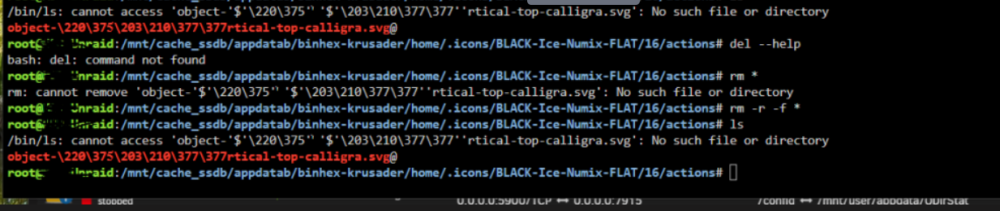
Unable to delete a Krusader folder I used as backup when doing a cache drive recovery. Any help is much appreciated. I posted my question in the Unraid forum but no one has replied to date: "Long story short, I had to recreate my cache drive. As backup i copied appdata folder and system. Now the appdata backup folder cannot be delete becuase of a single file. I have no clue how to remove it. Any advice is much appreciated."
-
Bump... Anyone any ideas?
-
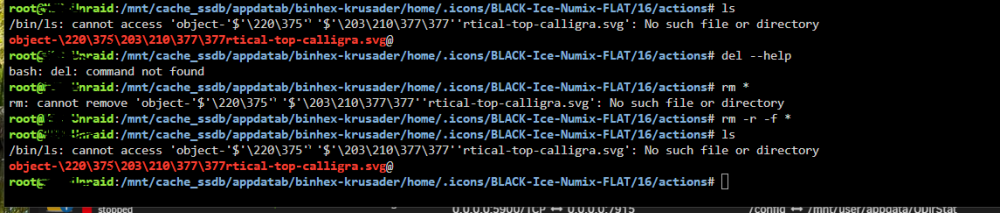
Long story short, I had to recreate my cache drive. As backup i copied appdata folder and system. Now the appdata backup folder cannot be delete becuase of a single file. I have no clue how to remove it. Any advice is much appreciated.
-
Sickdove changed their profile photo
-
I updated this morning around 10am EST to 6.12.1 The server is been halting every so often. I can send diagnostic report later when it becomes responsive. The attached screen to the server has this message: BUG: Bad rss counter state mm:000000008897cd45 type:HM_ANONPAGES val:1
-
My goodness. That easy. Thank you!
-
I use to be able to re-arrange the docker list to choose priority boot order. I can't see the arrow anymore.
-
I have. I've tried pihole stopped. Static DNS 8.8.8.8, 8.8.4.4 and also opendns servers. Ive updated DD-WRT to latest firmware. It's got to be a setting somewhere I cannot see. I am attaching newest diagnostic file whereas I went back to pihole running and using it's ip for DNS. I'll revert back in a few hours to pihole off and google DNS so to not disrupt internet access to other users in peak hours. Hope someone can point me in the right direction. msd-unraid-diagnostics-20220928-1011.zip
-
Read the post. Google DNS servers nor opendns servers are working. Stopping pihole and removing it's DNS address doesnt do anything better.
-
I am unable to figure out how to fix this: "Unable to communicate with GitHub.com" - "Reset your modem / router or try again later, or set your to 8.8.8.8 and 8.8.4.4 Also make sure that you have a Gateway address set up (Your Routers IP address). Additionally, this may also mean that GitHub is currently down. This error means that you may not be able to update your OS or plugins More Information" Over the weekend i swapped my router for a nighthawk R6700 running DD-WRT V3.0. I think the issue seems to be improper DNS settings. I have pihole running on 10.0.0.253. Pihole works. But any docker container is unable to communicate with github. Any advice is much appreciated. I've tried a number of options including the image below with static DNS 2, 3 blank to no avail. msd-unraid-diagnostics-20220926-0755.zip