





Mohrian
Members
-
Joined
-
Last visited
Everything posted by Mohrian
-
Hi, es war der Controller selbst. Ich habe diesen getauscht und danach lief es sofort. Danke für deine Hilfe
-
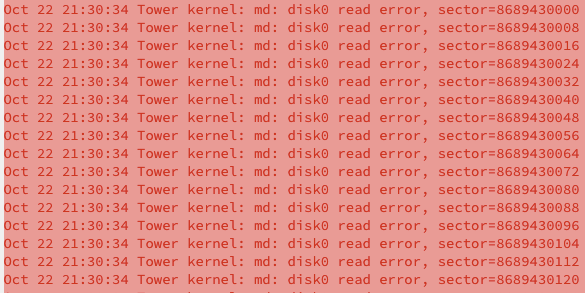
Read Error, was ich aber nicht verstehe, die neue Platte ist frisch...Langsam glaube ich das es am Controller hängt
-
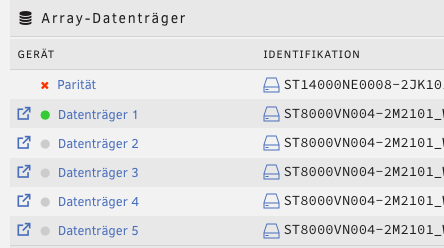
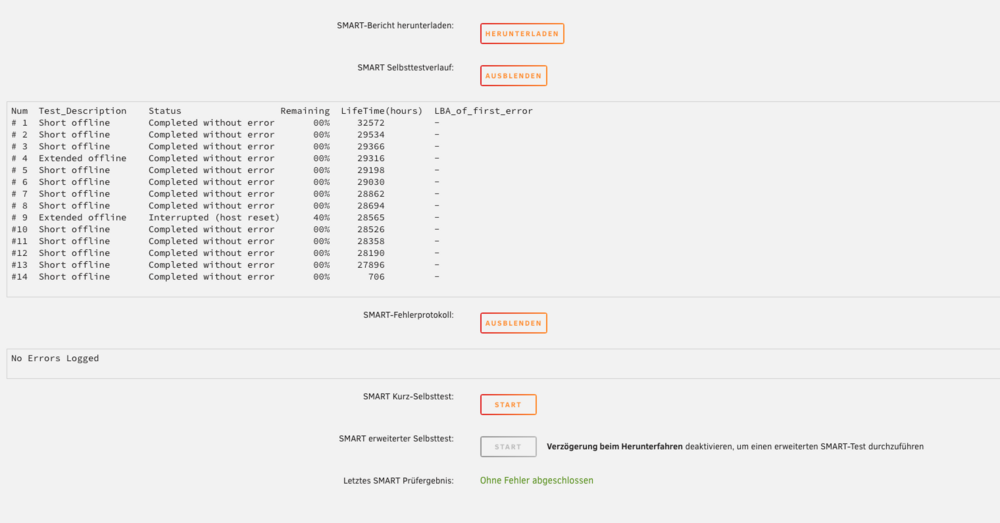
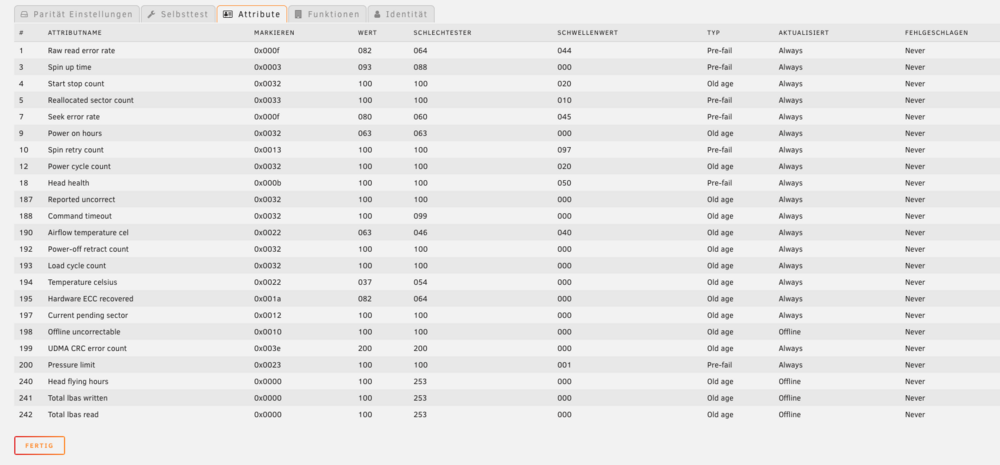
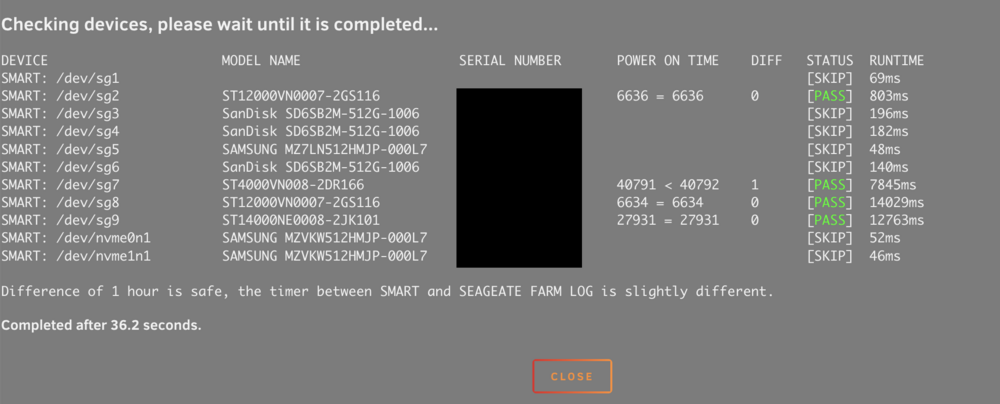
Hi zusammen, gestern war auf einmal meine Parität Platte deaktiviert mit einem Fehler, aber weder im SMART noch sonst wo steht ein Fehlercode. Also habe ich eine neue Platte eingebaut, lief auch alles toll, bis bei 8% der Paritätsprüfung wieder deaktiviert wurde. Kabel habe ich alle geprüft, ich bin echt langsam am ende mit meinen Ideen. Anbei ein paar Screenshots:
-
Das ist der Text im Shop: Es handelt sich um eine Recertified Festplatte, welche 0 Stunden Betriebsdauer aufweist. ABER, der Shop übernimmt den Fehler und tauscht die Platte ohne mucken aus.
-
Ja vorher waren Sie in einem Gehäuse das die Platten Hochkannt lagert, jetzt sind Sie in einem 19" Rack Gehäuse das Sie quer lagert. Es handelt sich hier um eine von ebay die laut Shop Hersteller Refurbished sein soll. Er hat davon auch über 2000 Stück schon verkauft. Aber ja evtl. stimmt mit dem Shop etwas nicht. Wie lese ich die FARM Werter aus ?
-
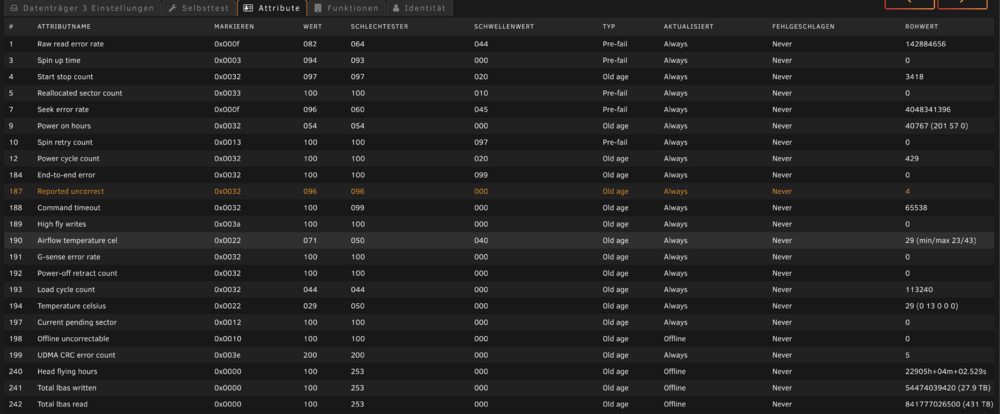
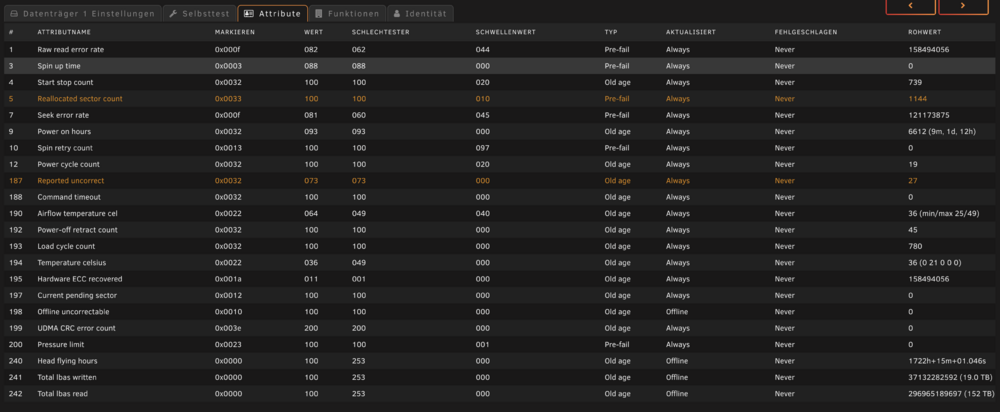
Hi zusammen, ich habe von onboard auf einen LSI Controller gewechselt vor 1 Woche. Heute Nacht ist der Parity Check durchgelaufen, seit dem habe ich bei zwei Platten die nie Probleme gemacht haben, SMART Werte Fehler. Kann das am LSI Controller (LSI SAS2008 PCI-Express) hängen oder sind jetzt echt auf einmal zwei Platten Futsch gegangen. Die Platten sind in einem Gehäuse das per SFF-8087 auf SFF-8087 Kabel von Backplane zu HBA angeschlossen sind. Anbei die Protokolle der Platten. Würde mir sehr helfen, da mir hier das Know-How fehlt. Vielen Dank ST4000VN008-2DR166_ZGY6BQQ1-20250403-0519.txt ST12000VN0007-2GS116_ZJV516VQ-20250403-0518.txt
-
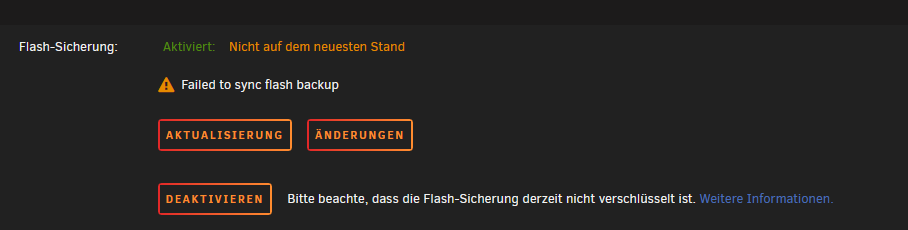
Hi, ich wollte eben das Flash Backup per Unraid Connect einstellen. Leider bekomme ich immer diese Fehlermeldung. Unraid Version: 7.0.1 Habt ihr eine Idee woran das liegen kann ?
-
Hi, komisch, evtl. war es zu lang Sorry tut mir leid. Ja aber manchmal ist nach einem Neustart die Temp weg, dann muss ich nochmal neustarten und es kommt wieder. Daher dachte ich es fehlt evtl. ein Treiber und er hat ein Thema. Da ich dann die beiden von dir vorgeschlagenen im App Store gefunden habe, wusste ich nicht welcher evtl. der richtige ist. Auch habe ich eine X520 SFP+ 10gbit Karte im Server, aber diese scheint von hause aus wohl zu gehen. Kenne mich da noch nicht so aus, daher die unsicherheit.
-
Doch war eigentlich alles an dem Text angehängt der hier von jemand bearbeitet wurde..... Treiber für Temperaturen. root@Tower:~# sensors coretemp-isa-0000 Adapter: ISA adapter Package id 0: +35.0°C (high = +84.0°C, crit = +100.0°C) Core 0: +34.0°C (high = +84.0°C, crit = +100.0°C) Core 1: +33.0°C (high = +84.0°C, crit = +100.0°C) Core 2: +35.0°C (high = +84.0°C, crit = +100.0°C) Core 3: +33.0°C (high = +84.0°C, crit = +100.0°C) Core 4: +36.0°C (high = +84.0°C, crit = +100.0°C) Core 5: +33.0°C (high = +84.0°C, crit = +100.0°C) nvme-pci-0500 Adapter: PCI adapter Composite: +38.9°C (low = -273.1°C, high = +69.8°C) (crit = +72.8°C) Sensor 1: +38.9°C (low = -273.1°C, high = +65261.8°C) Sensor 2: +42.9°C (low = -273.1°C, high = +65261.8°C) nct6791-isa-0290 Adapter: ISA adapter Vcore: 312.00 mV (min = +0.00 V, max = +1.74 V) in1: 1.68 V (min = +0.00 V, max = +0.00 V) ALARM AVCC: 3.34 V (min = +0.00 V, max = +0.00 V) ALARM +3.3V: 3.34 V (min = +0.00 V, max = +0.00 V) ALARM in4: 1.02 V (min = +0.00 V, max = +0.00 V) ALARM in5: 1.06 V (min = +0.00 V, max = +0.00 V) ALARM in6: 1000.00 mV (min = +0.00 V, max = +0.00 V) ALARM 3VSB: 3.44 V (min = +0.00 V, max = +0.00 V) ALARM Vbat: 3.07 V (min = +0.00 V, max = +0.00 V) ALARM in9: 1.06 V (min = +0.00 V, max = +0.00 V) ALARM in10: 232.00 mV (min = +0.00 V, max = +0.00 V) ALARM in11: 1.06 V (min = +0.00 V, max = +0.00 V) ALARM in12: 1.21 V (min = +0.00 V, max = +0.00 V) ALARM in13: 1.29 V (min = +0.00 V, max = +0.00 V) ALARM in14: 1.06 V (min = +0.00 V, max = +0.00 V) ALARM Array Fan: 780 RPM (min = 0 RPM) Array Fan: 1103 RPM (min = 0 RPM) Array Fan: 786 RPM (min = 0 RPM) Array Fan: 786 RPM (min = 0 RPM) MB Temp: +37.0°C (high = +36.0°C, hyst = +35.0°C) ALARM sensor = thermistor CPU Temp: +32.0°C (high = +36.0°C, hyst = +35.0°C) sensor = thermistor AUXTIN0: +26.0°C sensor = thermistor AUXTIN1: +96.0°C sensor = thermistor AUXTIN2: +23.0°C sensor = thermistor AUXTIN3: +23.0°C sensor = thermistor PECI Agent 0: +34.5°C (high = +36.0°C, hyst = +35.0°C) (crit = +100.0°C) intrusion0: ALARM intrusion1: ALARM beep_enable: disabled nvme-pci-0300 Adapter: PCI adapter Composite: +33.9°C (low = -273.1°C, high = +69.8°C) (crit = +72.8°C) Sensor 1: +33.9°C (low = -273.1°C, high = +65261.8°C) Sensor 2: +40.9°C (low = -273.1°C, high = +65261.8°C)
-
root@Tower:~# sensors-detect # sensors-detect version 3.6.0 # Board: ASRock B365M Phantom Gaming 4 # Kernel: 6.6.78-Unraid x86_64 # Processor: Intel(R) Core(TM) i5-9600K CPU @ 3.70GHz (6/158/13) This program will help you determine which kernel modules you need to load to use lm_sensors most effectively. It is generally safe and recommended to accept the default answers to all questions, unless you know what you're doing. Some south bridges, CPUs or memory controllers contain embedded sensors. Do you want to scan for them? This is totally safe. (YES/no): yes Silicon Integrated Systems SIS5595... No VIA VT82C686 Integrated Sensors... No VIA VT8231 Integrated Sensors... No AMD K8 thermal sensors... No AMD Family 10h thermal sensors... No AMD Family 11h thermal sensors... No AMD Family 12h and 14h thermal sensors... No AMD Family 15h thermal sensors... No AMD Family 16h thermal sensors... No AMD Family 17h thermal sensors... No AMD Family 15h power sensors... No AMD Family 16h power sensors... No Hygon Family 18h thermal sensors... No Intel digital thermal sensor... Success! (driver `coretemp') Intel AMB FB-DIMM thermal sensor... No Intel 5500/5520/X58 thermal sensor... No VIA C7 thermal sensor... No VIA Nano thermal sensor... No Some Super I/O chips contain embedded sensors. We have to write to standard I/O ports to probe them. This is usually safe. Do you want to scan for Super I/O sensors? (YES/no): yes Probing for Super-I/O at 0x2e/0x2f Trying family `National Semiconductor/ITE'... No Trying family `SMSC'... No Trying family `VIA/Winbond/Nuvoton/Fintek'... Yes Found `Nuvoton NCT6791D Super IO Sensors' Success! (address 0x290, driver `nct6775') Probing for Super-I/O at 0x4e/0x4f Trying family `National Semiconductor/ITE'... No Trying family `SMSC'... No Trying family `VIA/Winbond/Nuvoton/Fintek'... No Trying family `ITE'... No Some systems (mainly servers) implement IPMI, a set of common interfaces through which system health data may be retrieved, amongst other things. We first try to get the information from SMBIOS. If we don't find it there, we have to read from arbitrary I/O ports to probe for such interfaces. This is normally safe. Do you want to scan for IPMI interfaces? (YES/no): yes Probing for `IPMI BMC KCS' at 0xca0... No Probing for `IPMI BMC SMIC' at 0xca8... No Some hardware monitoring chips are accessible through the ISA I/O ports. We have to write to arbitrary I/O ports to probe them. This is usually safe though. Yes, you do have ISA I/O ports even if you do not have any ISA slots! Do you want to scan the ISA I/O ports? (yes/NO): yes Probing for `National Semiconductor LM78' at 0x290... No Probing for `National Semiconductor LM79' at 0x290... No Probing for `Winbond W83781D' at 0x290... No Probing for `Winbond W83782D' at 0x290... No Lastly, we can probe the I2C/SMBus adapters for connected hardware monitoring devices. This is the most risky part, and while it works reasonably well on most systems, it has been reported to cause trouble on some systems. Do you want to probe the I2C/SMBus adapters now? (YES/no): yes Using driver `i2c-i801' for device 0000:00:1f.4: Kaby Lake (PCH) Module i2c-dev loaded successfully. Next adapter: SMBus I801 adapter at f040 (i2c-0) Do you want to scan it? (yes/NO/selectively): yes Client found at address 0x50 Probing for `Analog Devices ADM1033'... No Probing for `Analog Devices ADM1034'... No Probing for `SPD EEPROM'... No Probing for `EDID EEPROM'... No Client found at address 0x51 Probing for `Analog Devices ADM1033'... No Probing for `Analog Devices ADM1034'... No Probing for `SPD EEPROM'... No Client found at address 0x52 Probing for `Analog Devices ADM1033'... No Probing for `Analog Devices ADM1034'... No Probing for `SPD EEPROM'... No Client found at address 0x53 Probing for `Analog Devices ADM1033'... No Probing for `Analog Devices ADM1034'... No Probing for `SPD EEPROM'... No Next adapter: i915 gmbus dpc (i2c-1) Do you want to scan it? (yes/NO/selectively): yes Next adapter: i915 gmbus dpb (i2c-2) Do you want to scan it? (yes/NO/selectively): yes Next adapter: i915 gmbus dpd (i2c-3) Do you want to scan it? (yes/NO/selectively): yes Next adapter: AUX D/DDI D/PHY D (i2c-4) Do you want to scan it? (yes/NO/selectively): yes Now follows a summary of the probes I have just done. Just press ENTER to continue: Driver `coretemp': * Chip `Intel digital thermal sensor' (confidence: 9) Driver `nct6775': * ISA bus, address 0x290 Chip `Nuvoton NCT6791D Super IO Sensors' (confidence: 9)
-
Hi zusammen, wie finde ich raus, ob mein Mainboard Treiber benötigt ? Kann ich mit einem Befehl sehen das etwas fehlt ? Ich sehe das es unter App viele Treiber gibt, woher weis ich welcher der richtige für mein Board ist ? Über die Herstellerseite finde ich z.b nichts bezgl. Sensoren etc. Vielen Dank Jerome
-
Hi, nachdem ich mit Proton auf einmal riesen Probleme hatte, bin ich zu Mullvad VPN gewechselt für meinen Jdownloader (Habe eine Telekomleitung daher von nöten). Wenn ich den VPN Client für meinen Mac nutze von Mullvad habe ich volle 700mbit Download. Wenn ich dann die Wireguard Datei bei Unraid in den VPN Manager packe und bei Jdownloader die VPN Verbindung auswähle habe nur noch max. 25% der Leistung. Hat das Thema noch jemand ?
-
Also ich habe einfach den Port den ich in Plex eingetragen habe (Standart ist er bei 32000 glaube) in der Fritzbox freigeschaltet, oder verstehe ich grad etwas falsch ?
-
Also ich habe gestern mal versucht den dig befehl im Terminal vom Macbook mit der IP vom pihole zu machen, siehe da geht. dig befehl vom unbound im Terminal vom Macbook, siehe da geht. Wenn das ganze aber im Terminal von Unraid mache, bekomme ich den Fehler.
-
pi und unbound sollten den selben Port haben oder ? Ja die IP passt, muss ich bei der IP evtl. etwas in der Fritzbox einstellen noch ?
-
Vielen Dank, ich teste es gleich. Komisch wenn ich den Befehl mit der IP des Pay mache, das selbe root@Tower:~# dig www.heise.de -p 53 @192.168.178.4 ; <<>> DiG 9.16.42 <<>> www.heise.de -p 53 @192.168.178.4 ;; global options: +cmd ;; connection timed out; no servers could be reached
-
Bei mir funktioniert er leider auch nicht. Die 192.168.178.5 ist die IP von unbound, ich nutze auch pihole (welches seit wochen sauber läuft). Irgendwo habe ich einen Fehler. root@Tower:~# dig www.heise.de -p 53 @192.168.178.5 ; <<>> DiG 9.16.42 <<>> www.heise.de -p 53 @192.168.178.5 ;; global options: +cmd ;; connection timed out; no servers could be reached Mein Log: [1708489532] unbound[1:0] error: Could not open logfile /dev/null: Permission denied [1708489532] unbound[1:0] warning: subnetcache: serve-expired is set but not working for data originating from the subnet module cache. [1708489532] unbound[1:0] warning: subnetcache: prefetch is set but not working for data originating from the subnet module cache. [1708489532] unbound[1:0] info: start of service (unbound 1.19.0). [1708489845] unbound[1:0] info: service stopped (unbound 1.19.0). [1708489848] unbound[1:0] error: Could not open logfile /dev/null: Permission denied [1708489848] unbound[1:0] warning: subnetcache: serve-expired is set but not working for data originating from the subnet module cache. [1708489848] unbound[1:0] warning: subnetcache: prefetch is set but not working for data originating from the subnet module cache. [1708489849] unbound[1:0] info: start of service (unbound 1.19.0). [1708489977] unbound[1:0] info: service stopped (unbound 1.19.0). [1708489981] unbound[1:0] error: Could not open logfile /dev/null: Permission denied [1708489981] unbound[1:0] warning: subnetcache: serve-expired is set but not working for data originating from the subnet module cache. [1708489981] unbound[1:0] warning: subnetcache: prefetch is set but not working for data originating from the subnet module cache. [1708489981] unbound[1:0] info: start of service (unbound 1.19.0).
-
Weil der Traffic für die RZs bei Telekom am teuersten ist, daher wirst du Tagsüber gedrosselt....Ich denke ich weiss auch welchen Hoster du nutzen willst
-
Also was wohl auch geht..... Proton VPN, dort eine Wireguard Konfiguration auf der Seite erstellen, diese downloaden und beim VPN Manager in den Einstellungen von Unraid einfügen. Dann sagen das diese für Docker ist. In den Einstellungen von JD2 bei Netzwerk diese Schnittstelle auswählen.... Schon hast du wieder Full Speed.... Ob das jetzt richtig ist, keine Garantie...Aber es geht. Tippe mal du hast Telekom als Internetanbieter ?
-
Sobald ich /dev/dri als Device einstelle, stürzt der Container ab. Bei Plex klappt es wunderbar.
-
Hi zusammen, ich wollte Intel Quick Transcoding bei Jellyfin installieren. Ich habe mich an die Anleitung von Plex gehalten, jedoch funktioniert diese nicht. Hat jemand eine Anleitung was ich einstellen muss ? Vielen Dank
-
Vielen Dank, er hat aber ein neue Unraid aufgesetzt, möchte ungern meine Daten verlieren aber eigentlich ist es ja wie wenn ich neue Hardware nutze und meine Festplatten und den usb Stick mitnehme oder ? Da kann ich’s ja auch direkt weiter nutzen.
-
Hey zusammen, wäre es möglich mein System in eine Proxmox Umgebung umzuziehen ohne Datenverlust? Das heißt in Proxmox eine Unraid VM erstellen und dort den USB Stick und alle Platten hin durch zu schleifen so das ich sie einfach wie jetzt weiter nutzen kann ? Vielen Dank
-
Hallo zusammen, ich möchte gerne CubeBackup für die Sicherung meiner drei One Drive Accounts nutzen. Dazu habe ich CubeBackup im App Store gefunden, leider bekomme ich dieses nicht zum laufen. Ich Installiere es und egal was ich mache, es startet den Docker einfach nicht. Hat jemand die App schon zum laufen gebracht ? Vielen Dank Jerome
-
Lustig jetzt läuft es und die CPU last bleibt auch tief.....



