





Auden69
Members
-
Joined
-
Last visited
Everything posted by Auden69
-
Thaks, lt's now fixed with renaming file.
-
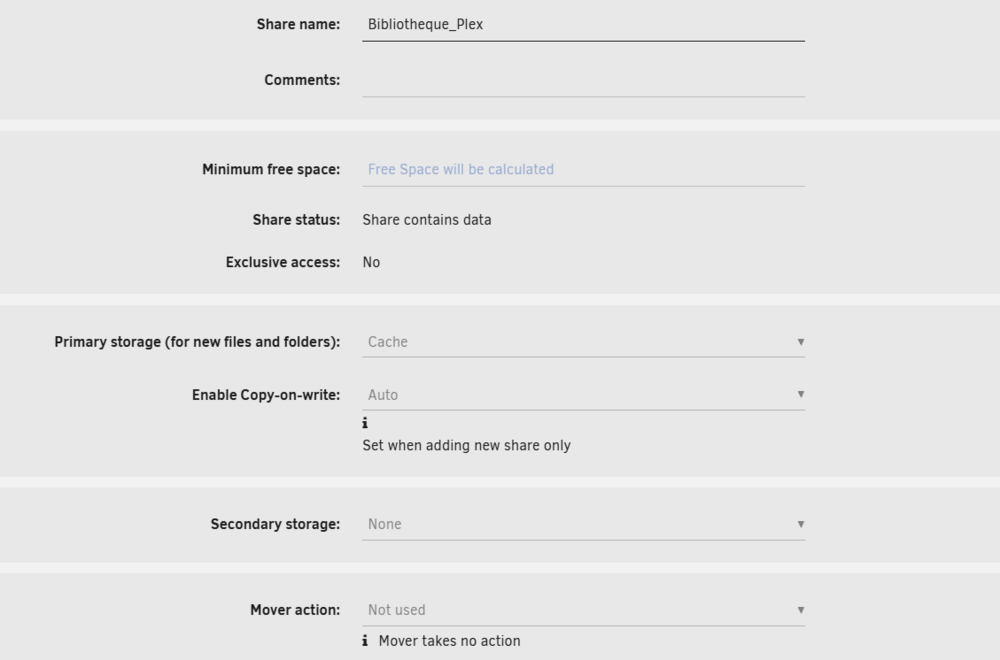
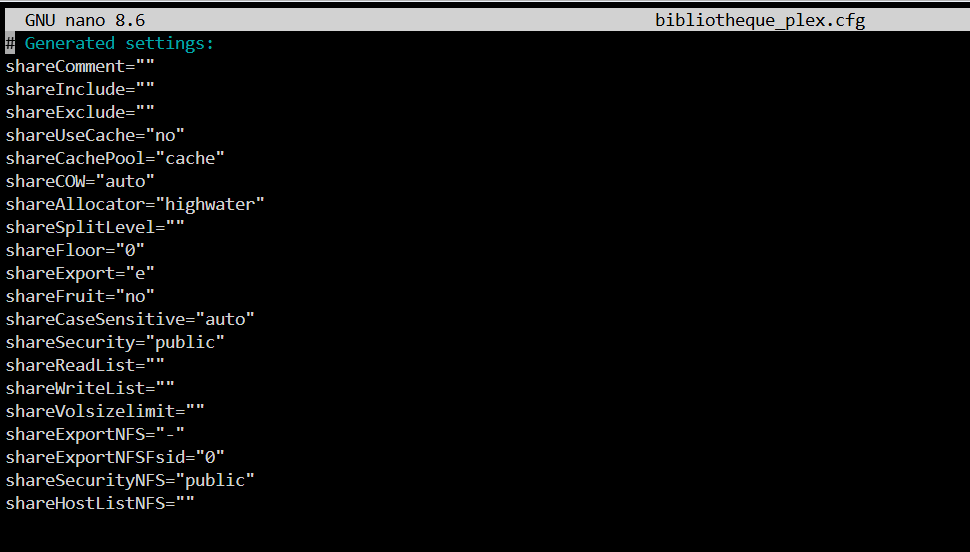
Hello I’m having trouble understanding an issue on Unraid 7.2. Two days ago, I emptied my cache drive because it was full. No problems there, but I realized that my “Bibliotheque_Plex” share, where I store my movies, was set to use the cache (as shown by the icon and the text on the right). However, it still showed 22 TB of available space. When I went into the share settings, I couldn’t change anything — it’s set to “cache only” for primary storage, nothing for secondary, and most options are grayed out. In the end, my cache drive emptied correctly and I was able to put in the new 1 TB drive for the cache. But now, the share Bibliotheque_Plex is still showing as using the cache and only shows 250 GB free (from my cache) instead of free space on the array. I’m worried this might cause problems later. Even after stopping Docker and the VMs in the settings, there’s no way to move this share to the array — it remains grayed out. Thanks for any ideas or suggestions!

-
Hello, First, thanks for the wonderfull work about this plugin! I tried to solve a problem but i'm stuck. My unraid is hosted on 192.168.1.100:8071 I wanted to join devices with fixed ip on my lan, so i added I added 192.168..1.0/24 in advertisee routes. It works, I now can join 192.168.1.101 (a server with OMV hosted on a different bare metal ) but AdguardHome witch is hosted within unraid (brO network with ip 192.168.1.200) is still unreachable. How can i solve this.. ? Thanks.
-
Thanks !!!
-
You saved my week !!! Thanks !!
-
So, I'm not the only one to have this problem.... So ,right now you can't use your stick ?
-
Hello I don't understand why my conbee II is not found : Unraid Version: 6.10.3 Zigbee2MQTT version 1.26.0 root@Tower: ls -l /dev/serial/by-id total 0 lrwxrwxrwx 1 root root 13 Jul 28 08:15 usb-RFXCOM_RFXtrx433_A11P1XIW-if00-port0 -> ../../ttyUSB0 lrwxrwxrwx 1 root root 13 Jul 28 08:56 usb-dresden_elektronik_ingenieurtechnik_GmbH_ConBee_II_DE2230164-if00 -> ../../ttyACM0 My Z2M configuration : GNU nano 6.0 configuration.yaml # Home Assistant integration (MQTT discovery) homeassistant: true # allow new devices to join permit_join: true # MQTT settings mqtt: # MQTT base topic for zigbee2mqtt MQTT messages base_topic: zigbee2mqtt # MQTT server URL server: 'mqtt://192.168.1.100:1883' # MQTT server authentication, uncomment if required: user: ******* password: ***** # Serial settings serial: port: >- /dev/serial/by-id/usb-dresden_elektronik_ingenieurtechnik_GmbH_ConBee_II_DE2230164-if00 adapter: deconz advanced: log_level: info My M2Q log : Using '/app/data' as data directory Zigbee2MQTT:info 2022-07-28 09:22:43: Logging to console and directory: '/app/data/log/2022-07-28.09-22-43' filename: log.txt Zigbee2MQTT:info 2022-07-28 09:22:43: Starting Zigbee2MQTT version 1.26.0 (commit #cd23aea) Zigbee2MQTT:info 2022-07-28 09:22:43: Starting zigbee-herdsman (0.14.40) Zigbee2MQTT:error 2022-07-28 09:22:43: Error while starting zigbee-herdsman Zigbee2MQTT:error 2022-07-28 09:22:43: Failed to start zigbee Zigbee2MQTT:error 2022-07-28 09:22:43: Check https://www.zigbee2mqtt.io/guide/installation/20_zigbee2mqtt-fails-to-start.html for possible solutions Zigbee2MQTT:error 2022-07-28 09:22:43: Exiting... Zigbee2MQTT:error 2022-07-28 09:22:43: Error: Error while opening serialport 'Error: Error: No such file or directory, cannot open /dev/serial/by-id/usb-dresden_elektronik_ingenieurtechnik_GmbH_ConBee_II_DE2230164-if00 ' at SerialPort.<anonymous> (/app/node_modules/zigbee-herdsman/src/adapter/deconz/driver/driver.ts:182:28) at SerialPort._error (/app/node_modules/@serialport/stream/lib/index.js:198:14) at /app/node_modules/@serialport/stream/lib/index.js:242:12 My conbee 2 works. I tried it with ZHA in my VM home assistant (just to try) but only with "dev/serial/by-id/usb-QEMU_QEMU_USB_SERIAL_1-0000:00:07.7-4-if00-port0" as path. Any idea ?? Thanks
-
I can use zigbee2mqtt in docker and link it to sent info to the HA broker .... But for the moment, it dont work with Z2m in docker 😞
-
It's me.... I followed the tuto and it works with ZHA with "dev/serial/by-id/usb-QEMU_QEMU_USB_SERIAL_1-0000:00:07.7-4-if00-port0" How do to the same thing with Z2M Thanks
-
Finally, i found "dev/serial/by-id/usb-QEMU_QEMU_USB_SERIAL_1-0000:00:07.7-4-if00-port0" in HA hardware page So in my z2m(docker) configuration file i put : # Home Assistant integration (MQTT discovery) homeassistant: true # allow new devices to join permit_join: true # MQTT settings mqtt: # MQTT base topic for zigbee2mqtt MQTT messages base_topic: zigbee2mqtt # MQTT server URL server: 'mqtt://localhost' # MQTT server authentication, uncomment if required: # user: my_user # password: my_password # Serial settings serial: port: /dev/serial/by-id/usb-QEMU_QEMU_USB_SERIAL_1-0000:00:07.7-4-if00-port0 But when I start the container : Using '/app/data' as data directory Zigbee2MQTT:info 2022-07-27 07:39:24: Logging to console and directory: '/app/data/log/2022-07-27.07-39-24' filename: log.txt Zigbee2MQTT:info 2022-07-27 07:39:24: Starting Zigbee2MQTT version 1.26.0 (commit #cd23aea) Zigbee2MQTT:info 2022-07-27 07:39:24: Starting zigbee-herdsman (0.14.40) Zigbee2MQTT:error 2022-07-27 07:39:24: Error while starting zigbee-herdsman Zigbee2MQTT:error 2022-07-27 07:39:24: Failed to start zigbee Zigbee2MQTT:error 2022-07-27 07:39:24: Check https://www.zigbee2mqtt.io/guide/installation/20_zigbee2mqtt-fails-to-start.html for possible solutions Zigbee2MQTT:error 2022-07-27 07:39:24: Exiting... Zigbee2MQTT:error 2022-07-27 07:39:24: Error: Error while opening serialport 'Error: Error: No such file or directory, cannot open /dev/serial/by-id/usb-QEMU_QEMU_USB_SERIAL_1-0000:00:07.7-4-if00-port0' at SerialPort.<anonymous> (/app/node_modules/zigbee-herdsman/src/adapter/z-stack/znp/znp.ts:146:28) at SerialPort._error (/app/node_modules/@serialport/stream/lib/index.js:198:14) at /app/node_modules/@serialport/stream/lib/index.js:242:12 Big noob i know 😞
-
I follow your link..... In my HA hardware page, i've no "/dev/serial/by-id/usb-QEMU_QEMU_USB_SERIAL_**********" : Only: ttyACM0 /dev/serial/by-id/usb-dresden_elektronik_ingenieurtechnik_GmbH_ConBee_II_DE2230164-if00 Sous-système: tty Chemin d’accès au périphérique: /dev/ttyACM0 ID: /dev/serial/by-id/usb-dresden_elektronik_ingenieurtechnik_GmbH_ConBee_II_DE2230164-if00 Attributs: DEVLINKS: >- /dev/serial/by-id/usb-dresden_elektronik_ingenieurtechnik_GmbH_ConBee_II_DE2230164-if00 /dev/serial/by-path/pci-0000:00:07.0-usb-0:2:1.0 DEVNAME: /dev/ttyACM0 DEVPATH: /devices/pci0000:00/0000:00:07.0/usb2/2-2/2-2:1.0/tty/ttyACM0 ID_BUS: usb ID_MODEL: ConBee_II ID_MODEL_ENC: ConBee\x20II ID_MODEL_ID: '0030' ID_PATH: pci-0000:00:07.0-usb-0:2:1.0 ID_PATH_TAG: pci-0000_00_07_0-usb-0_2_1_0 ID_REVISION: '0100' ID_SERIAL: dresden_elektronik_ingenieurtechnik_GmbH_ConBee_II_DE2230164 ID_SERIAL_SHORT: DE2230164 ID_TYPE: generic ID_USB_DRIVER: cdc_acm ID_USB_INTERFACES: ':020201:0a0000:' ID_USB_INTERFACE_NUM: '00' ID_VENDOR: dresden_elektronik_ingenieurtechnik_GmbH ID_VENDOR_ENC: dresden\x20elektronik\x20ingenieurtechnik\x20GmbH ID_VENDOR_ID: 1cf1 MAJOR: '166' MINOR: '0' SUBSYSTEM: tty TAGS: ':systemd:' USEC_INITIALIZED: '2654061' In my unraid system/device I've : Bus 001 Device 001 Port 1-0 ID 1d6b:0002 Linux Foundation 2.0 root hub Bus 001 Device 002 Port 1-3 ID ffff:5678 USB Disk 2.0 Bus 001 Device 003 Port 1-11 ID 0403:6001 Future Technology Devices International, Ltd FT232 Serial (UART) IC Bus 001 Device 118 Port 1-12 ID 1cf1:0030 Dresden Elektronik ZigBee gateway [ConBee II] Bus 002 Device 001 Port 2-0 ID 1d6b:0003 Linux Foundation 3.0 root hub Bus 001 Device 118 Port 1-12 ID 1cf1:0030 Dresden Elektronik ZigBee gateway [ConBee II] Device 118 It's not a problem ? EDIT : Oups I forgot Unckeck the device... I can see the lines now. I 'm still testing...
-
Hello; Hi already tried this : <serial type='dev'> <source path='/dev/serial/by-id/usb-dresden_elektronik_ingenieurtechnik_GmbH_ConBee_II_DE2230164-if00'/> <target type='usb-serial' port='1'> <model name='usb-serial'/> </target> <address type='usb' bus='0' port='4'/> </serial> The VM starts, and I can see my Conbee in HA Hardware Page, but I can't start Zigbee2Mqtt service : [06:29:25] INFO: Handing over control to Zigbee2MQTT Core ... > [email protected] start > node index.js Zigbee2MQTT:info 2022-07-27 06:29:27: Logging to console and directory: '/config/zigbee2mqtt/log/2022-07-27.06-29-27' filename: log.txt Zigbee2MQTT:info 2022-07-27 06:29:27: Starting Zigbee2MQTT version 1.26.0 (commit #unknown) Zigbee2MQTT:info 2022-07-27 06:29:27: Starting zigbee-herdsman (0.14.40) Zigbee2MQTT:error 2022-07-27 06:29:27: Error while starting zigbee-herdsman Zigbee2MQTT:error 2022-07-27 06:29:27: Failed to start zigbee Zigbee2MQTT:error 2022-07-27 06:29:27: Check https://www.zigbee2mqtt.io/guide/installation/20_zigbee2mqtt-fails-to-start.html for possible solutions Zigbee2MQTT:error 2022-07-27 06:29:27: Exiting... Zigbee2MQTT:error 2022-07-27 06:29:27: Error: spawn udevadm ENOENT at Process.ChildProcess._handle.onexit (node:internal/child_process:283:19) at onErrorNT (node:internal/child_process:478:16) at processTicksAndRejections (node:internal/process/task_queues:83:21) With Z2M in docker same problem : Using '/app/data' as data directory Zigbee2MQTT:info 2022-07-27 06:35:28: Logging to console and directory: '/app/data/log/2022-07-27.06-35-28' filename: log.txt Zigbee2MQTT:info 2022-07-27 06:35:28: Starting Zigbee2MQTT version 1.26.0 (commit #cd23aea) Zigbee2MQTT:info 2022-07-27 06:35:28: Starting zigbee-herdsman (0.14.40) Zigbee2MQTT:error 2022-07-27 06:35:28: Error while starting zigbee-herdsman Zigbee2MQTT:error 2022-07-27 06:35:28: Failed to start zigbee Zigbee2MQTT:error 2022-07-27 06:35:28: Check https://www.zigbee2mqtt.io/guide/installation/20_zigbee2mqtt-fails-to-start.html for possible solutions Zigbee2MQTT:error 2022-07-27 06:35:28: Exiting... Zigbee2MQTT:error 2022-07-27 06:35:28: Error: Error while opening serialport 'Error: Error: No such file or directory, cannot open /dev/serial/by-id/usb-dresden_elektronik_ingenieurtechnik_GmbH_ConBee_II_DE2230164-if00' at SerialPort.<anonymous> (/app/node_modules/zigbee-herdsman/src/adapter/z-stack/znp/znp.ts:146:28) at SerialPort._error (/app/node_modules/@serialport/stream/lib/index.js:198:14) at /app/node_modules/@serialport/stream/lib/index.js:242:12 So, I don't think it's problem with the template of my VM.... but i don't know where to search... 😞 I tried different firmware with the conbee : same results I tested the conbee with Windows and it worked.
-
-
Thanks for your support, but as newbie i'm still blocked... This is where i am.... : root@Tower:~# lsusb Bus 002 Device 001: ID 1d6b:0003 Linux Foundation 3.0 root hub Bus 001 Device 002: ID ffff:5678 USB Disk 2.0 Bus 001 Device 020: ID 1cf1:0030 Dresden Elektronik ZigBee gateway [ConBee II] Bus 001 Device 003: ID 0403:6001 Future Technology Devices International, Ltd FT232 Serial (UART) IC Bus 001 Device 001: ID 1d6b:0002 Linux Foundation 2.0 root hub root@Tower:~# lsusb -vs 001:020 Bus 001 Device 020: ID 1cf1:0030 Dresden Elektronik ZigBee gateway [ConBee II] Device Descriptor: bLength 18 bDescriptorType 1 bcdUSB 2.01 bDeviceClass 2 Communications bDeviceSubClass 0 bDeviceProtocol 0 bMaxPacketSize0 64 idVendor 0x1cf1 Dresden Elektronik idProduct 0x0030 ZigBee gateway [ConBee II] bcdDevice 1.00 iManufacturer 1 dresden elektronik ingenieurtechnik GmbH iProduct 2 ConBee II iSerial 3 DE2230164 bNumConfigurations 1 Configuration Descriptor: bLength 9 bDescriptorType 2 wTotalLength 0x0043 bNumInterfaces 2 bConfigurationValue 1 iConfiguration 0 bmAttributes 0x80 (Bus Powered) MaxPower 100mA Interface Descriptor: bLength 9 bDescriptorType 4 bInterfaceNumber 0 bAlternateSetting 0 bNumEndpoints 1 bInterfaceClass 2 Communications bInterfaceSubClass 2 Abstract (modem) bInterfaceProtocol 1 AT-commands (v.25ter) iInterface 0 CDC Header: bcdCDC 1.10 CDC ACM: bmCapabilities 0x02 line coding and serial state CDC Union: bMasterInterface 0 bSlaveInterface 1 CDC Call Management: bmCapabilities 0x03 call management use DataInterface bDataInterface 1 Endpoint Descriptor: bLength 7 bDescriptorType 5 bEndpointAddress 0x83 EP 3 IN bmAttributes 3 Transfer Type Interrupt Synch Type None Usage Type Data wMaxPacketSize 0x0040 1x 64 bytes bInterval 16 Interface Descriptor: bLength 9 bDescriptorType 4 bInterfaceNumber 1 bAlternateSetting 0 bNumEndpoints 2 bInterfaceClass 10 CDC Data bInterfaceSubClass 0 bInterfaceProtocol 0 iInterface 0 Endpoint Descriptor: bLength 7 bDescriptorType 5 bEndpointAddress 0x81 EP 1 IN bmAttributes 2 Transfer Type Bulk Synch Type None Usage Type Data wMaxPacketSize 0x0040 1x 64 bytes bInterval 0 Endpoint Descriptor: bLength 7 bDescriptorType 5 bEndpointAddress 0x02 EP 2 OUT bmAttributes 2 Transfer Type Bulk Synch Type None Usage Type Data wMaxPacketSize 0x0040 1x 64 bytes bInterval 0 Binary Object Store Descriptor: bLength 5 bDescriptorType 15 wTotalLength 0x000c bNumDeviceCaps 1 USB 2.0 Extension Device Capability: bLength 7 bDescriptorType 16 bDevCapabilityType 2 bmAttributes 0x00000002 HIRD Link Power Management (LPM) Supported Device Status: 0x0000 (Bus Powered) root@Tower:~# lsusb -vs 001:020 | grep iSerial iSerial 3 DE2230164 So , in my template i added this : </serial> <serial type='dev'> <source path='/dev/serial/by-id/DE2230164'/> <target type='usb-serial' port='1'> <model name='usb-serial'/> </target> <address type='usb' bus='0' port='4'/> </serial> My full template : <?xml version='1.0' encoding='UTF-8'?> <domain type='kvm'> <name>Home Assistant</name> <uuid>7677fc3b-6f9f-69b8-c6e6-152d4e5cf0db</uuid> <metadata> <vmtemplate xmlns="unraid" name="Linux" icon="default.png" os="linux"/> </metadata> <memory unit='KiB'>4194304</memory> <currentMemory unit='KiB'>2097152</currentMemory> <memoryBacking> <nosharepages/> </memoryBacking> <vcpu placement='static'>1</vcpu> <cputune> <vcpupin vcpu='0' cpuset='0'/> </cputune> <os> <type arch='x86_64' machine='pc-q35-5.1'>hvm</type> <loader readonly='yes' type='pflash'>/usr/share/qemu/ovmf-x64/OVMF_CODE-pure-efi.fd</loader> <nvram>/etc/libvirt/qemu/nvram/7677fc3b-6f9f-69b8-c6e6-152d4e5cf0db_VARS-pure-efi.fd</nvram> </os> <features> <acpi/> <apic/> </features> <cpu mode='host-passthrough' check='none' migratable='on'> <topology sockets='1' dies='1' cores='1' threads='1'/> <cache mode='passthrough'/> </cpu> <clock offset='utc'> <timer name='rtc' tickpolicy='catchup'/> <timer name='pit' tickpolicy='delay'/> <timer name='hpet' present='no'/> </clock> <on_poweroff>destroy</on_poweroff> <on_reboot>restart</on_reboot> <on_crash>restart</on_crash> <devices> <emulator>/usr/local/sbin/qemu</emulator> <disk type='file' device='disk'> <driver name='qemu' type='qcow2' cache='writeback'/> <source file='/mnt/user/isos/hassos_ova-5.12.qcow2'/> <target dev='hdc' bus='sata'/> <boot order='1'/> <address type='drive' controller='0' bus='0' target='0' unit='2'/> </disk> <controller type='pci' index='0' model='pcie-root'/> <controller type='pci' index='1' model='pcie-root-port'> <model name='pcie-root-port'/> <target chassis='1' port='0x10'/> <address type='pci' domain='0x0000' bus='0x00' slot='0x02' function='0x0' multifunction='on'/> </controller> <controller type='pci' index='2' model='pcie-root-port'> <model name='pcie-root-port'/> <target chassis='2' port='0x11'/> <address type='pci' domain='0x0000' bus='0x00' slot='0x02' function='0x1'/> </controller> <controller type='pci' index='3' model='pcie-root-port'> <model name='pcie-root-port'/> <target chassis='3' port='0x12'/> <address type='pci' domain='0x0000' bus='0x00' slot='0x02' function='0x2'/> </controller> <controller type='pci' index='4' model='pcie-root-port'> <model name='pcie-root-port'/> <target chassis='4' port='0x13'/> <address type='pci' domain='0x0000' bus='0x00' slot='0x02' function='0x3'/> </controller> <controller type='pci' index='5' model='pcie-root-port'> <model name='pcie-root-port'/> <target chassis='5' port='0x14'/> <address type='pci' domain='0x0000' bus='0x00' slot='0x02' function='0x4'/> </controller> <controller type='virtio-serial' index='0'> <address type='pci' domain='0x0000' bus='0x03' slot='0x00' function='0x0'/> </controller> <controller type='sata' index='0'> <address type='pci' domain='0x0000' bus='0x00' slot='0x1f' function='0x2'/> </controller> <controller type='usb' index='0' model='ich9-ehci1'> <address type='pci' domain='0x0000' bus='0x00' slot='0x07' function='0x7'/> </controller> <controller type='usb' index='0' model='ich9-uhci1'> <master startport='0'/> <address type='pci' domain='0x0000' bus='0x00' slot='0x07' function='0x0' multifunction='on'/> </controller> <controller type='usb' index='0' model='ich9-uhci2'> <master startport='2'/> <address type='pci' domain='0x0000' bus='0x00' slot='0x07' function='0x1'/> </controller> <controller type='usb' index='0' model='ich9-uhci3'> <master startport='4'/> <address type='pci' domain='0x0000' bus='0x00' slot='0x07' function='0x2'/> </controller> <filesystem type='mount' accessmode='passthrough'> <source dir='/mnt/user/'/> <target dir='partage'/> <address type='pci' domain='0x0000' bus='0x01' slot='0x00' function='0x0'/> </filesystem> <interface type='bridge'> <mac address='52:54:00:40:fe:fe'/> <source bridge='br0'/> <model type='virtio-net'/> <address type='pci' domain='0x0000' bus='0x02' slot='0x00' function='0x0'/> </interface> <serial type='pty'> <target type='isa-serial' port='0'> <model name='isa-serial'/> </target> </serial> <serial type='dev'> <source path='/dev/serial/by-id/DE2230164'/> <target type='usb-serial' port='1'> <model name='usb-serial'/> </target> <address type='usb' bus='0' port='4'/> </serial> <console type='pty'> <target type='serial' port='0'/> </console> <channel type='unix'> <target type='virtio' name='org.qemu.guest_agent.0'/> <address type='virtio-serial' controller='0' bus='0' port='1'/> </channel> <input type='tablet' bus='usb'> <address type='usb' bus='0' port='1'/> </input> <input type='mouse' bus='ps2'/> <input type='keyboard' bus='ps2'/> <graphics type='vnc' port='-1' autoport='yes' websocket='-1' listen='0.0.0.0' keymap='fr'> <listen type='address' address='0.0.0.0'/> </graphics> <audio id='1' type='none'/> <video> <model type='qxl' ram='65536' vram='65536' vgamem='16384' heads='1' primary='yes'/> <address type='pci' domain='0x0000' bus='0x00' slot='0x01' function='0x0'/> </video> <hostdev mode='subsystem' type='usb' managed='no'> <source> <vendor id='0x1cf1'/> <product id='0x0030'/> </source> <address type='usb' bus='0' port='2'/> </hostdev> <memballoon model='virtio'> <address type='pci' domain='0x0000' bus='0x04' slot='0x00' function='0x0'/> </memballoon> </devices> </domain> But now I can't start my VM : Execution Error Path '/dev/serial/by-id/DE2230164' is not accessible: No such file or director I really a noob, sorry 😞 PS : I realized the problem came this the 6.10.3 update 😞
-
Unraid 6.10.3 I 've just ckeck the box where the conbee is displayed... I can see my conbee in my vm, but I can' t use it.
-
Hello, I just moved and boot again my unraid server. I d'ont remember where my conbee II where plugged... and it's now a problem... I can't use it... in unraid : Bus 001 Device 001 Port 1-0 ID 1d6b:0002 Linux Foundation 2.0 root hub Bus 001 Device 002 Port 1-3 ID ffff:5678 USB Disk 2.0 Bus 001 Device 017 Port 1-12 ID 1cf1:0030 Dresden Elektronik ZigBee gateway [ConBee II] Bus 002 Device 001 Port 2-0 It seems ok. I've a VM with home assistant, but when i start zigbee2mqtt : Zigbee2MQTT:info 2022-07-23 21:02:27: Starting Zigbee2MQTT version 1.26.0 (commit #cd23aea) Zigbee2MQTT:info 2022-07-23 21:02:27: Starting zigbee-herdsman (0.14.40) Zigbee2MQTT:error 2022-07-23 21:02:27: Error while starting zigbee-herdsman Zigbee2MQTT:error 2022-07-23 21:02:27: Failed to start zigbee Zigbee2MQTT:error 2022-07-23 21:02:27: Check https://www.zigbee2mqtt.io/guide/installation/20_zigbee2mqtt-fails-to-start.html for possible solutions Zigbee2MQTT:error 2022-07-23 21:02:27: Exiting... Zigbee2MQTT:error 2022-07-23 21:02:27: Error: Error while opening serialport 'Error: Error: No such file or directory, cannot open /dev/serial/by-id/usb-dresden_elektronik_ingenieurtechnik_GmbH_ConBee_II_DE2230164-if00' at SerialPort.<anonymous> (/app/node_modules/zigbee-herdsman/src/adapter/z-stack/znp/znp.ts:146:28) at SerialPort._error (/app/node_modules/@serialport/stream/lib/index.js:198:14) at /app/node_modules/@serialport/stream/lib/index.js:242:1 It worked perfectly before i move. I tried to install zigbee2mqtt via docker : Zigbee2MQTT:info 2022-07-23 21:02:27: Starting Zigbee2MQTT version 1.26.0 (commit #cd23aea) Zigbee2MQTT:info 2022-07-23 21:02:27: Starting zigbee-herdsman (0.14.40) Zigbee2MQTT:error 2022-07-23 21:02:27: Error while starting zigbee-herdsman Zigbee2MQTT:error 2022-07-23 21:02:27: Failed to start zigbee Zigbee2MQTT:error 2022-07-23 21:02:27: Check https://www.zigbee2mqtt.io/guide/installation/20_zigbee2mqtt-fails-to-start.html for possible solutions Zigbee2MQTT:error 2022-07-23 21:02:27: Exiting... Zigbee2MQTT:error 2022-07-23 21:02:27: Error: Error while opening serialport 'Error: Error: No such file or directory, cannot open /dev/serial/by-id/usb-dresden_elektronik_ingenieurtechnik_GmbH_ConBee_II_DE2230164-if0 I followed the link in the error message to solve but all seems to be ok : root@Tower:~# ls -l /dev/serial/by-id total 0 lrwxrwxrwx 1 root root 13 Jul 23 20:38 usb-dresden_elektronik_ingenieurtechnik_GmbH_ConBee_II_DE2230164-if00 -> ../../ttyACM0 root@Tower:~# test -w /dev/ttyACM0 && echo success || echo failure success root@Tower:~ This is my configuration for zigbee : # Home Assistant integration (MQTT discovery) homeassistant: true # allow new devices to join permit_join: true # MQTT settings mqtt: # MQTT base topic for zigbee2mqtt MQTT messages base_topic: zigbee2mqtt # MQTT server URL server: 'mqtt://localhost' # MQTT server authentication, uncomment if required: # user: my_user # password: my_password # Serial settings serial: port: /dev/ttyACM0 I've just try to update the firmware on my combee, same result Any idea to solve this problem ???? Thanks
-
Hello, I just configured tailscale. It's very easy to use but i've a little problem when I want open gui of a service... Ie : My ip connection is 10.100.23.9:1234 I want to open my torrent docker (clicking on gui link) but It doesn't go to 10.100.23.9:8080 but to 192.168.23.9:8080... So it's not ok. If I type 10.100.23.9:8080 in my browser it's ok. How to fix it ? Thanks.
-
Bonjour, Je suis en rade avec mon serveur... J'ai voulu changer mon mot de passe plex et depuis ma bibliothèque n'est plus accessible mëme en local : Quand je me rends sur : http://192.168.0.100:32400/web/index.html#!/settings/account L'interface fonctionne normalement, je vois les serveurs de mes amis, mais aucune trace du mien. Mon plex est bien lancé, dans les logs : ------------------------------------- _ () | | ___ _ __ | | / __| | | / \ | | \__ \ | | | () | |_| |___/ |_| \__/ Brought to you by linuxserver.io ------------------------------------- To support LSIO projects visit: https://www.linuxserver.io/donate/ ------------------------------------- GID/UID ------------------------------------- User uid: 99 User gid: 100 ------------------------------------- [cont-init.d] 10-adduser: exited 0. [cont-init.d] 40-chown-files: executing... [cont-init.d] 40-chown-files: exited 0. [cont-init.d] 45-plex-claim: executing... [cont-init.d] 45-plex-claim: exited 0. [cont-init.d] 50-gid-video: executing... [cont-init.d] 50-gid-video: exited 0. [cont-init.d] 60-plex-update: executing... Docker is used for versioning skip update check [cont-init.d] 60-plex-update: exited 0. [cont-init.d] 90-custom-folders: executing... [cont-init.d] 90-custom-folders: exited 0. [cont-init.d] 99-custom-scripts: executing... [custom-init] no custom files found exiting... [cont-init.d] 99-custom-scripts: exited 0. [cont-init.d] done. [services.d] starting services [services.d] done. Starting Plex Media Server. Critical: libusb_init failed Il me semble que le critical en dernière ligne a toujours été là.... C'est la dernière version à jour. Si je me rends dans "reglages" (http://192.168.0.100:32400/web/index.html#!/settings/web/general ) aucune trace de mon serveur dans le panneau latéral à gauche... J'avoie que ça fait 3 heures que je tourne en rond... et pas moyen de trouver une solution. J'ai déjà relancé le container plex, j'ai même rebooté unraid.... Si quelqu'un a une idée je suis preneur, car là je désespère. Merci
-
Hi, I use last version (0.6.14) and i can't find anymore how to display infos about users activities..... (numbers of downloads, last date connection..) In my memories, it's was possible to display this, but I may be wrong on that. It's possible ? Thanks
-
Hello, I managing my library with Calibre (about 9000 Ebooks) and share it with Calibre-server. Sometimes i've this error when i try to edit a Book in calibre : Traceback (most recent call last): File "calibre/gui2/library/models.py", line 1130, in setData File "calibre/gui2/library/models.py", line 1204, in _set_data File "calibre/db/legacy.py", line 551, in set File "calibre/db/cache.py", line 72, in call_func_with_lock File "calibre/db/cache.py", line 1198, in set_field File "calibre/db/write.py", line 543, in set_books File "calibre/db/write.py", line 404, in many_many File "calibre/db/write.py", line 268, in get_db_id File "calibre/db/backend.py", line 920, in execute apsw.BusyError: BusyError: database is locked To avoid this bug, i've to shut off Calibre-web and restart Calibre. I found a Fix on a forum : From the manual: nobrl - Do not send byte range lock requests to the server. This is necessary for certain applications that break with cifs style mandatory byte range locks (and most cifs servers do not yet support requesting advisory byte range locks). So in the /etc/fstab: Code: //server/nas /home/nas cifs nobrl,user=uid,password=xxx,uid=1001,gid=1001 0 0 "Then you can use the calibre libraries on this volume without errors." But I don't know/understand what i should do on my unraid server... I'm starting with unraid 😞 Anyone can help me ? Thanks ! Auden.
-
Hi, I'm juste installing Calibre but i've a problem... All is ok but the auto add dosen't work... When i add the forder manualy it's ok but when i drag a a file into this same folder, Calibre don't add the file automaticaly as he should do.... nothing happens... If you've a solution... i'm here 🙂 EDIT : I found my problem... Calibre don't scan sub folder 😞 A solution ? Thx
-
Bonjour Moi c'est Charles, 41 ans et j'habite la région lyonnaise... J'ai un vieux syno DS411, autant dire que s'il fait son taf, niveau possibilités c'est assez limité... En regardant du coté des solution nas DIY je suis tombé sur Unraid et ça m'a bien tenté... Pour le moment je fais joujou avec un nuc sur lequel j'ai monté 2 disques. C'est juste pour me faire la main et faire des tests... Au final mes besoins : VM avec Home assistant... J'ai quitté Jeedom sans regret... Plex Nextcloud Bitwarden Photoprism... Il y aura surement d'autres choses comme une vm windows... Pour ma future config j'ai juste commandé le boitier : Fractal Node 804 Pour le reste je vais certainement taper dans le bon coin pour trouver une micro atx avec un I5 dessus et 8 ou 16Go de ram... Au plaisir de vous lire....


