aremack
Members
-
Joined
-
Last visited
-
I abandoned the project in favor of obsidian + git sync. It’s really nice.
-
I was able to get the reverse proxy working with swag last time I had it up and running. What I still haven't figured out yet was the connection to postgres that I spoke about above.. did you get that part working yet? I can probably help you get there, what does your set up look like so far, or where do you think you're having trouble?
-
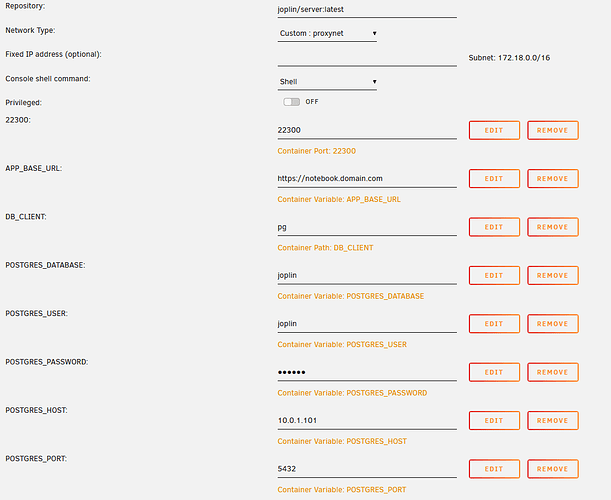
Wondering if anyone would mind helping me sort out joplin server, postgres and nginx reverse proxy. I had this working a few months ago, and something got hosed when I upgraded my cache drive pool. Since I'm pretty new to unraid and docker, and brand new to postgres, I figured I might as well wipe everything and start from scratch. Set it back up, but not really positive about all the settings that I put in. Now I'm mostly getting errors like 502 Bad Gateway error which leads me to believe it might be a reverse proxy problem maybe? I can't figure out how to troubleshoot this to see where the problem is. I was hoping someone might take a look at my settings, and see if I'm missing something obvious. I've deleted everything and started from scratch like 6 times now. I used this to set up Postgres 11 CREATE USER joplin WITH PASSWORD 'joplin'; CREATE DATABASE joplin TEMPLATE template0 ENCODING 'UNICODE'; ALTER DATABASE joplin OWNER TO joplin; GRANT ALL PRIVILEGES ON DATABASE joplin TO joplin; Joplin Server v2.3.5 I'm using Nginx Proxy Manager for reverse proxy