





BuTscH
Members
-
Joined
Everything posted by BuTscH
-
Ja das ist richtig, du benötigst dafür einen Turn Server. Da ich schon einen laufen hatte für Nextcloud habe ich diesen auch für Matrix verwendet. Das wäre der Stun-Turn-Server von ich777. Dieser ist super leicht einzurichten einfach domain, passwort, und Land auswählen, dann noch den Port in deinem Router freigeben. Dann musst du nur noch die homeserver.yaml von deinen Matrix Server berarbeiten dies einfügen und durch deine Domain+Port und Passwort des Turn Servers ersetzen. turn_uris: [ "turn:turn.matrix.org?transport=udp", "turn:turn.matrix.org?transport=tcp" ] turn_shared_secret: "n0t4ctuAllymatr1Xd0TorgSshar3d5ecret4obvIousreAsons" turn_user_lifetime: 86400000 turn_allow_guests: True Hier auch auch nochmal der Link zum Wik: https://matrix-org.github.io/synapse/v1.39/turn-howto.html Das hört sich für mich ganz so an das irgendein Energiesparmodus die App im hintergrund killt. Schau mal in deinen App einstellungen vom Android system nach ob du dort was findest. Ich kann zumindest sagen das bei mir und meinen bekannten, die Element app auf android zuverlässig push nachrichten versendet.
-
ich hatte mich beim erstmaligen einrichten von GeoIP an die Anleitung gehalten und dort wird es mit 404 gemacht. https://github.com/linuxserver/docker-mods/tree/swag-maxmind Danke für die Idee mit 444! Das wäre natürlich optimal wenn er garkeine Antwort gibt, das werde ich so mal ausprobieren.
-
Ich habe mir nochmal ein paar Gedanken zum Thema GeoIP2 gemacht. Die letzten Tage über hatte ich viele Anfragen von ausländischen IP's Die GeoIP2 Mod funktioniert soweit auch auch gibt 404 aus sobald eine IP außerhalb von Deutschland drauf zugreifen. Nur waren die zugriffen ziemlich hartnäckig und haben es trotzdem weiter probiert. Nun dachte ich mir das ich mit Fail2ban gleich einfach alle IP's außerhalb deutschlands banne sobald sie zugreifen. ich hatte es erst mit einer config versucht die 404 gleich bannt, aber damit habe ich mich beim benutzen von Nextcloud selber ausgesperrt Dann habe ich Geoip2 so eingestellt das es 451 ausgibt und mir dementsprechend eine config angelegt. # Fail2Ban for GeoIP # # [Definition] failregex = ^<HOST>.*"(GET|POST).*" (451) .*$ ignoreregex = Soweit funktioniert das auch und ich sperre mich nicht mehr selber nicht aus Weiß vielleicht jemand ob man dies auch ein bisschen "eleganter" lösen könnte? Oder kann man das so ruhig machen?
-
Ohh mann... da war ich ziemlich blind diesen Ordner habe ich komplett vergssen ^^ Vielen Dank da ist sie fail2ban läuft jetzt auch mit nextcloud

-
Gute Frage der ist schon ziemlich alt den habe ich vor c.a. 2 Jahren installiert. Das Verzeichniss habe ich leider nicht, ich habe mit der suche auch schon nacht nextcloud.log gesucht, aber sie schein wirklich nicht dabei zu sein.

-
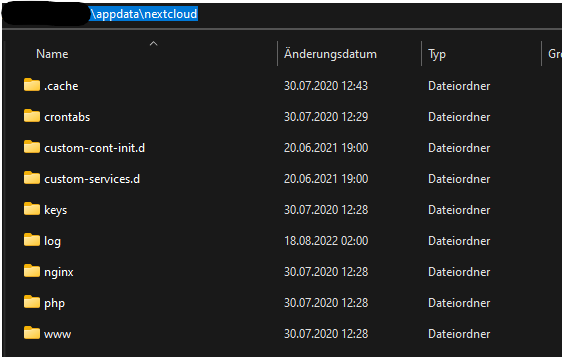
Alles klar dankeschön das werd ich mal so weitergeben ^^ Eine Frage hätte ich noch bezüglich Nextcloud und fail2ban. Ich finde bei meinem Nextcloud Docker nur eine access.log Datei unter \appdata\nextcloud\log\nginx Dort werden aber keine fehlerhaften Login versuche dokumentiert. In der Weboberfläche jedoch schon, nur weiß ich leider nicht wo die Datei liegt und wie ich dort zugriff drauf bekommen. Ich kann lediglich eine Protokolldatei downloaden und habe dann ein nextcloud.log wo die fehlerhaften Login versuche drinstehen.

-
Danke ja du hast recht es funktioniert so schon, ich dachte nur es sei falsch weil ich im fail2ban.log error bekomme. Im Emby forum ist jemand der hat auch das Problem aber leider ist dort keine Lösung bis jetzt. 2022-08-18 08:14:40,952 fail2ban.filter [443]: ERROR Failed to process line: '\tFramework: .NET 6.0.2', caught exception: IndexError('string index out of range') 2022-08-18 08:14:42,953 fail2ban.filter [443]: ERROR Failed to process line: '\tOS/Process: x64/x64', caught exception: IndexError('string index out of range') 2022-08-18 08:14:44,955 fail2ban.filter [443]: ERROR Failed to process line: '\tRuntime: system/System.Private.CoreLib.dll', caught exception: IndexError('string index out of range') 2022-08-18 08:14:46,957 fail2ban.filter [443]: ERROR Failed to process line: '\tProcessor count: 4', caught exception: IndexError('string index out of range') 2022-08-18 08:14:48,959 fail2ban.filter [443]: ERROR Failed to process line: '\tData path: /config', caught exception: IndexError('string index out of range') 2022-08-18 08:14:50,962 fail2ban.filter [443]: ERROR Failed to process line: '\tApplication path: /system', caught exception: IndexError('string index out of range') 2022-08-18 08:14:52,965 fail2ban.filter [443]: ERROR Failed to process line: '\tSystem.Exception: System.Exception: Invalid username or password.', caught exception: IndexError('string index out of range') 2022-08-18 08:14:54,968 fail2ban.filter [443]: ERROR Failed to process line: '\tSource: Emby.Server.Implementations', caught exception: IndexError('string index out of range') 2022-08-18 08:14:56,972 fail2ban.filter [443]: ERROR Failed to process line: '\t', caught exception: IndexError('string index out of range') 2022-08-18 08:14:58,974 fail2ban.filter [443]: ERROR Failed to process line: '2022-08-18 08:14:40.603 Info HttpClient: POST https://connect.emby.media/service/user/authenticate', caught exception: IndexError('string index out of range') 2022-08-18 08:15:00,977 fail2ban.filter [443]: ERROR Failed to process line: '2022-08-18 08:14:41.049 Warn Server: AUTH-ERROR: xx.xx.xxx.xx - Invalid username or password entered.', caught exception: IndexError('string index out of range') 2022-08-18 08:15:02,979 fail2ban.filter [443]: ERROR Failed to process line: '2022-08-18 08:14:41.049 Error Server: Invalid username or password entered.', caught exception: IndexError('string index out of range') die emby.conf datei habe ich aus dem Emby Forum. Diese ist schon älter vielleicht hat sich ja irgendwas verändert in der Zeit. # Fail2Ban for emby # # [Definition] failregex = AUTH-ERROR: <HOST> - Invalid user HTTP Response 401 to <HOST>. ignoreregex =
-
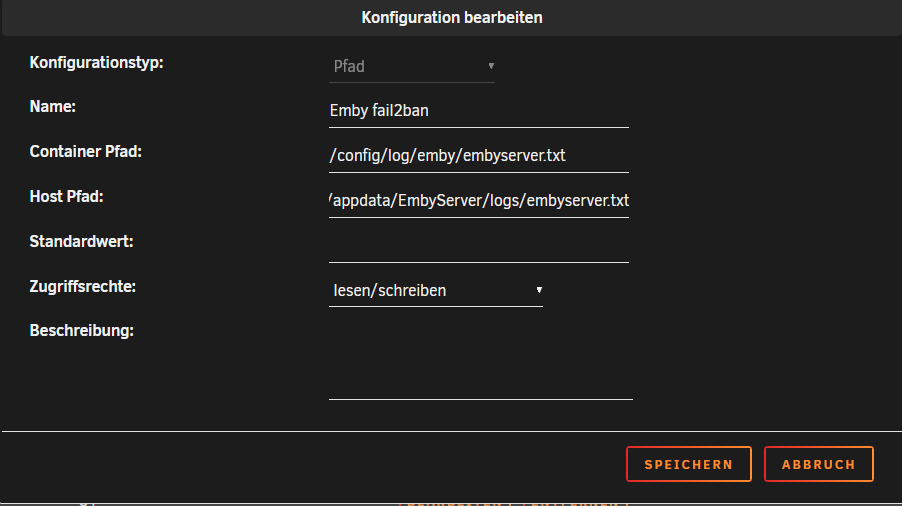
hey zusammen, mein fail2ban läuft soweit schonmal, nun wollte ich auch emby und nexcloud noch überwachen lassen. Eine config im filter.d Ordner habe ich schon angelegt und auch im jail.local Aktiviert. Ich weiß leider nicht wie ich die log datein von emby und nextcloud im SWAG Container mappen soll damit fail2ban sie lesen kann. So funktioniert es zumindest nicht! Wäre echt toll wenn mir jemand weiterhelfen könnte ich steh da echt auf dem schlauch ^^
-
Hey, Ich habe mich gestern mit Matrix auch mal beschäftigt und mir einen aufgesetzt. Es reicht eine dyndns Adresse. Du brauchst nur einen Docker. Ich habe den Matrix-Synapse Docker genommen. Ich benutze SWAG und es war kein problem Matrix dort einzubinden. Ich bin zwar auch kein Experte aber falls du noch Probleme hast kann ich dir ja vielleicht helfen.
-
- iperf3 - perl - powertop
-
hmm that's a good question I did not know that it plays a role ^^ The 2 mods are from the Steam Workshop. But there I could not find any information whether they work only with windows.
-
I have tried it with I think it is the same as in arma. Under windows works so at least. The client also detects that mods are on the server. But the server doesn't seem to load them correctly.
-
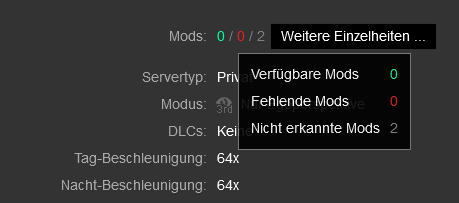
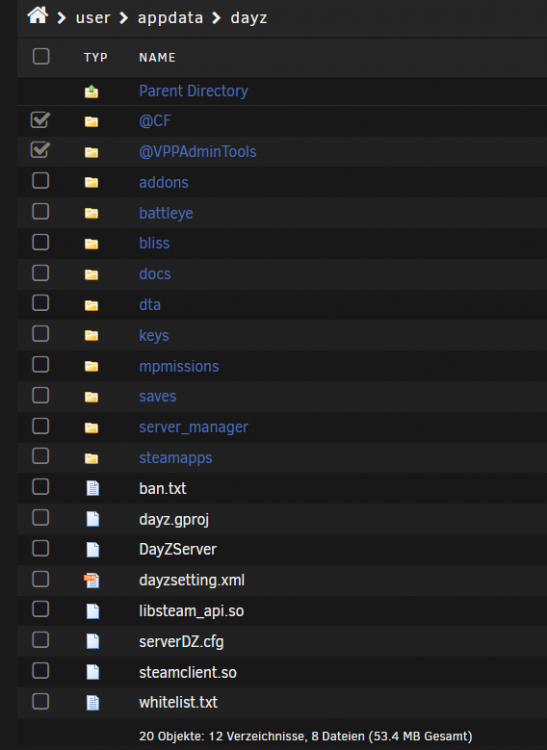
Does anyone know how to use the dayz server with mods. I copied the mods in the main directory and copied the key files in the keys folder. But unfortunately after starting the server no folder is created where the files to configure the plugins are. I am not quite sure if I have entered the variable here correctly or if it must be done differently.

-
Das wäre absolut kein Problem. Ich wollte nur lieber vorher mal Fragen was es für möglichkeiten gibt. Vielen Dank euch beiden
-
Hey, ich betreibe den Emby Docker mit dem Netzwerktyp: "proxynet" im Subnet: 172.18.x.x damit er über den reverse Proxy von außen erreichbar ist, mein normaler interner IP adressberreich ist 192.168.x.x. Das Problem ist mein TV und AVR finden dann den DLNA Server von Emby nicht. Wenn ich Emby jedoch als Netzwerktyp: "Host" starte wird der DLNA Server sofort gefunden. Meine Frage wäre ist es möglich Emby mit dem Netzwerktyp: proxynet zu starten und auch den DLNA Server zu nutzen?
-
Ich hatte in so einem fall eine tastatur angeschlossen und einfach "STRG ALT ENT" gedrückt das hatte so wie ich es geshen habe einen normalen neustart ausgelöst.
-
Yes, I can confirm that. After my server goes to sleep and I wake it up again, the server does not appear on the network.
-
Thanks! I use RC4 and that has helped me. Will this be fixed in the next RC versions? Or do you always have to use the script now?
-
Hi i have bad network speeds with Unraid Version 6.9.x - 6.10.x With 6.8.3 it worked perfekt. With 6.9.x - 6.10.x my network speed gets only to 90MB/s. Unraid 6.8.3: Unraid 6.10: (its the same result in Unraid 6.9.x) I use a J4105-ITX with onboard LAN and 8GB Ram. What Ive tried yet: - Ive tried a new Intel networkcard it dosent help. - Ive Change the Cable dosent help. - ive set the cpu guvenor to all possible setting but it only gets worse. - ive install unraid 6.9.x and 6.10.x on a second usb stick and only install iperf3 to check the speed same result. Let me know if you need more information.
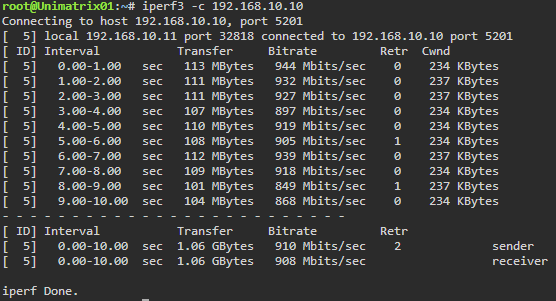
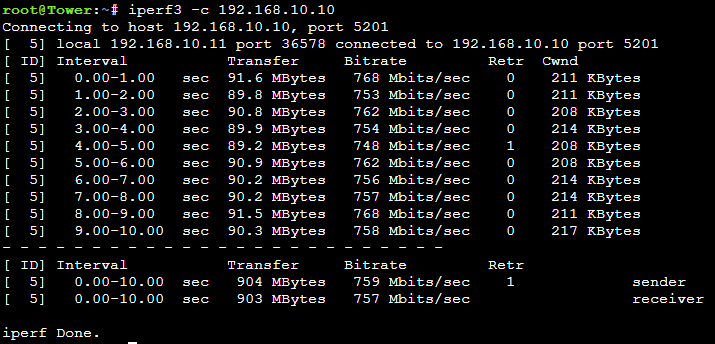
-
Hey, My Mainboad: ASRock J4105-ITX My Onboard NIC: RTL8111H iperf comparison: 6.8.3: root@Unimatrix01:~# iperf3 -c 192.168.10.10 Connecting to host 192.168.10.10, port 5201 [ 5] local 192.168.10.11 port 56480 connected to 192.168.10.10 port 5201 [ ID] Interval Transfer Bitrate Retr Cwnd [ 5] 0.00-1.00 sec 114 MBytes 954 Mbits/sec 0 237 KBytes [ 5] 1.00-2.00 sec 111 MBytes 932 Mbits/sec 0 237 KBytes [ 5] 2.00-3.00 sec 110 MBytes 924 Mbits/sec 0 242 KBytes [ 5] 3.00-4.00 sec 112 MBytes 940 Mbits/sec 0 237 KBytes [ 5] 4.00-5.00 sec 113 MBytes 946 Mbits/sec 0 237 KBytes [ 5] 5.00-6.00 sec 111 MBytes 934 Mbits/sec 0 240 KBytes [ 5] 6.00-7.00 sec 112 MBytes 940 Mbits/sec 0 237 KBytes [ 5] 7.00-8.00 sec 113 MBytes 944 Mbits/sec 0 237 KBytes [ 5] 8.00-9.00 sec 113 MBytes 945 Mbits/sec 0 240 KBytes [ 5] 9.00-10.00 sec 112 MBytes 943 Mbits/sec 0 240 KBytes - - - - - - - - - - - - - - - - - - - - - - - - - [ ID] Interval Transfer Bitrate Retr [ 5] 0.00-10.00 sec 1.09 GBytes 940 Mbits/sec 0 sender [ 5] 0.00-10.00 sec 1.09 GBytes 939 Mbits/sec receiver iperf Done. 6.9.0: root@Unimatrix01:~# iperf3 -c 192.168.10.10 Connecting to host 192.168.10.10, port 5201 [ 5] local 192.168.10.11 port 59456 connected to 192.168.10.10 port 5201 [ ID] Interval Transfer Bitrate Retr Cwnd [ 5] 0.00-1.00 sec 97.8 MBytes 821 Mbits/sec 0 214 KBytes [ 5] 1.00-2.00 sec 91.3 MBytes 766 Mbits/sec 0 211 KBytes [ 5] 2.00-3.00 sec 91.4 MBytes 767 Mbits/sec 0 214 KBytes [ 5] 3.00-4.00 sec 91.9 MBytes 771 Mbits/sec 0 211 KBytes [ 5] 4.00-5.00 sec 90.8 MBytes 762 Mbits/sec 0 220 KBytes [ 5] 5.00-6.00 sec 90.9 MBytes 762 Mbits/sec 0 208 KBytes [ 5] 6.00-7.00 sec 90.9 MBytes 762 Mbits/sec 0 211 KBytes [ 5] 7.00-8.00 sec 90.6 MBytes 760 Mbits/sec 0 211 KBytes [ 5] 8.00-9.00 sec 90.4 MBytes 759 Mbits/sec 0 211 KBytes [ 5] 9.00-10.00 sec 88.0 MBytes 738 Mbits/sec 0 208 KBytes - - - - - - - - - - - - - - - - - - - - - - - - - [ ID] Interval Transfer Bitrate Retr [ 5] 0.00-10.00 sec 914 MBytes 767 Mbits/sec 0 sender [ 5] 0.00-10.00 sec 913 MBytes 766 Mbits/sec receiver iperf Done. And here my diagnostics from 6.9.0 If you need more Informations let me know...
-
In Unraid 6.9.0 the drop-down menu is broken for: Enable Intel Turbo... I cant choose yes or no. In 6.8.3 it works.








