






Knutowskie
Members
-
Joined
-
Last visited
-
this thread is the first result in brave search. thank you for no solution @T_Matz did you ever resolve this? My guess, as is got the same issue: install the crowdsec dashboard app from appstore.
-
a year passed by and still no MFA login. shame. unraid is so easy to manage, i wanted to roll it our to customers. But i can't without headaches.
-
I had a APC USV in use until it decided to burn. Never had this warning, even when it started to go up in smoke. Now i got no USV in use and i stopped the daemon. Every week now i get a message, that it lost communication. I got the very same problem like OP here. The daemon is set to not start at all. And it still does. Edit: Here is the cause and a solution
-
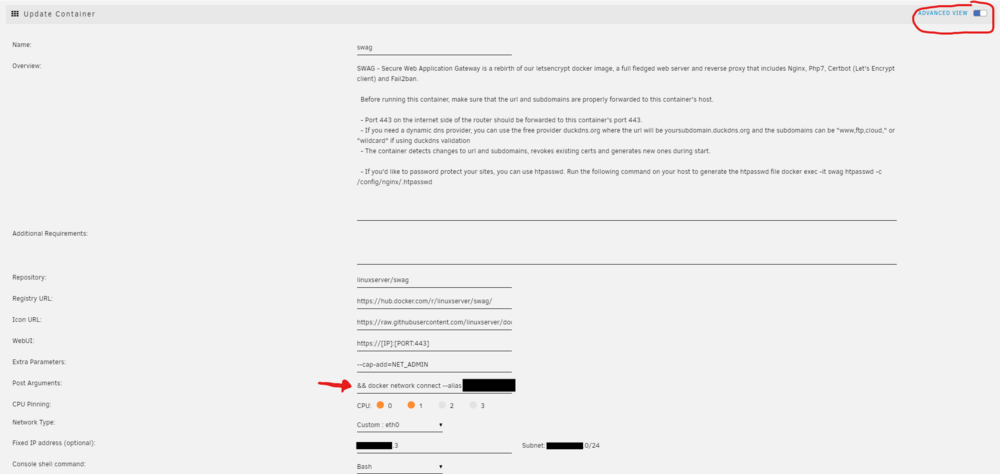
but if i want to connect a docker container to the same network twice, i get an error. "The command failed." ... Error response from daemon: endpoint with name swag already exists in network proxynet So this is my solution that seems to work: i created some custom network named "eth0" a while ago for my pihole. The swag container now is connected primary to it and gets an IP in my Home-LAN. Let's say 192.168.0.3. With the above way i attached it to my "proxynet" where the 2 nextclouds, a mariaDB and the collabora lives. All seems to work! Any suggestions why this may be a bad idea?
-
Thank you for your reply. So where can i add the network aliases for my swag container? It needs to be something like cloud.domain.com and collabora.domain.com so the internal traffic stays internal. In the situation right now the nextcloud container talks to collabora container over WAN, as it is only able to use "collabora.domain.com" and no IP address. To be honest: i don't know which dropdown you mean where i can add the line for the alias. It should look like this: docker network connect --alias cloud.domain.com --alias collabora.domain.com somedockernetwork swag But this would connect it to another network as far as i understand. I only need the swag to be connected to one single docker net, but with aliases. Is there a docker-compose file or something, that unraid uses and that i can edit? The other solution would be to connect swag to a dummy network in default and then add the real network with the solution i found here: using_multiple_docker_networks_in_unraid
-
I got the following setup: SWAG, 2x Nextcloud, MariaDB and Collabora are running in docker containers. All fine so far. I noticed that the containers Nextcloud and Collabora are talking with each other over the WAN Loop. The solution for speeding things up should be to set up docker network aliases ( see here: https://help.nextcloud.com/t/probably-dns-help-with-nc-docker-collabora-wireguard-tunnel/176562/5 ) My problem is: where in the Web-GUI of unraid i can set up this? My search attempts here didnt reveal another threat. So maybe someone got a solution?
-
this
-
what was the error when downloading multiple files? Does it try to download a htm File? Because on my end it happens since one of the last updates... Can't download a zip anymore, what would be the expected behaviour. I found the solution here on page 262, i cant quote it. wait a moment.
-
Okay i upgraded and made the changes recommended. We will see.
-
I am on 6.11.5 and had the "macvlan traces found" in my fix common things plugin. So far nothing unstable. Machine rock solid. So i decided to switch to ipvlan to resolve the "issue" and the journey began. With ipvlan my "proxynet" network (containing swag, nextcloud and collabora) stopped responding. No idea how and why. Just didnt work. I read something that it could be related to AVM Fritzboxes. So i am using a Fiber Firtzbox... nice. After switching back to macvlan everything started acting wonky. docker service won't come up. So i tired to go for a safe reboot, but /mnt/cache was busy. hooray. its the docker.img that didnt let go. so i unmounted loop2 and then the machine restarted. If you are using a fritzbox you are fucked. Thats it. I am living in fear now as the macvlan traces occur. Someday they may become a problem. Everything worked fine. Why they do break things up and FOR MONTHS no fix? Any idea how to work around this? No i can't buy another router.
-
Hatte den Update checker laufen lassen... der meckerte. Ich habe nun einfach mal Nerdpack weggeworfen und das Update gemacht. YOLO... Bin mal gespannt, was nicht mehr funktioniert die Tage.
-
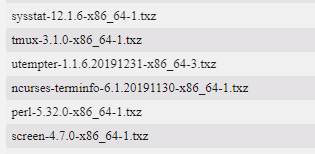
Bin gerade mal am gucken gewesen, ob ich endlich updaten kann... Dann sagt es: nö. Die Pakete habe ich installiert über nerdpack: Was denkt ihr? Ich hab das nerdpack damals nach Anleitungsvideo einfach mit drauf gezogen und ehrlich gesagt nicht so viel Ahnung, wofür. Ich hab einige dynamix plugins am Laufen.
-
i have to dig this out. i love my telegram bot, that notifies me with every message. but i wanted it to be not 00:20 in the frickin morning. who needs a notification at THIS time. who set this value? i would be very happy if it could send me the array notification at a self chosen time.
-
i added the ud preclear plugin and then i got the same error. Thx for your research, i ignore the error for now.
-
this is all i get. nothing. edit: magically it works today! nice.




