





chris206
Members
-
Joined
-
Last visited
Everything posted by chris206
-
Ah sorry, if it's not already obvious, I'm quite inexperienced with using linux at this level. Output: Those seem to be the correct folders for the drive.
-
So, I tried this, but I'm a bit uncertain about what I should be looking for? I used the webterminal to enter the first two commands, but as far as browsing the created directory, assuming it mounted, I type "browse /x" into the same terminal? Or do I need to have the array started in maintenance mode before doing any of this? tower-diagnostics-20250516-1147.zip
-
Attempted it twice, both times seemed to fail, do I need to remove the replacement drive first? Edit: attached full diagnostics to this post. tower-diagnostics-20250515-1504.zip
-
Alright, offending disk removed, server seems to be stable now, array not started. Here's where I'm at: The original disk that started this all with read errors remains in unassigned devices (sds). I have the replacement disk that highlighted filesystem errors in Disk 13's place. This disk seemed to have issues with its format previously? I'm not entirely sure, that information should be in the original syslog and/or diagnostics. I have NOT updated to 7.1.2, still on 7.0.1 Should I proceed with updating as previously instructed or do other things first? tower-diagnostics-20250515-1247.zip
-
I may have screwed myself further. Rebooted and it's taking a while to come back... Edit: the LEDs on the card are back and are active, but no idea how to read them... Update: server came back up, recognized the drives and it's attempting to read that disk again. I have a feeling I need to shutdown and remove it entirely before moving forward. Update 2: It went through the same pattern, so I've shutdown and plan to remove the offending disk and will try to work from there. I should've removed it over a month ago in hindsight... tower-diagnostics-20250515-1210.zip
-
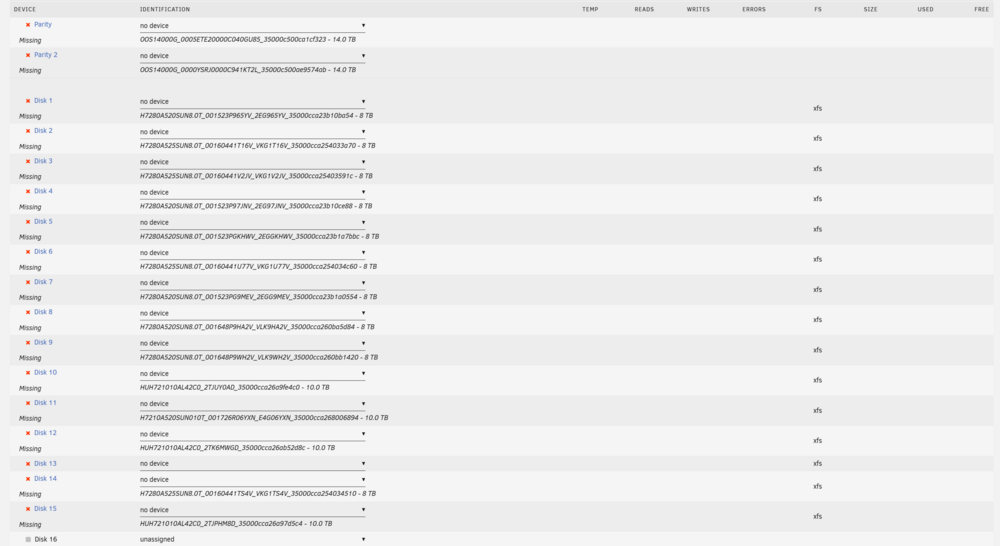
Rebooting from the CLI worked. However, this brought in a whole new host of issues... Server booted seemingly normally, found the disks and then it started freaking out over a drive that failed previously, but was only in unassigned devices. Now, it seems every drive has been dropped out of the array and there are issues with my HBA card? Edit: no drives are detected and LED lights on the card are off... tower-syslog-20250515-1659.zip
-
Alright, I cancelled the check, but that seemed to hang on something. So, I went and stopped the array and got two errors regarding the drive being busy. It won't even let me take the drive out of the array. How can I see what process is accessing the drive and stop it? The server had been in maintenance mode. Edit: It also says the array is started and it seemingly won't let me do anything...
-
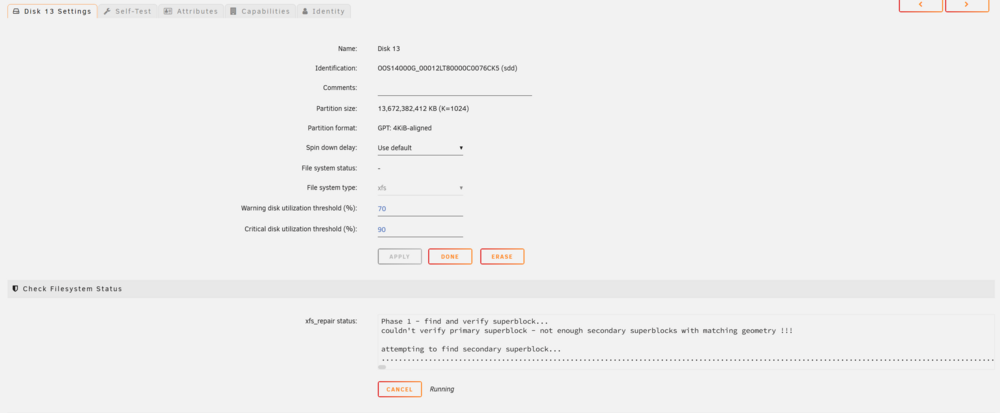
Sadly this is still running on the disk, should I cancel the process? It's been roughly 11 hours without any apparent progress.
-
Alright, I refreshed the page after waiting a while and this is what's displayed: This is checking the file system on the emulated disk and not the new drive I put in the failed disks place correct?
-
No, it's still showing the loading icon.
-
I went to Disk 13's settings per the instructions and clicked "Check" under Check Filesystem Status, however, Unraid seems hung up. Is it normally supposed to take a while for anything to happen after clicking that button?
-
Done. I currently have the array in maintenance mode with the new 14TB drive in the failed disks place, but I haven't restarted the sync/rebuild process on it. tower-diagnostics-20250514-2006.zip
-
Earlier today I had a 10TB drive fail out with multiple i/o write errors. I had a larger 14TB drive on standby, parity drives are both 14TB, so I stopped the array, replaced the failed disk and started the array. After doing this, I noticed that the new drive reported as unmountable, but not until after I had started the array in attempt to rebuild the failed disk. So, I stopped the array, which may have been a mistake. I attempted a few different things including starting the array again without a disk present and now it reads the failed disk, whose contents are supposedly emulated as unmountable. I'm afraid to do anything further, because even with some googling I honestly don't know what I should do to troubleshoot this issue. Also a bit frustrated because this same disk failed before, but with a different drive in its place. I also clicked on the checkmark in unassigned devices next to the drive I tried to use as a replacement, and it started a file system check on that? so I guess it's going to do that for the next 20ish hours or so. Anyways, any help would be appreciated. syslog 5.14.25

