




-
Final update, Following a motherboard change the server is now up.
-
+1 pour du stockage sans traitement c'est surdimensionné, un simple N150 suffirait. J'ai eu un minipc/routeur de chez CWWK que j'ai revendu depuis (je n'en avais plus l'utilité) il était pas mal. Après le soucis avec ce type de constructeurs c'est toujours la même chose : support fluctuant, maj BIOS inconstante. Dans le cas d'un socket LGA1700 je te conseille vraiment de choisir un constructeur classique, certaines séries de CPU intel (>13600 et >14600) ont des soucis thermiques que seul une mise à jour du BIOS peut corriger. Je ne suis pas certain que tu obtienne un support réactif de la part de ces boites. Par contre chez Asus, MSI, etc tu auras des MAJ régulières (et un mode d'emploie en anglais ... voir français) dès qu'Intel publie un nouveau microcode. Je parle en connaissance de cause, je viens de faire un RMA de mon 14700. Et le support Intel demandant les références de la CM, j'aurais été moins serein avec une CM CWWK. Bref à ce prix je prendrai une CM du marché "classique" complétée avec des accessoires (carte PCIE 10GB, adaptateur M2/SATA, ...). Dernier conseil : vérifie et planifie bien ce que tu veux brancher sur tes ports PCIE et M2, en particulier les lignes PCIE attribuées à chaque port. Les constructeurs s'amusent à mettre des ports PCIE full size (x16) qui plafonnent en x1.
-
So I received yesterday my new CPU from intel, same model a 14700. While assembling the CPU with the MB I noticed some bended pin on the MB. I suspect it was bended from the beginning (but only lightly) as it was a second hand from amazon. And that mounting/unmountig CPUs emphasized the bent until the MB was unusable. It could also be the root cause of my issues. So I think I have to buy another motherboard as I don't think I'm able to fix this, unfortunately 8 sata MB for LGA1700 and DDR4 are not common. Fortunately I have an unused LSI 9211 controller card I bought years ago for a project I did not do. So I'l buy a MB and use the controller card. I kind of feel like going down in the rabbit hole for this issue. Hopefully this will be the last step !
-
Not so small update : After a while (~2w) the crash came back. So I went in the BIOS to try to mitigate the issue by lowering the CPU frequency, I noticed that the PL1 was set by default to 125W which is default for a 14700K but mine is a non-K CPU, so I set it to 65W. I also limited the top frequency of the p-core to 4,3GHz instead of 4,5Ghz (or was it 4,6 I don't remember, anyway I lowered the p-core top frequency by 200 Mhz). After that, no issue whatsoever for two weeks. At the same time I initiated a RMA with intel support services and decided to proceed with an exchange as I can't be sure the crash won't come back. Good thing the CPU support has been extended to 5 years ! If there's anything to retain from this thread : Check and double check your BIOS configuration and settings, even the default settings. Never throw up the intel box in the garbage bin 😅. Luckily I still had mine, as FPO and ATPO are written on it.
-
Salut, J'ai eu aussi une série de méchants kernel panic qui a duré plusieurs semaines sur mon serveur c'est une plaie à diagnostiquer, même avec un syslog externe sur un autre serveur j'avais que dalle. Comme toi, les traces syslog s'arrêtaient puis reprenaient au redémarrage, pas vraiment utile donc. Dans un premier temps je conseillerais de revoir la partie matos (cable sata, pate thermique et ventirad, ...) mais j'ai l'impression que c'est déjà fait. Consulte aussi ce thread : https://forums.unraid.net/topic/46802-faq-for-unraid-v6/page/2/#findComment-819173 Il contient des informations spécifiques aux Ryzen qui ne semble pas aimer les C-States. D'ailleurs quelques conseils d'ordre général qui m'avait été donné par JorgeB : Load BIOS defaults and disable XMP (ou son équivalent chez AMD), overclocking, undervolting, or other performance tuning (y compris les c-state). Boot Unraid in Safe Mode, ensuring the any script and other third-party power-management changes are not applied. Initially test with the array stopped. If stable for at least 24 hours, start the array while leaving Docker and VMs disabled. If that remains stable, enable Docker and bring containers back in small groups. Despite the previous successful Memtest result, consider another extended test. Testing one DIMM at a time may help identify an intermittent DIMM, slot, CPU memory-controller, or motherboard issue. if another crash occurs, capture the beginning of the panic directly from the local console. The initial BUG/Oops lines, CPU/task information, registers, and complete call trace are the most important parts. Note aussi les heures de crash et regarde si ça ne correspond pas à des lancements de traitements (sur plex/jellyfin ou autre) ça peut t'aiguiller sur une piste. Si ta clef USB faiblit tu devrais voir des erreurs dans le syslog et/ou via la commande dmesg. Sinon tu peux aussi nous fournir un fichier diag et le retour de la commande dmesg histoire de voir s'il y a des trucs louches.
-
Two days later and still no issue despite some heavy load from a jellyfin stack I forgot to shut down. syslog/dmesg look clean. The parity check has finished with 3048 errors which is kind of expected considering all the kernel panic I had in the past week. Overall I think the culprit was the CPU cooler that was not correctly mounted which reduced its efficiency. The kernel panics were mostly during the night when the plex/jellyfin workload was happening (opening detection, ...) so precisely when the load was high on the p-cores. I'll have to find a way to send notifications in case of high temperature.
-
Small update : I have been running for two weeks without any issue, then I had more and more kernel panic, the server could not even make it to 24h of uptime, sometime a couple of hours. Of course it happened when I was not at home, I could barely reboot the server with my nanokvm with tailscale help. Anyway, I unracked the 4U server and made some cleanup : Change of the thermal paste of the CPU and I moved from the default intel cpu cooler to a Thermalright Phantom Spirit 120 SE. Changing the faulty sata cable. I have some doubt on the intel provided cpu cooler I was using : While unscrewing it I noticed that one of its mounting pins wasn’t properly inserted into the motherboard, the pressure wasn’t evenly distributed across the CPU die. When I had those kernel panics, once I kept a nanokvm session opened on the unraid GUI and I'm pretty sure it shown a temp at 95°C at the bottom of the ui. I also have some doubt on the CPU itself, as the 14700 has some thermal issue, but I couldn't find anything conclusive with stress-ng. The memory has also been tested with memtest86 (the version embedded with unraid) but I couldn't make it crash. The server has been restarted and I'm now waiting for to see if it is crashing again.
-
Comme te l'as suggéré @waazaa boot en safe mode. Tu peux aussi tester ta ram avec memtest.
-
Thank you ! I'll stay like this for a while to see if I have a kernel panic again (most likely tonight), then I'll follow your list. But I'll replace the sata cable for sure. Update : No kernel panic for the latest 24h and I was able to complete the parity check, as a side note there is also no more connectivity issue with my parity disk anymore.
-
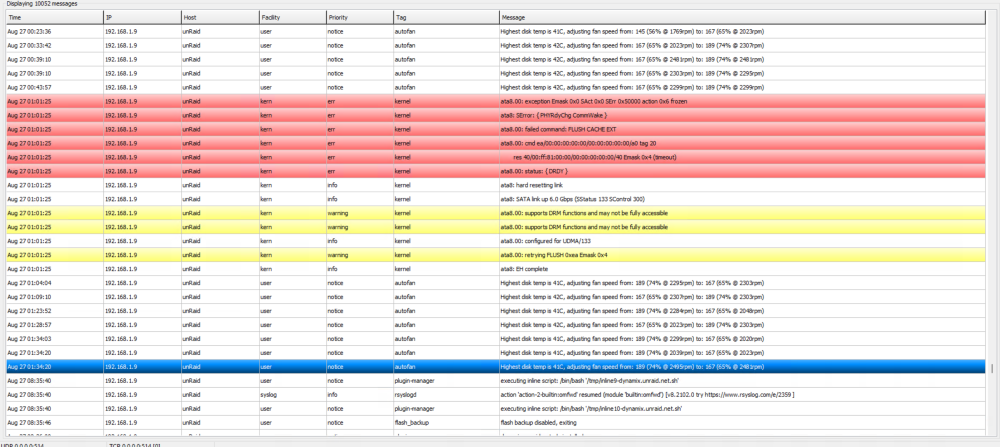
Here's the unfiltered syslog from the external host. And the kernel panic time I remember : 27/08/2026 around 01h34 26/08/2026 at 04h05 syslog.zip
-
I have an external syslog on another host. Nothing in the logs, the server just stop logging, here it is : I suspect the kernel panic happened after 01h34. There are some issues before that (a faulty disk connectivity with ata8) but it was 30 minutes before.
-
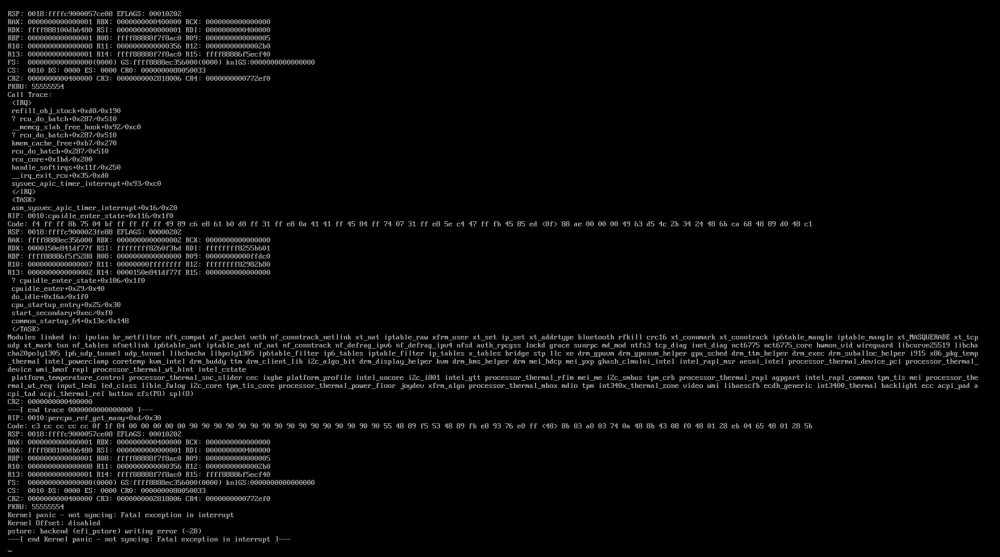
Hello, Since a week I have frequent kernel panics, the uptime is < 24h. No hardware or software changes. Motherboard BIOS is up to date. My server is headless so I do not have a trace of the kernel messages. I do have a partial feedback from my kvm over ip : For now I tried : memtest86, OK. Disabling uneeded containers, no effect Following the latest kernel panic I disabled c-states and energy related features in the bios as the kernel messages seems to be energy efficiency related. unraid-diagnostics-20260826-1700.zip
-
I'm curious where you'll draw the line for docker compose management : I used portainer, komodo and now dockhand to manage my stacks on my unraid server, the compose files are hosted on private github repos. It is so easy to update my stacks on github (versioning, branching, ...) that I would never go back for less feature-wise.
-
Test en changeant le disque de port ou via un adaptateur usb ? Est-ce que le disque disparait aussi du bios ?
-
uncured592 changed their profile photo
-
Hello, Jamais essayé pour ma part, cela dit je pense que ton usage est correct. Jette un coup d'oeil aux logs ou poste ton fichier diag dans le topic officiel du plugin officiel : https://forums.unraid.net/topic/120567-unassigned-devices-preclear-a-utility-to-preclear-disks-before-adding-them-to-the-array En tout cas c'est une erreur qui revient souvent. Sinon il semble qu'un mauvais cable sata peut causer ce genre d'erreur.

View in the app
A better way to browse. Learn more.



