





Jorgensen
Members
-
Joined
-
Last visited
Everything posted by Jorgensen
-
I left the VM off, and I've not had any issues since. Both the docker log and the syslog are clean. So, not related to Unraid, but to my VM.
-
Hi, I need your assistance again... My server has been acting up the last couple of days. Basically, the last two days, I've received (~20 minutes past midnight) a cache disk hot warning. And the cache disk does not return to normal temperature until ~04:20. And today, it resulted in a OOM Feb 10 04:08:41 Tower kernel: docker-proxy invoked oom-killer: gfp_mask=0x140cca(GFP_HIGHUSER_MOVABLE|__GFP_COMP), order=0, oom_score_adj=0 ... Feb 10 04:08:41 Tower kernel: oom-kill:constraint=CONSTRAINT_NONE,nodemask=(null),cpuset=/,mems_allowed=0,global_oom,task_memcg=/machine/qemu-1-Ubuntu-server.libvirt-qemu,task=qemu-system-x86,pid=13066,uid=0 Feb 10 04:08:41 Tower kernel: Out of memory: Killed process 13066 (qemu-system-x86) total-vm:11195768kB, anon-rss:10685708kB, file-rss:0kB, shmem-rss:6544kB, UID:0 pgtables:21844kB oom_score_adj:0 Looking into the docker log, there are also a vast number of errors in this time span, but I can't figure out what is triggering this. Diagnostics attached. EDIT: Just noticed my VM was stopped which I did not expect. Not sure if related. EDIT2: Time of VM crash corresponds to OOM time (-1 hour offset), from VM log: 2025-02-10 03:08:42.405+0000: shutting down, reason=crashed TIA, Jorgensen tower-diagnostics-20250210-0930.zip
-
Wow, that was a lot of errors (Tower kernel: SQUASHFS error: Failed to read block)... I've just created a backup of the flash and I'll be looking for a new flash drive. I'm a bit surprised this wasn't highlighted in the Unraid GUI. Anyway, thanks a lot for your assistance. I'll close this issue as resolved.
-
I left the server on, as I didn't have time to troubleshoot the issue. And now it is back in business! (a modern Christmas miracle ) From Uptime Kuma, I can see that the server was unresponsive from 22nd of December 19:00 until December 24 around 14:48. I have now collected diagnostics (haven't had time to look at it). tower-diagnostics-20241225-1810.zip EDIT: I'm actually only on 6.12.13 and not 6.12.14 as I expected. Time to update I guess.
-
Unraid OS: 6.12.14 (I think, can't check until I reboot) My Unraid server has become unresponsive, ping is ok: > ping 192.168.1.10 PING 192.168.1.10 (192.168.1.10) 56(84) bytes of data. 64 bytes from 192.168.1.10: icmp_seq=1 ttl=63 time=4.13 ms 64 bytes from 192.168.1.10: icmp_seq=2 ttl=63 time=24.9 ms 64 bytes from 192.168.1.10: icmp_seq=3 ttl=63 time=25.5 ms 64 bytes from 192.168.1.10: icmp_seq=4 ttl=63 time=20.1 ms 64 bytes from 192.168.1.10: icmp_seq=5 ttl=63 time=2.13 ms 64 bytes from 192.168.1.10: icmp_seq=6 ttl=63 time=28.3 ms ^C --- 192.168.1.10 ping statistics --- 6 packets transmitted, 6 received, 0% packet loss, time 5010ms rtt min/avg/max/mdev = 2.126/17.498/28.275/10.455 ms I started Wireshark and filtered for ip addr 192.168.1.10 (ip address of Unraid server). I've tried to SSH to the server, from browser attempted to access tower.local and 192.168.1.10:80. I've also attempted to access NFS shares with no avail. All should be included in the Wireshark trace. Attempting to ssh to unraid server: > ssh unraid -vvv OpenSSH_9.6p1 Ubuntu-3ubuntu13.5, OpenSSL 3.0.13 30 Jan 2024 debug1: Reading configuration data /home/NAME/.ssh/config debug1: /home/niels/.ssh/config line 20: Applying options for unraid debug1: Reading configuration data /etc/ssh/ssh_config debug1: /etc/ssh/ssh_config line 19: include /etc/ssh/ssh_config.d/*.conf matched no files debug1: /etc/ssh/ssh_config line 21: Applying options for * debug2: resolve_canonicalize: hostname 192.168.1.10 is address debug3: expanded UserKnownHostsFile '~/.ssh/known_hosts' -> '/home/NAME/.ssh/known_hosts' debug3: expanded UserKnownHostsFile '~/.ssh/known_hosts2' -> '/home/NAME/.ssh/known_hosts2' debug3: channel_clear_timeouts: clearing debug3: ssh_connect_direct: entering debug1: Connecting to 192.168.1.10 [192.168.1.10] port 22. debug3: set_sock_tos: set socket 3 IP_TOS 0x10 debug1: Connection established. debug1: identity file /home/NAME/.ssh/id_ed25519 type 3 debug1: identity file /home/NAME/.ssh/id_ed25519-cert type -1 debug1: Local version string SSH-2.0-OpenSSH_9.6p1 Ubuntu-3ubuntu13.5 debug1: Remote protocol version 2.0, remote software version OpenSSH_9.8 debug1: compat_banner: match: OpenSSH_9.8 pat OpenSSH* compat 0x04000000 debug2: fd 3 setting O_NONBLOCK debug1: Authenticating to 192.168.1.10:22 as 'root' debug3: record_hostkey: found key type ED25519 in file /home/NAME/.ssh/known_hosts:18 debug3: load_hostkeys_file: loaded 1 keys from 192.168.1.10 debug1: load_hostkeys: fopen /home/NAME/.ssh/known_hosts2: No such file or directory debug1: load_hostkeys: fopen /etc/ssh/ssh_known_hosts: No such file or directory debug1: load_hostkeys: fopen /etc/ssh/ssh_known_hosts2: No such file or directory debug3: order_hostkeyalgs: have matching best-preference key type [email protected], using HostkeyAlgorithms verbatim debug3: send packet: type 20 debug1: SSH2_MSG_KEXINIT sent debug3: receive packet: type 20 debug1: SSH2_MSG_KEXINIT received debug2: local client KEXINIT proposal debug2: KEX algorithms: [email protected],curve25519-sha256,[email protected],ecdh-sha2-nistp256,ecdh-sha2-nistp384,ecdh-sha2-nistp521,diffie-hellman-group-exchange-sha256,diffie-hellman-group16-sha512,diffie-hellman-group18-sha512,diffie-hellman-group14-sha256,ext-info-c,[email protected] debug2: host key algorithms: [email protected],[email protected],[email protected],[email protected],[email protected],[email protected],[email protected],[email protected],ssh-ed25519,ecdsa-sha2-nistp256,ecdsa-sha2-nistp384,ecdsa-sha2-nistp521,[email protected],[email protected],rsa-sha2-512,rsa-sha2-256 debug2: ciphers ctos: [email protected],aes128-ctr,aes192-ctr,aes256-ctr,[email protected],[email protected] debug2: ciphers stoc: [email protected],aes128-ctr,aes192-ctr,aes256-ctr,[email protected],[email protected] debug2: MACs ctos: [email protected],[email protected],[email protected],[email protected],[email protected],[email protected],[email protected],hmac-sha2-256,hmac-sha2-512,hmac-sha1 debug2: MACs stoc: [email protected],[email protected],[email protected],[email protected],[email protected],[email protected],[email protected],hmac-sha2-256,hmac-sha2-512,hmac-sha1 debug2: compression ctos: none,[email protected],zlib debug2: compression stoc: none,[email protected],zlib debug2: languages ctos: debug2: languages stoc: debug2: first_kex_follows 0 debug2: reserved 0 debug2: peer server KEXINIT proposal debug2: KEX algorithms: [email protected],curve25519-sha256,[email protected],ecdh-sha2-nistp256,ecdh-sha2-nistp384,ecdh-sha2-nistp521,diffie-hellman-group-exchange-sha256,diffie-hellman-group16-sha512,diffie-hellman-group18-sha512,diffie-hellman-group14-sha256,ext-info-s,[email protected] debug2: host key algorithms: rsa-sha2-512,rsa-sha2-256,ecdsa-sha2-nistp256,ssh-ed25519 debug2: ciphers ctos: [email protected],aes128-ctr,aes192-ctr,aes256-ctr,[email protected],[email protected] debug2: ciphers stoc: [email protected],aes128-ctr,aes192-ctr,aes256-ctr,[email protected],[email protected] debug2: MACs ctos: [email protected],[email protected],[email protected],[email protected],[email protected],[email protected],[email protected],hmac-sha2-256,hmac-sha2-512,hmac-sha1 debug2: MACs stoc: [email protected],[email protected],[email protected],[email protected],[email protected],[email protected],[email protected],hmac-sha2-256,hmac-sha2-512,hmac-sha1 debug2: compression ctos: none,[email protected] debug2: compression stoc: none,[email protected] debug2: languages ctos: debug2: languages stoc: debug2: first_kex_follows 0 debug2: reserved 0 debug3: kex_choose_conf: will use strict KEX ordering debug1: kex: algorithm: [email protected] debug1: kex: host key algorithm: ssh-ed25519 debug1: kex: server->client cipher: [email protected] MAC: <implicit> compression: none debug1: kex: client->server cipher: [email protected] MAC: <implicit> compression: none debug3: send packet: type 30 debug1: expecting SSH2_MSG_KEX_ECDH_REPLY debug3: receive packet: type 31 debug1: SSH2_MSG_KEX_ECDH_REPLY received debug1: Server host key: ssh-ed25519 SHA256:9XB9lD+KjQtAKg3pQ32/wWpK2jeBo6oIrYP7VmlC1+I debug3: record_hostkey: found key type ED25519 in file /home/NAME/.ssh/known_hosts:18 debug3: load_hostkeys_file: loaded 1 keys from 192.168.1.10 debug1: load_hostkeys: fopen /home/NAME/.ssh/known_hosts2: No such file or directory debug1: load_hostkeys: fopen /etc/ssh/ssh_known_hosts: No such file or directory debug1: load_hostkeys: fopen /etc/ssh/ssh_known_hosts2: No such file or directory debug1: Host '192.168.1.10' is known and matches the ED25519 host key. debug1: Found key in /home/NAME/.ssh/known_hosts:18 debug3: send packet: type 21 debug1: ssh_packet_send2_wrapped: resetting send seqnr 3 debug2: ssh_set_newkeys: mode 1 debug1: rekey out after 134217728 blocks debug1: SSH2_MSG_NEWKEYS sent debug1: Sending SSH2_MSG_EXT_INFO debug3: send packet: type 7 debug1: expecting SSH2_MSG_NEWKEYS debug3: receive packet: type 21 debug1: ssh_packet_read_poll2: resetting read seqnr 3 debug1: SSH2_MSG_NEWKEYS received debug2: ssh_set_newkeys: mode 0 debug1: rekey in after 134217728 blocks debug3: send packet: type 5 debug3: receive packet: type 7 debug1: SSH2_MSG_EXT_INFO received debug3: kex_input_ext_info: extension server-sig-algs debug1: kex_ext_info_client_parse: server-sig-algs=<ssh-ed25519,ecdsa-sha2-nistp256,ecdsa-sha2-nistp384,ecdsa-sha2-nistp521,[email protected],[email protected],rsa-sha2-512,rsa-sha2-256> debug3: kex_input_ext_info: extension [email protected] debug1: kex_ext_info_check_ver: [email protected]=<0> debug3: kex_input_ext_info: extension [email protected] debug1: kex_ext_info_check_ver: [email protected]=<0> debug3: receive packet: type 6 debug2: service_accept: ssh-userauth debug1: SSH2_MSG_SERVICE_ACCEPT received debug3: send packet: type 50 Connection closed by 192.168.1.10 port 22 Before I reboot, is there any way I can secure/check further logs? And after the reboot, where do I find the relevant logs? Thanks! unraid-server-unresponsive-filtered.pcapng
-
-
I use rsync to backup to backblaze, works perfect. Disclaimer: I didn't read the entire thread so not sure I missed anything regarding a rsync solution.
-
Hi, Is there a option for saving the backup in a single archive, and not a archive for each app data folder? Thanks, Jorgensen
-
Did you ever find a solution to your issue?
-
No worries. Unfortunately, I haven't figured out how to do it.
-
Hi, I would like my Prometheus container to have access to a specific IP address on the host network for data scraping. I know this is possible by enabling 'Host access to custom networks'. However, is it possible to achieve the same with out allowing host access to all custom networks? Ideally, only allowing the Prometheus container access to the host network. Best Regards, Jorgensen
-
Ok, so I solved my problem, thanks to binhex The IP of the computer I was attempting to access the WebUI was not part of the LAN_NETWORK. In the qBittorrentVPN edit page, set the proper LAN_NETWORK environment variable and it works for me.
-
EDIT: I had not set LAN_NETWORK correct. I've started experiencing the same. WebUI works as soon as I disable VPN. I've attached "docker" logs and specific qbittorrent logs. BR, Jorgensen
-
Currently I have an array with 1x disk and 1x parity. I also have a cahce pool with a single SSD. Unfortunately, the cache SSD started reporting read errors, thus I want to add a parity drive to the cache pool before it totally fails. Before I start I want to be sure on the procedure. From https://wiki.unraid.net/Manual/Storage_Management#Pool_Modes I guess the proper procedure is: Backup pool to array using 'mover' Add extra disk to pool Restore pool using 'mover' And when this is up an running, I guess I can replace the failing SSD? Note: I have everything backed up, so if I f*** this up, I can always restore, but I would perfer to add parity before restoring my backup.
-
Thanks, I've updated to 6.10.4 rc and changed to ipvlan. I'll mark this as solved until proven otherwise.
-
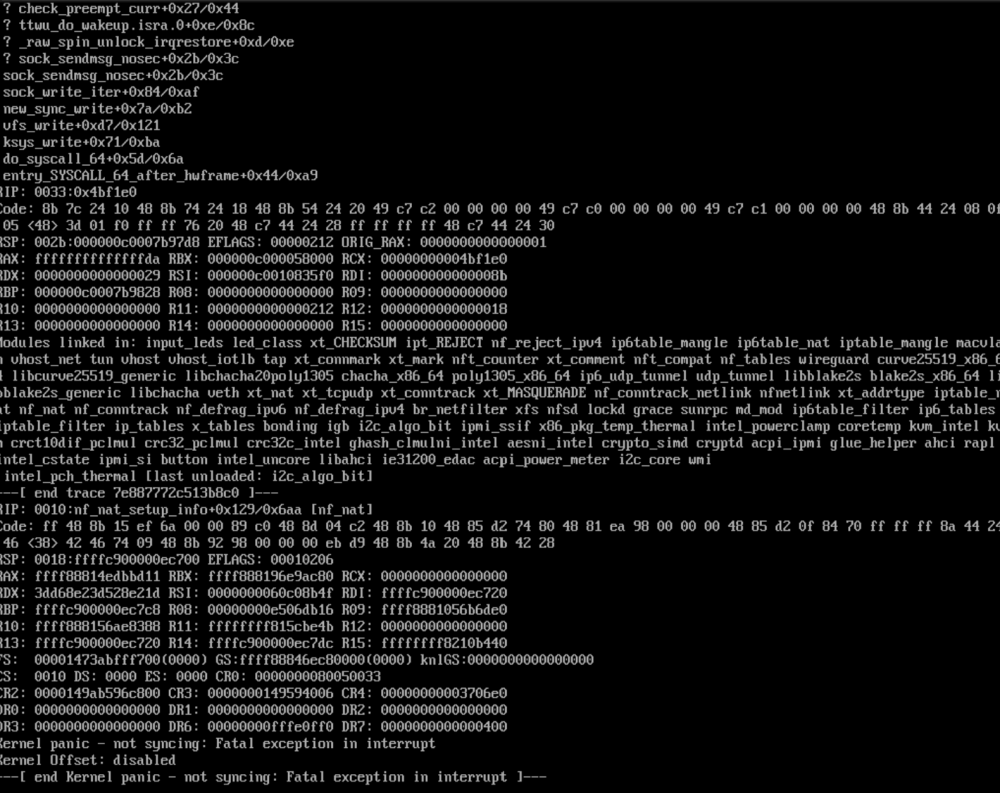
Hi, I've just had my first kernel panic after almost a year with UnRaid. My last changes were to install BlockyDNS (docker) and assign it a fixed IP. From the limited information I have (see attached screenshot) it does seem network related to me. Or could it be related to the winter->summer time change? Any input is appreciated. BR, Jorgensen
-
Hi, I'm trying to setup a smb share hosted by Unraid on a Ubuntu client. However, I'm not able to access the share from Ubuntu. If I run smbstatus in Unraid, there are no entries. Thus, I had a look in the syslog, and I see a few error/warnings related to smb and nmbd. I've attached the log and diagnostics. And I'm able to ping the Unraid server from the client using the IP adress. Hope you can help me figure out the error. tower-syslog-20210912-2147.zip tower-diagnostics-20210912-2350.zip
-
Sorry for the late reply. Must have missed the post. Generally, I'm very happy with the Gen10+. It is a huge improvement over my old Synology NAS. So far my only issue is that it did not recognize one of my HGST HDD. I've just bought a Samsung Evo 870, hope it will be recognized...
-
Thanks, I was about to create my own template for Uptime Kuma, but you beat me to it. I'll report back if I encounter any issues.
-
I would like to request Gokapi https://github.com/Forceu/Gokapi Lightweight selfhosted Firefox Send alternative without public upload. AWS S3 supported.
-
Hi, I've been trying to setup Wikijs with an PostgreSQL data base, however I get an "EACCES: permission denied, mkdir '/data/cache'" I click Install when setting up the admin account and public URL. From the logs, it seems Wikijs connects to database, but not authorized, what am I doing wrong? Wikijs log: 2021-06-13T12:02:03.869Z [MASTER] [32minfo[39m: ======================================= 2021-06-13T12:02:03.870Z [MASTER] [32minfo[39m: = Wiki.js 2.5.201 ===================== 2021-06-13T12:02:03.870Z [MASTER] [32minfo[39m: ======================================= 2021-06-13T12:02:03.870Z [MASTER] [32minfo[39m: Initializing... 2021-06-13T12:02:04.315Z [MASTER] [32minfo[39m: Using database driver pg for postgres [ OK ] 2021-06-13T12:02:04.319Z [MASTER] [32minfo[39m: Connecting to database... 2021-06-13T12:02:04.332Z [MASTER] [32minfo[39m: Database Connection Successful [ OK ] 2021-06-13T12:02:06.213Z [MASTER] [33mwarn[39m: DB Configuration is empty or incomplete. Switching to Setup mode... 2021-06-13T12:02:06.213Z [MASTER] [32minfo[39m: Starting setup wizard... 2021-06-13T12:02:06.312Z [MASTER] [32minfo[39m: Starting HTTP server on port 3000... 2021-06-13T12:02:06.312Z [MASTER] [32minfo[39m: HTTP Server on port: [ 3000 ] 2021-06-13T12:02:06.315Z [MASTER] [32minfo[39m: HTTP Server: [ RUNNING ] 2021-06-13T12:02:06.315Z [MASTER] [32minfo[39m: 🔻🔻🔻🔻🔻🔻🔻🔻🔻🔻🔻🔻🔻🔻🔻🔻🔻🔻🔻🔻🔻🔻🔻🔻🔻🔻🔻🔻🔻 2021-06-13T12:02:06.315Z [MASTER] [32minfo[39m: 2021-06-13T12:02:06.315Z [MASTER] [32minfo[39m: Browse to http://YOUR-SERVER-IP:3000/ to complete setup! 2021-06-13T12:02:06.315Z [MASTER] [32minfo[39m: 2021-06-13T12:02:06.315Z [MASTER] [32minfo[39m: 🔺🔺🔺🔺🔺🔺🔺🔺🔺🔺🔺🔺🔺🔺🔺🔺🔺🔺🔺🔺🔺🔺🔺🔺🔺🔺🔺🔺🔺 2021-06-13T12:03:48.969Z [MASTER] [32minfo[39m: Creating data directories... PostgreSQL log: PostgreSQL Database directory appears to contain a database; Skipping initialization 2021-06-13 13:59:42.859 CEST [1] LOG: starting PostgreSQL 12.5 on x86_64-pc-linux-musl, compiled by gcc (Alpine 10.2.1_pre1) 10.2.1 20201203, 64-bit 2021-06-13 13:59:42.859 CEST [1] LOG: listening on IPv4 address "0.0.0.0", port 5432 2021-06-13 13:59:42.859 CEST [1] LOG: listening on IPv6 address "::", port 5432 2021-06-13 13:59:43.010 CEST [1] LOG: listening on Unix socket "/var/run/postgresql/.s.PGSQL.5432" 2021-06-13 13:59:43.202 CEST [21] LOG: database system was shut down at 2021-06-13 13:59:39 CEST 2021-06-13 13:59:43.269 CEST [1] LOG: database system is ready to accept connections
-
I've now bought the Xeon version and considering a SSD for cache. Do you have any experience with SSDs in the MSG10+? It seems rather picky with disk drives, I've a 8TB HGST HDD which is not recognized... I would like to avoid buying a SSD which won't be recognized.
-
Thanks, I didn't know.
-
Hi guys, Hope you can help me, however it is not a Photoview issue per se. I'm new to Unraids docker management system, prefers docker-compose... To get Photoview running, I need a MariaDB (or Mysql). So I need to create a MariaDB container besides Photoview. But what if another container also requires a MariaDB, should I then have two MariaDBs containers, one for Photoview and one for "another container"?
-
Yes, I've found the power consumption for the Xeon version only. Just curious about the Pentium version before buying. The form factor is the primary reason that I'm buying it. I can't build anything remotely that small that fits 4x 3.5 HDDs. I did consider the UNAS 400 case, but that is not available in EU. I also considered the Supermicro NAS cases, but they are approximately twice the size. I do like the Chenbro ES34169, but that is almost 10 years old, and not possible to find anywhere. The closest case I could find is the GD06, but then I prefer the HPE MS.
