




Skip to content
View in the app

A better way to browse. Learn more.

Unraid

A full-screen app on your home screen with push notifications, badges and more.

To install this app on iOS and iPadOS
  1. Tap the Share icon in Safari
  2. Scroll the menu and tap Add to Home Screen.
  3. Tap Add in the top-right corner.
To install this app on Android
  1. Tap the 3-dot menu (⋮) in the top-right corner of the browser.
  2. Tap Add to Home screen or Install app.
  3. Confirm by tapping Install.

mapa92

Members
  • Joined

  • Last visited

  1. mapa92 replied to Zotarios's topic in Docker Containers
    Yes I can confirm that it works although it shows "Connecting...". But this is not the expected behaviour is it? Nevertheless, at least it does work :D
  2. mapa92 replied to Zotarios's topic in Docker Containers
    Did not help, still stuck on "Connecting..." 😕
  3. mapa92 replied to Zotarios's topic in Docker Containers
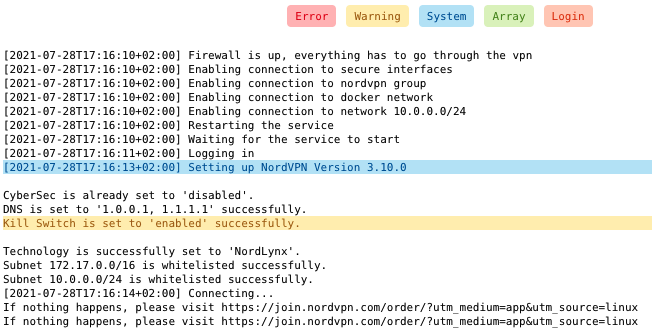
    Anyone else having problems with getting stuck in "Connecting..."? It appears that a VPN connection is still established successfully, as when I route all traffic from a Firefox Docker through the NordVPN container and visit https://nordvpn.com/de/what-is-my-ip/ it tells me that I am protected and the IP address and the geolocation differs from my actual ip address/location. Though if I manually specify a preferred server (CONNECT), then no docker container is connected to the Internet (as I enabled KILLSWITCH).
Account

Navigation

Search

Search

Configure browser push notifications

Chrome (Android)
  1. Tap the lock icon next to the address bar.
  2. Tap Permissions → Notifications.
  3. Adjust your preference.
Chrome (Desktop)
  1. Click the padlock icon in the address bar.
  2. Select Site settings.
  3. Find Notifications and adjust your preference.