vvlang
Members
-
Joined
-
Last visited
-
我没有 A 卡,所以没写 A 卡的
-
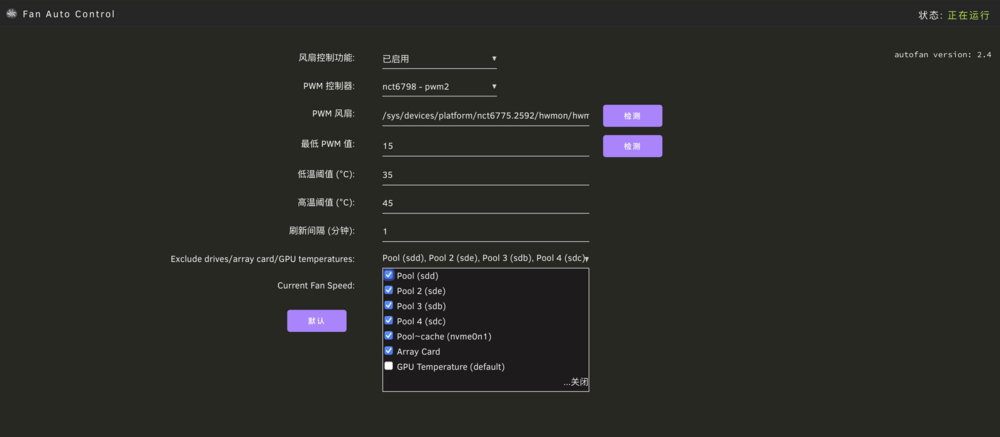
Hello Unraid Community, I’ve made several enhancements to the Dynamix Auto Fan Control plugin and wanted to share them with you. Building on the original plugin, I’ve added the following features: New Features: 1. Support for GPU and Array Card Temperatures: The plugin now supports using GPU and array card temperatures to control fan speed. You can choose to include or exclude these temperatures in the fan control logic. 2. Fan Speed Display in the Settings Page: The settings page now displays the fan speed for the selected controller, making it easier to identify which fan is being controlled. 3. Multi-GPU Support: Added support for multiple GPUs, allowing you to exclude specific GPUs from temperature calculations independently. Usage Instructions: 1. Place the Files: Copy the modified files into the /boot/config/plugins/dynamix.system.autofan directory on your Unraid system. 2. Copy Files to the Plugin Directory: Use the following commands to copy the files to the original plugin directory: cp /boot/config/plugins/dynamix.system.autofan/FanSettings.page /usr/local/emhttp/plugins/dynamix.system.autofan/FanSettings.page cp /boot/config/plugins/dynamix.system.autofan/scripts/get_fan_speed.sh /usr/local/emhttp/plugins/dynamix.system.autofan/scripts/get_fan_speed.sh cp /boot/config/plugins/dynamix.system.autofan/scripts/rc.autofan /usr/local/emhttp/plugins/dynamix.system.autofan/scripts/rc.autofan cp /boot/config/plugins/dynamix.system.autofan/scripts/autofan /usr/local/emhttp/plugins/dynamix.system.autofan/scripts/autofan 3. Set File Permissions: Ensure the files have the correct permissions: chmod 644 /usr/local/emhttp/plugins/dynamix.system.autofan/FanSettings.page chmod 755 /usr/local/emhttp/plugins/dynamix.system.autofan/scripts/get_fan_speed.sh chmod 755 /usr/local/emhttp/plugins/dynamix.system.autofan/scripts/rc.autofan chmod 755 /usr/local/emhttp/plugins/dynamix.system.autofan/scripts/autofan 4. Restart the Plugin: Restart the plugin to apply the changes: /usr/local/emhttp/plugins/dynamix.system.autofan/scripts/rc.autofan restart Notes: Dependencies: Ensure nvidia-smi is installed if you’re using GPU temperature control. You may also need get_storcli_temp.sh for array card temperature support. Persistence: To make the plugin start automatically on boot, add the following line to your /boot/config/go file: /usr/local/emhttp/plugins/dynamix.system.autofan/scripts/rc.autofan start Testing: After restarting, visit the Fan Settings page (Settings > Fan Auto Control) to verify that the fan speed is displayed and that GPU/array card temperature options are available in the "Exclude drives/array card/GPU temperatures" dropdown. Feedback: I’d love to hear your feedback or suggestions for further improvements! If you encounter any issues, please share your logs (tail -f /var/log/syslog | grep autofan) or screenshots of the Fan Settings page. Happy cooling! _dynamix.zip
-
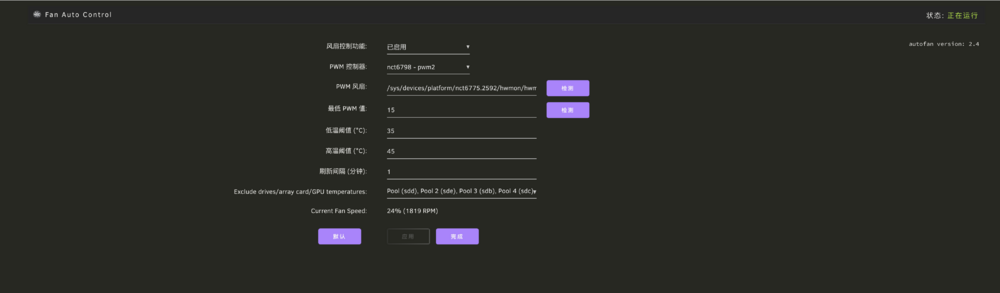
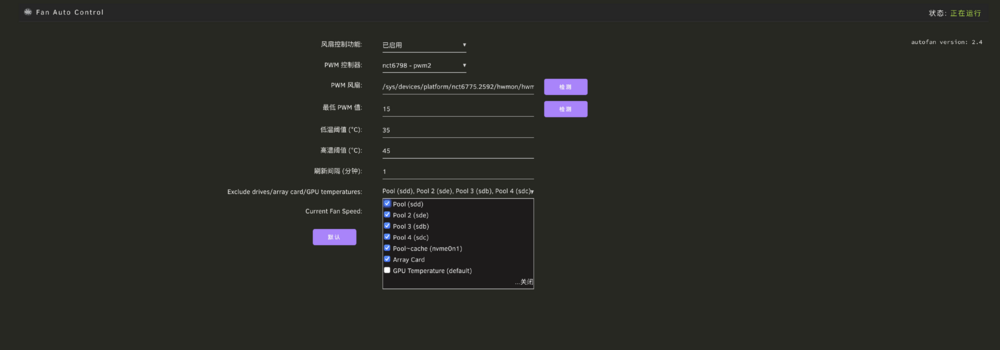
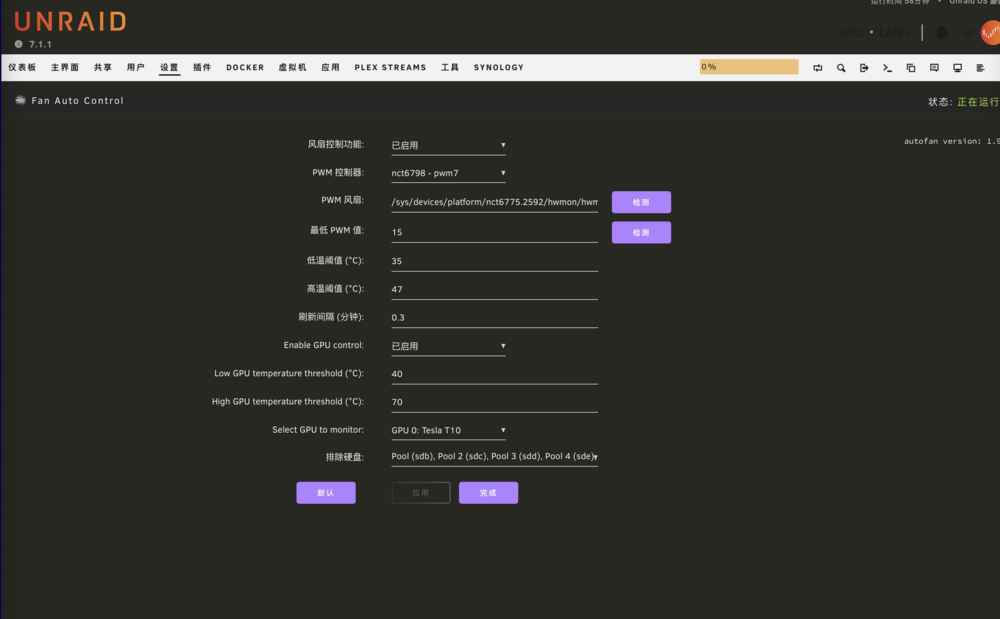
在原版Dynamix Auto Fan Control基础上增加了以下功能: 对显卡温度、阵列卡温度的支持,支持使用显卡温度和阵列卡温度控制风扇转速; 在设置界面展示控制器下面的风扇转速,方便确定控制的是哪个风扇; 增加多显卡支持,独立控制。 用法: 将文件放入/boot/config/plugins/dynamix.system.autofan目录; 使用命令拷贝文件到原版程序目录 cp /boot/config/plugins/dynamix.system.autofan/FanSettings.page /usr/local/emhttp/plugins/dynamix.system.autofan/FanSettings.page cp /boot/config/plugins/dynamix.system.autofan/scripts/get_fan_speed.sh /usr/local/emhttp/plugins/dynamix.system.autofan/scripts/get_fan_speed.sh cp /boot/config/plugins/dynamix.system.autofan/scripts/rc.autofan /usr/local/emhttp/plugins/dynamix.system.autofan/scripts/rc.autofan cp /boot/config/plugins/dynamix.system.autofan/scripts/autofan /usr/local/emhttp/plugins/dynamix.system.autofan/scripts/autofan chmod 644 /usr/local/emhttp/plugins/dynamix.system.autofan/FanSettings.page chmod 755 /usr/local/emhttp/plugins/dynamix.system.autofan/scripts/get_fan_speed.sh chmod 755 /usr/local/emhttp/plugins/dynamix.system.autofan/scripts/rc.autofan chmod 755 /usr/local/emhttp/plugins/dynamix.system.autofan/scripts/autofan 重启程序 /usr/local/emhttp/plugins/dynamix.system.autofan/scripts/rc.autofan restart _dynamix.zip
-
有点小问题,因为是该的官方的,没法持久化,把下载下来的文件放到/boot/config/plugins/dynamix.system.autofan下面,修改nano /boot/config/go文件 添加 # Restore modified autofan files cp /boot/config/plugins/dynamix.system.autofan/autofan /usr/local/emhttp/plugins/dynamix.system.autofan/scripts/autofan cp /boot/config/plugins/dynamix.system.autofan/rc.autofan /usr/local/emhttp/plugins/dynamix.system.autofan/scripts/rc.autofan cp /boot/config/plugins/dynamix.system.autofan/FanSettings.page /usr/local/emhttp/plugins/dynamix.system.autofan/FanSettings.page # Set permissions chmod 755 /usr/local/emhttp/plugins/dynamix.system.autofan/scripts/autofan chmod 755 /usr/local/emhttp/plugins/dynamix.system.autofan/scripts/rc.autofan # Restart autofan service /usr/local/emhttp/plugins/dynamix.system.autofan/scripts/rc.autofan restart 这样曲线救国
-
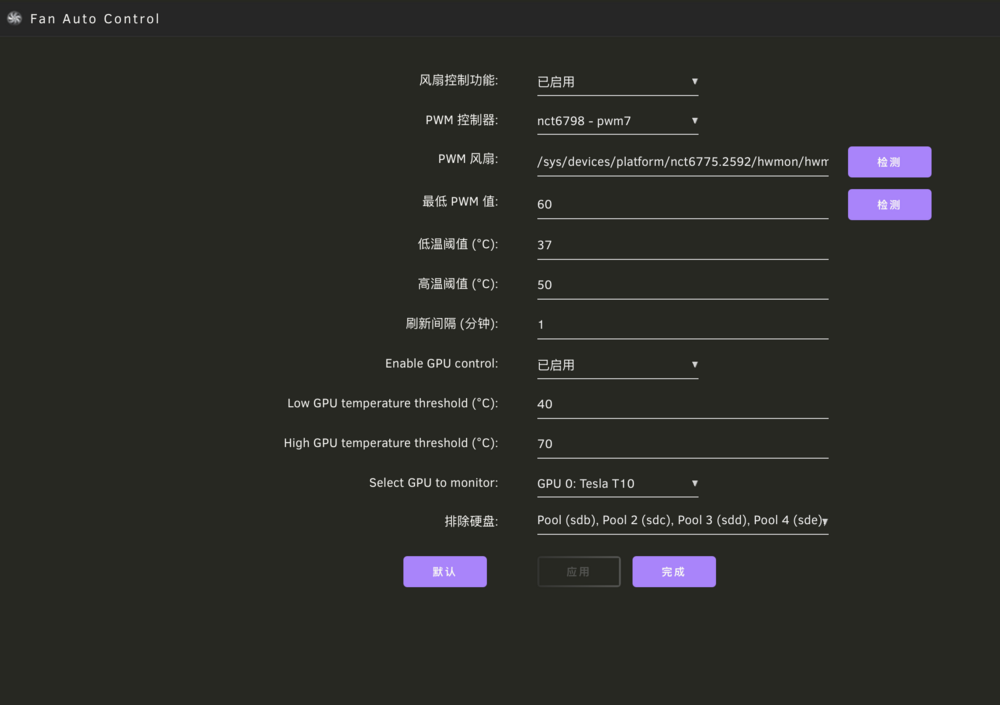
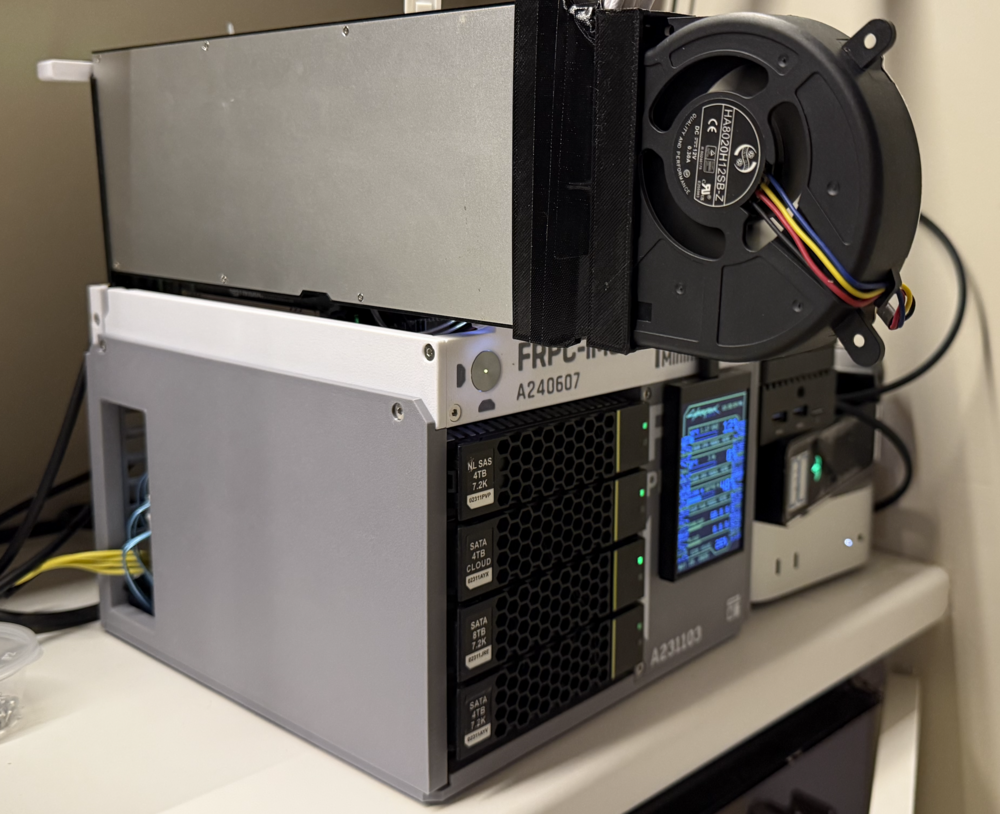
下载附件中的文件,替换到/usr/local/emhttp/plugins/dynamix.system.autofan下,然后重启插件/usr/local/emhttp/plugins/dynamix.system.autofan/scripts/rc.autofan restart即可修改 GPUFAN.zip
-
这题我会啊,在原来autofan加一个功能即可
-
改了xmp设置,微星的xmp设置比较变态,只有自动和载入xmp配置,自动就会各种自动超频,载入xmp模板就是固定的超频模版,改了xmp模板低一个频率才好
-
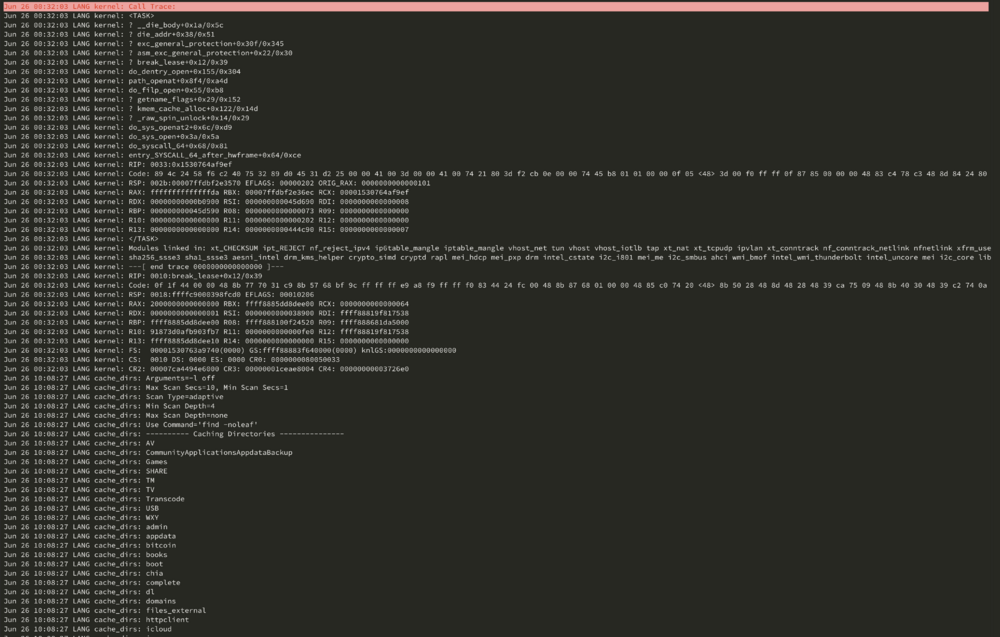
附件中是诊断和日志,已经测试了内存没有问题,每天都要硬重启,不知道什么时候就挂了,很烦。 lang-diagnostics-20240626-1013.zip syslog-10.0.0.10.log.txt
-
The issue persists.
-
V 6.12.6 has been running normally all along.
-
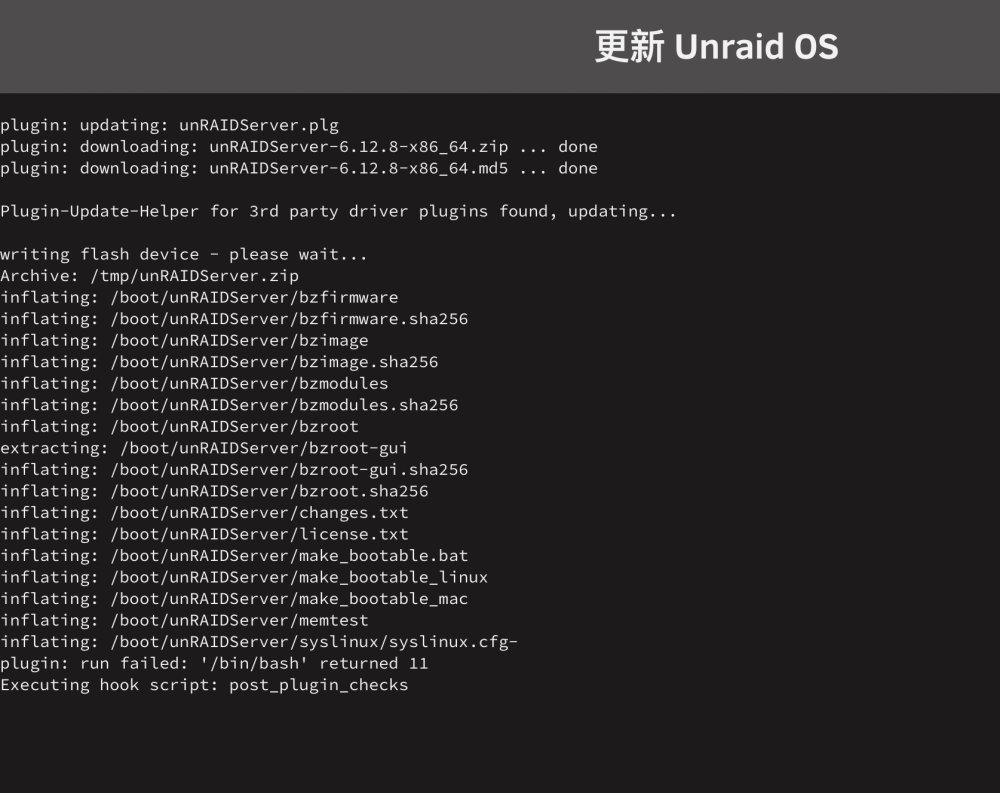
UPDATE 6.12.6 -> 6.12.8 FAILED lang-syslog-20240218-1615.zip
-
-
I tried. It didn't work
-
How should we deal with such a problem?
-
lang-diagnostics-20220114-2123.zip