





antonio3427
Members
-
Joined
-
Last visited
-
I got to the point where it says "PRESS POWER BUTTON ON SERVER TO CONTINUE " and then I press the power button the script doesn't continue just hangs You have selected this device to dump the vbios from 2d:00.0 VGA compatible controller: NVIDIA Corporation GP106 [GeForce GTX 1060 6GB] (rev a1) This does look like a valid GPU to me. Continuing ......... Checking if location to put vbios file exists Vbios folder created at mkdir: created directory '/mnt/user/isos/vbios/' I will try and dump the vbios without disconnecting and reconnecting the GPU This normally only works if the GPU is NOT the Primary or the only GPU I will check the vbios at the end. If it seems wrong I will then retry after disconnecting the GPU Defining temp vm with gpu attached Domain dumpvbios defined from /tmp/dumpvbios.xml Starting the temp vm to allow dump Domain dumpvbios started Waiting for a few seconds ..... Stopping the temp vm Domain dumpvbios destroyed Removing the temp vm Domain dumpvbios has been undefined Okay dumping vbios file named rtx 1060.rom to the location /mnt/user/isos/vbios/ /mnt/user/isos/vbios/rtx 1060.rom is less than 70kb This seems too small. Probably the GPU is Primary and needs disconnecting and reconnecting to get proper vbios Running again Disconnecting the graphics card 1 Entered suspended (sleep) state ...... PRESS POWER BUTTON ON SERVER TO CONTINUE
-
I just installed Radarr and and trying to import my movies and I keep getting page: TypeError: l.responseJSON.map is not a function at r (http://192.168.1.50:7878/index.js?h=zUcZaiTWuIKF4+Ac3h78Ow:1:456976) at S (http://192.168.1.50:7878/vendors.js?h=jiG9XdtP2+0VqLqmyUKw+Q:2:1344524) at div at DocumentTitle at o (http://192.168.1.50:7878/vendors.js?h=jiG9XdtP2+0VqLqmyUKw+Q:2:1359139) at r (http://192.168.1.50:7878/index.js?h=zUcZaiTWuIKF4+Ac3h78Ow:1:145999) at LP (http://192.168.1.50:7878/index.js?h=zUcZaiTWuIKF4+Ac3h78Ow:1:235178) at r (http://192.168.1.50:7878/index.js?h=zUcZaiTWuIKF4+Ac3h78Ow:1:476792) at r (http://192.168.1.50:7878/index.js?h=zUcZaiTWuIKF4+Ac3h78Ow:1:479322) at S (http://192.168.1.50:7878/vendors.js?h=jiG9XdtP2+0VqLqmyUKw+Q:2:1344524) at t (http://192.168.1.50:7878/vendors.js?h=jiG9XdtP2+0VqLqmyUKw+Q:2:1356798) at t (http://192.168.1.50:7878/vendors.js?h=jiG9XdtP2+0VqLqmyUKw+Q:2:1357424) at r (http://192.168.1.50:7878/index.js?h=zUcZaiTWuIKF4+Ac3h78Ow:1:487167) at r (http://192.168.1.50:7878/index.js?h=zUcZaiTWuIKF4+Ac3h78Ow:1:487670) at t (http://192.168.1.50:7878/vendors.js?h=jiG9XdtP2+0VqLqmyUKw+Q:2:1356798) at t (http://192.168.1.50:7878/vendors.js?h=jiG9XdtP2+0VqLqmyUKw+Q:2:1357424) at r (http://192.168.1.50:7878/index.js?h=zUcZaiTWuIKF4+Ac3h78Ow:1:487167) at P9 (http://192.168.1.50:7878/index.js?h=zUcZaiTWuIKF4+Ac3h78Ow:1:1111265) at div at div at r (http://192.168.1.50:7878/index.js?h=zUcZaiTWuIKF4+Ac3h78Ow:1:225697) at r (http://192.168.1.50:7878/index.js?h=zUcZaiTWuIKF4+Ac3h78Ow:1:229137) at S (http://192.168.1.50:7878/vendors.js?h=jiG9XdtP2+0VqLqmyUKw+Q:2:1344524) at n (http://192.168.1.50:7878/vendors.js?h=jiG9XdtP2+0VqLqmyUKw+Q:2:1357961) at t (http://192.168.1.50:7878/vendors.js?h=jiG9XdtP2+0VqLqmyUKw+Q:2:1354141) at u (http://192.168.1.50:7878/vendors.js?h=jiG9XdtP2+0VqLqmyUKw+Q:2:301919) at o (http://192.168.1.50:7878/vendors.js?h=jiG9XdtP2+0VqLqmyUKw+Q:2:303354) at S (http://192.168.1.50:7878/vendors.js?h=jiG9XdtP2+0VqLqmyUKw+Q:2:1344524) at c (http://192.168.1.50:7878/vendors.js?h=jiG9XdtP2+0VqLqmyUKw+Q:2:1342606) at DocumentTitle at o (http://192.168.1.50:7878/vendors.js?h=jiG9XdtP2+0VqLqmyUKw+Q:2:1359139) at e (http://192.168.1.50:7878/index.js?h=zUcZaiTWuIKF4+Ac3h78Ow:1:1113266)
-
sonarr.txt supervisord.log
-
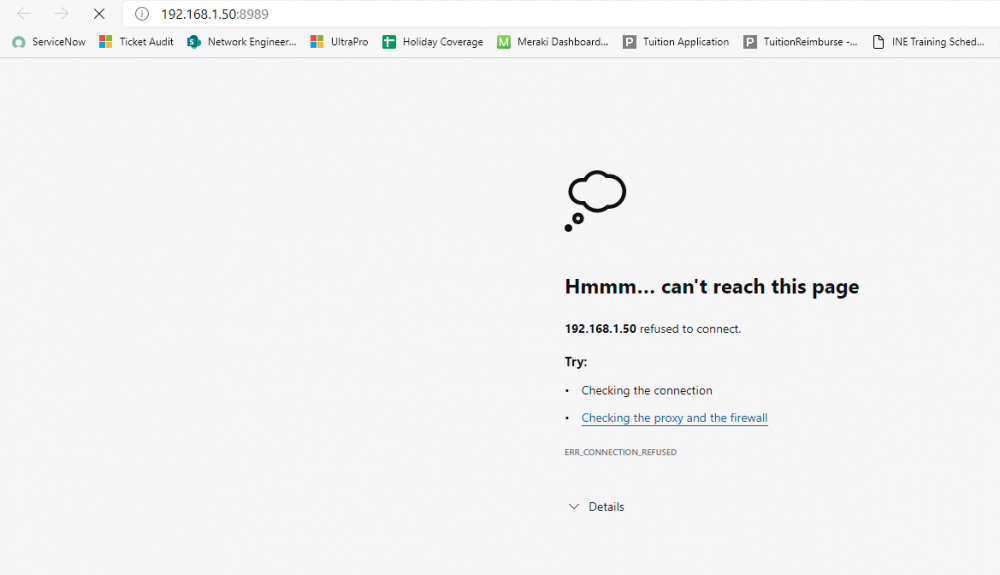
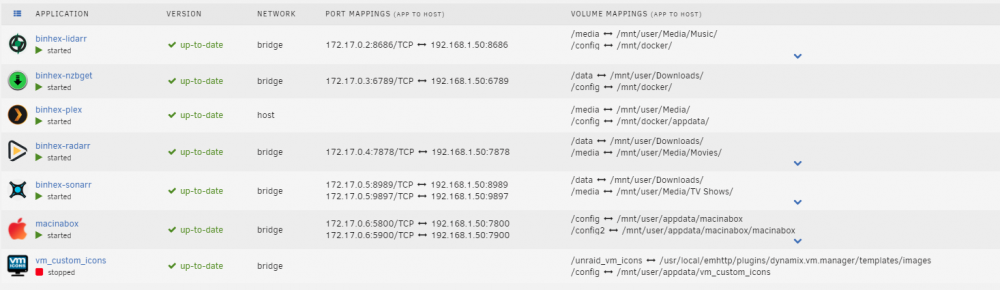
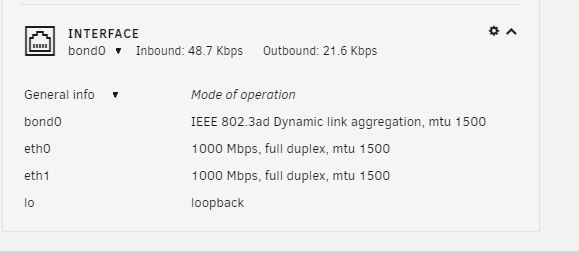
I am having issues with a number of dockers showing refused to connect: Below are the dockers I have so far: Plex, NZBgetm and radarr have no issues. Lidarr and Sonarr refuse to connect I am running a bond interface: I have deleted the dockers, deleted their folders in my appdata folder and re-installed unraid-diagnostics-20210512-1055.zip
-
I have changed to DD4-3200


