




-
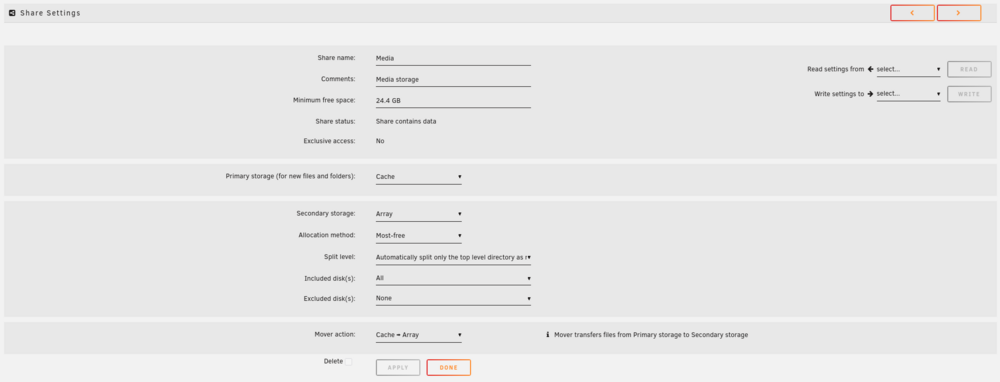
Thanks for the reply, what is the best split level setting if i do want to keep all episodes from a season on the same disk? Or should i just leave it on Any?
-
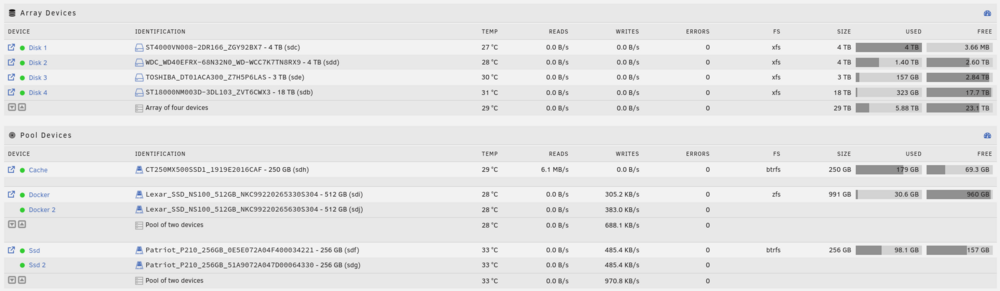
Hello, This morning i had a warning that my Cache drive storage was running full, which is weird because i run a daily mover schedule. So i check the logs and see this message: Sep 22 11:22:07 Tower shfs: copy_file: /mnt/cache/Media/tvshows/Tokyo Revengers/Season 1/Tokyo Revengers - S01E06 - Regret.mkv /mnt/disk1/Media/tvshows/Tokyo Revengers/Season 1/Tokyo Revengers - S01E06 - Regret.mkv.partial (28) No space left on device Sep 22 11:22:07 Tower move: move: /mnt/cache/Media/tvshows/Tokyo Revengers/Season 1/Tokyo Revengers - S01E06 - Regret.mkv No space left on deviceIt tries to move to /mnt/disk1 But this disk has no free space left. So i go to the share settings, and changed Allocation method from high-water to Most-free, started mover again but it still wants to move to disk1. See below overview of my array and disks: Here are the settings for the Media share:
-
How long does it take for binhex to push updates? I get this message from Plex: You are currently running version 1.22.0.4163 on the server. Version 1.22.1.4275 is now available.

View in the app
A better way to browse. Learn more.

