Allanon
Members
-
Joined
-
Last visited
Everything posted by Allanon
-
Thanks trurl, I am just reading up on this, https://community.home-assistant.io/t/solved-conbee-2-fails-to-connect-to-zha-ha-in-unraid-vm/431276 i have a conbee stick on a linux vm that runs Home Assistant, i have just started that vm but without the stick selected in the VM template to see if that makes any difference??? syslog.zip main-diagnostics-20220818-1617.zip
-
Existing system was working fine but tired hardware, replaced motherboard, cpu & memory, system rock solid for about a week but now shutting down after several hours. Syslog copied onto flash drive and i was going to attach it as it only has 3 days worth of logs but the file is 136mb, there are literally thousands of rows showing this Aug 17 19:26:01 Main kernel: usb 1-2.2: usbfs: process 16344 (qemu-system-x86) did not claim interface 1 before use Aug 17 19:26:01 Main kernel: usb 1-2.2: usbfs: process 16344 (qemu-system-x86) did not claim interface 1 before use Aug 17 19:26:01 Main kernel: usb 1-2.2: usbfs: process 16344 (qemu-system-x86) did not claim interface 1 before use Aug 17 19:26:01 Main kernel: usb 1-2.2: usbfs: process 16344 (qemu-system-x86) did not claim interface 1 before use Aug 17 19:26:01 Main kernel: usb 1-2.2: usbfs: process 16344 (qemu-system-x86) did not claim interface 1 before use , nothing jumping out at me in the last few entries, i'm guessing the error above is the issue but I do not know what to do, can anyone take a look and suggest anything please ? Aug 18 03:57:23 Main kernel: Aug 18 04:40:01 Main root: Fix Common Problems Version 2022.08.16 Aug 18 04:43:19 Main kernel: ata3: SATA link up 6.0 Gbps (SStatus 133 SControl 300) Aug 18 04:43:19 Main kernel: ata3.00: configured for UDMA/133 Aug 18 04:43:19 Main emhttpd: read SMART /dev/sdd Aug 18 04:43:19 Main root: Fix Common Problems: Error: Unable to communicate with GitHub.com Aug 18 04:43:19 Main root: Fix Common Problems: Other Warning: Could not check for blacklisted plugins Aug 18 04:43:29 Main emhttpd: read SMART /dev/sdf Aug 18 04:43:50 Main emhttpd: read SMART /dev/sde Aug 18 04:47:23 Main kernel: mdcmd (42): set md_write_method 1 Aug 18 04:47:23 Main kernel: Aug 18 04:49:23 Main root: Fix Common Problems: Warning: Syslog mirrored to flash Aug 18 04:59:01 Main emhttpd: spinning down /dev/sde Aug 18 04:59:24 Main rsyslogd: [origin software="rsyslogd" swVersion="8.2102.0" x-pid="1087" x-info="https://www.rsyslog.com"] rsyslogd was HUPed Aug 18 05:00:01 Main emhttpd: spinning down /dev/sdd Aug 18 05:00:01 syslogMain emhttpd: spinning down /dev/sdf Aug 18 05:02:23 Main kernel: mdcmd (43): set md_write_method 0 Aug 18 05:02:23 Main kernel: Aug 18 15:37:18 Main kernel: Linux version 5.15.46-Unraid (root@Develop) (gcc (GCC) 11.2.0, GNU ld version 2.37-slack15) #1 SMP Fri Jun 10 11:08:41 PDT 2022
-
Thanks yayitazale Sorry I should have said I have tried before to add unassigned drives to home assistant VM, basically the same way as you explained above and how i have successfully done it before in Docker. Unfortunately the Home Assistant VM always hangs then and I dont know how to troubleshoot that. Not sure if you use Home Assistant but any googling on this subject seems to point to it being very locked down intentially, hence the complicated instructions in the link I provided earlier. On my way out now but will try again as per your instructions and see if I can find some logs or something. Appreciate the help thank you!
-
As part of the normal SMB shares that are created, there is Home Assisted Share called media which then has media\frigate media\cache frigate and cache are created by the frigate addon

-
Thank you! 🙂 Will do
-
I have found this https://community.home-assistant.io/t/solved-hassos-mount-nas-network-share/303292 Honestly I understand about 1 word in 5, does anyone with more knowledge agree this is the best way on Unraid to get more storage to the Frigate addon for longer term camera storage rather than saving it on a cache ssd? Thanks
-
Thanks yayitazale I got the addon running in Home Assistant and its recognizing my USB Coral, having problems with the hardware acceleration but thats another story! I'v hit a hurdle though, reason I wanted Frigate in a docker was due to easily mounting my Unraid unassigned drive to it to store all the media from the camera, I have been googling how to pass the same drive to a Home Assistant VM and to be honest struggling! As i am just constantly filling up my cache drive. Any idea if there is going to be a Unraid docker created for Frigate for the OLD CPU version? Do you plan on keeping this version, addon and possibly Docker version updated in the future? Really want to say thanks for all the work you have done, i'm just trying to work out if I have to save up and invest in some new hardware, you wouldn't believe the hours I have put into this to get as far as I am now 😕 What you have created is just perfect for my use case 🙂 and i hope to keep using it Thanks 🙂
-
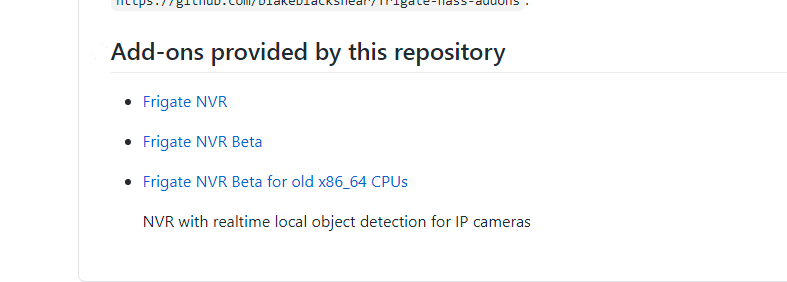
Ok just trying it now with https://github.com/pdecat/frigate-hass-addons/
-
Hi thanks for that but when i go to https://github.com/pdecat/frigate-hass-addons I'm getting a 404 page not found https://github.com/pdecat/frigate-hass-addons/blob/main/frigate_beta_old/README.md Sorry if I am doing something daft 😞
-
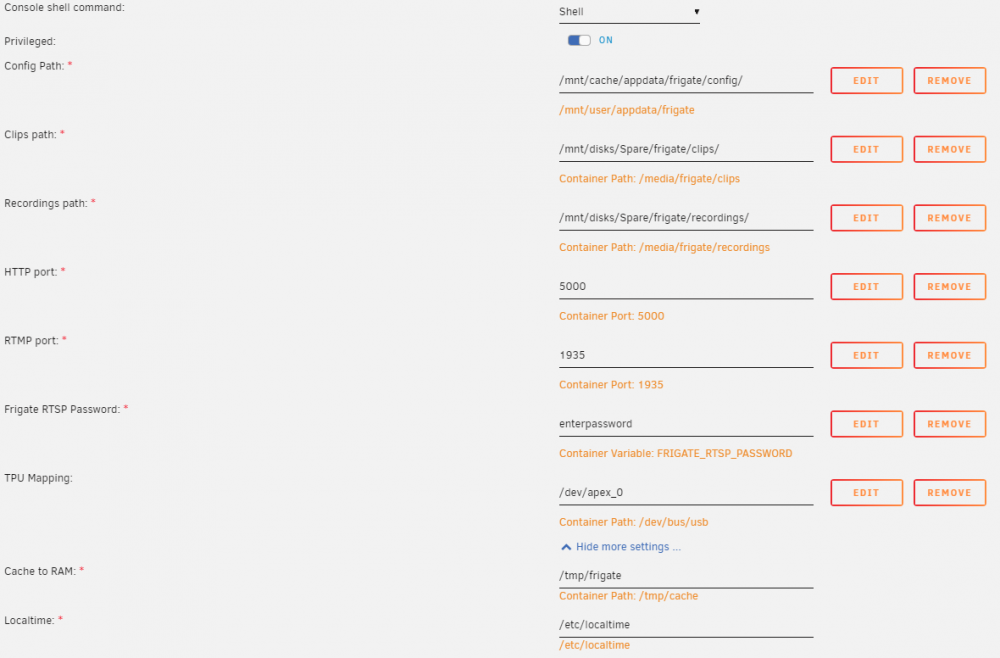
Hi all, hope someone can please help i have unraid and this docker working perfectly on one system but its a real power hog so I have been trying to get this working on my hp proliant nl36 which only has a AMD Athlon II, 2 core 1.30GHz CPU. From what I have found out this CPU does not support AVX, and I think that is what is causing this error below, Iv also asked on the Home Assistant forum post for Frigate but I did not get any replies. Any suggestions appreciated, thanks https://github.com/blakeblackshear/frigate/issues/49 ``` * Starting nginx nginx ...done. Fatal Python error: Illegal instruction Current thread 0x00001553e214a740 (most recent call first): File "<frozen importlib._bootstrap>", line 219 in _call_with_frames_removed File "<frozen importlib._bootstrap_external>", line 1101 in create_module File "<frozen importlib._bootstrap>", line 556 in module_from_spec File "<frozen importlib._bootstrap>", line 657 in _load_unlocked File "<frozen importlib._bootstrap>", line 975 in _find_and_load_unlocked File "<frozen importlib._bootstrap>", line 991 in _find_and_load File "<frozen importlib._bootstrap>", line 219 in _call_with_frames_removed File "<frozen importlib._bootstrap>", line 1042 in _handle_fromlist File "/usr/local/lib/python3.8/dist-packages/tflite_runtime/interpreter.py", line 36 in <module> File "<frozen importlib._bootstrap>", line 219 in _call_with_frames_removed File "<frozen importlib._bootstrap_external>", line 783 in exec_module File "<frozen importlib._bootstrap>", line 671 in _load_unlocked File "<frozen importlib._bootstrap>", line 975 in _find_and_load_unlocked File "<frozen importlib._bootstrap>", line 991 in _find_and_load File "/opt/frigate/frigate/edgetpu.py", line 15 in <module> File "<frozen importlib._bootstrap>", line 219 in _call_with_frames_removed File "<frozen importlib._bootstrap_external>", line 783 in exec_module File "<frozen importlib._bootstrap>", line 671 in _load_unlocked File "<frozen importlib._bootstrap>", line 975 in _find_and_load_unlocked File "<frozen importlib._bootstrap>", line 991 in _find_and_load File "/opt/frigate/frigate/app.py", line 19 in <module> File "<frozen importlib._bootstrap>", line 219 in _call_with_frames_removed File "<frozen importlib._bootstrap_external>", line 783 in exec_module File "<frozen importlib._bootstrap>", line 671 in _load_unlocked File "<frozen importlib._bootstrap>", line 975 in _find_and_load_unlocked File "<frozen importlib._bootstrap>", line 991 in _find_and_load File "/opt/frigate/frigate/__main__.py", line 7 in <module> File "/usr/lib/python3.8/runpy.py", line 87 in _run_code File "/usr/lib/python3.8/runpy.py", line 194 in _run_module_as_main ```