





Sinister Crayon
Members
-
Joined
-
Last visited
-
So I'm not sure if this is a problem that others are hitting, but I have noticed that since 7.3.0 this plugin seems to have stopped working. In fairness I only have a single SAS drive in my array but even clicking the spin down icon will just spin the icon for a minute and the drive never spins down. The logs do say "SAS Assist v2024.11.25: Spinning down device /dev/sda" but it never seems to actually spin down. Might be a bug, might be my specific setup I'm not sure. The plugin did seem to work with 7.2.x though. EDIT TO ADD: I did a bit of troubleshooting when I had a moment. It appears that all the "normal" SAS spindown commands like sdparm just don't work on that disk. Not sure what has changed... might be something at the kernel level. Probably not something you can fix unfortunately and it might be my controller... maybe a driver issue? Who knows?
-
Very well. Submitted a ticket and referenced this thread.
-
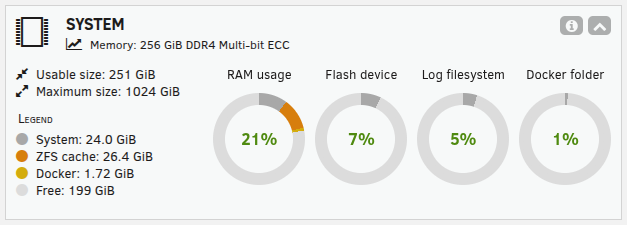
Yes. In this case it was "18171". It was one of my NFSD processes, again. I was able to stop the array and restart it and the problem is resolved again. I did not reboot the server, just restarted the array. I did try to just restart NFS first but it wouldn't stop the NFS services, just hung until I stopped the entire array. The SYSTEM memory taken up by the rogue NFSD process is still taken up; it got up to 24G of RAM and my machine's still showing a "SYSTEM" memory load of 24G while under normal operations it usually sits around 6-8GB of SYSTEM memory. Of note; I have some machines connected to the array via NFS. One of them at the time the problem occurred showed an error that the NFS server was not responding in its DMESG logs. However, everything appeared to be working just fine as in I could enter and browse the NFS mounted filesystems without an issue and all the apps running on it were running fine. I did reboot this box as part of my troubleshooting and during boot it refused to reconnect to the NFS server (the unRAID machine). It was only after I restarted the array that the NFS mounts came back without an issue. The mount line used to mount those NFS mounts is; "10.10.10.202:/mnt/ixios/sandata /sandata nfs _netdev,noatime,nodiratime,fsc,nconnect=8,actimeo=1,timeo=600 0 0" I may reboot this system today to try to free that memory up unless you have any specific commands you'd like me to run to gather data. I have attached an updated diagnostic dump since I did not reboot the server, just restarted the array. The problem is not occurring right now since I restarted the array except for the "lost" memory. If it starts again I can try to run the strace again but I just tried strace again on an existing NFSD process but it doesn't appear I can attach to any of them. strace against another process running on the system (Pi-Hole) returns data as expected. NFSD processes all return "Operation not permitted" ixios-diagnostics-20251208-0720.zip
-
Alright... problem has occurred again. I tried doing "strace -p PID" but got "Operation not permitted."
-
Will do. I'll start on a reboot now and will post an update when it happens again. For the record I had already increased the NFS threads to 32
-
Got an unRAID box recently moved to production. I have a problem after a couple of days that's driving me nuts and is consistent. At some random point a single NFSD daemon suddenly spikes to 100% CPU and hangs there. Once this happens, the SYSTEM memory in the dashboard starts rising and rising eventually exhausting all the memory in the system. There aren't a ton of NFS clients but this is the main use case for this server. Storage backend is a ZFS pool. This is not new per se; the array itself was only recently built but has been problematic since the start. Basically runs for a few days then stops responding with a crashed NFSD (or once, more than one) process eating up a CPU core of utilization and memory growing out of control. NFS services are generally unaffected except for this constant memory growth. All the clients are operating completely normally and none of them seem particularly busy either. Checked DMESG and SYSLOG for errors but nothing seems amiss. Since this a Dell T440 server I checked iDRAC to see if it had snagged any hardware failures but nothing comes up there either. Diagnostics attached. Server's still running and I'm monitoring the situation but the memory use is still growing. Not sure what'll happen when the process eventually eats all the RAM. ixios-diagnostics-20251127-1133.zip
-
That was it. For anyone else searching this in future, create a single pool of ALL your devices not just the main pool data devices and assign them all. It'll get sorted out on first startup. Thanks, @JorgeB
-
Thank you. No that wasn't clear but indeed this seems to have resolved the problem. Going to try a couple of reboots to be sure before I mark it as a solution but it's looking good at the moment.
-
Context here; your response to my earlier concern was "Yes, you can, and you must. Subpools devices are assigned together with the other devices; all together, they will be sorted at array start"
-
You literally told me I "must" use "Auto" filesystem. If I select Auto filesystem then I can't assign subpool devices.
-
A scrub is probably going to take 24 hours or more and I think is unlikely to resolve the issue. The fact that it imports means that it's usable... I can literally read data from it. I tried booting up an Ubuntu live USB stick and I can import the pool there too. No issues. Are you telling me there's no effective way to just import an existing ZFS pool into unRAID? Imagine for a moment this is an existing ZFS pool (for example from TrueNAS) that I want to import into a new unRAID install; how would I do that? Is there any configuration on the USB stick I should be looking at? Some saved value that has gotten broken somewhere?
-
root@Ixios:~# zpool import ixios root@Ixios:~# zpool status -v pool: ixios state: ONLINE status: One or more devices has experienced an error resulting in data corruption. Applications may be affected. action: Restore the file in question if possible. Otherwise restore the entire pool from backup. see: https://openzfs.github.io/openzfs-docs/msg/ZFS-8000-8A scan: scrub canceled on Mon Nov 17 13:47:12 2025 config: NAME STATE READ WRITE CKSUM ixios ONLINE 0 0 0 raidz2-0 ONLINE 0 0 0 sdm1 ONLINE 0 0 0 sdn1 ONLINE 0 0 0 sdc1 ONLINE 0 0 0 sdj1 ONLINE 0 0 0 sdf1 ONLINE 0 0 0 sdk1 ONLINE 0 0 0 sdg1 ONLINE 0 0 0 sdh1 ONLINE 0 0 0 sde1 ONLINE 0 0 0 sdl1 ONLINE 0 0 0 sdd1 ONLINE 0 0 0 sdi1 ONLINE 0 0 0 special mirror-1 ONLINE 0 0 0 nvme1n1p1 ONLINE 0 0 0 nvme3n1p1 ONLINE 0 0 0 logs mirror-15 ONLINE 0 0 0 nvme0n1p1 ONLINE 0 0 0 nvme2n1p1 ONLINE 0 0 0 errors: Permanent errors have been detected in the following files: /mnt/ixios/appdata/syncthing/index-v2/folder.0002-bchrqmal.db
-
BTW, I'm aware of the errors. That was a DB file that got corrupted due to the sudden power off. Non-critical file and replaceable.
-
root@Ixios:~# zpool import -f -m -N -d /dev/sdm1 1247441232252185846 ixios cannot import 'ixios' as 'ixios': I/O error Destroy and re-create the pool from a backup source. root@Ixios:~# zpool import -f -m -N -d /dev/sdn1 1247441232252185846 ixios cannot import 'ixios' as 'ixios': I/O error Destroy and re-create the pool from a backup source. root@Ixios:~#
-
Done. Pool inaccessible. Did not import. ixios-diagnostics-20251118-1243.zip
