





Creativity404
Members
-
Joined
-
Last visited
-
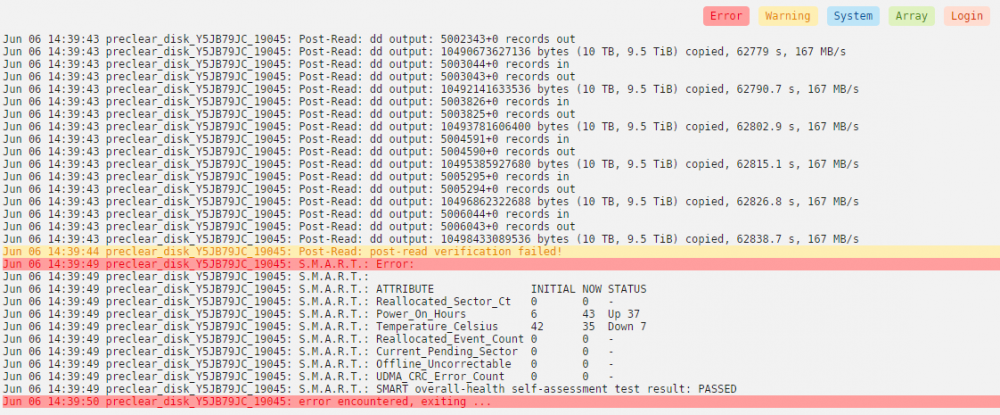
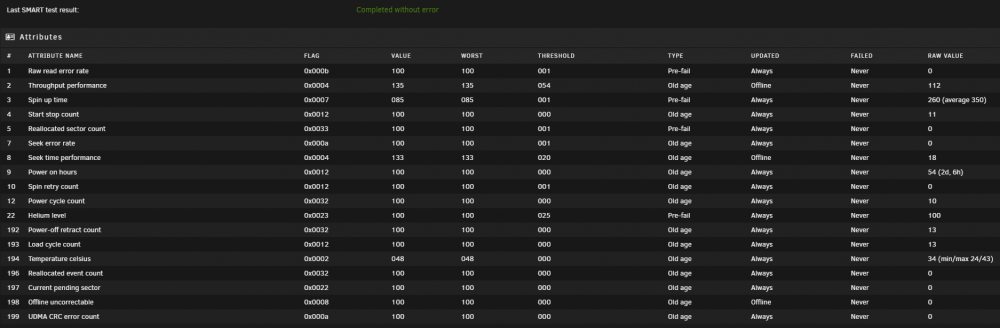
Goodday everyone, I'm adding 2, 12 TB drives to my system. 1 precleared succesfully the other one did not. In the log it says: Y5JB79JC_19045: Post-Read: cmp command failed - disk not zeroed Y5JB79JC_19045: Post-Read: dd command failed, exit code [141] Would anybody have some advice for me? It would be greatly appreciated. Is the drive faulty? should i run another preclear? APOLLO-unassigned.devices.preclear-20220607-0200.zip

-
Try getting rid of "DOGE:" in your wallet adress
-
Do you actually replace "mywallet" with your wallet? Show a screenshot of how you have the docker settings
-
Do you understand your command line? also it is a windows command line so you can't just paste it into a terminal. edit the docker: basically you are going to edit the pool, your wallet, and the rest goes into additional xmrig arguments. Look here for the command line options and familiarize yourself with what your command line actually does: https://xmrig.com/docs/miner/command-line-options You should then understand what to put into additional arguments
-
Update but without better/additional info: So after 3 days(usually just 1) of running without fail the problem has occurred again. I notice the problem has occurred because there will be 2-3 hyperthreads stuck on 100% I have been unable to try anything because this time the whole server became unresponsive since the thread of core 0 became "stuck". I could still see the dashboard since it was already open but i couldnt view any other page or open the web terminal. I went and looked at the physical machine but it just showed a black screen as output. I will troubleshoot/diagnose at the next opportunity.
-
I have disabled gpu drivers in order to tinker with passing through my gpu, and ever since (last night) the problem does not occur anymore. So when i had amdgpu & radeon drivers enabled the problem was consistent, and reproducable but now it seems to not occur at all. I prefer to pass through the GPU and leave the drivers dissabled. But that is a whole different problem i am struggling with. if i fail to pass through the GPU i will try to enable the drivers again and will continue to diagnose this problem.
-
I am running latest-root When i mean a clean shutdown, i mean the whole server. The docker doesnt respond to anything, and when i try to reboot the server it hangs. i will have to go push the physical reset button or: echo 1 > /proc/sys/kernel/sysrq echo b > /proc/sysrq-trigger (^i found that online I'm a total linux noob) Pulling image: lnxd/xmrig:latest-root IMAGE ID [latest-root]: Pulling from lnxd/xmrig. Status: Image is up to date for lnxd/xmrig:latest-root TOTAL DATA PULLED: 0 B i forced an update but it was latest. I am going to try: docker logs XMRig -f docker exec -ti XMRig apt-get install -y htop && htop When it is frozen, can you please run docker stop ----time=60 XMRig, see if it takes the full minute to stop. If it does, this means sigterm is failing. This shouldn't happen, but your diagnostics.zip could explain why it does. I will report back 😃 apollo-diagnostics-20210417-0225.zip
-
After running this docker for a few hours the docker becomes unresponsive to shutdown/reboot. When i try to do anything with it the entire docker proces becomes unresponsive. I have not assigned the first core to the docker so unraid still runs and responds. but with the docker being unresponsive i am unable to do a clean shutdown. Any idea why this might be happening? I could make an hourly(or every 3-4) user script: But id prefer to know how/why it happens and if there is a neater solution. The docker keeps running/mining btw, just unresponsive and logs dont load.
-
Is there a default passphrase or email configured if youd want to change your pool payout settings? I found it searching the thread, my bad. Thank you for this docker!



