





BrownHP800
Members
-
Joined
-
Last visited
-
Found the issue. I had a user script that was blacklisting the Realtek drivers. No idea how long that script has been there but removing it worked
-
So been running Unraid for a long time. No issues. Built in NIC. Got a TPLink TX201 2.5gb card. Installed. Disabled internal nic. Will not assign eth0 Deleted the network config. Sometimes it will come up after doing that but on a reboot it goes back to not working. I have a strange feeling it has something to do with docker but not sure on that. If I disable docker and delete the network config it will work. I can then start docker and it is as happy as can be until I reboot. Short of doing a fresh install I am at a loss. I enabled the internal nic for now (tp link is still installed) and it is happy again. Not sure where to look or what log files you would want me to post.
-
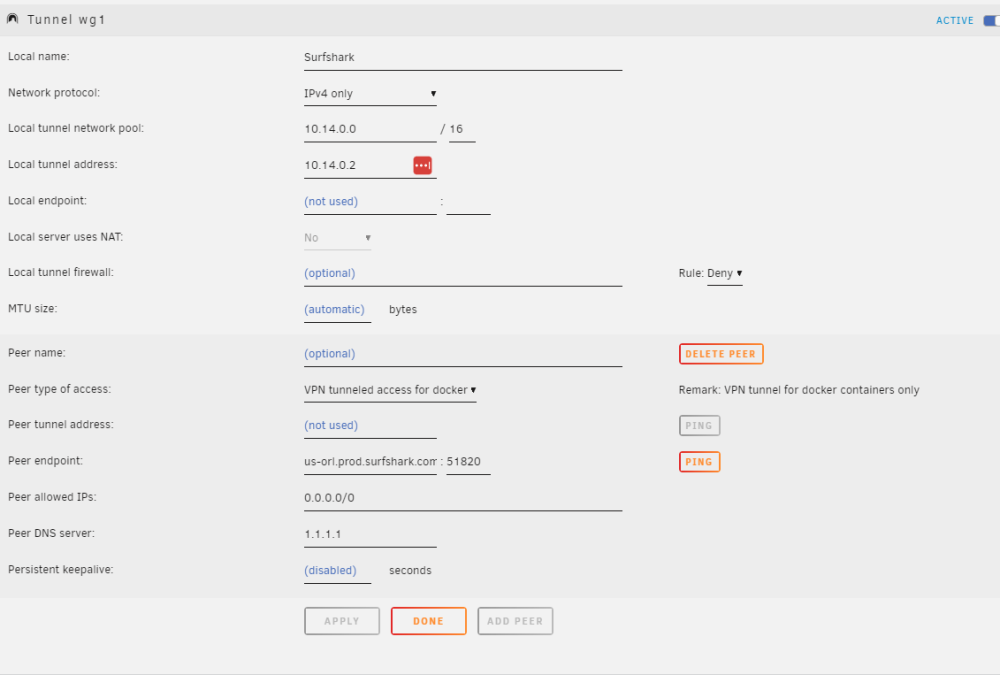
I guess I am doing something wrong. Kind of new to this so forgive me. I am trying to use SurfSharkVPN and set up wg1 tunnel to route dockers through. Now I have this config file in qbittorrentvpn using wireguard and I can route docker through no problems. But changing the docker to wg1, it does not seem to do anything. Now I can log into the console and do curl ipconfig.io and get the vpn ip, but any docker container I run does not work. Like I have firefox and it will not connect to any sites. I can ping them from the console but can not access them from the gui. (Radarr and sonarr are the same way) Here is my surfshark config [Interface] Address = 10.14.0.2/16 PrivateKey = DNS = 162.252.172.57,149.154.159.92 [Peer] PublicKey = AllowedIPs = 0.0.0.0/0 Endpoint = us-orl.prod.surfshark.com:51820 I manually added the DNS to the WG tunnel. Even changed it to just 1.1.1.1 or 8.8.8.8 Is there something I am missing?
-
I know its an old topic, but using UNRaid 6.9.2 and I have qemu-gest-agent running, it shows the IP in proxmox but I can not shut the UNRaid VM down from proxmox. I have to log into the UNRaid gui and shut it down from there. Is this a bug with the guest agent version UNRaid has or am I just missing a setting or something?
