





gzelvis
Members
-
Joined
-
Last visited
-
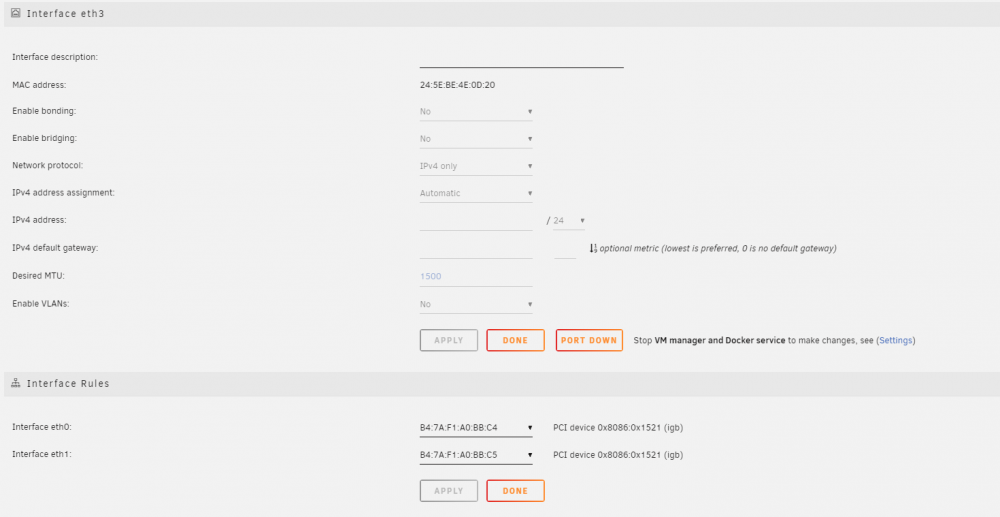
if any more information u need, plz let me know。 eth3 can't be found in [Interface Rules] so i cant chage unraid to use it as eth0 for main network use
-
IOMMU group 3:[8086:a36d] 00:14.0 USB controller: Intel Corporation Cannon Lake PCH USB 3.1 xHCI Host Controller (rev 10) Bus 002 Device 001: ID 1d6b:0002 Linux Foundation 2.0 root hub Bus 002 Device 002: ID 0424:2660 Standard Microsystems Corp. Hub Bus 002 Device 004: ID 1c04:0015 QNAP System Inc. QNAP QNA-UC5G1T USB to 5GbE Adapter Bus 003 Device 001: ID 1d6b:0003 Linux Foundation 3.0 root hub Bus 003 Device 003: ID 090c:1000 Silicon Motion, Inc. - Taiwan (formerly Feiya Technology Corp.) Flash Drive
-
root@HOMESERVER:~# ifconfig docker0: flags=4163<UP,BROADCAST,RUNNING,MULTICAST> mtu 1500 inet 172.17.0.1 netmask 255.255.0.0 broadcast 172.17.255.255 inet6 fe80::42:9fff:fe03:8684 prefixlen 64 scopeid 0x20<link> ether 02:42:9f:03:86:84 txqueuelen 0 (Ethernet) RX packets 769736 bytes 503056618 (479.7 MiB) RX errors 0 dropped 0 overruns 0 frame 0 TX packets 731398 bytes 568106147 (541.7 MiB) TX errors 0 dropped 0 overruns 0 carrier 0 collisions 0 eth0: flags=4163<UP,BROADCAST,RUNNING,MULTICAST> mtu 1500 inet 10.0.0.88 netmask 255.255.255.0 broadcast 0.0.0.0 ether b4:7a:f1:a0:bb:c4 txqueuelen 2000 (Ethernet) RX packets 150754356 bytes 177547905334 (165.3 GiB) RX errors 0 dropped 4148724 overruns 0 frame 0 TX packets 189578572 bytes 275264539550 (256.3 GiB) TX errors 0 dropped 0 overruns 0 carrier 0 collisions 0 device memory 0x87400000-874fffff eth3: flags=4163<UP,BROADCAST,RUNNING,MULTICAST> mtu 1500 inet6 fd27:f9d1:9a96:1:265e:beff:fe4e:d20 prefixlen 64 scopeid 0x0<global> inet6 fe80::265e:beff:fe4e:d20 prefixlen 64 scopeid 0x20<link> ether 24:5e:be:4e:0d:20 txqueuelen 1000 (Ethernet) RX packets 167 bytes 40214 (39.2 KiB) RX errors 0 dropped 0 overruns 0 frame 0 TX packets 35 bytes 7376 (7.2 KiB) TX errors 0 dropped 0 overruns 0 carrier 0 collisions 0 lo: flags=73<UP,LOOPBACK,RUNNING> mtu 65536 inet 127.0.0.1 netmask 255.0.0.0 inet6 ::1 prefixlen 128 scopeid 0x10<host> loop txqueuelen 1000 (Local Loopback) RX packets 293689 bytes 357824408 (341.2 MiB) RX errors 0 dropped 0 overruns 0 frame 0 TX packets 293689 bytes 357824408 (341.2 MiB) TX errors 0 dropped 0 overruns 0 carrier 0 collisions 0 veth2f7ce7d: flags=4163<UP,BROADCAST,RUNNING,MULTICAST> mtu 1500 inet6 fe80::d8bd:a9ff:fe56:d8fb prefixlen 64 scopeid 0x20<link> ether da:bd:a9:56:d8:fb txqueuelen 0 (Ethernet) RX packets 260551 bytes 333788126 (318.3 MiB) RX errors 0 dropped 0 overruns 0 frame 0 TX packets 377938 bytes 128551510 (122.5 MiB) TX errors 0 dropped 0 overruns 0 carrier 0 collisions 0 veth4690b2c: flags=4163<UP,BROADCAST,RUNNING,MULTICAST> mtu 1500 inet6 fe80::287f:c1ff:fed6:85ad prefixlen 64 scopeid 0x20<link> ether 2a:7f:c1:d6:85:ad txqueuelen 0 (Ethernet) RX packets 35817 bytes 10980138 (10.4 MiB) RX errors 0 dropped 0 overruns 0 frame 0 TX packets 1643 bytes 1377443 (1.3 MiB) TX errors 0 dropped 0 overruns 0 carrier 0 collisions 0 veth83343a5: flags=4163<UP,BROADCAST,RUNNING,MULTICAST> mtu 1500 inet6 fe80::64df:dbff:fe0b:7199 prefixlen 64 scopeid 0x20<link> ether 66:df:db:0b:71:99 txqueuelen 0 (Ethernet) RX packets 346240 bytes 135829660 (129.5 MiB) RX errors 0 dropped 0 overruns 0 frame 0 TX packets 298284 bytes 352301682 (335.9 MiB) TX errors 0 dropped 0 overruns 0 carrier 0 collisions 0 veth978f18c: flags=4163<UP,BROADCAST,RUNNING,MULTICAST> mtu 1500 inet6 fe80::c82e:56ff:feaf:17d6 prefixlen 64 scopeid 0x20<link> ether ca:2e:56:af:17:d6 txqueuelen 0 (Ethernet) RX packets 5028 bytes 1589778 (1.5 MiB) RX errors 0 dropped 0 overruns 0 frame 0 TX packets 40363 bytes 31394156 (29.9 MiB) TX errors 0 dropped 0 overruns 0 carrier 0 collisions 0 vethbf14116: flags=4163<UP,BROADCAST,RUNNING,MULTICAST> mtu 1500 inet6 fe80::68d2:7dff:fe18:8b5 prefixlen 64 scopeid 0x20<link> ether 6a:d2:7d:18:08:b5 txqueuelen 0 (Ethernet) RX packets 87685 bytes 22856750 (21.7 MiB) RX errors 0 dropped 0 overruns 0 frame 0 TX packets 118597 bytes 22230503 (21.2 MiB) TX errors 0 dropped 0 overruns 0 carrier 0 collisions 0 virbr0: flags=4099<UP,BROADCAST,MULTICAST> mtu 1500 inet 192.168.122.1 netmask 255.255.255.0 broadcast 192.168.122.255 ether 52:54:00:47:39:b2 txqueuelen 1000 (Ethernet) RX packets 0 bytes 0 (0.0 B) RX errors 0 dropped 0 overruns 0 frame 0 TX packets 0 bytes 0 (0.0 B) TX errors 0 dropped 0 overruns 0 carrier 0 collisions 0 --------------------------------------------------- eth3 is the usb aqc111 usb ethernet card . and i found it will not auto get ipv4 adresss
-
thanks for your works, but when i install this module in Unraid 6.9.2 , The OS add this Qnap AQC111 usb ethernet card, but in [ Interface Rules ] Coloum i can't see this usb ethernet card info, so i can't chanage eth0 to Qnap aqc usb ethernet card, which i want to replace the system original 1Gbps i350 nic to boot and for unraid main use. is there need to change /boot/config/network-rules.cfg to add this usb aqc111 card info?
-
is there anyone would help me? last night i install l777 nvidia plugins, it notice me to reboot the server, when i reboot i can't access unraid webui anymore. i try use keyboard in boot time webui mode, it show blank screen. and i try safe mode and disable plugins mode, it works. but in this mode i can't get into docker or plugins fuctions. so what can i do? Plz help
