





Aloyloy
Members
-
Joined
-
Last visited
-
Thank you very much for the assistance and the link (https://docs.unraid.net/unraid-os/manual/storage-management/#rebuilding-a-drive-onto-itself) I learned something about unraid which is good, how to properly rebuild. But because I did not understand that I'm not sure which of the MANY things I did resolve the issue (change power cables, change SAS to SATA cable, etc). However it now appears to be resolved. It rebuilt without issue and even completed its weekly parity check with no problems.
-
Anything important is saved elsewhere currently. The rest is just media and such. I don't have another drive. After the weather passes this week I'll try a rebuild. Fingers crossed.
-
*Sigh* Sorry, I think I'm slowly losing my mind. Let me try one more time. metis-diagnostics-20240112-1825.zip
-
Got it. Hopefully this is better. metis-diagnostics-20240112-1759.zip
-
I see. Okay here is the new diagnostic. We have some bad weather coming in so I'll probably wait until early next week to do that. (no reason to run the server when power is going to rocket up in price to stupid levels over the next 4 or 5 days) So far the links in the forum I've found to those steps no longer work though. I guess the whole wiki was changed at some point. metis-diagnostics-20240112-1759.zip
-
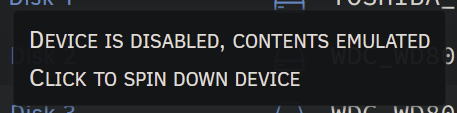
After a bit of delay I have replaced the power Molex to SATA adapter with 3 SATA splitters (with the correct pins blocked for a couple of drives that were shucks) and I'm still right where I started with one disk saying its missing. Or to be exact it says: *attached image*
-
Not just reseated. I've totally changed the controller since this started. I'll do better. ordered replacements. I'll try tomorrow and see if it fixes it. Its the last thing I've not replaced at this point.
-
Yes I am using a splitter. One that was suggested to help me get around the 3.3v pin issue. This one. Been using it since 2020. https://www.amazon.com/gp/product/B078BQGKYJ/ref=ppx_yo_dt_b_search_asin_title?ie=UTF8&psc=1
-
I have now even replaced the SAS to SATA cables. Same thing. Thought it was fine and at some point a disk fell out of the array. Someone? Anyone? I'm getting desperate. metis-diagnostics-20240108-1511.zip
-
No. But none of my drives can. Probably because I'm using a LSI 9207-8i card from art of server. Btw I had another LSI 9207-8i card I used before from random ebayer that I was using when this happened the first time. I've since changed the card but it happened again.
-
I had this problem before. The I discovered at least one bad drive. Since then I've: Built a new array out of 2x 16tb drives. Read data off the first original drive, extended smart test, preclear. Added it back to the array. Read data off the second original drive, extended smart test, preclear. Added it back to the array. Read data off the third original drive, extended smart test, preclear. Added it back to the array. Read data off the fourth original drive, extended smart test, preclear. Added it back to the drive and also plugged in the next drive while I was at it. When I booted back up. the first original drive is no longer seen. Unplugged the "next" drive and no change. Still not seeing the first original drive any more. Removed the third original drive, since I had installed it at the same time, and when it came back up its not seen (Obviously, since I removed it) but the 1st original drive is STILL not seen. Sorry to be verbose. I'm just hoping to get an answer. Anyway here is an updated diag. Any advice would be helpful but keep in mind I don't know linux well. If the USB disconnect/reconnects are in there the problem is AFTER that. I fixed that. It was a device I had connected that I should have had (non compatible UPS) To further clarify the one that dropped out is disk2 in the array, its just the first of my old drives that I added back in. metis-diagnostics-20231230-1927.zip
-
I apologize for wasting everyone's time. I am a moron when it comes to Linux and the solution was so dumb. It was all due to the lack of a proper GUI. In midnight commander I was selecting the files I wanted to copy then selecting where I wanted them to go on the right. Then hitting the copy button. Thus I was sending the files the WRONG DIRECTION. So it was the old 8tb that was full, not the 16tb I was copy to.
-
Disk one shows 4tb free but when I use MC to copy files to the share I get a message that its full. The only USB devices connected are the KVM and the Unraid drive. I guess I could unplug the KVM, not sure why its disconnecting and reconnecting. I did have a problem previously with that but was pretty sure it was fixed when I replaced the unraid flash drive a week or so ago (it was damaged when I bumped it) edit: DOH it was an incompatible UPS plugged in. fixed that now.

-
I couldn't figure out how to browse to the active share and the mounted drives in Krusader. Done. metis-diagnostics-20231228-0830.zip
-
I can use it to move them to another drive in the array but does that tool support moving from a mounted drive outside array into it?
