





Pava
Members
-
Joined
-
Last visited
-
Hello, thank you for Matrix setup all its working. Please for what need coturn? Please what is ip : external-ip=Br0 server IP, and turn.yoururl? Is it matrix.chat url?
-
Is it possible to get working Odoo https://hub.docker.com/_/odoo in Unraid ? This is the best productivity aplication, but no way to get working. I try to install but no UI. Please if somebody know how I can get working Odoo.
-
For me also ok. I was backup appdata/mariadb, reinstall image, roll back appdata/mariedb did like what whiredraft wrote, and now all is ok. Thank you so much for help.
-
Hello, thank you for help. I change repository to linuxserver/mariadb:110.4.21mariabionic-ls31, click apply, but now can not find Mariadb in Docker Containers. Its missing. Please where I can find now Mariadb config file to change and start again? Now I find container in orphan image. How I can rebuild again?
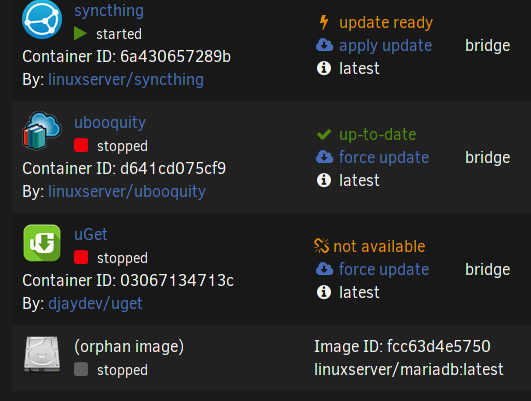
-
After last update Mariadb Nextcloud stop to work. have message: / I try to restart, stop, start / Internal Server Error The server encountered an internal error and was unable to complete your request. Please contact the server administrator if this error reappears multiple times, please include the technical details below in your report. More details can be found in the server log. From MAriadb have logs: 210825 23:53:24 mysqld_safe Starting mariadbd daemon with databases from /config/databases 210825 23:53:25 mysqld_safe Logging to '/config/databases/34e8bef8ba82.err'. From log: 210826 08:56:14 mysqld_safe mysqld from pid file /var/run/mysqld/mysqld.pid ended 210826 08:56:15 mysqld_safe Starting mariadbd daemon with databases from /config/databases 2021-08-26 8:56:15 0 [Note] /usr/bin/mariadbd (mysqld 10.5.12-MariaDB-log) starting as process 15613 ... 2021-08-26 8:56:15 0 [Note] InnoDB: Uses event mutexes 2021-08-26 8:56:15 0 [Note] InnoDB: Compressed tables use zlib 1.2.11 2021-08-26 8:56:15 0 [Note] InnoDB: Number of pools: 1 2021-08-26 8:56:15 0 [Note] InnoDB: Using SSE4.2 crc32 instructions 2021-08-26 8:56:15 0 [Note] mariadbd: O_TMPFILE is not supported on /var/tmp (disabling future attempts) 2021-08-26 8:56:15 0 [Note] InnoDB: Using Linux native AIO 2021-08-26 8:56:15 0 [Note] InnoDB: Initializing buffer pool, total size = 268435456, chunk size = 134217728 2021-08-26 8:56:15 0 [Note] InnoDB: Completed initialization of buffer pool 2021-08-26 8:56:15 0 [ERROR] InnoDB: Upgrade after a crash is not supported. The redo log was created with MariaDB 10.4.21. 2021-08-26 8:56:15 0 [ERROR] InnoDB: Plugin initialization aborted with error Generic error 2021-08-26 8:56:15 0 [Note] InnoDB: Starting shutdown... 2021-08-26 8:56:15 0 [ERROR] Plugin 'InnoDB' init function returned error. 2021-08-26 8:56:15 0 [ERROR] Plugin 'InnoDB' registration as a STORAGE ENGINE failed. 2021-08-26 8:56:15 0 [Note] Plugin 'FEEDBACK' is disabled. 2021-08-26 8:56:15 0 [ERROR] Unknown/unsupported storage engine: InnoDB 2021-08-26 8:56:15 0 [ERROR] Aborting Please how I can resolve this problem?
