distel
Members
-
Joined
-
Last visited
-
Hi All, is there a way to mount a SMB share via console ? My NAS is off while backup is not running but turns on via WOL before backup runs. The SMB share is mounted via unassigned devices. I want to mount the share via a user script when it comes online again. /usr/local/sbin/rc.unassigned mount name=NAS is not working
-
Ah, thank you for the reply. Everything else looks fine ?
-
Question regarding Upgrade array and cache pool drives I am planning on upgrading my server to 3x 12 TB and 3x 2 TB SSD (cache pool) Currently, my setup looks like this: 2 x 4 TB HDD for Array 3 x SSD (mixed sizes 500gb - 1TB As I only have 6 SATA Ports, I was thinking of this process: Move Data from Cache to Array halt VM / Docker services set Cache -> Array Start mover SSD Remove and HDD add Shutdown Unraid server Put out 3xSSD's Put in 3x12TB HDD Restart machine Change Parity Drive: stop the array unassigned the current parity drive assign a new 12 TB HDD as new parity drive instead start the array and wait for parity rebuild Change Data drive Stop Array In the Array tab under identification, switch to one of the new 12 TB HDD Add the other 12 TB drive to the array. Start array and wait until data is rebuilt Add the SSD's Shutdown unraid server Remove old HDD's Add new SSD's Start server Make sure VM and docker service is stopped Create new Cache pool with 3 SSDs as raidz for 4tb usable space Move from Array to Cache pool Make sure VM and Docker service is stopped revert location for all folder that were there prior from array -> Cache Start mover after everything is moved, start VM and docker service again. What do you guys think of the procedure, any obvious bodges ? If you have any suggestions, I will add them to this post. Does it make sens to have one HDD as ZFS For backup location ?
-
Hi tying to set up standardnotes. I did copy the file to appdata and set up the file as described. docker is created but when I start it logs only show text error warn system array login lerna-lite notice cli v1.6.0 lerna-lite info versioning independent lerna-lite notice filter including "@standardnotes/web-server" lerna-lite info filter ["@standardnotes/web-server"] lerna-lite info Executing command in 1 package: "yarn run start" lerna-lite notice cli v1.6.0 lerna-lite info versioning independent lerna-lite notice filter including "@standardnotes/web-server" lerna-lite info filter ["@standardnotes/web-server"] lerna-lite info Executing command in 1 package: "yarn run start" lerna-lite notice cli v1.6.0 lerna-lite info versioning independent lerna-lite notice filter including "@standardnotes/web-server" lerna-lite info filter ["@standardnotes/web-server"] lerna-lite info Executing command in 1 package: "yarn run start" Prestart Step 1/1 - Removing server lock Starting Server... Prestart Step 1/1 - Removing server lock Starting Server... Prestart Step 1/1 - Removing server lock Starting Server... You write "Update the container ExtraParams accordingly." Do i need to add all content of the env file to the extra parameters? br, distel
-
I will try my 980 - that is currently in use in a friends rig - this week with a complete new VM and let you know. thanks for the effort @ilarion !
-
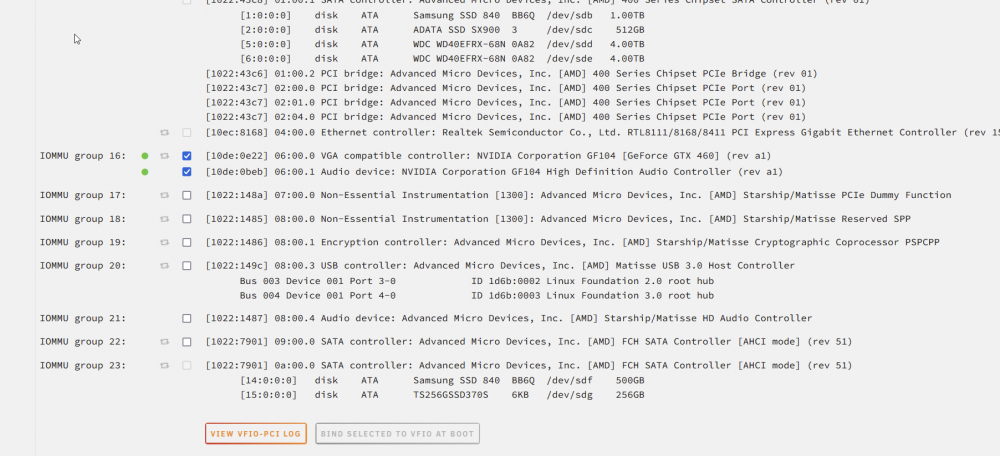
<?xml version='1.0' encoding='UTF-8'?> <domain type='kvm' id='2'> <name>Windows 10</name> <uuid>7bac6c42-10a7-f459-3c20-14544c07264c</uuid> <metadata> <vmtemplate xmlns="unraid" name="Windows 10" icon="windows.png" os="windows10"/> </metadata> <memory unit='KiB'>2097152</memory> <currentMemory unit='KiB'>2097152</currentMemory> <memoryBacking> <nosharepages/> </memoryBacking> <vcpu placement='static'>4</vcpu> <cputune> <vcpupin vcpu='0' cpuset='4'/> <vcpupin vcpu='1' cpuset='12'/> <vcpupin vcpu='2' cpuset='5'/> <vcpupin vcpu='3' cpuset='13'/> </cputune> <resource> <partition>/machine</partition> </resource> <os> <type arch='x86_64' machine='pc-i440fx-6.2'>hvm</type> </os> <features> <acpi/> <apic/> </features> <cpu mode='host-passthrough' check='none' migratable='on'> <topology sockets='1' dies='1' cores='2' threads='2'/> <cache mode='passthrough'/> <feature policy='require' name='topoext'/> </cpu> <clock offset='localtime'> <timer name='rtc' tickpolicy='catchup'/> <timer name='pit' tickpolicy='delay'/> <timer name='hpet' present='no'/> </clock> <on_poweroff>destroy</on_poweroff> <on_reboot>restart</on_reboot> <on_crash>restart</on_crash> <devices> <emulator>/usr/local/sbin/qemu</emulator> <disk type='block' device='disk'> <driver name='qemu' type='raw' cache='writeback'/> <source dev='/dev/sdb' index='3'/> <backingStore/> <target dev='hdc' bus='virtio'/> <boot order='1'/> <alias name='virtio-disk2'/> <address type='pci' domain='0x0000' bus='0x00' slot='0x05' function='0x0'/> </disk> <disk type='file' device='cdrom'> <driver name='qemu' type='raw'/> <source file='/mnt/user/isos/Windows10enx64.iso' index='2'/> <backingStore/> <target dev='hda' bus='ide'/> <readonly/> <boot order='2'/> <alias name='ide0-0-0'/> <address type='drive' controller='0' bus='0' target='0' unit='0'/> </disk> <disk type='file' device='cdrom'> <driver name='qemu' type='raw'/> <source file='/mnt/user/isos/virtio-win-0.1.221-1.iso' index='1'/> <backingStore/> <target dev='hdb' bus='ide'/> <readonly/> <alias name='ide0-0-1'/> <address type='drive' controller='0' bus='0' target='0' unit='1'/> </disk> <controller type='pci' index='0' model='pci-root'> <alias name='pci.0'/> </controller> <controller type='ide' index='0'> <alias name='ide'/> <address type='pci' domain='0x0000' bus='0x00' slot='0x01' function='0x1'/> </controller> <controller type='virtio-serial' index='0'> <alias name='virtio-serial0'/> <address type='pci' domain='0x0000' bus='0x00' slot='0x03' function='0x0'/> </controller> <controller type='usb' index='0' model='ich9-ehci1'> <alias name='usb'/> <address type='pci' domain='0x0000' bus='0x00' slot='0x07' function='0x7'/> </controller> <controller type='usb' index='0' model='ich9-uhci1'> <alias name='usb'/> <master startport='0'/> <address type='pci' domain='0x0000' bus='0x00' slot='0x07' function='0x0' multifunction='on'/> </controller> <controller type='usb' index='0' model='ich9-uhci2'> <alias name='usb'/> <master startport='2'/> <address type='pci' domain='0x0000' bus='0x00' slot='0x07' function='0x1'/> </controller> <controller type='usb' index='0' model='ich9-uhci3'> <alias name='usb'/> <master startport='4'/> <address type='pci' domain='0x0000' bus='0x00' slot='0x07' function='0x2'/> </controller> <interface type='bridge'> <mac address='52:54:00:0c:12:ac'/> <source bridge='br0'/> <target dev='vnet1'/> <model type='virtio-net'/> <alias name='net0'/> <address type='pci' domain='0x0000' bus='0x00' slot='0x04' function='0x0'/> </interface> <serial type='pty'> <source path='/dev/pts/1'/> <target type='isa-serial' port='0'> <model name='isa-serial'/> </target> <alias name='serial0'/> </serial> <console type='pty' tty='/dev/pts/1'> <source path='/dev/pts/1'/> <target type='serial' port='0'/> <alias name='serial0'/> </console> <channel type='unix'> <source mode='bind' path='/var/lib/libvirt/qemu/channel/target/domain-2-Windows 10/org.qemu.guest_agent.0'/> <target type='virtio' name='org.qemu.guest_agent.0' state='disconnected'/> <alias name='channel0'/> <address type='virtio-serial' controller='0' bus='0' port='1'/> </channel> <input type='tablet' bus='usb'> <alias name='input0'/> <address type='usb' bus='0' port='1'/> </input> <input type='mouse' bus='ps2'> <alias name='input1'/> </input> <input type='keyboard' bus='ps2'> <alias name='input2'/> </input> <graphics type='vnc' port='5901' autoport='yes' websocket='5701' listen='0.0.0.0' keymap='en-us'> <listen type='address' address='0.0.0.0'/> </graphics> <audio id='1' type='none'/> <video> <model type='qxl' ram='65536' vram='65536' vgamem='16384' heads='1' primary='yes'/> <alias name='video0'/> <address type='pci' domain='0x0000' bus='0x00' slot='0x02' function='0x0'/> </video> <hostdev mode='subsystem' type='pci' managed='yes'> <driver name='vfio'/> <source> <address domain='0x0000' bus='0x06' slot='0x00' function='0x0'/> </source> <alias name='hostdev0'/> <address type='pci' domain='0x0000' bus='0x00' slot='0x06' function='0x0' multifunction='on'/> </hostdev> <hostdev mode='subsystem' type='pci' managed='yes'> <driver name='vfio'/> <source> <address domain='0x0000' bus='0x06' slot='0x00' function='0x1'/> </source> <alias name='hostdev1'/> <address type='pci' domain='0x0000' bus='0x00' slot='0x06' function='0x1'/> </hostdev> <memballoon model='none'/> </devices> <seclabel type='dynamic' model='dac' relabel='yes'> <label>+0:+100</label> <imagelabel>+0:+100</imagelabel> </seclabel> </domain> Passtrough works with an AMD firepro 4900v but sadly i can not get it to work with NVIDIA cards for some odd reason.
-
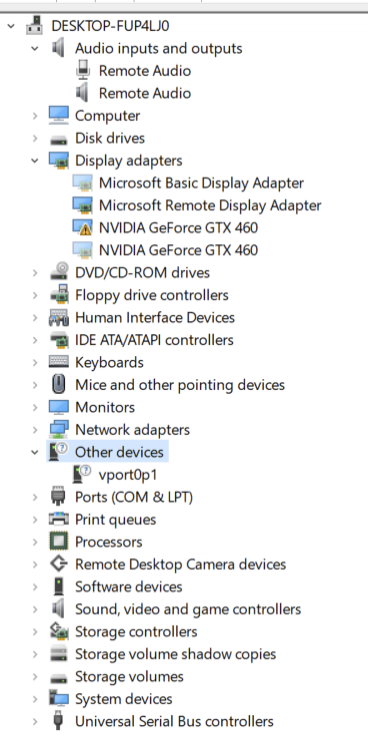
Hi, Sadly I can not get this to work for some reason - The audio part of the GTX460 I try to pass trough never shows up in the VM and I hjave the vport0p1 which does not find any drivers. Also, I tried all the other methods in the videos in the 2nd post. No luck.