





marcinwhite
Members
-
Joined
-
Last visited
-
All good, thanks, I was messing with /app/config location unnecessary.
-
Hi, I'm trying to spin this container, but no matter where I put the config.yml (or yaml, tried that too), container cannot find it? Error: unable to load configuration: can't read config file(s): stat /mnt/user/blocky/config.yml: no such file or directory Can you give me some advice what is the correct approach to this damn config?
-
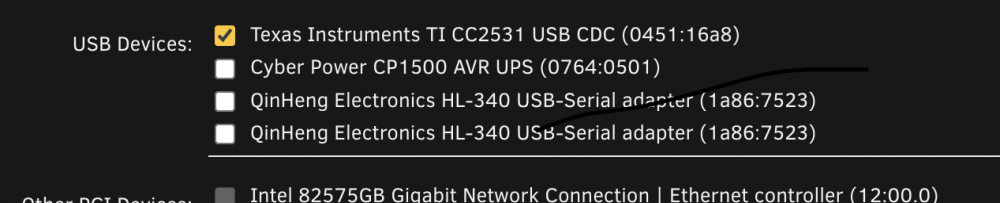
Good morning all, I have a problem with VM with Home Assistant installed. Some time ago I couldn't make Zigbee USB dongle to appear in VM config to passthrough it to the HA. I did something back then to make it work, but I don't remember what. Recently I've had to shut down my Unraid server for few days. Since then - dongle is duplicated in VM config and VM is unable to start. When I unplug this device - only one line is visible. Looks like I managed to store/write it somewhere, but I can't find the solution I used back then. Screenshot of the problem attached together with diagnostics. I have the second (old) dongle (CC2531...) which is working, but that's not the solution I'm looking for. Thanks in advance for help. skynet-diagnostics-20220816-1216.zip
-
https://github.com/BeryJu/authentik - authentik is an open-source Identity Provider focused on flexibility and versatility. You can use authentik in an existing environment to add support for new protocols. authentik is also a great solution for implementing signup/recovery/etc in your application, so you don't have to deal with it. https://goauthentik.io/


