





Ericsunraid
Members
-
Joined
-
Last visited
-
So I still haven't been able to figure out what is causing this but here is a new wrinkle. If I shutdown and restart all of the disks show up. Anytime I just restart they are missing. Any ideas?
-
I just searched and I do not. I guess I am going to crack the case open and see what is going on. It is just odd to me that everything was working fine until the upgrade.
-
I always forget that. Thanks trurl! tower-diagnostics-20230914-2304.zip
-
Title says it all. My system had been running great for a couple of months when I finally decided it was time to upgrade. After rebooting 4 out of my 16 disks are missing, My server is in a very difficult place to get to so I am hoping this isn't a hardware issue that requires me to pull the box out and work on it. I have rebooted a half dozen times with the same result. Any ideas? Logs attached. tower-syslog-20230914-2209.zip
-
Yeah, I guess this is more of a reverse proxy problem than an audiobookshelf issue. Ill keep working at it. Update: As a workaround, a Wire Guard tunnel works perfectly fine
-
My ISP blocks port 80. Any hope for me? I was really hoping to use the android app on my phone in the car.
-
It wasn't seated properly.
-
You would think that I would remember that by now! Thanks tower-diagnostics-20220415-0839.zip
-
First off I want to say thank you to everyone that has helped me in the past. The support community for unraid is incredible! As the title suggests, I swapped cases yesterday to give my server some more breathing room and went ahead and upgraded the parity drive while I was at it. After the rebuild I noticed that plex wasn't working and then noticed that my GPU wasn't registering on the dashboard. I checked PCI Devices and it wasn't listed there as well. Before I crack open the case and make sure that the GPU is seated correctly, would someone mind checking out my log file? This line in particular caught my eye: "Tower kernel: serial 0000:00:16.3: Couldn't register serial port f0a0, irq 19, type 0, error -28". Could this be related? Thanks in advance for the help! tower-syslog-20220415-1442.zip
-
I figured it out. There was some kind of file in my watch folder that SAB was trying to load. Cleared my watch folder and problem gone.
-
Yes. It is up to date. I uninstalled and started a fresh installation and am having the same problem. Here is the docker run: root@localhost:# /usr/local/emhttp/plugins/dynamix.docker.manager/scripts/docker create --name='sabnzbd' --net='bridge' -e TZ="America/Los_Angeles" -e HOST_OS="Unraid" -e 'PUID'='99' -e 'PGID'='100' -e 'UMASK'='022' -p '8080:8080/tcp' -v '/mnt/user/Media/Downloads/Complete/':'/downloads':'rw' -v '/mnt/user/Media/Downloads/Incomplete/':'/incomplete-downloads':'rw' -v '/mnt/user/Media/Laptop Downloads/':'/watchfolder':'rw' -v '/mnt/user/appdata/sabnzbd':'/config':'rw' 'lscr.io/linuxserver/sabnzbd' e246a13cf8f9508d1624cd947fae3d3d460e7d135d54ee3bfcb46d502293bfe9 The command finished successfully!
-
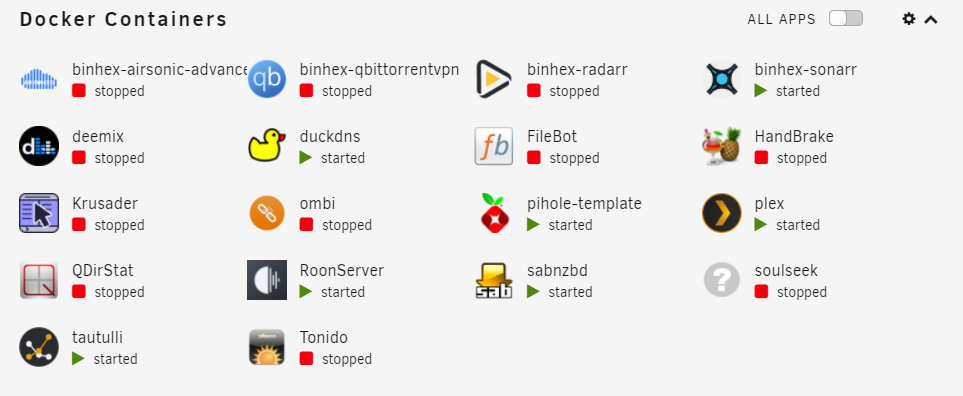
So, I am pretty sure it is being caused by SABnzbd. Does that track with the log file and diagnostic? If I stop the container my ram and cpu utilization return to normal. Any ideas why this just started happening?
-
That's why I am confused. I'm nut sure what is using python. Midnight Commander has been locking up at times. Here is the docker containers I'm running if there is a clue there.
-
Here it is. I knew I was forgetting something. Thank you. tower-diagnostics-20220112-1112.zip
-
Hello. I am trying to get to the bottom of why this is happening but having trouble deciphering the logs. Any help would be greatly appreciated! tower-syslog-20220112-1820.zip
