





Irithor
Members
-
Joined
-
Last visited
-
It's the 2nd NVME device in the motherboard. Initially I received: root@UNRAIDServer:~# cryptsetup luksOpen /dev/nvme0n1p1 nvme1n1p1 --allow-discards --key-file=/root/keyfile Cannot use device /dev/nvme0n1p1 which is in use (already mapped or mounted). But then changed the nvme device and received: root@UNRAIDServer:~# cryptsetup luksOpen /dev/nvme1n1p1 nvme1n1p1 --allow-discards --key-file=/root/keyfile root@UNRAIDServer:~# zpool import pool: downloads id: 15142986959555305596 state: ONLINE action: The pool can be imported using its name or numeric identifier. config: downloads ONLINE nvme1n1p1 ONLINE Followed by: zpool import -o readonly=on downloads And now I can see everything in Midnight Commander again! Incredible, I was quite genuinely convinced it was a lost cause. So the process now is to just copy everything off, delete the Share/Dataset and recreate the Pool again?
-
unraidserver-diagnostics-20241205-0044.zip
-
root@UNRAIDServer:~# zpool status pool: cache state: ONLINE scan: scrub repaired 0B in 00:33:04 with 0 errors on Wed Dec 4 18:46:08 2024 config: NAME STATE READ WRITE CKSUM cache ONLINE 0 0 0 nvme0n1p1 ONLINE 0 0 0 errors: No known data errors pool: disk1 state: ONLINE status: Some supported and requested features are not enabled on the pool. The pool can still be used, but some features are unavailable. action: Enable all features using 'zpool upgrade'. Once this is done, the pool may no longer be accessible by software that does not support the features. See zpool-features(7) for details. config: NAME STATE READ WRITE CKSUM disk1 ONLINE 0 0 0 md1p1 ONLINE 0 0 0 errors: No known data errors pool: disk10 state: ONLINE status: Some supported and requested features are not enabled on the pool. The pool can still be used, but some features are unavailable. action: Enable all features using 'zpool upgrade'. Once this is done, the pool may no longer be accessible by software that does not support the features. See zpool-features(7) for details. config: NAME STATE READ WRITE CKSUM disk10 ONLINE 0 0 0 md10p1 ONLINE 0 0 0 errors: No known data errors pool: disk2 state: ONLINE status: Some supported and requested features are not enabled on the pool. The pool can still be used, but some features are unavailable. action: Enable all features using 'zpool upgrade'. Once this is done, the pool may no longer be accessible by software that does not support the features. See zpool-features(7) for details. config: NAME STATE READ WRITE CKSUM disk2 ONLINE 0 0 0 md2p1 ONLINE 0 0 0 errors: No known data errors pool: disk3 state: ONLINE status: Some supported and requested features are not enabled on the pool. The pool can still be used, but some features are unavailable. action: Enable all features using 'zpool upgrade'. Once this is done, the pool may no longer be accessible by software that does not support the features. See zpool-features(7) for details. config: NAME STATE READ WRITE CKSUM disk3 ONLINE 0 0 0 md3p1 ONLINE 0 0 0 errors: No known data errors pool: disk4 state: ONLINE status: Some supported and requested features are not enabled on the pool. The pool can still be used, but some features are unavailable. action: Enable all features using 'zpool upgrade'. Once this is done, the pool may no longer be accessible by software that does not support the features. See zpool-features(7) for details. config: NAME STATE READ WRITE CKSUM disk4 ONLINE 0 0 0 md4p1 ONLINE 0 0 0 errors: No known data errors pool: disk5 state: ONLINE status: Some supported and requested features are not enabled on the pool. The pool can still be used, but some features are unavailable. action: Enable all features using 'zpool upgrade'. Once this is done, the pool may no longer be accessible by software that does not support the features. See zpool-features(7) for details. config: NAME STATE READ WRITE CKSUM disk5 ONLINE 0 0 0 md5p1 ONLINE 0 0 0 errors: No known data errors pool: disk6 state: ONLINE status: Some supported and requested features are not enabled on the pool. The pool can still be used, but some features are unavailable. action: Enable all features using 'zpool upgrade'. Once this is done, the pool may no longer be accessible by software that does not support the features. See zpool-features(7) for details. config: NAME STATE READ WRITE CKSUM disk6 ONLINE 0 0 0 md6p1 ONLINE 0 0 0 errors: No known data errors pool: disk7 state: ONLINE status: Some supported and requested features are not enabled on the pool. The pool can still be used, but some features are unavailable. action: Enable all features using 'zpool upgrade'. Once this is done, the pool may no longer be accessible by software that does not support the features. See zpool-features(7) for details. config: NAME STATE READ WRITE CKSUM disk7 ONLINE 0 0 0 md7p1 ONLINE 0 0 0 errors: No known data errors pool: disk8 state: ONLINE status: Some supported and requested features are not enabled on the pool. The pool can still be used, but some features are unavailable. action: Enable all features using 'zpool upgrade'. Once this is done, the pool may no longer be accessible by software that does not support the features. See zpool-features(7) for details. config: NAME STATE READ WRITE CKSUM disk8 ONLINE 0 0 0 md8p1 ONLINE 0 0 0 errors: No known data errors pool: disk9 state: ONLINE status: Some supported and requested features are not enabled on the pool. The pool can still be used, but some features are unavailable. action: Enable all features using 'zpool upgrade'. Once this is done, the pool may no longer be accessible by software that does not support the features. See zpool-features(7) for details. config: NAME STATE READ WRITE CKSUM disk9 ONLINE 0 0 0 md9p1 ONLINE 0 0 0 errors: No known data errors root@UNRAIDServer:~# zpool import no pools available to import
-
Thanks JorgeB, I have taken the following steps: 1. Upgraded Motherboard bios to latest version. 2. Reseated RAM and changed from slots A1/B1 to A2/B2 as per manufacturer recommendations. 3. Ran memtest, passed with zero errors. 4. Reseated CPU. 5. Re-adjusted cooler mount pressure. 6. Adjusted the following bios settings (as per recommended elsewhere on the Unraid forums): - All settings as per Intel recommended defaults. - Set ASPM from hardware-controlled to software-controlled. - Disabled power saving. - Disabled Fast Boot. - Disabled C-States. The server has now been running no issues for almost a week which looks promising. The motherboard in this server has been replaced 3 times, CPU twice and RAM twice, with similar outcomes. So it seems the culprit is likely some funny business with power-saving states, likely software-side, as this was a similar erratic behavior that was caused by installing powertop, ultimately leading to me uninstalling it. Unfortunately, the downside is the server now has a substantially higher power-draw even at idle which is obviously suboptimal, and will be looking to tweak back in some power-saving settings slowly over the coming weeks. Will update with any major changes. Thanks again for the help.
-
Hi JorgeB, Thanks for getting back. That command returns: "cannot import 'Downloads': no such pool available" The pool in question is also not showing when executing cli command 'zfs list'. Does the pool need to be created with the drive in it for this to work? Or the array started in Maintenance Mode or anything like that? Otherwise I'm guessing this one's gone for good? If so very strange, all other pools are showing fine. Not terribly important I guess, was just using it as a download cache and a bit of a headache trying to remember what was on there. Strange that the ZFS Upgrade process caused it. Cheers.
-
Good news: Managed to get the Array back up and running by creating a new config and excluding the pool with the drive that wouldn't mount, allowing the rest of the array to start. Bad news: Unmountable drive won't mount at all as an Unassigned Device. I am also no longer able to recreate that pool without the warning 'Can't create Pool with same name as a Share'.
-
Running into an issue after upgrading a ZFS Pool. Array is stuck on 'Mounting' only on my 'Downloads' pool and array is prevented from starting. Cache device was upgraded at the same time with no issues. Didn't realise the device was completely full when initiating the upgrade, could that have something to do with it? Can't start the array to pull down the syslog but i've copied the log output in Unraid to a text file. syslog.rtf
-
Hi All, My Unraid Server has been experiencing intermittent crashing over the last few months. Sometimes the server will last only a couple hours, sometimes up to a week but never longer. When the crashes occur, the server GUI becomes unresponsive, can't stop array, reboot, or interact with it (ie. to stop parity check etc). At this stage, the server will be unable to be pinged and unable to be SSH'd into. A hard-reset or power-cycle is then needed to restore functionality. Server activity at this time seems to be none so I am yet to incur any corruption or data loss but is obviously not great for the server in general. For reference since the issues have started occurring the following significant changes have been made to the Server, but am not sure if any are contributing to the issue. 1. Upgraded the Motherboard, CPU and RAM (ASUS ProArt Z790, Intel 14900K @ stock settings, Corsair 2x48GB DDR5 RAM @ without overclock) 2. Upgraded Array drives and Pool drives to ZFS 3. Changed from Docker Disk IMG to Docker Directory format 4. Upgraded from Unraid Stable Release 6.12.13 to Pre-Release Version 7.0.0-beta.4 5. Deleted ZFS Docker Directory and recreated using Overlay2 driver as recommended per Pre-Release Version 7.0.0-beta.4 patch-notes. It may have felt like there were slightly less crashes before migrating from XFS to ZFS and also before upgrading from Stable to Pre-Release, but this may also just be in my head and the crashes were still occurring nonetheless. A look through the syslog spanning at least a few of these occurrences doesn't seem to show anything particular but I have attached incase someone more Unraid-literate than I can see something I cannot. My best guess is to chalk this up to a hardware issue? As always thanks in advance, Andrew syslog-192.168.0.34.log
-
A scrub won't return anything specifically in regards to Docker Image corruption. Just overall corruption I believe. I just ended up re-creating the Docker Image and downloading all the images from scratch. I also believe the culprit may be that the Plex Meta Manager container was creating a memory leak due to trying to restart itself in extremely quick succession without just stopping because of a bad update that was pushed that needed to disable part of it's start up process but didn't account for this looping issue. Between those two things the issue seems to have resolved itself for now.
-
Thanks for taking a look! I thought 96gb for the Docker Image was very large also. I have since decided to just go ahead and recreate the image and re-download my containers. This has allowed me to at least have the service up and running with no containers and a clean image, so that's progress. I am now in the process of turning them back on one by one. It having one or some of them auto-start with the array causes this issue and doesn't resolve until a full reboot. I know the Docker Image can fill up when paths are incorrectly configured but I feel I have pretty meticulously checked and re-checked they are all correct. I've attached a report of the Container Sizes. I'm not sure if they will mean anything to you as you might not be familiar with them but appreciate letting me know if anything looks off to you. Container Sizes.txt
-
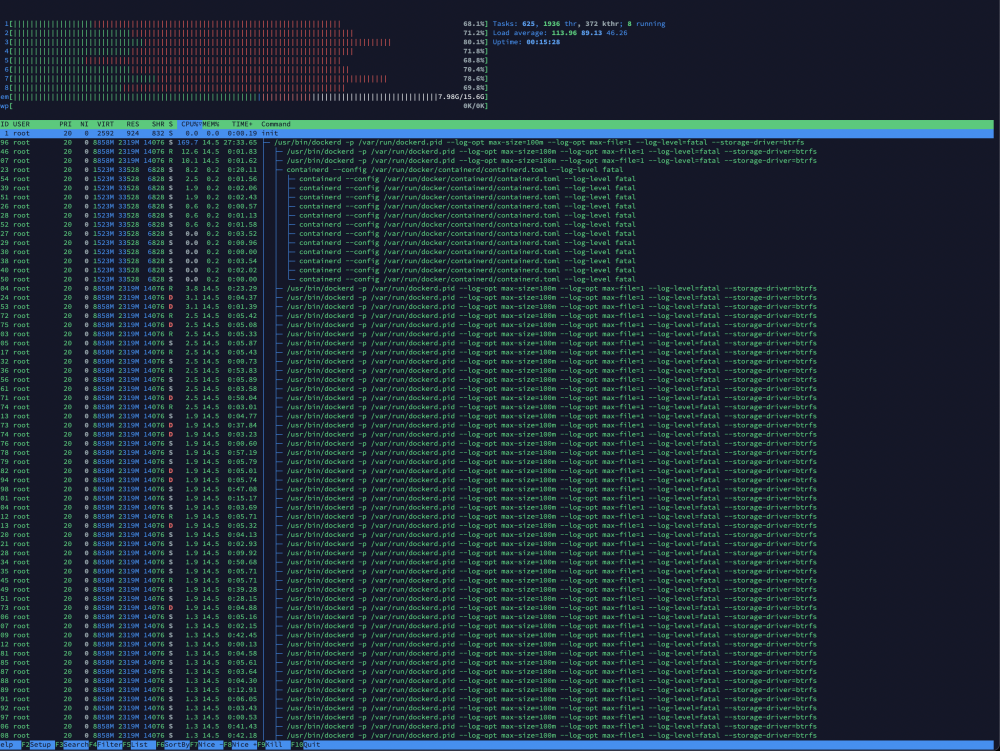
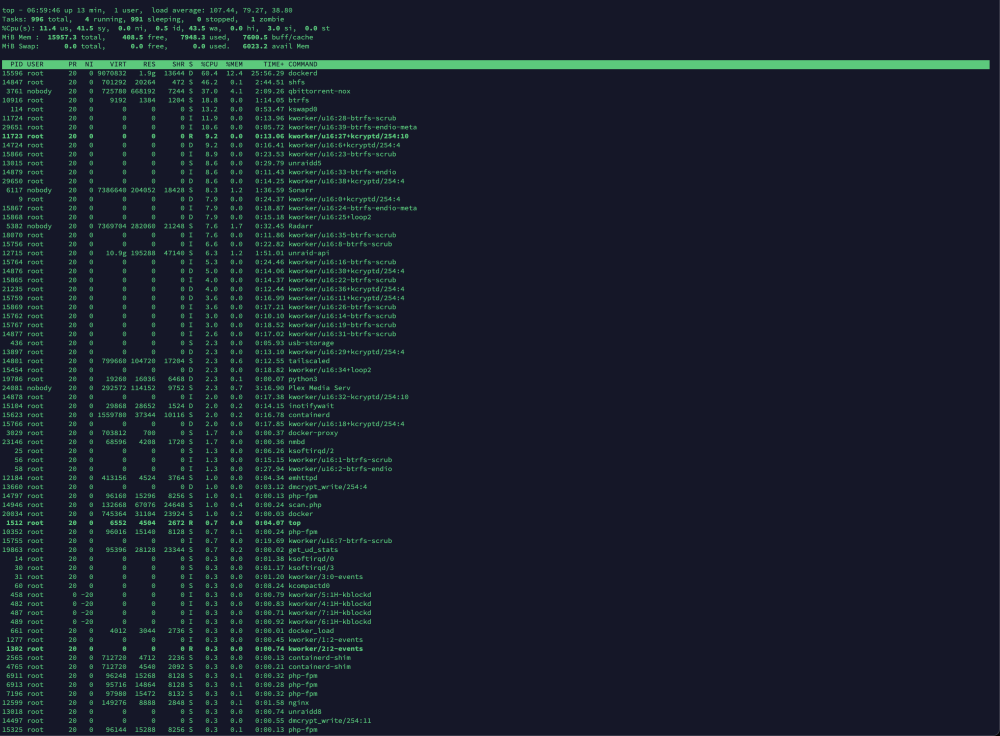
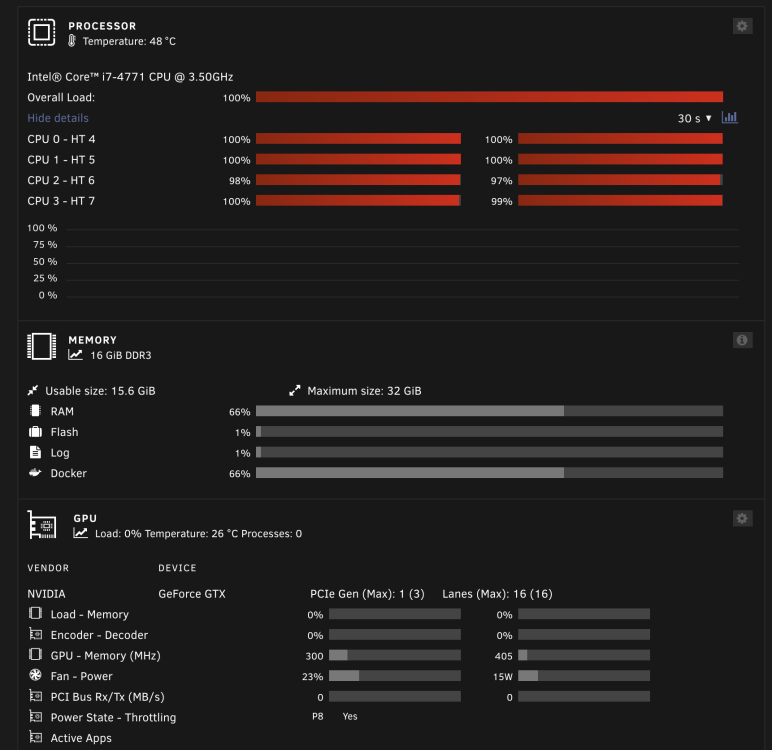
I'm getting huge CPU usage from the docker service causing my system/webgui to lock up. It started right in the middle of normal operation (was renaming some files in Sonarr I think). I cannot attribute it to any specific container as the problem persists even with all containers off. I've tried turning them on/off one at a time but no obvious culprit. If I disable the Docker service entirely though, it seems to go away. The only other change I have made recently is increasing the size of the docker image from 64gb to 96gb. Top is showing Dockerd using around 600%. A couple of orphaned docker images were created around this time but not exactly sure when. I am also noticing irregularly high reads in my cache pool (the one with my appdata and docker img). Is this corruption? Thanks in advance. unraidserver-diagnostics-20230511-0654.zip
-
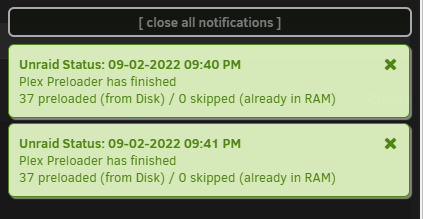
Hmm, seems after running consecutive scripts that nothing is being stored in RAM which I suspect means that it's not working for me? Spinning down all disks and then attempting to play still incurs buffering. Is this error in the logs still to be disrgarded?: tr: write error: Broken pipe tr: write error cut: write error: Broken pipe
-
Trying to get it running now, any chance you'd care to elaborate on the process? Thanks in advance!
-
If I were to leave the container running 24/7 instead then theoretically yes, but where as booting to GUI only shows about 13-14w consumption on a GTX1650 Super, substituting the container hovers around 20W due to which I assume is an increased workload over simply running the Unraid UI. No boot to GUI and no container hovers around 28w.
-
Ahh. Initially thought to myself "Can't be that, I definately don't have any containers or VM's using the GPU at all other than the occasional Plex transcode." until it dawned on me i've been booting into GUI mode since watching a Spaceinvader One vid on doing that to force GPU's to idle for lower power consumption over time. For anybody getting the same error as myself and @kl0wn, go to your 'Main' tab and click on your flash under 'Boot Device' and change the boot from 'Unraid OS GUI Mode' back to 'Unraid OS' as this will in effect count as a 'screen'. A shame to lose that power/performance ratio though. If anything can be done to allow multiple screens that would be awesome but as I understand it is a limitation of the operating system. Thanks again, going to have a play now!



