





kdwg
Members
-
Joined
Everything posted by kdwg
-
Hey. Looks like a docker container bindingbeing mounted on /mnt/user or equivalent diskshare. Please double check docker container volume bindings (probably appdata). In general these created folders can be deleted with no problem. Identify the creating container first. also your Mover cant find some directories anymore: and Plex is throwing alot of errors like: and you probably have some errors in smtp settings for (probably) gmail MTA ? In your Go file, please the modprobe i915 above Management Utility Start: #!/bin/bash # Start Hardware Decoding Via Intel modprobe i915 # Start the Management Utility /usr/local/sbin/emhttp & That some to check for now, keep us posted what you did.
-
ich hatte das Gefühl der Turbo kommt nicht richtig. Wie sieht es bei dir aus ?
-
Ich hab den Sprung auf 6.11rc2 ebenfalls gewagt Musste ebenfalls acpi_cpufreq deaktivieren. So sind also die Settigns: amd_pstate.replace=1 amd_pstate.shared_mem=1 initcall_blacklist=acpi_cpufreq_init Außerdem "modprobe amd_pstate" im go-file Ich beobachte das ganze mal und vergleiche die Ergebnisse
-
du solltest die Optionen für CPPC im BIOS aktivieren. Konnte ich bisher aber noch nicht verifizieren. Danke für den Einsatz @ich777 ! Ich hab mein System gerade erst wieder stabil bekommen, will es eigentlich ungern auf ein Prerelease loslassen.... aber neugierig was man messen kann bin ich schon ... vielleicht nächste Woche.
-
dann muss ich mich wohl noch in Geduld üben. Bin jedenfalls gespannt.
-
It should have no impact if array is started or not. As with most plugins as they are copied from boot drive and loaded to ram
-
Jetzt bin ich zufällig in einem Alder Lake Thread auf einen Custom Kernel 5.18+ gestoßen... Mir juckt es tatsächlich etwas in den Fingern das mal zu testen, natürlich muss ich mich dazu noch etwas mehr mit Custom Kernels in Unraid befassen ... aber ich würde es schon gerne Testen. CPPC kann ich im Mainboard forcen. Aktuell komme ich im Spindown auf 25,2W. Finde ich eigentlich schon sehr gut, bedenkt man den Chipsatz und generell AMD unter Unraid. Bin nur eben gespannt, ob man da noch ein Stück an Intel ran kommt. <20W wäre ein Traum. Folgende Eckdaten: -R5 4650G X570m 2*32gb ecc 2*nvme (pcie3.0) 2*sata-ssd i350-t2 nic (~4,4W, kommt bald auch wieder raus) 4 hdd RM550x (2021) (zuvor BQ PurePower 400W) @ich777 wäre hier generell von einem Test abzuraten oder hast du ggf. bereits etwas getestet? Falls man hier ruhig testen kann, sollte ich Maßnahmen ergreifen um mein Array zu schützen? Seperates Testsystem habe ich so leider nicht und ich würde gerne die Auswirkungen bei mir wissen & messen.
-
I may have found the issue: There seems to be a relationship between 6.10+ and AMD fTPM, which was set enabled by default with UEFI 3.60 on x570m. With 6.9.2 I was not facing this behavior. Anyway, so far it looks good on 6.10.3, if I run into another freeze I will let you know. It certainly helps others too, the board is relatively widespread.
-
Bridge or br0 ? What output you get from console "docker container inspect %containername%", at the bottom you should see networking information. Remember to mask ipv6 IF you want to post the output here. But when you say your host has .83, the docker showing up with .45 cannot be in bridge network. Basically for a consumer connection you have at most 1 ipv4 assigned to your WAN, and only if you have a dual stack connection. If you have a dslite connection, you couldn't really make use of it at all due to sharing and tunneling (so just your ipv6 is unique to you). But most important: What I would recommend you avoid enabling port-forwarding when you don't have sufficient knowledge in networking. Maybe you should consider using VPN instead or building something like zerotier. It is too dangerous when you don't really know what you are doing and releasing containers to the open world.
-
Do you want to access Emby without a reverse Proxy in between ? I would definetly consider using one. Makes it alot easier too. This would then check the requests from the outside and pass them on to (here) emby depending on the configuration. Otherwise, the standard DHCPv4 pool on ISP devices starts later and does not use the whole network (usually it starts at 100 or similar). Can you check in which range leases are assigned? Emby seems to see already your WAN IP and in the LAN is also ipv4 assigned. Static IPv6 is always a mess (imho). Inspect if the container doesnt already get a dynamically assigned address. What network type have you assigned to the container? Are you running unraid 6.10+ ?
-
Okay I may have found something. Running for 12h without lock/panic now, this is a record compared to previous days. I keep you posted and if, fingers crossed, the system keeps stable until sunday I will publish. EDIT: Forget what I've said. 5min after posting I have started a manual parity check, didn't go well after a while. citadel-diagnostics-20220701-2028.zip
-
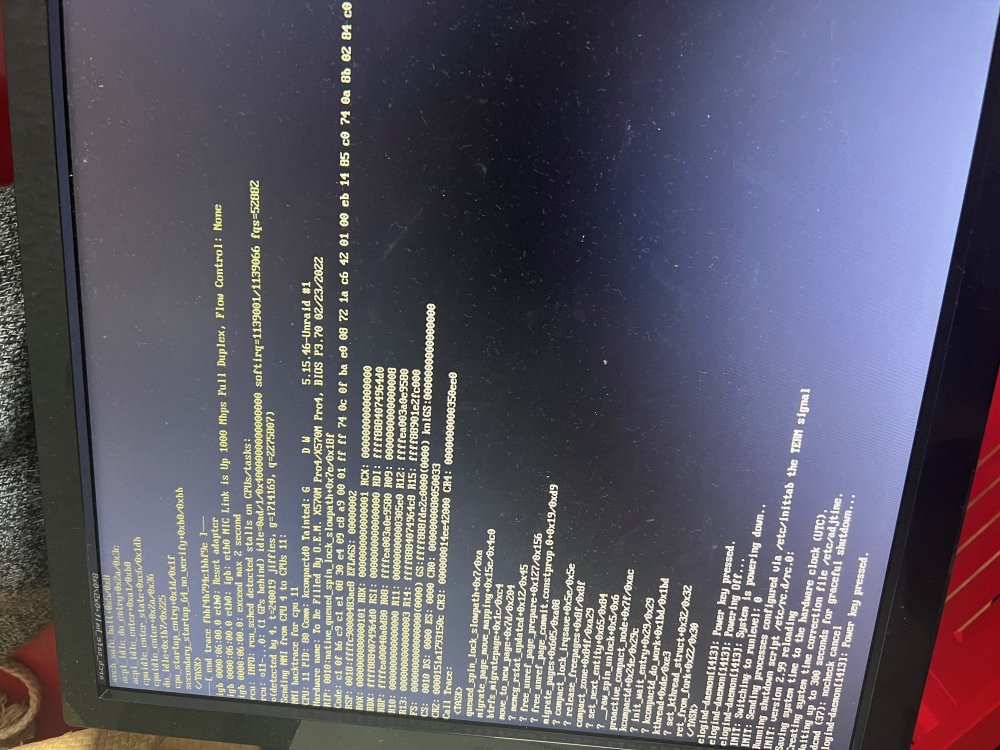
Okay I have somehow gotten all kind of errors in the past time. The system has gotten unbelievable unstable. I will try to run the Bootdrive now on frontusb, I receive a slotmodule in the next days. I throw in a collection of panics I got (OCR extracted, may does have some false recognized chars): cpu_startup_entry+Ox1d/Ox1f sccondary_startup_64_no_verify+Oxb0/Oxbb </TASK> -L end trace fbbf4b794c1bbf9e l- igb 0000:06:00.0 etho: Reset adapter igb 0000:06:00.0 etho: igb: etho NIC Link is Up 1000 Mbps Full Duplex, Flow Control: None igb 0000:06:00.0: exceed max 2 second reu: INFO: rou _sched detected stalls on CPUs/tasks: rou: 011-. . .0: (1 GPs behind) idle-Oad/1/0x4000000000000000 soft iry=1139001/1139066 fqs=52882 o(detected by 4, t=240019 jiffies, g=1714169, q=2275007) Sending NMI from CPU 4 to CPUs 11: NMI backtrace for cpu: 11 5.15.46-Unraid 11 CPU: 11 PID: 80 Comm: kcompactd0 Tainted: G Hardware name: To Be Filled By O.E.M. X570M Pro4/X570M Pro4, BIOS P3.70 02/23/2022 RIP: 0010: native _queued _spin_lock_slowpath+0x7e/0x18f that one today in noon, interestingly I accidently clicked on "plugins" header menu and the system just hang as it searched for plugin updates. Connected via wg by that time. What syslog says: Jun 28 11:22:17 citadel webGUI: Unsuccessful login user root from 10.253.0.3 Jun 28 11:22:23 citadel webGUI: Successful login user root from 10.253.0.3 Jun 28 11:24:06 citadel emhttpd: cmd: /usr/local/emhttp/plugins/dynamix.plugin.manager/scripts/checkall Here I had to hardreset again. Jun 28 17:36:32 citadel kernel: Linux version 5.15.46-Unraid (root@Develop) (gcc (GCC) 11.2.0, GNU ld version 2.37-slack15) #1 SMP Fri Jun 10 11:08:41 PDT 2022 Jun 28 17:36:32 citadel kernel: Command line: BOOT_IMAGE=/bzimage initrd=/bzroot Suprisingly, there has been a panic without a lock today, after I tried stopping File Activity Plugin in charge of the inotiy watches. This time, it appears as cache_dirs. The system kept running. Jun 29 02:52:09 citadel file.activity: Stopping File Activity Jun 29 02:52:10 citadel file.activity: File Activity inotify exiting Jun 29 02:55:23 citadel kernel: BUG: unable to handle page fault for address: ffffffffffffff89 Jun 29 02:55:23 citadel kernel: #PF: supervisor write access in kernel mode Jun 29 02:55:23 citadel kernel: #PF: error_code(0x0002) - not-present page Jun 29 02:55:23 citadel kernel: PGD 520e067 P4D 520e067 PUD 5210067 PMD 0 Jun 29 02:55:23 citadel kernel: Oops: 0002 [#1] SMP NOPTI Jun 29 02:55:23 citadel kernel: CPU: 3 PID: 13697 Comm: cache_dirs Not tainted 5.15.46-Unraid #1 Jun 29 02:55:23 citadel kernel: Hardware name: To Be Filled By O.E.M. X570M Pro4/X570M Pro4, BIOS P3.70 02/23/2022 Jun 29 02:55:23 citadel kernel: RIP: 0010:error_entry+0x83/0xe0 Jun 29 02:55:23 citadel kernel: Code: 44 00 00 48 25 ff e7 ff ff 0f 22 d8 41 5c 48 89 e7 e8 a1 e6 e0 ff 48 89 c4 41 54 c3 48 8d 0d 1b fd ff ff 48 39 8c 24 88 00 00 <00> 74 29 89 c8 48 39 84 24 88 00 00 00 74 15 48 81 bc 24 88 00 00 Jun 29 02:55:23 citadel kernel: RSP: 0000:ffffc90007c9ff58 EFLAGS: 00010002 Jun 29 02:55:23 citadel kernel: RAX: ffffc90007c9ff58 RBX: 0000000000000000 RCX: 0000000000000000 Jun 29 02:55:23 citadel kernel: RDX: 0000000000000000 RSI: fffffe00000b4000 RDI: ffffc90007c9ff58 Jun 29 02:55:23 citadel kernel: RBP: 0000000000000000 R08: 0000000000000000 R09: 0000000000000000 Jun 29 02:55:23 citadel kernel: R10: 0000000000000000 R11: 0000000000000000 R12: ffffffff81a00ab8 Jun 29 02:55:23 citadel kernel: R13: 0000000000000000 R14: 0000000000000000 R15: 0000000000000000 Jun 29 02:55:23 citadel kernel: FS: 0000150fb67bf740(0000) GS:ffff888fde0c0000(0000) knlGS:0000000000000000 Jun 29 02:55:23 citadel kernel: CS: 0010 DS: 0000 ES: 0000 CR0: 0000000080050033 Jun 29 02:55:23 citadel kernel: CR2: ffffffffffffff89 CR3: 00000001f57f2000 CR4: 0000000000350ee0 Jun 29 02:55:23 citadel kernel: Call Trace: Jun 29 02:55:23 citadel kernel: WARNING: stack recursion on stack type 1 Jun 29 02:55:23 citadel kernel: WARNING: can't access registers at error_entry+0x83/0xe0 Jun 29 02:55:23 citadel kernel: <TASK> Jun 29 02:55:23 citadel kernel: ? restore_regs_and_return_to_kernel+0x27/0x27 Jun 29 02:55:23 citadel kernel: </TASK> Jun 29 02:55:23 citadel kernel: Modules linked in: xt_nat xt_tcpudp veth xt_conntrack xt_MASQUERADE nf_conntrack_netlink nfnetlink xt_addrtype iptable_nat nf_nat nf_conntrack nf_defrag_ipv6 nf_defrag_ipv4 br_netfilter xfs md_mod nct6775 hwmon_vid efivarfs wireguard curve25519_x86_64 libcurve25519_generic libchacha20poly1305 chacha_x86_64 poly1305_x86_64 ip6_udp_tunnel udp_tunnel libchacha ip6table_filter ip6_tables iptable_filter ip_tables x_tables bonding igb amdgpu gpu_sched drm_ttm_helper ttm drm_kms_helper amd64_edac edac_mce_amd drm agpgart kvm_amd syscopyarea sysfillrect sysimgblt kvm crct10dif_pclmul crc32_pclmul crc32c_intel wmi_bmof ghash_clmulni_intel aesni_intel crypto_simd cryptd i2c_piix4 i2c_algo_bit rapl nvme k10temp fb_sys_fops i2c_core ccp input_leds ahci led_class tpm_crb libahci nvme_core tpm_tis tpm_tis_core video tpm backlight wmi button acpi_cpufreq [last unloaded: igb] Jun 29 02:55:23 citadel kernel: CR2: ffffffffffffff89 Jun 29 02:55:23 citadel kernel: ---[ end trace 40a36246779029d3 ]--- Jun 29 02:55:23 citadel kernel: RIP: 0010:error_entry+0x83/0xe0 Jun 29 02:55:23 citadel kernel: Code: 44 00 00 48 25 ff e7 ff ff 0f 22 d8 41 5c 48 89 e7 e8 a1 e6 e0 ff 48 89 c4 41 54 c3 48 8d 0d 1b fd ff ff 48 39 8c 24 88 00 00 <00> 74 29 89 c8 48 39 84 24 88 00 00 00 74 15 48 81 bc 24 88 00 00 Jun 29 02:55:23 citadel kernel: RSP: 0000:ffffc90007c9ff58 EFLAGS: 00010002 Jun 29 02:55:23 citadel kernel: RAX: ffffc90007c9ff58 RBX: 0000000000000000 RCX: 0000000000000000 Jun 29 02:55:23 citadel kernel: RDX: 0000000000000000 RSI: fffffe00000b4000 RDI: ffffc90007c9ff58 Jun 29 02:55:23 citadel kernel: RBP: 0000000000000000 R08: 0000000000000000 R09: 0000000000000000 Jun 29 02:55:23 citadel kernel: R10: 0000000000000000 R11: 0000000000000000 R12: ffffffff81a00ab8 Jun 29 02:55:23 citadel kernel: R13: 0000000000000000 R14: 0000000000000000 R15: 0000000000000000 Jun 29 02:55:23 citadel kernel: FS: 0000150fb67bf740(0000) GS:ffff888fde0c0000(0000) knlGS:0000000000000000 Jun 29 02:55:23 citadel kernel: CS: 0010 DS: 0000 ES: 0000 CR0: 0000000080050033 Jun 29 02:55:23 citadel kernel: CR2: ffffffffffffff89 CR3: 00000001f57f2000 CR4: 0000000000350ee0 Jun 29 02:57:56 citadel ool www[16754]: /usr/local/emhttp/plugins/file.activity/scripts/rc.file.activity 'update' And now the latest hang, just right a few seconds after the scheduled mover started. Nothing else in syslog mirrored flash of course.... could this be a hint towards Bootdrive? Shall I replace it? I checked it through chkdsk with no errors of course. Had no monitor connected so no info here.. AND: shall I boot in gui mode? Jun 29 06:22:14 citadel emhttpd: read SMART /dev/sdh Jun 29 06:36:48 citadel webGUI: Successful login user root from 192.168.10.135 Jun 29 06:37:28 citadel emhttpd: shcmd (31847): /usr/local/sbin/mover &> /dev/null & Jun 29 06:37:29 citadel emhttpd: read SMART /dev/sdf I see no SMART related errors. I will start an XFS Filesystem check in a few minutes and let it run in maintenenace mode. Sure, I still need to run it with one of each DIMMs only but couldnt do this yet as I ran another Memtest (okay only 9hours this time but...). On TODO. May it be related to a docker container? I have my dockerimage in DIR mode on an unassigned device formatted in xfs. @mgutt could this cause trouble? I am running this for a while now. Else I dont see any special. Still not sure if it might be related to "AMD GPU RESET BUG", haven't looked through it yet as far as I know only when passing through to a VM and not with iGPU. I just passthrough /dev/dri to emby and jellyfin docker. But my syslog during boot shows this: fbcon: amdgpudrmfb (fb0) is primary device Jun 29 02:36:41 citadel kernel: Console: switching to colour frame buffer device 240x67 Jun 29 02:36:41 citadel kernel: amdgpu 0000:0a:00.0: [drm] fb0: amdgpudrmfb frame buffer device Jun 29 02:36:41 citadel kernel: amdgpu 0000:0a:00.0: amdgpu: ring gfx uses VM inv eng 0 on hub 0 I am still wondering why these two crashes in last 24h happened immediatly after "plugin update search" and "mover kickoff". If its helpful, some more info: When I run the NUTv2 plugin for my UPS, it disc&reconnects after a few seconds when the service is not restarted on boot. I switched to builtin tool then until this issue might be closer to being solved or at least having a step further to the cause. What else could be causing or any other option I could check/try? Any idea what I shall do? I really have no other clue so far. Many thanks in advance for any idea or help. citadel-diagnostics-20220629-0737.zip
-
Me neither. Which BIOS are you running?
-
Sorry for the wrong expression. I meant I remove all custom modifications.
-
I will run a blank Go file now and see how the system appears to behave. The version 3.7 im am running is the latest, I could think of downgrading it to 3.6 but I see if some more people with this MB running 3.7 and having issues. The mb itself only has USB3+ ports, I try to use two ports I have on the front instead. Both nvme drives rely on pcie 3.0. For now I will keep two ram modules, giving it less changes done at once. Thank you for advices. Will keep status posted here.
-
Okay, probably have something. This time, display showed something. May thats be a different issue / cause... But no Jun 24 20:30:01 citadel docker: RAM-Disk synced Jun 24 20:45:06 citadel cache_dirs: Stopping cache_dirs process 16227 Jun 24 20:45:07 citadel cache_dirs: cache_dirs service rc.cachedirs: Stopped Jun 24 20:45:07 citadel cache_dirs: Arguments=-p 1 -u -i audio -i backup -i documents -i games -i import -i isos -i misc -i movies -i pictures -i shows -i temp -i veeam -i zcrap -W 150 -X 300 -Y 600 -U 55000 -l off -a -noleaf -name .Recycle.Bin -prune -o -name -temp Jun 24 20:45:07 citadel cache_dirs: Max Scan Secs=10, Min Scan Secs=1 Jun 24 20:45:07 citadel cache_dirs: Scan Type=adaptive Jun 24 20:45:07 citadel cache_dirs: Min Scan Depth=4 Jun 24 20:45:07 citadel cache_dirs: Max Scan Depth=none Jun 24 20:45:07 citadel cache_dirs: Use Command='find -noleaf -name .Recycle.Bin -prune -o -name -temp' Jun 24 20:45:07 citadel cache_dirs: ---------- Caching Directories --------------- Jun 24 20:45:07 citadel cache_dirs: audio Jun 24 20:45:07 citadel cache_dirs: backup Jun 24 20:45:07 citadel cache_dirs: documents Jun 24 20:45:07 citadel cache_dirs: games Jun 24 20:45:07 citadel cache_dirs: import Jun 24 20:45:07 citadel cache_dirs: isos Jun 24 20:45:07 citadel cache_dirs: misc Jun 24 20:45:07 citadel cache_dirs: movies Jun 24 20:45:07 citadel cache_dirs: pictures Jun 24 20:45:07 citadel cache_dirs: shows Jun 24 20:45:07 citadel cache_dirs: temp Jun 24 20:45:07 citadel cache_dirs: veeam Jun 24 20:45:07 citadel cache_dirs: zcrap Jun 24 20:45:07 citadel cache_dirs: ---------------------------------------------- Jun 24 20:45:07 citadel cache_dirs: Setting Included dirs: audio,backup,documents,games,import,isos,misc,movies,pictures,shows,temp,veeam,zcrap Jun 24 20:45:07 citadel cache_dirs: Setting Excluded dirs: Jun 24 20:45:07 citadel cache_dirs: min_disk_idle_before_restarting_scan_sec=150 Jun 24 20:45:07 citadel cache_dirs: scan_timeout_sec_idle=300 Jun 24 20:45:07 citadel cache_dirs: scan_timeout_sec_busy=600 Jun 24 20:45:07 citadel cache_dirs: scan_timeout_sec_stable=30 Jun 24 20:45:07 citadel cache_dirs: frequency_of_full_depth_scan_sec=604800 Jun 24 20:45:07 citadel cache_dirs: Including /mnt/user in scan Jun 24 20:45:07 citadel cache_dirs: cache_dirs service rc.cachedirs: Started: '/usr/local/emhttp/plugins/dynamix.cache.dirs/scripts/cache_dirs -p 1 -u -i "audio" -i "backup" -i "documents" -i "games" -i "import" -i "isos" -i "misc" -i "movies" -i "pictures" -i "shows" -i "temp" -i "veeam" -i "zcrap" -W 150 -X 300 -Y 600 -U 55000 -l off -a '-noleaf -name .Recycle.Bin -prune -o -name -temp' 2>/dev/null' Jun 24 20:46:33 citadel kernel: BUG: kernel NULL pointer dereference, address: 0000000000000088 Jun 24 20:46:33 citadel kernel: #PF: supervisor read access in kernel mode Jun 24 20:46:33 citadel kernel: #PF: error_code(0x0000) - not-present page Jun 24 20:46:33 citadel kernel: PGD 1526c9067 P4D 1526c9067 PUD 104273067 PMD 0 Jun 24 20:46:33 citadel kernel: Oops: 0000 [#1] SMP NOPTI Jun 24 20:46:33 citadel kernel: CPU: 9 PID: 32715 Comm: shfs Not tainted 5.15.46-Unraid #1 Jun 24 20:46:33 citadel kernel: Hardware name: To Be Filled By O.E.M. X570M Pro4/X570M Pro4, BIOS P3.70 02/23/2022 Jun 24 20:46:33 citadel kernel: RIP: 0010:__mod_lruvec_state+0x13/0x44 Jun 24 20:46:33 citadel kernel: Code: 25 28 00 00 00 74 05 e8 0c 95 61 00 48 83 c4 10 5b 5d 41 5c 41 5d c3 0f 1f 44 00 00 41 55 48 63 d2 55 48 89 fd 49 89 d5 41 50 <48> 8b bf 88 00 00 00 89 74 24 04 e8 f1 08 fa ff e8 c7 c1 ff ff 8b Jun 24 20:46:33 citadel kernel: RSP: 0018:ffffc90002f479d0 EFLAGS: 00010046 Jun 24 20:46:33 citadel kernel: RAX: 0000000000000000 RBX: ffffea00197c79c0 RCX: 000000000000000e Jun 24 20:46:33 citadel kernel: RDX: 0000000000000050 RSI: 0000000000000013 RDI: 0000000000000000 Jun 24 20:46:33 citadel kernel: RBP: 0000000000000000 R08: 0000000000000013 R09: ffff88901e2fc000 Jun 24 20:46:33 citadel kernel: R10: ffffc90002f47a40 R11: 0000000000000286 R12: 0000000000000001 Jun 24 20:46:33 citadel kernel: R13: 0000000000000050 R14: ffffc90002f47ac0 R15: 0000000000000001 Jun 24 20:46:33 citadel kernel: FS: 0000147f12a0b640(0000) GS:ffff888fde240000(0000) knlGS:0000000000000000 Jun 24 20:46:33 citadel kernel: CS: 0010 DS: 0000 ES: 0000 CR0: 0000000080050033 Jun 24 20:46:33 citadel kernel: CR2: 0000000000000088 CR3: 00000001011dc000 CR4: 0000000000350ee0 Jun 24 20:46:33 citadel kernel: Call Trace: Jun 24 20:46:33 citadel kernel: <TASK> Jun 24 20:46:33 citadel kernel: __mod_lruvec_page_state+0x65/0x70 Jun 24 20:46:33 citadel kernel: ? __mod_lruvec_page_state+0x65/0x70 Jun 24 20:46:33 citadel kernel: ? __add_to_page_cache_locked+0x1cb/0x296 Jun 24 20:46:33 citadel kernel: ? lruvec_page_state+0x36/0x36 Jun 24 20:46:33 citadel kernel: ? add_to_page_cache_lru+0x56/0xbb Jun 24 20:46:33 citadel kernel: ? pagecache_get_page+0x1ac/0x1ff Jun 24 20:46:33 citadel kernel: ? prepare_pages+0x77/0x143 Jun 24 20:46:33 citadel kernel: ? btrfs_buffered_write+0x2cc/0x5ec Jun 24 20:46:33 citadel kernel: ? btrfs_file_write_iter+0x2d0/0x360 Jun 24 20:46:33 citadel kernel: ? do_iter_readv_writev+0x99/0xdc Jun 24 20:46:33 citadel kernel: ? do_iter_write+0x81/0xc2 Jun 24 20:46:33 citadel kernel: ? iter_file_splice_write+0x143/0x2e5 Jun 24 20:46:33 citadel kernel: ? pipe_read+0x300/0x327 Jun 24 20:46:33 citadel kernel: ? do_splice+0x3a1/0x4ad Jun 24 20:46:33 citadel kernel: ? __do_sys_splice+0x14e/0x1e8 Jun 24 20:46:33 citadel kernel: ? do_syscall_64+0x83/0xa5 Jun 24 20:46:33 citadel kernel: ? entry_SYSCALL_64_after_hwframe+0x44/0xae Jun 24 20:46:33 citadel kernel: </TASK> Jun 24 20:46:33 citadel kernel: Modules linked in: ipvlan xt_nat xt_tcpudp veth xt_conntrack nf_conntrack_netlink nfnetlink xt_addrtype br_netfilter xfs ip6table_nat nfsd auth_rpcgss oid_registry lockd grace sunrpc md_mod nct6775 hwmon_vid efivarfs iptable_nat xt_MASQUERADE nf_nat nf_conntrack nf_defrag_ipv6 nf_defrag_ipv4 wireguard curve25519_x86_64 libcurve25519_generic libchacha20poly1305 chacha_x86_64 poly1305_x86_64 ip6_udp_tunnel udp_tunnel libchacha ip6table_filter ip6_tables iptable_filter ip_tables x_tables igb amdgpu amd64_edac edac_mce_amd gpu_sched drm_ttm_helper ttm drm_kms_helper drm agpgart kvm_amd kvm crct10dif_pclmul wmi_bmof crc32_pclmul crc32c_intel ghash_clmulni_intel aesni_intel crypto_simd cryptd rapl syscopyarea k10temp i2c_piix4 ccp nvme sysfillrect input_leds ahci i2c_algo_bit sysimgblt led_class tpm_crb fb_sys_fops libahci i2c_core nvme_core tpm_tis tpm_tis_core video tpm backlight wmi button acpi_cpufreq [last unloaded: igb] Jun 24 20:46:33 citadel kernel: CR2: 0000000000000088 Jun 24 20:46:33 citadel kernel: ---[ end trace fbbf4b794c1bbf9d ]--- Jun 24 20:46:33 citadel kernel: RIP: 0010:__mod_lruvec_state+0x13/0x44 Jun 24 20:46:33 citadel kernel: Code: 25 28 00 00 00 74 05 e8 0c 95 61 00 48 83 c4 10 5b 5d 41 5c 41 5d c3 0f 1f 44 00 00 41 55 48 63 d2 55 48 89 fd 49 89 d5 41 50 <48> 8b bf 88 00 00 00 89 74 24 04 e8 f1 08 fa ff e8 c7 c1 ff ff 8b Jun 24 20:46:33 citadel kernel: RSP: 0018:ffffc90002f479d0 EFLAGS: 00010046 Jun 24 20:46:33 citadel kernel: RAX: 0000000000000000 RBX: ffffea00197c79c0 RCX: 000000000000000e Jun 24 20:46:33 citadel kernel: RDX: 0000000000000050 RSI: 0000000000000013 RDI: 0000000000000000 Jun 24 20:46:33 citadel kernel: RBP: 0000000000000000 R08: 0000000000000013 R09: ffff88901e2fc000 Jun 24 20:46:33 citadel kernel: R10: ffffc90002f47a40 R11: 0000000000000286 R12: 0000000000000001 Jun 24 20:46:33 citadel kernel: R13: 0000000000000050 R14: ffffc90002f47ac0 R15: 0000000000000001 Jun 24 20:46:33 citadel kernel: FS: 0000147f12a0b640(0000) GS:ffff888fde240000(0000) knlGS:0000000000000000 Jun 24 20:46:33 citadel kernel: CS: 0010 DS: 0000 ES: 0000 CR0: 0000000080050033 Jun 24 20:46:33 citadel kernel: CR2: 0000000000000088 CR3: 00000001011dc000 CR4: 0000000000350ee0 Jun 24 20:47:36 citadel kernel: rcu: INFO: rcu_sched detected stalls on CPUs/tasks: Jun 24 20:47:36 citadel kernel: rcu: 11-...0: (1 GPs behind) idle=0ad/1/0x4000000000000000 softirq=1139001/1139066 fqs=13275 Jun 24 20:47:36 citadel kernel: (detected by 1, t=60005 jiffies, g=1714169, q=759796) Jun 24 20:47:36 citadel kernel: Sending NMI from CPU 1 to CPUs 11: Jun 24 20:47:36 citadel kernel: NMI backtrace for cpu 11 Jun 24 20:47:36 citadel kernel: CPU: 11 PID: 80 Comm: kcompactd0 Tainted: G D 5.15.46-Unraid #1 Jun 24 20:47:36 citadel kernel: Hardware name: To Be Filled By O.E.M. X570M Pro4/X570M Pro4, BIOS P3.70 02/23/2022 Jun 24 20:47:36 citadel kernel: RIP: 0010:native_queued_spin_lock_slowpath+0x78/0x18f Jun 24 20:47:36 citadel kernel: Code: 2a 08 8b 02 0f 92 c1 0f b6 c9 c1 e1 08 30 e4 09 c8 a9 00 01 ff ff 74 0c 0f ba e0 08 72 1a c6 42 01 00 eb 14 85 c0 74 0a 8b 02 <84> c0 74 04 f3 90 eb f6 66 c7 02 01 00 c3 48 c7 c1 40 c8 02 00 65 Jun 24 20:47:36 citadel kernel: RSP: 0018:ffffc90000483ae8 EFLAGS: 00000002 Jun 24 20:47:36 citadel kernel: RAX: 0000000000000101 RBX: 0000000000000001 RCX: 0000000000000000 Jun 24 20:47:36 citadel kernel: RDX: ffff8884074964d0 RSI: 0000000000000000 RDI: ffff8884074964d0 Jun 24 20:47:36 citadel kernel: RBP: ffffea00040a0d80 R08: ffffea003a0e9580 R09: 0000000000000008 Jun 24 20:47:36 citadel kernel: R10: 0000000000000000 R11: 00000000000305e0 R12: ffffea003a0e9580 Jun 24 20:47:36 citadel kernel: R13: 0000000000000003 R14: ffff8884074964c8 R15: ffff88901e2fc000 Jun 24 20:47:36 citadel kernel: FS: 0000000000000000(0000) GS:ffff888fde2c0000(0000) knlGS:0000000000000000 Jun 24 20:47:36 citadel kernel: CS: 0010 DS: 0000 ES: 0000 CR0: 0000000080050033 Jun 24 20:47:36 citadel kernel: CR2: 0000151a1793150c CR3: 000000014ee42000 CR4: 0000000000350ee0 Jun 24 20:47:36 citadel kernel: Call Trace: Jun 24 20:47:36 citadel kernel: <TASK> Jun 24 20:47:36 citadel kernel: queued_spin_lock_slowpath+0x7/0xa Jun 24 20:47:36 citadel kernel: migrate_page_move_mapping+0x15e/0x4c0 Jun 24 20:47:36 citadel kernel: btrfs_migratepage+0x1c/0xc4 Jun 24 20:47:36 citadel kernel: move_to_new_page+0x7d/0x204 Jun 24 20:47:36 citadel kernel: ? memcg_rstat_updated+0x12/0x45 Jun 24 20:47:36 citadel kernel: ? free_unref_page_prepare+0x127/0x156 Jun 24 20:47:36 citadel kernel: ? free_unref_page_commit.constprop.0+0x19/0xd9 Jun 24 20:47:36 citadel kernel: migrate_pages+0x605/0xa08 Jun 24 20:47:36 citadel kernel: ? compact_lock_irqsave+0x5e/0x5e Jun 24 20:47:36 citadel kernel: ? release_freepages+0x8f/0x8f Jun 24 20:47:36 citadel kernel: compact_zone+0x84f/0xa29 Jun 24 20:47:36 citadel kernel: ? set_next_entity+0x65/0x84 Jun 24 20:47:36 citadel kernel: ? __raw_spin_unlock+0x5/0x6 Jun 24 20:47:36 citadel kernel: proactive_compact_node+0x7f/0xac Jun 24 20:47:36 citadel kernel: kcompactd+0x24e/0x29c Jun 24 20:47:36 citadel kernel: ? init_wait_entry+0x29/0x29 Jun 24 20:47:36 citadel kernel: ? kcompactd_do_work+0x1bd/0x1bd Jun 24 20:47:36 citadel kernel: kthread+0xde/0xe3 Jun 24 20:47:36 citadel kernel: ? set_kthread_struct+0x32/0x32 Jun 24 20:47:36 citadel kernel: ret_from_fork+0x22/0x30 Jun 24 20:47:36 citadel kernel: </TASK> Jun 24 20:47:56 citadel emhttpd: cmd: /usr/local/emhttp/plugins/dynamix.plugin.manager/scripts/checkall Global C-States were disabled as described. I think this is a different issue. Edit: Got some more, forgot I made photos by phone. Added a picture and used OCR to extract the Logs, may check later if OCR was with useable output as I am a little in hurry. It says about eth0, which is the "primary" NIC. citadel-diagnostics-20220624-2108.zip ocr-panic.jpg.txt
-
Hast du die von jj1987 genannten Optionen alle gefunden? Was für eine BIOS Version läuft bei dir ?
-
There is no option with x570m pro4 bios v3.70 to set Power Supply Idle control. At least I cannot find it on common place. For Global C-States, there is enable disable and auto. disabled it for now.
-
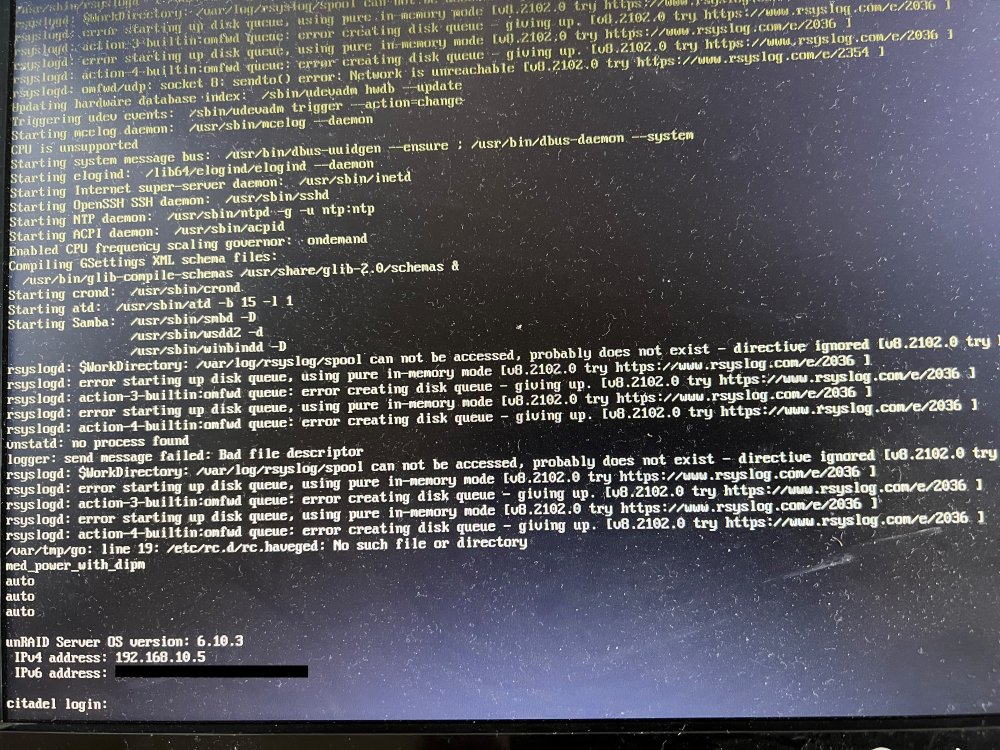
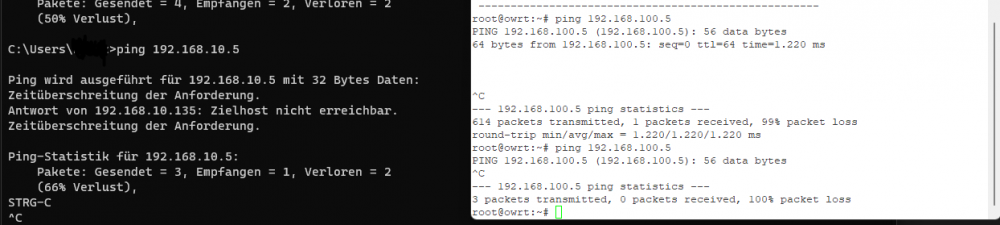
Okay I try the following now. I set Global C-States to auto. What I did, was to disable ACP Power Gating. I have a feeling this can cause trouble or is a reason. Will have to see how the system behaviour changes. ------------------------------ Of course I did already applied before I posted the upper part, following happend: Just after a little while, the system hang. Display shows as attached here but I cant make any input/login. Also, I made the "ping test" again. Attached as well. First echo on second NIC came back. The system is also unresponsive over ipv6 Will reset now and revert back to Disable C-States & Power Gating enable. (Of course, the monitor i attached is dusty as hell )
-
Ich finde es aber sehr verdächtig dass die Platten alle gemeinsam im gleichen Zeitraum aussteigen. Sind die Paritäten aus der gleichen Charge? Stimme ich dir zu. So kann man eben auch wichtigere Daten mehrfach spiegeln und eben sowieso extra sichern.
-
mgutt in irgendeinem Topic mal erwähnt, dass Powertop nicht mehr wirklich nutzbar zu sein scheint da die Version die zur Verfügung steht einfach zu alt ist. Wie genau sieht die deaktivierte Disk aus ?
-
Disabled Global C-States now and check. But there was no problem a while back, which is a little strange. Hopefully 5.17 for amd-pstate coming soon.... Thanks so far. I will update later, I think the system has logs somewhere else. This would be a sign to not having a crash. And other NIC partly accessible. Also, of course, it is asking for parity check after hard-reset all the time. As I am not doing any writes currently, I cancel it most of the time.
-
That is my problem. It is occurring randomly. I have connected a display since boot now and will check if it appears again - just a matter of time. Since in some cases the other NIC was reachable, I think it is just loosing LAN connectivity. Or atleast ARP is somehow not working. Could it somehow be related to Sleep? I haven't setup anything like that yet. Any specific log I should dive deeper in?
-
The latest "hang" today with whole boot process. 20220623-syslog-flashmirrorexport.txt
-
I am not making any progress. My server randomly loses connection on all interfaces. This was already the case at the beginning, but then it passed and it ran for months (at times 2 months without me having to reboot due to upgrade or similar) flawlessly. Now with 6.10+ no 24 hours pass, it is gone and only a hard reset helps. I have also tried many things. The custom bridge runs as IPvlan, second NIC in another network as ActivePassive with connection to another router. Curiously, it has also happened that I could access the second interface in a separate network and act. There was nothing in the log. On the other hand I did a ping on the second NIC (192.168.100.0/24 as planned network, current primary is 192.168.10.5 with /24. By this time, ping on primary was not possible already), which did not work after the second ICMP ECHO: PING 192.168.100.5 (192.168.100.5): 56 data bytes 64 bytes from 192.168.100.5: seq=0 ttl=64 time=1.391 ms 64 bytes from 192.168.100.5: seq=1 ttl=64 time=0.884 ms ... next request: --- 192.168.100.5 ping statistics --- 20 packets transmitted, 1 packets received, 95% packet loss The system has Syslog mirror enabled and running a local syslog as well, with forward to an external rsyslog (of course with not benefit when the network is down. Thats why local syslog now with mirror active). Currently deactivated VM service to get into investigation and just running a few containers. When this happens, I cannot access the systems webgui, ssh nor containers (or VMs when they were still active). Today I also checked if the system is listed on my notebooks ARP Cache, its not! May be some hint. Build currently on 6.10.3 Ryzen 4650G Pro 64GB ECC (memtest for hours no issues) ASRock X570m pro4 (Running BIOS v3.70) 2*1TB nvme drives in btrfs raid1 2 120gb sata ssd, 1 xfs pool cache & 1 unassigned device 1* 500gb sata ssd unassigned device Array: 1*18tb seagate exos x18 parity 2*14tb wd red plus 1*6tb seagate ironwolf PSU: BeQuiet Pure Power 11 400W CM Onboard LAN i211 connected to a Fritzbox 6591 (Vodafone OEM). 1 i350-t2 connected to a different (WIfi-AX) router running openwrt i was not able to finish yet, just in this setup for testing if I could access the other NIC when it appears. I attached latest diagnositcs, maybe someone has an idea what may be wrong. Would be very thankful to get the system running like a fridge again. Happy to answer more questions and add more details, just writing this in my lunch break. Best citadel-diagnostics-20220623-1448.zip



