





Helmer
Members
-
Joined
-
Last visited
-
haha yeah, I also don't understand it, but that's where all the action happens nowedays, if you have self-hosted apps or are into home automation. Great to see that the plugin is working now. Please also register a (free) TMdb key, since that needs to be registered on a personal level (https://www.themoviedb.org/settings/api). Feel free to give more feedback, this is my first reel app and I just build it how i see fit. But if there are features missing, or not logical let me know. Btw the best way to really report issues would be on the github page (https://github.com/helmerzNL/DiscVault/issues), so they can also be properly tracked. I've added all your feature request there too and closed almost all of them.
-
Version 26.3.0 has been released with some new features (https://github.com/helmerzNL/DiscVault/releases/tag/v26.3.0) his release delivers a broader DiscVault Next feature set focused on faster location workflows, cleaner navigation, and improved collection editing ergonomics. What's newBox-set Wizard (new). Added the new Box-set Wizard flow to streamline creating and managing box-set structures with a guided, step-by-step experience. Location feature upgrades (more specific). Location handling now includes a dedicated location detail page flow, plus a QR deep-link bridge so location QR scans open the exact intended destination in the Next app. Location QR quality and control polish. QR rendering was improved to square PNG output, and related location page controls were refined for better reliability and consistency. Filtering and select cleanup with icon-first controls. Filtering/select interactions were cleaned up by replacing text-heavy action labels with clearer icon-based controls where appropriate, improving scanability and reducing UI noise. Profile action menu cleanup. Statistics actions are now kept in the Profile action scope to keep top-level navigation cleaner and more predictable. Expanded localization coverage. Translation coverage was extended and aligned across supported locales for the new location, QR, and UI cleanup flows. Notable stability fixesRemoved a duplicate QR URL declaration that could cause a blank page. Added a regression guard for an app shell JavaScript syntax issue.
-
And it should be resolved, at least I noticed another abroad connection in the Cloudflare logs (not being Germany).
-
I found what is causing the issue, it's a Cloudflare protection thing. So it has nothing to do with Discvault. I thought I solved it, since my external hosted test container was able to just fix it. Do you have Discord...? We could have a chat there (around 20:00 CET) to see how to solve it. That is faster then just going back and forth on a forum. The link to join the Discord is on the website.
-
I think i've found the issue. It's not related to DiscVault or Movievault, but a Coudflare issue. I think i've solved it, could you please try again?
-
Thanks, let me dive into this. I'll get back to you when I've found the cause.
-
Could you check the logs for me, in the Admin menu (the Audit tab) and then select the Plugins log and open the audit details and share the JSON (by pressing Copy JSON). You can share it here (or through a DM), please remove your IP address if you want.
-
26.2.57 is good. The DiscVault Image set to auto is good. What about the reset connection button for the plugin?
-
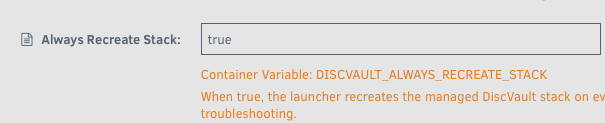
And if you select the beta version in the drop-down, which version do you see there? Interesting that you see 26.2.55, since the latest version (in PROD is 26.2.57). Could you try and set the Always recreate Stack to true and share the logs of the Discvault-26 container (after restarting it and after it ends with DiscVault launcher is ready) And for the plugin, can you click ' Reset connection'. That should initiate a new security handshake and let me know if you pressed that and I''ll take a look at the backend if I see something in the logs'.
-
This has also been resolved: https://github.com/helmerzNL/DiscVault/issues/111
-
This issue also has been resolved: https://github.com/helmerzNL/DiscVault/issues/108
-
This issue has been resolved: https://github.com/helmerzNL/DiscVault/issues/112
-
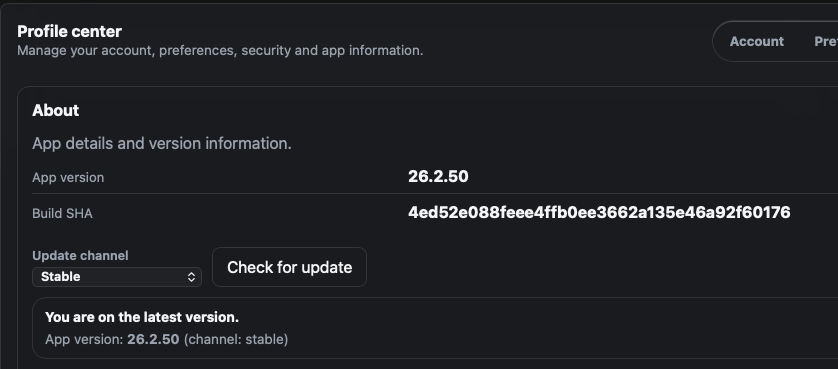
You should be running (at least) this version, which should work. If you have deployed the app with the DiscVault launcher, just restart the launcher should update the app to the version mentioned above. If it doesn't work, please let me know and I can help you troubleshoot.
-
Hi! Thanks a lot for testing stuff out. I'll need to do some checks and then respond to all the questions. One quick question, which build are you running? You should be able to see it in the Profile -> About page (should be something like 26.x.x) and are you running the beta (v26-beta) or stable (v26) built? The beta currently has a lot of new features (check the website for the list of new features), you should be able to move between the two without an issue. Plugin MovieVault26 errors out with "Health: connection error - HTTP 200" i had to disable it. neither version 1.5.0 nor 1.5.3 works for me. what do you mean by that? The Movievault plugin is the metadata plugin I developed, which seems to give an issue on your end. There have been some auth-sync changed being made, I don't see any requests coming in from an unknown/new DiscVault instance. I'll do some testing to see what's going on if there is a new DiscVault instance knocking on the door, maybe I did not push out the new stuff the pROD version yet.
-
Oke, if you btw have issues scanning certain (types) of movies, let me know. it's quiet difficult to get access to 'public' API's that allow for barcode readers, so i have something built in works for almost all my movies. But specific (older) DVD's for the Dutch market are not always recognized :-( That's why i also build an metadata search engine that movie data flows back into, so it only has be be contributed once. Not sure if it works with a barcode reader? It works with the camera of my laptop and the one on my iPHone, but the native iPHone app works best (and the fastest). Let me know if you want to test that one, and i'll send you the testflight linm If you could could reach your internal FQDN through the browser on your phone, then the app would also work. It just connects to your FQDN and you authenticate with your Passkey. If you could DM me your Apple ID then I can add you to TestFlight.

