





Stephan M.
Members
-
Joined
-
Last visited
-
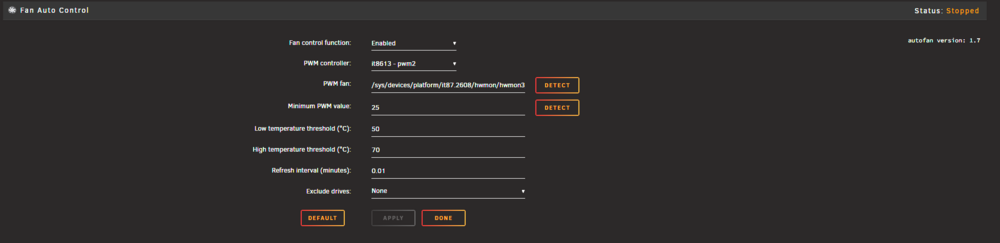
can someone explain me if it is normal that the fan control always shows "Status: Stopped"
-
Unfortunately, the same problem. Is there somewhere a log that shows me more information about the transcoding Plex is doing?
-
That's amazing! Thank you 🙂 I already did that in the past because it's the default way with the same result. The direct reference to on VT was just the last try I did. Don't worry 🙂 Appreciate your help a lot!
-
No one here?
-
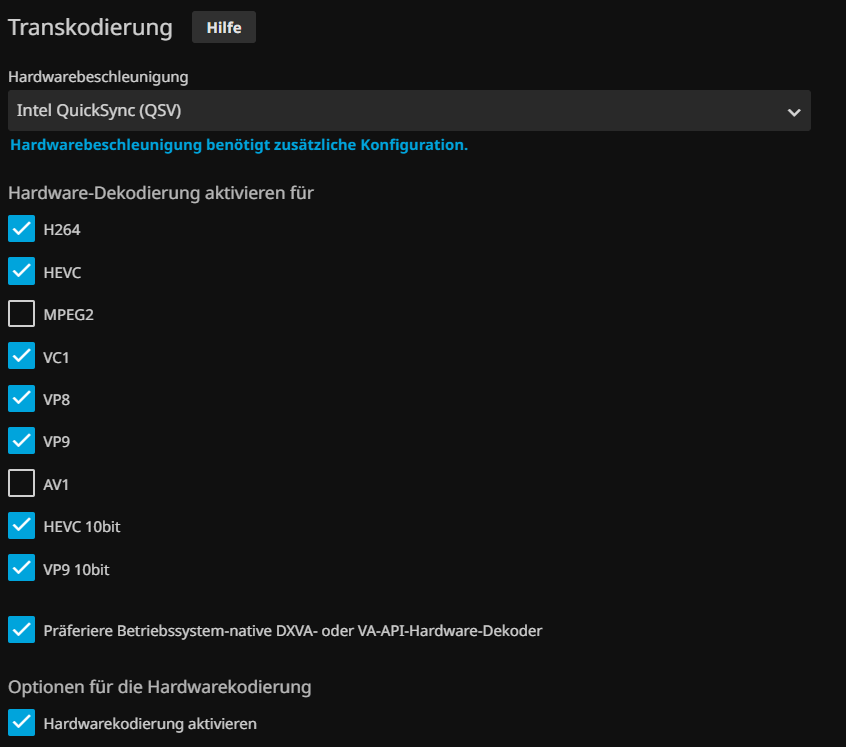
Hi guy's I have geneally speaking two problems. 1. While Intel iGPU SR-IOV Plugin installed the command intel_gpu_top is not working. 2. If i try to pass through one of the virtual gpus from the plugin to my jellyfin container jellyfin will not start to hardware accelerate. added the group to the container with "--group-add={groupid}" added the device by adding "/dev/dri/renderD130:/dev/dri/renderD130" device to the container activated HA in Jellyfin and used Quicksync whichs is supported by my alder lake gpu I'm pretty much without any idea. SR-IOV is working fine on my windows 11 vm so it is generally working in unraid
-
Thank you for your response. With the power of AI I found a solution for me. Used pwmconfig to create a fancontrol configuration file. That is now injected with a userscript that runs on array start. #!/bin/bash cat <<EOF | sudo tee /etc/fancontrol # Configuration file generated by pwmconfig, changes will be lost INTERVAL=10 DEVPATH=hwmon1=devices/pci0000:00/0000:00:06.0/0000:01:00.0/nvme/nvme0 hwmon3=devices/platform/it87.2608 DEVNAME=hwmon1=nvme hwmon3=it8613 FCTEMPS=hwmon3/pwm2=hwmon1/temp1_input FCFANS=hwmon3/pwm2=hwmon3/fan2_input MINTEMP=hwmon3/pwm2=45 MAXTEMP=hwmon3/pwm2=65 MINSTART=hwmon3/pwm2=22 MINSTOP=hwmon3/pwm2=20 MINPWM=hwmon3/pwm2=0 MAXPWM=hwmon3/pwm2=255 EOF echo "Starting fancontrol" /usr/sbin/fancontrol & exit 0
-
Is there no one with an idea how to analyse and solve that?
-
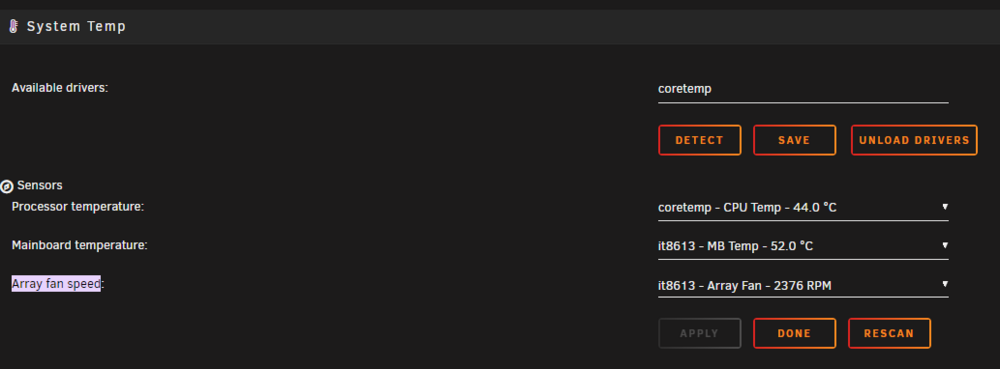
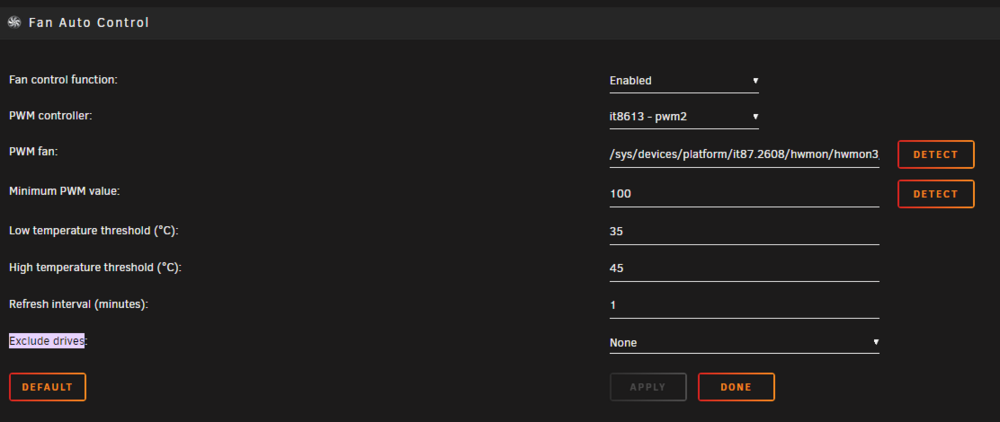
Hi Community, on my mini PC is the system fan not working in unraid. I need to set the fan speed to a fix level, but without System Temp Plugin it wouldn't work at all. What I try to archive is that the fan communicates with the thermal sensor my system is not running hot, and the fan is not running 24/7. Could someone help me with that? jericho-diagnostics-20240527-2205.zip
-
Hi friends, could someone help me with that installation issueß plugin: installing: corefreq.plg Executing hook script: pre_plugin_checks plugin: downloading: corefreq.plg ... done plugin: downloading: CoreFreq-2024.01.28.txz ... done +============================================================================== | Installing new package /boot/config/plugins/corefreq/CoreFreq-2024.01.28.txz +============================================================================== Verifying package CoreFreq-2024.01.28.txz. Installing package CoreFreq-2024.01.28.txz: PACKAGE DESCRIPTION: Package CoreFreq-2024.01.28.txz installed. ------ERROR - ERROR - ERROR - ERROR - ERROR - ERROR - ERROR-------- ---Can't get latest CoreFreq version and found no local package!--- plugin: run failed: '/bin/bash' returned 1 Executing hook script: gui_search_post_hook.sh Executing hook script: post_plugin_checks
-
Unfortunately none of the recommendations fixed it. Switch over to nfs and it works instantaneously. Thank you for the reply!
-
Hi folks, I have a little strange problem with my share. I use code-server docker to write some simple bash scripts. At code-server terminal, I get the following permissions displayed: abc@73486a3fe4f2:/unraid-mnt/user/data/IGEL/Scripts/IGEL OS/OS12_upgrade_utility/bash$ ls -ali os12_upgrade_util.sh 12666373952052750 -rw-rw-rw-+ 1 abc users 202 Mar 27 09:55 os12_upgrade_util.sh At unraid I get this one here: root@Unraid:/mnt/user/data/IGEL/Scripts/IGEL OS/OS12_upgrade_utility/bash# ls -ali os12_upgrade_util.sh 12666373952052750 -rw-rw-rw-+ 1 nobody users 202 Mar 27 09:55 os12_upgrade_util.sh At a device that runs some kind of Ubuntu and SMB mount with a dedicated user, I get this: root@ITC5254005F6496:/wfs/scripts/OS12_upgrade_utility/bash# ls -ali os12_upgrade_util.sh 12666373952052750 -rw-r--r-- 1 user users 202 Mär 27 09:55 os12_upgrade_util.sh Now the problem. Editing and writing from my code-server docker container is working fine. But on the Ubuntu device, I can't even run the script or change permissions. Mount is in read/write mode. Any ideas? Changing permissions in docker does not help. Changing permissions in unraid does some kind of suck 😄 And both does not affect the permission in the Ubuntu mount
-
No PiHole is just the DNS that upstreams to the fritzbox. Router is the fritzbox itself and both unraid server are lan connected to it. 1. Host to wake up (10.10.10.10/24) 2. Host for waking up Host 1 (10.10.10.11/24) The usecase is pritty much safing some power. Unraid 1 is a beast and it is there to host some heavy load VM's and so on Unraid 2 is a small mini pc that is up and running 24/7 with like Cloudflare and so on.
-
Hi folks, I would love to share a problem with you and maybe get some help here. Try to wake up my unraid server (HP Workstation Z440) from S3 initiated by S3 Sleep Plugin of Dynamic's. Waking up my server that is directly connected to my Fritzbox is working fine in the following cases: - Hitting a key on keyboard connected to the server - Pushing the power on button - Wake up the Server by fritzbox WebUI. (So that tells me general WOL is working) What is not working - Waking up the host by using UpSnap or Wake on LAN Plugin on a different Unraid Server in the same network. - Only network device between that servers is a pihole dns and the previous mentioned Fritzbox. I have really now Idea how to analyse that. So like I said, I'm happy with any help 🙂 Thanks
-
ARRRRGGG It was Docker Folder. tryed to unistall "Folder View" my bad sorry!
-
Have the same Problem on 6.12.6. With or without the folder plugin it is not functional. Just the Edit and the start with VNC button is working. In Dashboard everything works fine. 10.10.10.10-1701808103400.log unraid-diagnostics-20231205-2133.zip


