





tvd1
Members
-
Joined
-
Last visited
-
I didnt know that was a thing! I found it and file sharing wasnt ticked on, so I did so. That just made my file sharing icon disappear completely (and no option to share in the 3 dots). Disabling made it come back. Looks like i'll have to not use chrome if im trying to share files. bummer. Thanks for the help
-
Nothing on the first and the main page says theres 3 errors in the log but they are from long before i had this issue.
-
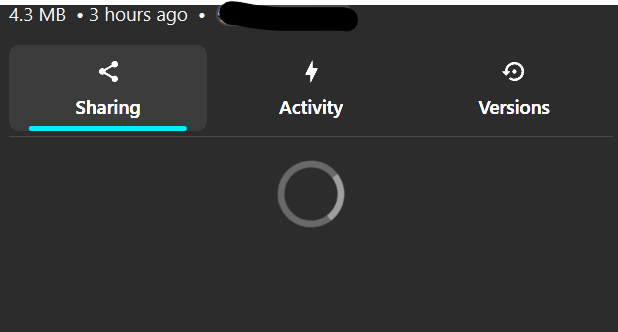
I click on a file that i want to share and i click on the share icon and it just spins and does nothing.
-
Sorry for the lack of details. I'm running the latest Nextcloud (34.0.3) on unraid 7.3.1 as a docker container. The app works fine for basically every other aspect but sharing. I just tried a few browsers and other computers and it looks like firefox works, but nothing else. Never had this problem before. I saw some posts on reddit about the repository changing or something to that effect. I figured if its suddenly happening to me, it might be to others. Looks like I may be an isolated case.
-
Just upgraded Nextcloud, now i can't share files anymore. I click on the share icon next to the file and it just spins. Never happened before, its worked fine for years. Anyone experiencing this?
-
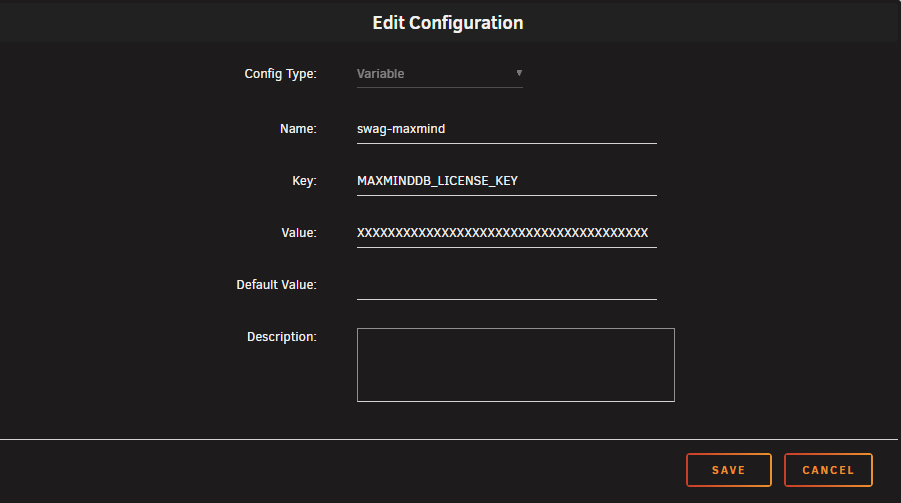
I'm trying to get a few SWAG arguments put in and I need to set environment variables, but i'm kind of lost. I'm not just sure how to translate/format it inside of the docker container. Heres what I'm trying to accomplish (from github, MAXMIND mod) In the container's docker arguments, set an environment variable DOCKER_MODS=linuxserver/mods:swag-maxmind If adding multiple mods, enter them in an array separated by |, such as DOCKER_MODS=linuxserver/mods:swag-maxmind|linuxserver/mods:swag-mod2 In the container's docker arguments, set the following environment variables: MAXMINDDB_LICENSE_KEY=<license-key> with your license key. MAXMINDDB_USER_ID=<account-id> with your account id. Which I translated roughly to: Am I doing this right? How would i add the account id? I've tried using the "|" to separate but swag gives errors on startup. Sorry if this is a noob question but I've tried a bunch of iterations and still no luck. thanks.
-
So i'm getting this, even after a force update. i was having problems before this but it brought down my unraid server, thankfully the server is fine now but the DB is corrupt. How can i tell if the DB is local or if its on my instance of MariaDB? I looked at the databases on my Maria install and dont see any db there that could be zoneminder. I do have backups of the appdata folder. Can i rebuild? Or worst case, can i export/save my settings for a reinstall?
-
This is what i had to do. A real PITA but a good PSA for backing up both the container and the DB.
-
Okay i think i've made progress. I figured out that Maria DB had a corrupted database (likely the nextcloud one) and was flipping on and off non stop in a boot loop. adding this to the mariadb conf file: [mysqld] innodb_force_recovery = 6 and restarting maria got it to stop, so i could do a mysql dump docker exec mariadb /usr/bin/mysqldump --user=root --password=******** nextcloud > /mnt/user/data/mariadb_backup/nextcloud/dump.sql restored the db from an old backup.. (now i know i need to backup the db frequently) Removed that line from mariadb conf and restarted. I also restored all the nextcloud data file backup too, yet when it started it still forced the update to v30. Either way, after it ran NC came back up. I had to do some permissions fixing on the data drives but it came up. However i was getting this error on the web UI: I couldnt find that file in previous backups, so i created that file and put "# Nextcloud data directory" in that file. after rebooting i get this error: Nothing in the logs, so i did another restore of the data drive and its working, but its all sorts of messed up. I can't upload files and many are missing. I'm going to revisit tomorrow.
-
Yea i've always kept NC up to date, i rarely let any docker containers i have go over a month or two without updating. I'll have to find your post about rolling back the DB, or let me know if theres a KB somewhere about how to do it.That seems to be the only solution atm.
-
has anyone come up with a solution? i've tried everything suggested and even tried restoring an old nextcloud instance from a backup. Even with the restore it still somehow shows it has to upgrade : then fails to connect to maria, which is confirmed working and the other apps i have that use it are fine. I can't believe that mariadb would be too new? then why push an update if thats the case?
-
I'm having trouble with nextcloud and im hearing it has something to do with mariadb. Everything was working fine prior to the failed upgrade of nextcloud. So i looked in my mariadb logs and its repeating this over and over again, 24/7. Are there issues here or is this normal? 241030 15:00:59 mysqld_safe Logging to syslog. 241030 15:00:59 mysqld_safe Starting mysqld daemon with databases from /config/databases 241030 15:01:01 mysqld_safe Logging to syslog. 241030 15:01:01 mysqld_safe Starting mysqld daemon with databases from /config/databases 241030 15:01:02 mysqld_safe Logging to syslog. 241030 15:01:02 mysqld_safe Starting mysqld daemon with databases from /config/databases 241030 15:01:03 mysqld_safe Logging to syslog. 241030 15:01:03 mysqld_safe Starting mysqld daemon with databases from /config/databases 241030 15:01:05 mysqld_safe Logging to syslog. 241030 15:01:05 mysqld_safe Starting mysqld daemon with databases from /config/databases
-
I just updated my unassigned devices plugin and now my windows shares are gone. I'm going through the settings and trying every combination that makes sense, as i assume permissions/settings have changed in this update. My unraid log shows this after the update: unassigned.devices: Warning: Unassigned Devices are not set to be shared with SMB. unassigned.devices: Warning: Unassigned Devices are not set to be shared with NFS.
-
for the record, im getting this same error just now upgrading the container. this keeps coming up:
-
I'm getting the update "not available" with the broken chain icon in docker.. Anyone else? (Also have it for plex). Everything is working fine (v27.1.4), the only change i made was i did update Unraid itself a few weeks ago.
