





Lolight
Members
-
Joined
Everything posted by Lolight
-
There's no need to search for a specific MB to have an efficient system. Modern consumer hardware can be very efficient - and normally just requires some minor BIOS tweaking to get it running at its peak efficiency. ITX (assuming you meant mini-ITX) and mATX/ATX are the MBs industry form factors (physical dims)- not some kind of an efficiency metric. There is no any special effort, focus or research required to select and build a very efficient NAS nowdays.
-
If you want to go real cheap, check out ebay for a still very capable refurbished Dell Optiplex workstation. Look for one with the 6th and up gen. CPU, with 4 cores/8 threads.
-
No, it doesn't. https://www.intel.com/content/www/us/en/products/compare.html?productIds=218834,218833
-
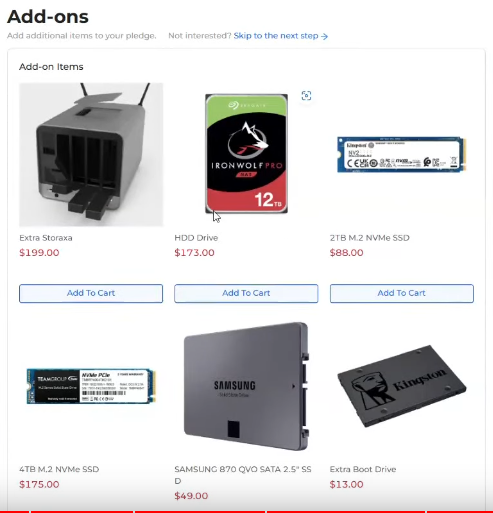
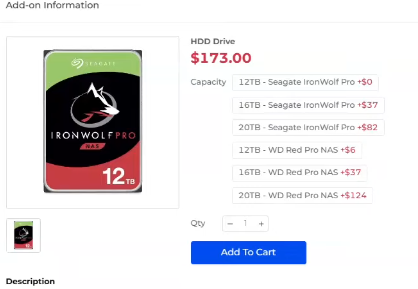
Some of the listed add-on prices: According to Storaxa, all HDDs are retail with international warranty! They really tempt the backers to throw even more money into the project by offering incredible discounts for add-ons. I suspect more options to become available with similarly good prices.
-
May I ask then about your reasons for choosing a used Enterprise grade hardware? What is your current setup?
-
You don't need ECC on a Plex server. MBs built on the w680 chipset also support ECC. Go with a consumer oriented hardware.
-
There are at least two updates to the initial video with more to come. As @JonathanM has mentioned, it remains to be seen how legit the whole project is. The youtuber (NASCompares) roots for the project and wants it to succeed but to his credit isn't hyping it without a disclaimer and at least is managing to issue a few warnings here and there of the risks involved. He also seems to be super impressed with quality of communication coming out of Storaxa. (???) I don't know why he finds timely, generic responses to trivial questions so impressive when the project has still nothing to show for other than marketing demonstrations. Even worse they keep adding more and more options to the available configurations. It's becoming a hot mess.
-
Assuming that the project comes through... Will they release and ship in quantity to cover all backers? Will the final product perform as promised and not become a hot mess of mismatched components (literally and figuratively)? Will the small case have dismal airflow leading to cooking HDDs among all other components? Will there be any after-sale RMA support with an established and followed on warranty process? There are still no definitive answers at this point.
-
Did you mean the Fractal Node 304? Yes, It's a very good, mini-ITX, NAS oriented case.
-
@peterg23 Have you just made a post with the link to the above mentioned article on the Unraid's subreddit? I'd suggest to post it to the HomeServer subreddit. Unraid haters won't be pleased.
-
What is your intended usage case?
-
Why are you fighting normal (actually quite cool for a NVMe) temperatures? Most of NVMes are rated to normally run up to 160F under load. HDDs, on another hand, require a significantly cooler top temperature limit, to never exceed 140F and preferably be kept below 120F at all times.
-
-
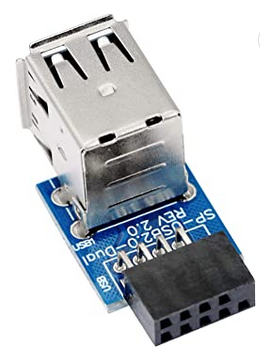
TRIM in the array is not supported, at least for now. HDDs in the array and NVMe's in cache pools is the recommended setup. btw the linked Storaxa project presentation doesn't look all that.... convincing. Sorry.Another low-power alternative is the Odroid H3+ https://www.hardkernel.com/shop/odroid-h3-plus/You should also be able use the M2_2 slot for a second NVMe SSD drive without disabling any of SATA ports.@FreeMan Make sure to get a USB 2.0 drive and plug it in this kind of or a similar 9-pin adapter. This is the most compact one but you can use other kinds.
 The Fractal Node 804 is about 13.5"W 15"D 12"HYou might want to have more than one M.2 in your system (not in the array) that should be used for system app data, file transfers, Jellyfin metadata/thumbnails, docker containers, VMs - all of which would greatly benefit from being set on NVMe cache drives. e.g. you could use one cache drive for Jellyfin metadata/thumbnails, the other one for docker/VMs and Appdata/system and the third one for downloads and then consecutive transfers to the much slower HDDs in the array on a predefined by you schedule. How much room do you have under that table? The Fractal Node 804 is less than 40cm tall. It also accepts cheaper and generally more suitable for NAS mATX motherboards (more SATA ports and NVMe slots).The adapters suggested by @trurl and @JonathanM would work just fine.I have the same USB drive. It's been reliable, also relatively cool running which seems to be a crucial factor determining failure rates. My theory is that the USB drive running temps might be influenced by its "demanded current" design - the lower the cooler. A metal casing should also add in heat dissipation making the Kingston DataTraveler even a better choice (if you can find one). https://www.amazon.com/Kingston-Digital-DataTraveler-Flash-KW-U4616Z02-8A/dp/B01N8XLPVY/ref=sr_1_16?crid=17B3TKTP604FZ&keywords=kingston+datatraveler+usb+2.0&qid=1677301904&sprefix=kingston+datatraveler+usb+2.0%2Caps%2C340&sr=8-16 You can "check" your drive with "USB Device Tree Viewer" which will detect and show your drive's demanded current specs. My Transcend and Kingston show 100 mA, so far the lowest number among other USB 2.0 drives I have. https://www.uwe-sieber.de/usbtreeview_e.htmlWelcome Loish! You can start with https://pcpartpicker.com/list/ Any major brand consumer motherboard should work just fine - ASRock, Asus, Gigabyte or MSI. Go for a cheaper and simpler one, of the non-gaming variety, preferably featuring 6-8 SATA ports for future expansions (choose a NAS friendly computer case). That site will warn you of any incompatibility within your chosen component list. Don't try to save on a PSU - go for the single rail, Tier A - High-End: https://cultists.network/140/psu-tier-list/And most importantly, don't use SMR HDDs as a parity drive(s). https://unraid-guides.com/2021/07/21/can-unraid-use-smr-hard-drives-the-smr-vs-cmr-debate/



