mmwilson0
Members
-
Joined
-
Last visited
-
Thanks @Josh.5! That's how i was installing (well, i was using the "download" from emudeck, which is basically just a script with that as its content". For password, i thought i had to use the password that i configured in the Unraid Docker settings. Everything emudeck related seems to work, but i did notice a few "permission denied" errors when the install script was running. I did have 2 other questions, one was about performance. Right now I have video output as VNC, and when i drop in through the web browser, performance is quite sluggish. Similarly when I try and use Moonlight or Steam link with the server and client on the same network, the performance isn't great. My system specs are Intel® Core™ i7-8700K CPU @ 3.70GHz, 32GB ram, and a NVIDIA GeForce GTX 1080 that I'm passing through to the container. I set the appdata location to the cache (in part, to resolve the steam crashing errors), though my roms are in a share on my array. I think that the hardware should be adequate, but even when testing NES roms, things seemed sluggish and laggy. The other question was on configuring a controller for steam headless. Is the recommended path still to use Uinput? I searched the CA store, but it is not showing up for me. Thanks! Malc
-
So, i've got it working, but the performance is really sluggish. I thought it was just that way because of VNC, but when i try and use sunshine or steam link, the behavior is the same. I'm running a Intel® Core™ i7-8700K CPU @ 3.70GHz, 32GB ram, and a NVIDIA GeForce GTX 1080. Resource utilization when trying a NES game was pretty modest, but still -- sluggish. Is there a way to boost performance of this container, or am i somehow facing restraints due to my hardware?
-
Hi All. I've been looking around but can't find any clarity here. Is there any documentation to support the 1-click install for Emudeck? I'm looking to set up emulation to stream to my shield, i'm wondering if this is the right solution for that or not.
-
I'm interested in this... what do I use for courses? Are there any collections of courses out there that I can browse?
-
Can we enable MFA for our servers as well?
-
Is your install wizard completeing after you launch the container and choose which apps you want to install? When i choose more than a couple apps, mine is hanging and not finishing. I tested with just doing one or two apps and watched the progress in the container, and one of the last steps is provisioning the user accounts. So if the install wizard is not completing, the admin and user accounts will not get provisioned. I am looking for how to troubleshoot why my installation wizard is not finishing, and i came across your post so it thought I'd chime in
-
@dlandon @JorgeB in case you folks are interested in this new piece to the puzzle -- i enabled Mover Logging, and the issue returned (after the next reboot). Disabled it, and the issue went away again (after i rebooted). So, there is something going on more than just what the enhanced logging plugin was doing, but is curiously still related to logging.
-
Hey @bajsakakka Did you resolve this? I'm getting the same issue. Accessing my cryptpad container over the web so i'm using the URL and Nginx Proxy Manager. it works fine if i access the container locally on my networking using ip:3000
-
I had tried re-installing enhanced logs, to see if a clean install of it would help, and the problem returned. It's uninstalled now, I'll live without
-
Hey @dlandon, Diagnostics attached. launchctl-diagnostics-20221102-1157.zip
-
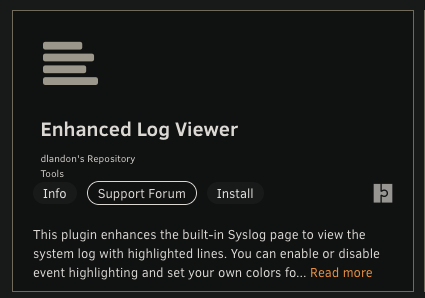
Update: Finally got to doing this. It appears that it was Enhanced Log Viewing that was causing my issues. Uninstalled it, and all is well now. Thanks for putting me on the right path @JorgeB
-
Thanks! i'll give it a shot after work tonight. I imagine this will require a reboot when I rename/restore a plugin?
-
When i boot in safe mode, everything seems to be working ok. But when i launch back in to normal mode, the behavior returns again
-
@JorgeB I tried Firefox and Chrome, as well as private windows (to disable extensions), and it's the same behavior all around.
-
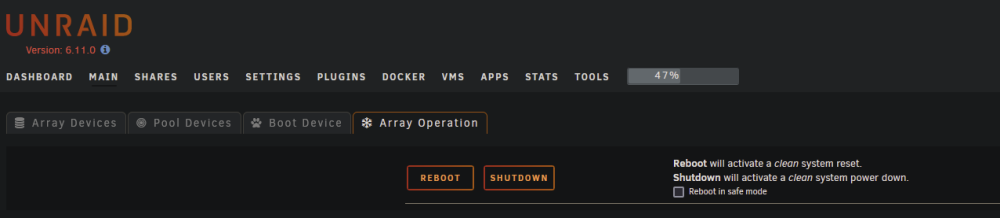
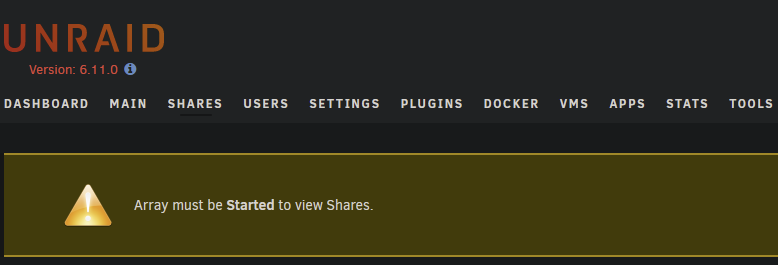
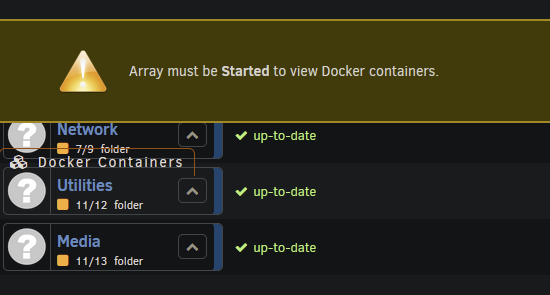
Hi Forum, I recently updated from 6.11.0 to 6.11.1. I applied the update initiated a reboot once I was prompted. The reboot hung for more than an hour, soI ended up holdlng the power button to complete a hard reboot. Once i finally got the unraid back up and running again, it was upgraded, but behaving oddly. After i enter my encryption key and start the array, the array operations menu is missing a lot of the options that are normally visible there. Additionaly, i get the "array must be started" message whenever i try and visit certain menus. In the bottom left it does say "Array Stopped. Stale Configuration". Docker containers appear to be running though, and i can stream to Plex. I have downgraded and upgraded the Unraid version twice now, hoping that would help resolve this, but it had no affect. Attaching the diag bundle generated before i most recently downgraded OS versions. launchctl-diagnostics-20221010-2243.zip