



Skip to content
View in the app

A better way to browse. Learn more.

Unraid

A full-screen app on your home screen with push notifications, badges and more.

To install this app on iOS and iPadOS
  1. Tap the Share icon in Safari
  2. Scroll the menu and tap Add to Home Screen.
  3. Tap Add in the top-right corner.
To install this app on Android
  1. Tap the 3-dot menu (⋮) in the top-right corner of the browser.
  2. Tap Add to Home screen or Install app.
  3. Confirm by tapping Install.

fee-fie

Members
  • Joined

  1. Thanks for the quick reply 😀 When i looked in the BIOS before i couldn't find it. But fond it now and disable. finger crossed and thanks again. 👍
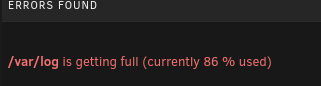
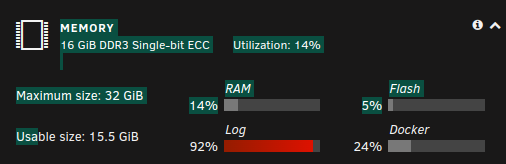
  2. Hi All After upgrading to 6.10.2, i've had nothing but issue's. Manage to get system back up with blank tg3.conf file. The issue i'm having now is the plugin Fix Common Problems is telling me that is filling up too quickly with 1 hour. Please help - first time on any forum, normal google and fix myself. but haven't got a clue with this. ml310e-diagnostics-20220602-1548.zip Any help is appreciated. regards, Simon
Account

Navigation

Search

Search

Configure browser push notifications

Chrome (Android)
  1. Tap the lock icon next to the address bar.
  2. Tap Permissions → Notifications.
  3. Adjust your preference.
Chrome (Desktop)
  1. Click the padlock icon in the address bar.
  2. Select Site settings.
  3. Find Notifications and adjust your preference.