





azche24
Members
-
Joined
-
Last visited
Everything posted by azche24
-
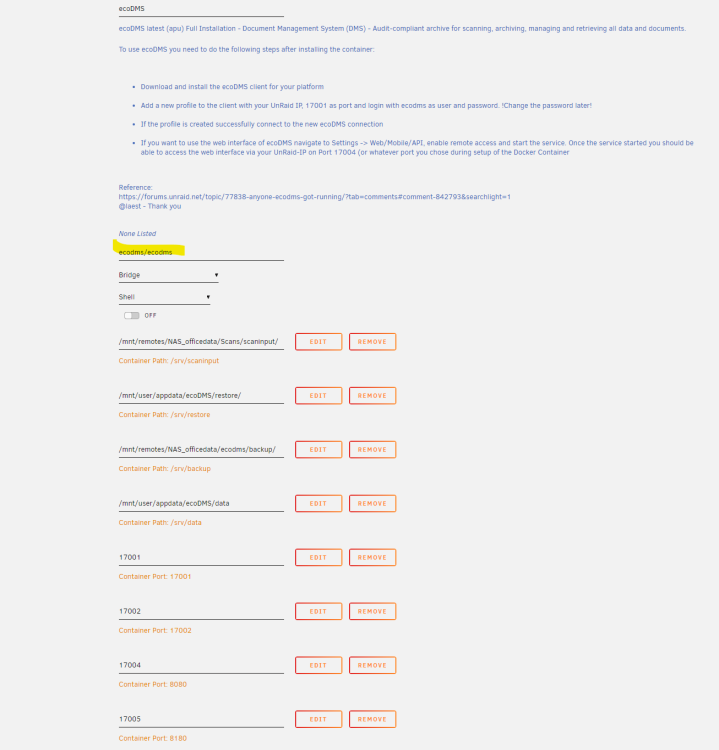
Update: ecoDMS still working (docker template edit needed). For reference i would like to contribute, what has happened to ecoDMS, a document archive and management system. The app in the repo is still based on ecoDMS 18.09 - this is not convenient any more - the actual version is 22.08! Also ecoDMS is pretty hard to maintain on a Synology NAS - you always have to re-install the whole stuff after every major update, which can be twice a year. So here unRAID comes in, which makes it sooo easy to install and update docker containers. These steps i would like to recommend for folks, who want to use ecoDMS: First create shares for scan input - should be readable/writable for the users and the docker container. In my case this directory resides on another NAS and is mounted via unassigned devices plugin. backup - very important, for this must be outside the docker container (don't use a directory in the apps-directory!) and must be backed up externally on a regular basis. I put this in a smb-mounted share (like "officedata") on another NAS, which is mounted by unassigned devices plugin. This is (aside from the data directory itself) the directory to back up externally (to the cloud or whereever). restore - should be reachable, can be on the unRAID nas (recommended) or somewhere else. Here you initiate the restore if needed. First install ecoDMS (APU 18.08) from the repo. This is the template to start with. After successful installation you have this (including the customisations) in your personal archive in "apps". Change the settings like in the screenshot. Docker should come from ecodms/ecodms repository, so updates are automatically done for you. Remember: The "backup" directory mapping should be outside the app-directory on unRAID. In my case this is also in the "working" directory on another NAS, which is backed up on a regular basis. This directory should not be in the /apps share - it can become quite large (4 GB in my case) and therefore should be kept and backupped outside. "restore" and "data" can stay in the /apps share on the cache drive. But you have to make shure, that the "restore.zip" (after a initial restore from your old data) is deleted after import - it can be pretty big also. Now have a look into the other settings and start the container - done!
-
Das ist schon ein Grund, Plex und Unraid nicht mehr für Downloads zu verwenden. Sämtliche Versuche, mit /transcode -> /tmp einen Download auf das iPad durchzuführen, scheiterten hier kläglich. Der Server erzeugt riesige Dateien im /tmp (von einem 2.5 GB H265 codierten Film bis zu 12 GB "output.mkv") und bricht dann ab - die Dateien werden durch den Plex-Server danach gelöscht. Gemerkt habe ich den Mist nur, weil Download im Plex nicht mehr möglich war und mein Unmanic Docker nicht mehr konvertieren konnte (/tmp war voll) Und Transcodierung in ein SSD Verzeichnis, z.B. /mnt/user/cache/Transcode ist auch keine Alternative, wenn man sich mal anguckt, wie viele und teilweise auch große Dateien Plex nur beim Streamen oder gar beim Download erzeugt. Das ganze Zeug möchte ich echt nicht dauerhaft auf die SSDs geschrieben haben. Edit: Habe es hinbekommen. Im Plex-Client auf dem iPad Settings->Downloads->Videoqualität 720p (Hoch), Ton 128 kbps und auf dem Server (Plex) -> Einstellung -> Mediathek -> erzeuge Kapitel-Thumbnails und Vorschau-Thumbnails = NIE. Wenn dann noch HW-Encoding funktioniert, geht es. Dauert etwa 15 Minuten für einen Download und erzeugt eine Datei auf dem iPad, die ca. 70 % vom Original umfasst.
-
I did not go through this whole thread, but you already checked this? Excessive writes to cache drive from docker applications seems to be a bit of a design problem in the docker/UnRAID combination. Many many docker apps write logs and temp-files to the docker image / cache drive, which should not happen. For my installation i had to change plex official with binhex-plex, add a few extra-paths for temp-files and map these to /tmp/ and install a RAM-drive like explained by @mgutt here. It still does excessive writes. In my case these come from roon-docker, which has tons of logs in docker.img and writes tmp files there too. There should be a "design guideline" for dockers with UnRAID, because this is really annoying. From the UnRAID point of view the problem is related to the design or implementation of the docker apps.
-
I don't know if this belongs here: Had serious trouble with rsync commands running wild. Started something like "rsync -avh --delete \\A \\b - huge job, almost 10 TB. I canceled it via userscript-plugin but it did not work. In the end i had about 10 rsync scripts copying the same stuff over and over (because the first ones altered the date/time and the later scripts did not notice). Annoying... Is there a way to include this (i needed "killall rsync" to clean up this mess) or should i provide something with the script to avoid this behaviour.
-
Schöne Boxen :-)! Abspielen geht hier auch mit diversen Raspberry PI 3 und 4, die Aktivlautsprecher, Amp oder DAC per Cinch oder digital "füttern". Auf denen läuft Roipee (eine Roon-Bridge auf Debian-Basis). Sehr problemlos das Ganze. Von LMS bin ich weg, nachdem ich das 1. Mal Roon-Server getestet hatte. Zumal die Hardware von Logitech ja nur noch antik zu Mondpreisen zu bekommen ist (und klanglich auch mit den heutigen Lösungen nicht mithalten kann).
-
Ich habe gute Erfahrungen damit, meine häufig benötigte Roon-Musiksammlung komplett auf eine billige kleine WD 2 TB 2,5 Zoll Platte zu legen. Die Musik läuft hier mehr als Filme, der Stromverbrauch der kleinen Platte ist vernachlässigbar, für die 2 - 5 MB/s Streaming von Musik reicht das dicke aus und die restlichen Platten laufen beim Musikhören nicht hoch, wenn man das Verzeichnis für Musik fest auf diese eine Platte zwingt. Ansonsten bin ich kein großer Freund von getrennten Servern, aber das kann anders aussehen, wenn VMs im Spiel sind. Mit so vielen Platten dürfte man kaum unter 20 - 25 Watt im idle kommen - das ist schon ziemlich gut. Bei mir ziehen die Docker ziemlich viel CPU und Watt, wenn sie richtig arbeiten. Video-Encodierung mit Unmanic, Plex, Indexierungs-Jobs, da läuft mein ähnlich konfigurierter UnRAID Server schnell von 20 - 25 W/idle auf das Dreifache hoch, vor allem, wenn alle Platten an sind. Das sind aber nur wenige Stunden am Tag. Ich messe den Stromverbrauch immer in Summe (USV, 2xNAS, Switches mit und ohne POE, Telefon-Server) - da kommt man im Leerlauf schon auf 90 - 105 Watt, in der Spitze dann bis zu 160 Watt. Aber schon wegen der geschäftlichen Daten, der nächtlichen Backups und weil auch externe Benutzer dran hängen brauchen wir hier 24/7. Viel Erfolg!
-
Er meint W/24h und das ist ein Verbrauchswert auf Zeit.
-
Search this forum. You need to activate rsync for a share using a script. But I would not recommend it. Unraid does not work too well as a backup target for the way it handles writing to disk.
-
Hi, i'm running this wonderful unraid behind a Synology device, which is also doing reverse proxy to my docker containers like vaultwarden, pihole, plex etc. on the unraid-server. I can not get rid of the synology for undisclosed reasons - unraid is just my media and docker machine. Dynamic DDNS including the SSL certificate comes from the Synology device (which is easy to implement and working well with plex and vaultwarden). So how do i integrate the unraid SSL/DNS with this cryptic "xyz..517a42973bc.unraid.net" url and certificate into this setup? The unraid-server itself always shows up with this unwanted DNS-entry and its own certificate. This gives me SSL related errors if i call the unraid-server via the "main" url (e.g. https://unraid.my-homeDDNS.synology.me). Somehow i did not find any useful information on handling of this part. Thx in advance, Alex



