






Batter Pudding
Members
-
Joined
-
Last visited
-
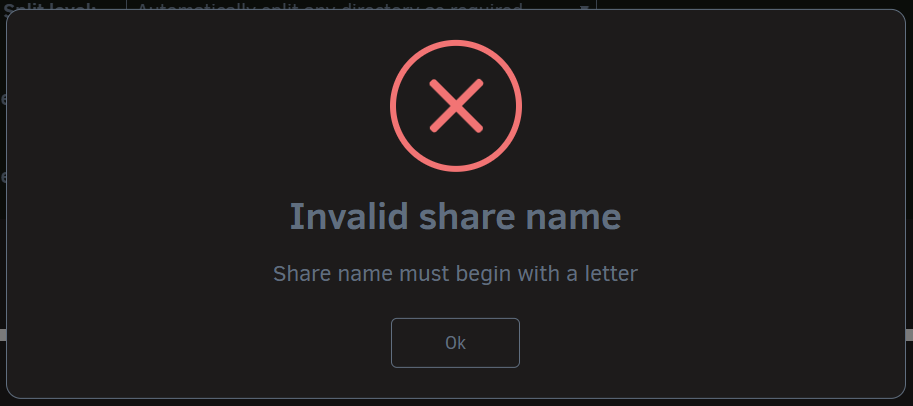
I do realise the error is about starting with a perfectly legal character like a dash. This is a system that has no ZFS drives and never will have any ZFS drives in it. Especially frustrating when earlier in v7 life I was allowed to do this and have a collection of folders setup like this already. Perfectly working. Trying to add one more to that set was then restricted by the GUI. This should just be an advisory. Not a forced by the GUI in case I'd put in a different format. I would not be able to move to ZFS. Too many of my sub-folders start with other characters like [ or ! or Japanese text. A format system restricted to the alphabet would never work for my use. Wow - this has been a bit of a shock learning curve. I am looking at those ZFS manuals and they don't even allow accented characters? Something like an é is not allowed in a folder name. I've been so used to full Unicode since the 90s that ZFS is an amazing backward step. I could literally not adopt it with my current folder hierarchy. I don't understand how something like ZFS can only restrict to 26 letters. I came from NTFS where for years we can use almost any letter on the keyboard and expanded into Unicode. SMB then allowed those names as folder shares. Many of my old shares started with "!Folder" and the move to a "-folder" was already a compromise for my naming scheme. I really don't want to start naming things as "aaa-folder" as it gets messy and starts eating into my character file length. I assume at some point they will actually fix ZFS to catch up with what other disk formats have been doing for decades. Now I have learnt it is only a GUI thing I have found a way around it in Unraid and helpfully learnt that I can never go anywhere near ZFS due to this oversight on how language works outside the US.
-
+1 to this. I came here today with the same problem. Setup my server on XFS formatted drives with an earlier v7 OS. Named lots of shares -something-. Now today come to add another share and can't name the folder as I want to. Please only put the restriction on the OS if there are ZFS drives. Reducing everything to the lowest common denominator is backwards. This should only be an advisory. @Frank1940 Thank you for giving us a way around this odd limitation. This meant I learned that Linux didn't really like talking to a folder on the command line as -folder- and needed mkdir -- -folder- to make it happen. But it is still legal. It was frustrating enough for me moving from NTFS where any character is allowed. My shares used to start with a ! and swapping to dashes caused a few hiccups. So it seems really really massive step backwards to end up with ZFS shares that only allow 26 letters of the alphabet. LOL - what? I was testing something. I can't even name a folder café or Motörhead ? ZFS is so so so backwards. 🤣 So many of my folders don't use pure ASCII, which helpfully rules out me ever thinking about ZFS until they get that fixed.
-
I hit something similar this morning, but worse. On v7.2.3 are we now now only restricted to the alphabet? I tried to call a share "-something-" and was rejected. Even though I have plenty of folders from earlier v7 release called "-other-" and "_this_". It seems a backwards step to only allow the 26 letters of the alphabet when previously we were at least allowed the "-" and "_" I use xfs and this limitation is especially frustrating when my other folders have the perfectly legal "-" in the name meaning I can actually group them as I need to. Why was that limitation not just restricted to zfs drives? I guess I could install an old version of v7, add the share, then upgrade again? Does anyone know when this "feature" was added? Edited to add: For anyone reading this, the topic is brought up here: https://forums.unraid.net/topic/197301-fix-logic-on-add-share-tab/ and the solution is just kick to the command line to get around this weird GUI only limitation.
-
Simple \ dumb question. How do you stop the Client running on Unraid so you can update it? I thought it would be the following, but that don't work. sudo systemctl stop urbackupclientbackend.service TF=$(mktemp) && wget "https://hndl.urbackup.org/Client/2.5.29/UrBackup%20Client%20Linux%202.5.29.sh" -O $TF && sudo sh $TF; rm -f $TF I then find there is no systemctl, any hints? I'm trying to manually update the client as obviously need to stop it before I update it. Tried to just run the script as it is, but server does not show any change of client version.
-
I rarely look in logs, but I looked today and spotted this same issue hitting me. But mine is simpler. And the pattern is obvious. Oct 7 11:14:07 unraid-box nginx: 2025/10/07 11:14:07 [error] 10121#10121: *2212853 limiting requests, excess: 20.291 by zone "authlimit", client: 192.168.0.8, server: , request: "PROPFIND /login HTTP/1.1", host: "192.168.0.7" In above, 192.168.0.7 is Unraid, 192.168.0.8 is my Pi-Hole Main part of the error says "request: "PROPFIND /login HTTP/1.1"," and is common to each error, no matter the machine. Any computer in my network that has a SMB network share to the Unraid box causes these errors. Win10 PCs, a Win10 Media PC accessing music, even a Raspberry PI with a link for stashing PI-Hole backups via SMB triggers it. Each of these is a username and password connection. Some read only, some read/write. Only one of these computers am I actually looking at the web interface on Unraid. The other computers are just using it as an SMB file share. Everything that talks SMB to the server causes these errors in the logs. I'm going to try the idea in the post linked above, but just wanted to add my "me too" here and the pattern that is obvious from use.
-
This was a fresh install of a new PC, and I thought I'd go for the Image backups on the boot drive like I used with a friend on a Windows Server running urBackup. I have a weird PC with multiple drives so most stuff was already split out onto other drives and file backups. Just really the OS drive had a Image Backup, and of course Sod's Law said I needed 40KB of files I had deleted a little earlier... At least I know now how to manually reassemble things from a VHDZ. 😁Grab a few files from the Windows Server to uncompress, and have a ton of disk space to hand. Out of a disaster one always learns something new. This is likely what I'll do. If it ain't broke, don't fix it. Though in the near future I know I'll upgrade that ancient box to get a faster disk controller in there. So the OCD says to try and tidy up a bit with the paths. Your comments on needing to move urbackup into a urbackup subfolder makes me realise it is not as simple as I hoped. I was hoping the backup database also used that same /media/urbackup path as noted in the GUI. All my other backups are file backups. That Image backup was a bit of a new experiment really. Already adjusting the plan there. That PC really only has OS on the C drive. D drive is data. E drive is apps, etc. This split setup makes backup easier. Part of it was to avoid a full reinstall of my main PC if a disaster occurred. So I think I am going to just readjust my disaster recovery plan Thanks all 😁
-
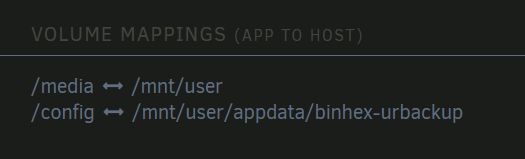
I want to fix my paths (see above) In a standard install where the /media/ points to /mnt/user/urbackup and the Backup Storage Path is /media what is in your /mnt/user/urbackup folder? I assume you have BackupName BackupName2 urbackup (with the database files in it) urbackup_temp_files As long as "urbackup" is a folder in there with the database files in it, I can't see why I can't just fix this. Stop server, fix paths, restart server. I do notice that at the moment I have two "urbackup_temp_files" folders. On in /mnt/user/ and one in /mnt/user/urbackup/. I guess one of those is not normally sitting there.
-
Thanks for confirming. This is what I started to learn, and realised was looking wrong. But can I fix that now without messing up the backups? If I changed the /media to point to /mnt/user/urbackup and updated the backup storage path to point to /media as your screenshot would the backups be happy and continue as they are now, with continued update to the current backups? Isn't there file links I need to be concerned about? To be fair, the only thing that has ever lived on that UNRAID box is urBackup. So no harm it being "wrong", but would be useful to correct. Managed to re-read part of this thread (for approx 10th time) and could see my problems. And now understand this is not a feature of our Docker version. Guess the time I was thinking of is when I have done this on a server running on Windows. But all was not lost. Even though the GUI would not let me unpack. The backups are there, just had to do some faffing around. I ended up manually dragging the last "full" backup back to my PC. And then raided files from the Windows Server edition so I could run "uncompress_image.bat" I need to dig in and experiment a bit more. But importantly yesterday I got back the 20KB of files I needed, after transferring 367GB across the network and unpacking that to a 500GB file!! LOL. Good job I had plenty of disc space 🤣 Now, next time this happens, I assume I could attempt to uncompress directly across the network? Looking at how that script ran it was trying to index back through the incrementals.
-
I tried to open a backed up image today, but getting an error. And I think I know what is going on on but don't want to break things 'cos I am noob in docker apps. Clearly the image BACKUPs are working as the large files are there, but the retrieval of the images is not possible. The paths are confused somewhere and the server is looking in the wrong place when attempting to mount the image. Note there is no problem with file backups. I am editing this post as I work through a process of elimination which also includes a crash course in how docker actually sees things...😁 First, my settings: Settings page: The GUI shows me: All BACKUPS are happening fine. And I can access FILE backups no problem. It is only mounting images is trouble. I attempt to open an Image file via the GUI. It fails to mount. It can't find it as it is looking in the wrong place 😕. The only thing I change in the pictures below is my PC name that is being backed up. Nothing else... no other part of the path I can go to /media/urbackup/MY-COMPUTER/250902-0030.... and find that backup is there. The backup exists, but not where it is looking. It has forgotten to add the /urbackup/ part Also in the log are cleanup messages, but that gets things correct and looks in the full path: Here the path is the full /media/urbackup/ in front of it. This one is trying to delete from the correct place (just can't find it as something else already deleted it). Question How do I fix where it opens the image from? Clearly the BACKUP is working fine. And I can access and recover files from the file side, just something is going wrong mounting the Image backups. It feels to me like some confusion of paths have crept in here. This is a REALLY old install of urbackup on an old v6.12.15 server. Has a path changed somewhere else? How do I fix this without disrupting the file backups? ONLY image backups seem to have an issue. Note - these images are from a Windows PC. Sure they used to work last I looked, but that could be years ago. Is there a simple tweak I can do to get it to look at the right place? My guessed answer I am a noob to this, but I am trying to make an educate guess at the answer. To me it is in those first two images. Are my initial settings wrong? Surely /media/ should point to /mnt/user/urbackup/ and the GUI should therefore just point to /media/ as to where it puts its backups? Updated: okay... so I am new to this stuff... and crash learning docker as I go along. I just learnt how to "open a terminal in the docker" so have re-written my previous dumb initial post. But that backup is in /media/urbackup/MY-COMPUTER/ and not just in /media/MY-COMPUTER/ like the log is showing when it tries to mount the image. Why is the image being loaded from the wrong place?😕




-
I have two Unraid systems: Oldest is a "Backup and Archive". Newest is now "Network Storage" And future will expand into more "Docker Applications"
-
Does it? I don't have any shares set to Public. My Unraid server popped up the "Windows cannot access \\SERVER. Check the spelling" error box. Even though that was clicking on it in the Network Neighbourhood. If it works for something, then maybe there is a logic. At least I now know a simple fix with the username thing.
-
So it is Unraid being weird. What an odd choice. 😕 I am now wondering if I fix it via SMB Extras, or leave it in case I start trying to answer questions on this forum. For some reason this rookie has a "Community Expert" tag attached to his account. 😂
-
7.1.3 -> 7.1.4 seems fine. Nothing exploded yet. Hardware: AsRock B550 Phantom Gaming 4 / AMD AM4 Ryzen 5 4600G 3700Mhz / 16GB DDR4-2133 RAM
-
I heard my name... Unraid is weird. I learnt something new today. All my PC in this house use different users. In the Windows to Windows world if Fred tried to click on \\Win7Server\ from the network neighbourhood, the Windows PC would throw up a login window as Fred was unknown to the Win7 box. I could then login with Known Creditials for the Win7 box. Even though Fred knocked at the door, I could login as Charlie with Charlie's WIn7 password. Try that with Unraid and you just plain get Rejected. To fix. Go to Unraid, give Fred an account but NO rights to anything. Just an account. Just let Unraid know that Fred is legit. Now go back to your Win10 machine and attempt to connect. NOW you will get acknowledged by the Unraid box and it asks you for credentials. Now you can login as a known user, but not need to be Fred. You can login as Charlie now. Notice I did not restart ANYTHING here. Just added the account on Unraid, then stepped back to the Win10 box and tried again. (I'm going to turn that into a FAQ like note and put that somewhere... need better wording. Also want to do some testing...) Also note - cos I am a tidy person, once I had logged in as Charlie I ticked the box on the Win10 box to let it remember the credentials. I then returned to unraid and deleted Fred. Rebooted the Win10 box and now it is happyily connected to the share every time. As Charlie. So @Snipe3000 , seeing this image makes me think you have a similar issue to me on the PC with a problem connecting, what EXACTLY is that username on that PC. That exact name has to be added to your unraid box as a user. Just add it. Don't need any rights to anything, just add that name. Now your Unraid box will acknowledge you and let you login with any username you like. Not sure who you are on that Windows box? Open a Command Prompt (CMD) and type net user You'll get a list of usernames for that windows box.
-
A noob is getting lost... but think I have worked it out now. I want to backup one Unraid box to an older Unraid box using urBackup. I have a four year old urBackup server on Unraid. Nice. Runs great and saved my old server more than one. Thanks @binhex I built a new, separate Unraid box, and now want to back that up to the same old urBackup server. To install the client, I read the pinned post and ran the script from here: https://www.urbackup.org/download.html#linux_all_binary TF=$(mktemp) && wget "https://hndl.urbackup.org/Client/2.5.25/UrBackup%20Client%20Linux%202.5.25.sh" -O $TF && sudo sh $TF; rm -f $TFAnd that worked great. It backed up. But how do I get it to survive a reboot? What do I copy to where on the USB stick? I saw the post that followed and don't know how to do that :"as its installed to ram (keep in mind everything is in ram in unraid, other than cache, array disks and flash drive), so you will probably(i dont know yet), have to re-run the script i mentioned above, or perhaps just copy the urbackupclient that gets built and shove that on your flash drive and then copy that to /usr/local/bin/ and execute that as part of the go script - whateve the mechanism there is a bit of fiddling to be done but its def doable!." Yeah... I got lost. Rebooted, and it has all gone. So what do I need to copy to where? I assume someone in this thread has done this? (And yes, I tried to read this thread and didn't quite get all the answers) Edited: After 3 hours of reading, think I have found the answer on page 11 of this thread: https://forums.unraid.net/topic/82198-support-binhex-urbackup/page/11/#findComment-1201888 Thanks @Nepherim Also there were a couple of questions during install I had to guess a reply to. Anyone any idea on these? Please select the snapshot mechanism to be used for backups: 3) btrfs filesystem snapshots (dattobd and LVM will automatically use btrfs snapshots for btrfs filesystems) 4) Linux device mapper based snapshots (supports image backups and changed block tracking) 5) Use no snapshot mechanism. Files will be backed up without creating snapshots of them. Images backups will be not supported. Enter choice (number 1-5, then enter): 4 I picked 4? Was that right? I only want file backups anyway of my four xfs disks. Edit to add: Should have picked option 5 as four is leaving errors in my log files on every run. Now need to work out how to change that setting. Guess I need to re-run the script. Also Convert root device into device mapper device on boot (initramfs)? This is required for root device/filesystem backup. [Y/n] I guessed a no as I only want file backup? thanks



