





kjames2001
Members
-
Joined
-
Last visited
Everything posted by kjames2001
-
now that i think of it, my parity disks could have contained corrupted data, which caused the new disk to remain at 8tb and corrupted the FUSE_based file system. im re-syncing my parity disks now.
-
figured it out. turns out my new disk 4 needs to be repaired and expanded to 16tb and re-added to the array. after that everything is now ok. here are the commands i used in case anyone encounter the same problem: mkdir /mnt/disks/1 mount /dev/sdh1 /mnt/disks/1 umount /mnt/disks/1 xfs_repair /dev/sdh1 mount /dev/sdh1 /mnt/disks/1 xfs_growfs /mnt/disks/1 umount /mnt/disks/1 rm -rf /mnt/disks/1
-
jameshomelab-diagnostics-20250722-2220.zip
-
Thanks for your help. there are a few containers constantly restarting, all because they couldnt make writes to /mnt/user/appdata. Im still rebuilding data on disks 3 and 4. will restart after that is done.
-
sorry, my first time posting here. kindly note disks 3 and 4 are rebuilding.
-
jameshomelab-diagnostics-20250722-0935.zip
-
Hi guys, i was replacing one of my drives and power went away. i do have ups, and i believe unraid shutdown properly. after booting it up, i started data rebuilding again, from the beginning. then i start to notice my docker containers are failing, especially my download manager. later i discovered if i mount the path to /mnt/cache/ instead of /mnt/user, everything works fine. i tried with both my pools and the array, writing into it through /mnt/disk*/ or /mnt/cache/ is totally fine. whereas writing into /mnt/user/anyfolder/ gives an i/o error! can anyone help please?
-
Thanks, please do make it permanent!
-
Sorry for the late reply, just saw your answer. Just tried now and everything is working now. Thanks a lot! Edit: some settings didnt stick, like individual app settings (dont stop container). Edit 2: only xml files are in the backup folder. i know this is a known issue, just confirming it. scratch that, its ok.
-
Yes, still the same problem.
-
Kindly let me know if i can config the plugin some how? like a config.yml file somewhere? and point me to a sample config plz, so that i can make use of it to back up my appdata. feeling very insecure right now.
-
cool, thanks. look forward to your update. NB: No, its not me.
-
i get this error in syslog: root: error: /Settings/AB.Main: missing csrf_token
-
Hi, I have just updated to the new plugin, but i could not save any settings. Whenever i click the save button, i just get a blank page. if i check the plugin again, the settings i set were not saved. Please help. Thank! Edit: My appdata folder is not on cache drive, its under /mnt/docker/appdata. When i try to change it in the plugin setting (before i can even click the save button), the page just redirects to a blank page again.
-

From the album: Community Created Banners
-
Just installed your cypht docker, thanks for the app! Add accounts using manual smtp settings, because apparently quick add doesnt support 2fa. All added accounts passed authentication by pressing test. However, i cant seem to see any of my mails. under everything and unread, it all say: You don't have any data sources assigned to this page, and on the top right corner, it also displays: last 6 weeks-0 sources@100 each-0 total. Log shows: An error occured when creating user "USERNAME" and: CRIT Supervisor is running as root. Privileges were not dropped because no user is specified in the config file. If you intend to run as root, you can set user=root in the config file to avoid this message. kindly advice what to do to fix it. Thanks in advance!
-
thanks, but i didnt turn it on, its on auto.
-
i got the same problem. please elaborate! where do i turn disk sharing off?
-
Joined, thanks!
-
Thanks! I noticed that this official docker points to version 6 of seafile, and there's a bug preventing intergration of onlyoffice. This bug is fixed in version 8.0.3, and the latest Community Edition version is 9+. is there anyway we can have a docker for the latest CE version?
-
hi, i just installed the seafile app you uploaded, there's an extra ":" in "seafileltd:/seafile:latest" causing the docker pull to fail. just to bring it to your attention.
-
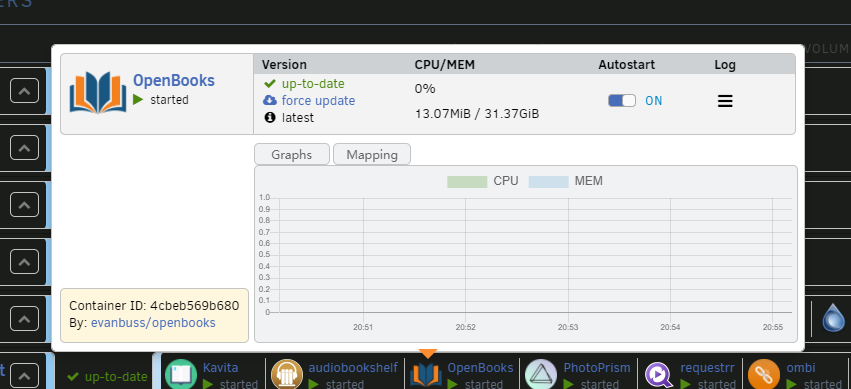
hi, i just updated to unraid 6.10 rc3, and since then there's no options when i click an icon.
-
Thank you so much for this solution! For anyone who's looking for and dont know this yet: You can schedule the script to run everytime the array starts, just add 'sleep 180' before your command in the script, to delay 3 minutes after the boot.
-
I'm a noob, so i still use notepad. lol Yeah, not a big deal, but it was super convenient. Because as long as the file is saved after any change, the container updates its config.
-
just checked out the update, fixed config file. everything works properly, except now the container wont auto update when there's a config change. it used to auto update config when any changes are made.

