





TheBazlow
Members
-
Joined
-
Last visited
-
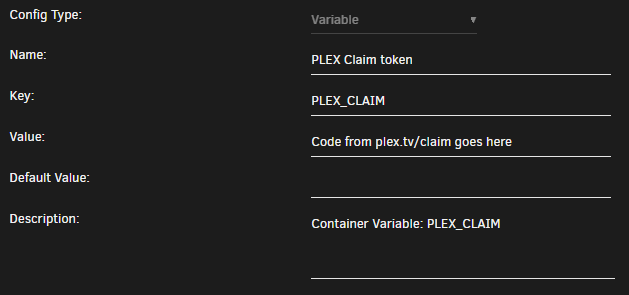
Here's the docker section I noticed that if the Preferences fields are populated, adding the claim token doesn't seem to change anything, wiping them seems to be necessary before claiming. I didn't sign out of every device prior to doing all of this, i'm pretty sure this would have been a lot easier if I had.
-
I think i'm fully back up and running. Here's a rundown of my adventure. I've reset my password Opened /appdata/plex/Library/Application Support/Plex Media Server/Preferences.xml Made a backup Removed the values from PlexOnlineHome, PlexOnlineMail, PlexOnlineToken, PlexOnlineUsername from xml file and saved. Stopped the container Added a new variable with a key of "PLEX_CLAIM" to container Opened https://www.plex.tv/claim/ Copied the claim code into the value for the docker variable Restarted the plex docker It populates the Preferences.xml file with new data At this stage I can access the web ui from direct IP. Trying to reach it from plex.tv, apps or custom domain wouldn't work I went to settings, remote access and disabled it, enabled it, restarted docker again and now finally it's started working again.
