kenig
Members
-
Joined
-
Last visited
-
Hi! I get the following error: Multiple NICs on the same IPv4 network eth1 and eth2 both have IP addresses on the 192.168.11.0 network. This is rarely a valid configuration. I don't have eth2. Can someone help me getting rid of this problem? Thx tower-diagnostics-20221109-2233.zip
-
Will there be an update to use the new git? https://github.com/deconz-community/deconz-docker marthoc won't be updated anymore
-
Data is ok. Will have to wait to rebuild parity until tonight. Need the array for work atm. Thanks a lot for that perfect support!
-
Ok, will do that and then wipe parity if data is ok
-
Thanks! Is there a way to tell which disk has been parity and which one was data? The problematic disc is sdc (12TB data drive) at the moment. I fear loosing data if I wipe parity and the drive has failed too. I tried mounting both with "Unassigned Drives" Plugin but neither could be mounted. Jul 9 11:44:39 Tower unassigned.devices: Mount drive command: /sbin/mount -t btrfs -o rw,auto,async,noatime,nodiratime '/dev/sdc1' '/mnt/disks/WDC_WD120EDAZ-11F3RA0_5PJHXG4C_2' Jul 9 11:44:39 Tower unassigned.devices: Mount of '/dev/sdc1' failed: 'mount: /mnt/disks/WDC_WD120EDAZ-11F3RA0_5PJHXG4C_2: mount(2) system call failed: File exists. '
-
Here you go tower-diagnostics-20210709-1036.zip
-
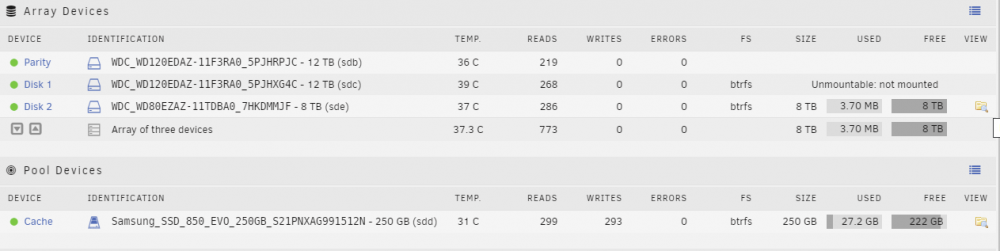
Hi! I recently set up an unraid server and after some fiddling managed to get it working. Today I installed a new CPU fan and after starting up the array couldnt start all drives anymore. My setup: 12 TB parity (sdb) 12 TB data (sdc) 8TB data (sde) 256GB cache SSD (sda) the 12TB isn't mounting anymore. I get Unmountable: not mounted. After checking some forum posts I tried btrfs fi show and get both my 12TB drives with the same uuid: root@Tower:~# btrfs fi show /dev/sde1 WARNING: adding device /dev/sdc1 gen 2016 but found an existing device /dev/sdb1 gen 2032 ERROR: cannot scan /dev/sdc1: File exists WARNING: adding device /dev/md1 gen 2016 but found an existing device /dev/sdb1 gen 2032 ERROR: cannot scan /dev/md1: File exists Label: none uuid: 0b6913ce-61b3-4b16-9a03-3a82f0ef306b Total devices 1 FS bytes used 144.00KiB devid 1 size 7.28TiB used 2.02GiB path /dev/md2 root@Tower:~# btrfs fi show /dev/sda1 WARNING: adding device /dev/sdc1 gen 2016 but found an existing device /dev/sdb1 gen 2032 ERROR: cannot scan /dev/sdc1: File exists WARNING: adding device /dev/md1 gen 2016 but found an existing device /dev/sdb1 gen 2032 ERROR: cannot scan /dev/md1: File exists ERROR: not a valid btrfs filesystem: /boot root@Tower:~# btrfs fi show /dev/sdb1 WARNING: adding device /dev/sdc1 gen 2016 but found an existing device /dev/sdb1 gen 2032 ERROR: cannot scan /dev/sdc1: File exists WARNING: adding device /dev/md1 gen 2016 but found an existing device /dev/sdb1 gen 2032 ERROR: cannot scan /dev/md1: File exists Label: none uuid: 49d47325-9269-4f32-a2b3-6539ff1be045 Total devices 1 FS bytes used 5.31TiB devid 1 size 10.91TiB used 5.33TiB path /dev/sdb1 root@Tower:~# btrfs fi show /dev/sdc1 Label: none uuid: 49d47325-9269-4f32-a2b3-6539ff1be045 Total devices 1 FS bytes used 5.31TiB devid 1 size 10.91TiB used 5.33TiB path /dev/md1 The 8TB device is empty (3.7MB of 8TB used) I tried different SATA Ports. Unfortunately it made things more confusing as parity and data disk started switching places. Now I dont know which one is which. Can I use btrfstune -u /dev/sdc1 to get a new uuid for it? Is my data on that disk still available after that? Any help would be greatly appreciated!